

First Stop Health
- 143.00
- 4.8
- Installs
- 100.00K
- Price
- Free

Screenshots
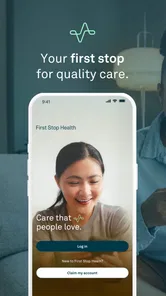
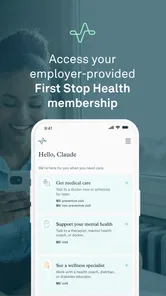
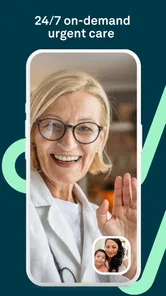
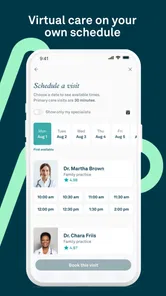
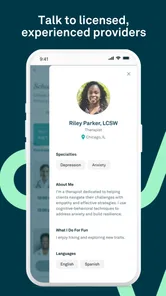
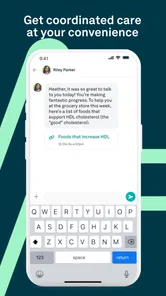

Analysis by Reviewed
When a health problem appears outside normal office hours, the hardest part is often deciding what to do next. First Stop Health is designed for that uncomfortable middle ground: a non-emergency issue that needs professional attention, but does not seem serious enough for an emergency department. I found its purpose easy to understand. It connects users with a physician at any time for help with diagnosis and treatment, making it a practical medical app for people who want a quicker first conversation before choosing their next step.
My overall impression is that this is most useful when I treat it as a first point of contact rather than a complete replacement for every part of healthcare. A doctor’s consultation can help clarify whether a symptom is suitable for remote care, what self-care makes sense, and whether an in-person appointment is necessary. That distinction matters. The app is free, rated for Everyone, and developed by First Stop Health, but “free” does not mean every medical need can be handled inside a phone consultation.
How I would use First Stop Health in an ordinary week
The simplest workflow is also the most sensible one. I would open the app when I had a non-emergency concern, explain what was happening, and prepare to answer questions about symptoms, timing, severity, and any relevant health history. The quality of a remote consultation depends heavily on the information I provide, so I would avoid starting the conversation with only “I feel sick.” A short timeline is much more useful: when the problem began, whether it is improving or worsening, what I have already tried, and which symptoms appeared alongside it.
A realistic example would be developing a sore throat and congestion late in the evening. Instead of searching through random websites and trying to match my symptoms to alarming possibilities, I could use the service to discuss the problem with a physician. The consultation would be valuable not only for possible treatment guidance, but also for deciding whether the situation sounds appropriate for continued home care or deserves an in-person examination. That kind of decision support is where the app makes the most sense to me.
I would keep a few details ready before beginning. A list of current medicines, known allergies, recent temperature readings, and the exact location of pain can prevent a consultation from becoming a long series of forgotten details. For recurring problems, I would also note what happened during previous episodes. This is a small habit, but it makes a remote medical conversation more focused and reduces the chance that an important detail is remembered only after the consultation ends.
The app’s medical role also means I would use careful judgment before opening it. A non-emergency service is not the right destination for severe breathing trouble, major bleeding, sudden weakness, serious injury, or any situation that feels immediately dangerous. In those cases, I would seek urgent local help instead of waiting for a remote consultation. First Stop Health is useful precisely because it handles the less urgent layer of care; expecting it to replace emergency services would be unsafe.
What the basic experience is good at
The strongest part of the concept is convenience without pretending that a search engine is a doctor. When I am unsure whether a symptom deserves an appointment, a physician conversation can provide a more responsible starting point than browsing forums. It can also be helpful for questions that are difficult to schedule around, especially when a busy day or a late hour makes a traditional visit inconvenient.
More From Our News Desk

 Instagram
Instagram’s Power Comes From Its Place in Your Phone
A close look at how Instagram turns Meta’s reach, recommendation systems and everyday camera habits into durable platform power—and what that costs users.

 Gmail
GmailGmail in a Busy Inbox: Who Benefits Most?
From first account to crowded workday, Gmail earns its place through dependable search and flexible sorting—but its best fit depends on how much inbox maintenance you can tolerate.

 Prime Video
Switching to Prime Video: What Changes in Your Viewing Routine
Prime Video can make a compelling second home for streaming, but switching means learning a different catalog, rental layer, and route from browsing to playback.

 Universal TV Remote Control
Universal TV Remote Control Works Best as a Reliable Backup
A phone remote earns its place through quick setup and reliable habits. Here is how to get more from Universal TV Remote Control—and where its limits show.

 Weather - By Xiaomi
Weather by Xiaomi Review: Clear at a Glance, Less Clear Up Close
Xiaomi’s weather app makes everyday forecasts quick to scan, but its calm surface can leave useful details and recovery paths harder to find than they should be.

 X
XX Under Pressure: Can It Recover When Posting Goes Wrong?
A resilience-focused review of X, examining setup, mistaken posts, interruptions, weak connections, and the gaps that matter when recovery needs to be dependable.
Latest News



I also like the idea of using it before committing to an unnecessary trip. A remote consultation may help separate a minor issue from something that needs examination, testing, or a different level of care. That does not guarantee a diagnosis through the app, and it should not be treated as one, but it can improve the next decision. In practice, the value is often less about avoiding a clinic altogether and more about arriving at the right kind of care sooner.
The app has been available since August 11, 2017, and its current version is 4.117.0. It supports devices running Android 7.1 or later. Those details make it accessible to many older Android users, although anyone with an especially old or poorly maintained phone should still check whether the installation and consultation experience work comfortably on their device.
Settings and preparation that make the service more useful
There is no advantage in rushing into a medical consultation with an unorganized explanation. Before using First Stop Health, I would check that my profile and contact details are current, then make sure I can clearly describe the reason for contacting a physician. Medical apps are more useful when the account setup is treated as preparation for a conversation, not as an administrative task to finish as quickly as possible.
One practical habit is to keep a short symptom note on the phone. I would write down the start time, changes during the day, anything that makes the symptom better or worse, and any medicine already taken. This is particularly helpful for problems that fluctuate, such as headaches, stomach discomfort, or fever. A consultation based on a pattern is usually more informative than one based on a single moment.
I would also pay attention to the way I describe the goal of the consultation. “What should I do next?” is often more useful than asking for a definite diagnosis immediately. The physician can then focus on triage, possible causes, treatment guidance, and warning signs. If medication is discussed, I would ask what to watch for, how long improvement should take, and what should prompt a follow-up or in-person visit.
Another setting worth checking is the device itself rather than an app option. I would use a stable connection, keep the phone charged, and choose a quiet place where I can speak privately. These steps sound basic, but a broken conversation or a rushed explanation can make remote care frustrating. If I am likely to be interrupted, I would wait until I can give the consultation proper attention, unless the situation requires immediate action elsewhere.
Privacy is also part of the workflow. I would avoid discussing sensitive symptoms in a crowded room and would not hand the phone to someone else while personal medical information is visible. The app’s medical purpose makes ordinary phone security habits more important than they might be for a casual utility. A screen lock and a private environment are simple ways to keep the consultation more comfortable.
Questions I would ask before relying on a remote consultation
A common concern is whether the app can deal with a particular symptom. I would begin by asking whether the issue is appropriate for remote care. The service is intended for non-emergency health concerns, so the physician’s assessment of whether an examination is needed is itself an important outcome. If the problem depends on a physical examination, imaging, laboratory work, or urgent treatment, the app may be only the first step.
Another question is whether a consultation replaces a regular doctor. In my view, it does not. It works better as a convenient complement for timely advice, especially when access to a usual provider is difficult. People managing ongoing conditions, complex medication plans, or symptoms that require physical monitoring should continue using the clinicians and services responsible for that care.
I would also ask what happens after the conversation. Before ending, I would repeat the plan in my own words and confirm the warning signs that should change it. If the physician recommends an in-person visit, I would treat that recommendation as the next action rather than viewing the app as unsuccessful. A good remote consultation can end with a referral or escalation; that is often evidence that the service is being used responsibly.
Faster patterns for experienced users
Once I had used First Stop Health more than once, I would build a repeatable routine. I would keep my medication and allergy information easy to access, record symptoms before opening the app, and decide in advance what I need from the conversation. This removes unnecessary hesitation and helps me use the physician’s time for details that actually affect the decision.
For a recurring but non-emergency issue, I would compare the current episode with earlier ones instead of assuming they are identical. A familiar symptom can still change in severity or appear with a new warning sign. The shortcut here is not skipping questions; it is preparing the comparison in advance. I would tell the physician what is the same, what is different, and whether the usual self-care has worked this time.
I would use the app earlier when uncertainty is the main problem. Waiting until a minor concern becomes much worse can make the conversation less useful and may narrow the available options. On the other hand, I would not open it for every fleeting sensation. The best pattern is to use it when I need medical judgment about a persistent, bothersome, or unclear non-emergency issue, rather than using it as a constant reassurance tool.
Another efficient habit is to prepare a short closing checklist. I would confirm the working explanation, the recommended action, the expected direction of improvement, and the point at which I should seek another level of care. I would also note any instructions immediately. In a stressful moment, relying on memory is unreliable, and a clear written reminder can prevent me from forgetting the most important part of the consultation.
These habits are more valuable than trying to find a hidden shortcut that the app does not promise. First Stop Health is not something I would approach like a productivity tool with elaborate automation. Its speed comes from being ready to communicate clearly and from knowing when remote care is appropriate. That is a more realistic form of efficiency for a medical service.
Where it fits beside ordinary healthcare options
Compared with searching the web, the main advantage is individualized discussion. Search results can offer broad explanations, but they cannot ask follow-up questions about my exact timeline or current medicines. Compared with a walk-in clinic, the app may be more convenient for a suitable non-emergency concern, particularly when travel and waiting would be difficult. Compared with a regular primary-care appointment, it is less likely to provide continuity and physical examination.
That trade-off determines who should use it. I would recommend it to someone who needs timely guidance for a non-emergency issue, wants help deciding what to do next, or cannot easily reach a usual provider at that moment. I would be more cautious about recommending it as the main option for a person with complicated ongoing care, symptoms that clearly require testing, or a condition where the clinician needs to examine the body directly.
The app is free to install and use, which lowers the barrier to trying it. Still, I would not confuse the absence of an app price with the absence of the wider healthcare considerations that may surround a consultation. Depending on the user’s healthcare arrangement, a physician’s recommendation may lead to another service, appointment, or treatment decision. The app is best understood as an access point, not as a promise that every later step is unnecessary.
Limits that matter before making it your default
The biggest limitation is inherent to remote medical care: a physician cannot perform every examination through a phone. Some symptoms are easy to describe but difficult to evaluate without seeing, touching, listening to, or testing the affected area. Even when the initial advice is useful, the next step may still be an in-person visit. I see that as a boundary users should accept from the start, not as a flaw unique to this app.
Communication quality can also vary with the situation. If I am tired, anxious, embarrassed, or unsure how to describe a symptom, I may leave out information that changes the assessment. Preparing notes helps, but it cannot remove every limitation. For this reason, I would involve a trusted person when appropriate, especially if the user is a child, an older adult, or someone who struggles to explain the problem clearly.
There is also a risk of treating convenience as certainty. A quick consultation can feel reassuring, but reassurance should not override a symptom that is worsening or behaving differently. I would follow the physician’s instructions, monitor the problem, and seek further care if the situation changes. The app should support better decisions, not encourage me to delay care simply because I already had one conversation.
The Everyone age rating makes the app broadly approachable, but age alone does not determine whether a consultation is suitable. Children and dependent adults may need a parent or caregiver to provide accurate history and understand the plan. I would make sure the person using the service can participate safely and that an adult responsible for their care is available when needed.
The public response is encouraging: First Stop Health holds an average rating of 4.8 from over 800 ratings, with more than 140 written reviews. I treat that as a useful sign that many users find the experience worthwhile, but not as a guarantee that every consultation will match my needs. Medical concerns differ too much for a rating to replace careful judgment about urgency and suitability.
My verdict after looking at the whole workflow
I would keep First Stop Health available for the moments when I need a physician’s perspective on a non-emergency problem and do not want to begin with guesswork. Its strongest quality is practical access: it gives users a clear way to start a medical conversation at any time, then decide whether home care, follow-up, or in-person attention makes sense. That is more useful than a symptom library when the real question is what to do next.
I would recommend it to busy adults, caregivers who need a first assessment, and anyone who wants an alternative to searching symptoms online for every uncertain situation. I would skip it as the primary solution for emergencies, complex long-term care, or problems that obviously require examination and testing. In those cases, a local clinician, urgent service, or emergency help is the better choice.
The app works best when paired with disciplined habits: prepare a symptom timeline, keep medication information nearby, choose a private and stable setting, and finish by confirming the plan and warning signs. Those small steps make the consultation more efficient without pretending that technology can replace hands-on medicine.
For a free medical app from First Stop Health, the combination of broad accessibility, physician consultation, and a clear non-emergency focus makes it a sensible tool to have ready. My recommendation is to use it as a thoughtful first stop, not as the final answer to every health concern. That mindset matches its real strength and keeps its limitations in view.
First Stop Health Frequently Asked Questions
Who is eligible to use First Stop Health?
First Stop Health is intended for members whose employer or organization provides access to the service. Eligibility can determine which care options are available, so it is worth checking with your benefits provider before downloading or registering. The app’s availability by itself does not mean every user can book a visit; you may need member details to confirm that your plan includes the service.
What is First Stop Health, and what services does it provide?
First Stop Health is a virtual healthcare service designed to help members connect with medical professionals through their phone, tablet, or computer. Depending on the plan provided by an employer or organization, users may receive access to virtual doctor visits, behavioral health support, and care navigation. Available services, appointment types, and treatment options can vary, so checking your eligibility before downloading is important.
Is First Stop Health free to download and use?
The First Stop Health app is free to download, but access to its healthcare services depends on your employer-sponsored or organization-sponsored benefit plan. Some consultations may have no additional cost, while others could involve a copayment or plan-specific fee. The app normally requires eligible member information, so downloading it does not necessarily mean that every feature will be available to all users.
Can I use First Stop Health for urgent or emergency medical problems?
First Stop Health can be useful for many non-emergency healthcare needs, such as common illnesses, minor symptoms, general medical questions, and certain behavioral health concerns. However, it should not replace emergency services. If you are experiencing chest pain, severe breathing difficulty, uncontrolled bleeding, signs of a stroke, or another life-threatening condition, call your local emergency number or go to the nearest emergency department immediately.
How do virtual visits work in the First Stop Health app?
After signing in and confirming your eligibility, you can generally select the type of care you need and request an appointment or begin the available consultation process. You may be asked to provide symptoms, medical history, contact details, and insurance or benefit information. A stable internet connection, working microphone, and camera may be needed for video visits, although availability can depend on your plan and location.
Pros
- Virtual doctor visits are convenient for non-emergency health concerns.
- Appointments can help users avoid unnecessary trips to a clinic.
- The service may provide access to care outside regular office hours.
- Digital consultations are useful for users with limited local provider access.
- Prescription support can simplify treatment after an eligible consultation.
Cons
- Availability and benefits depend on the employer or health plan.
- It is not suitable for emergencies or conditions needing physical examination.
- Some symptoms may still require an in-person follow-up visit.
- Prescription options can vary by state
- medication
- and medical history.
- Video visits require a reliable internet connection and compatible device.











