

Find Phone by Clap, Whistle
- 220.00
- 3.9
- Installs
- 10.00M
- Price
- Free

Screenshots

Analysis by Reviewed
I’m most interested in a phone-finder app when it solves a small, familiar problem without adding a complicated routine. Find Phone by Clap, Whistle is built around that idea: when my phone is somewhere nearby but out of sight, I can make a sound and listen for a response instead of checking every pocket and cushion. It is a personalisation app with a practical locating purpose, and its appeal depends on a very ordinary question: can the phone hear me where I tend to leave it?
Where a sound cue helps—and where it gets awkward
The best setting is a home or private workspace where I can make a clear sound without bothering anyone. A phone buried in a blanket, slipped beside the sofa, or left on a desk under papers is a good candidate. It is less convenient in a shared office, while someone is sleeping, or in a quiet public place. Before relying on it, I’d also consider whether I can make a sound comfortably and whether the phone can respond without causing a disturbance.
That makes the app a different kind of tool from searching by memory. It can help narrow down where a nearby phone is, but it does not provide the same kind of help as a built-in locating service when a device may have been left outside the home. I’d think of those options as complements: one is useful for a nearby mix-up, while the other is better suited to a phone that might be somewhere else.
There is a trade-off between sensitivity and accidental reactions. A sound-based locator needs to notice a cue, but everyday homes are full of claps, sharp noises, and conversations. I would test the app in the room where I actually use it and choose a cue I can repeat consistently. If it reacts too readily to ordinary sounds, or misses the cue amid household noise, that environment may not suit this approach.
How It Works
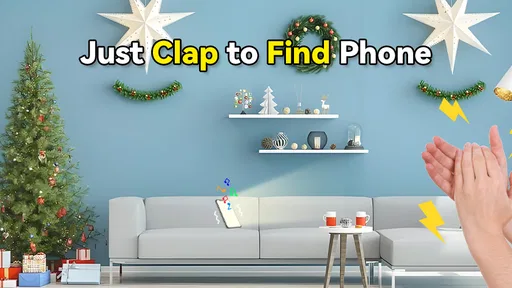
The concept behind Find Phone by Clap, Whistle is quite straightforward yet brilliantly effective. Once the app is installed and set up, it uses your phone’s microphone to detect specific sounds, such as a clap or a whistle. Upon recognizing these sounds, the app triggers your device to ring, vibrate, or flash its light, helping you locate it in no time. It's like having a little helper who’s always ready to assist you in your search.
Setting Up the App
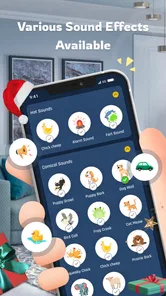
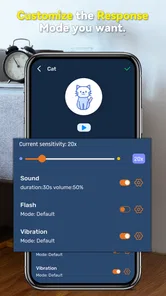
Getting started with this app is a breeze. After downloading it from the app store, you’ll be guided through a quick setup process. You can choose the specific sound settings and customize the response your phone will make once it hears the trigger sound. Whether you prefer the subtlety of a flash, the vibration, or a full-on ring, the choice is all yours. And don't worry, the app works even when your phone is on silent mode!
Checks that can save a frustrating first try
I’d test the chosen sound and response while the phone is nearby, before relying on them when it is genuinely lost. Try a clap or whistle from a couple of places in the room, then make sure you can hear, feel, or see the response you selected. If the phone does not react, first check that the app has been set up and that microphone access is allowed in the phone’s settings. Also consider whether the room is noisy or whether the sound you are making is too faint or different from your test cue.
More From Our News Desk

 Gmail
GmailGmail in a Busy Inbox: Who Benefits Most?
From first account to crowded workday, Gmail earns its place through dependable search and flexible sorting—but its best fit depends on how much inbox maintenance you can tolerate.

 Prime Video
Switching to Prime Video: What Changes in Your Viewing Routine
Prime Video can make a compelling second home for streaming, but switching means learning a different catalog, rental layer, and route from browsing to playback.

 Universal TV Remote Control
Universal TV Remote Control Works Best as a Reliable Backup
A phone remote earns its place through quick setup and reliable habits. Here is how to get more from Universal TV Remote Control—and where its limits show.

 Weather - By Xiaomi
Weather by Xiaomi Review: Clear at a Glance, Less Clear Up Close
Xiaomi’s weather app makes everyday forecasts quick to scan, but its calm surface can leave useful details and recovery paths harder to find than they should be.

 X
XX Under Pressure: Can It Recover When Posting Goes Wrong?
A resilience-focused review of X, examining setup, mistaken posts, interruptions, weak connections, and the gaps that matter when recovery needs to be dependable.

 Clash of Clans
Clash of Clans Is Won Between the Battles
Its raids are quick; its community is a long-term project of coordination, teaching, rivalry, and shared responsibility—with all the friction that entails.
Latest News



Think about which response fits your home. A flash may be easier to spot in a dim room, while vibration can help if the phone is tucked into bedding and the surroundings are quiet. A ring is likely more useful when the device is covered or out of sight, but it may be disruptive in shared spaces. Testing those choices ahead of time is more useful than changing them while you are already searching.
A useful routine for finding the right setup
I would begin with the simplest possible trial: leave the phone in a familiar spot, move a short distance away, and use the cue I expect to make when I’m in a hurry. Then I’d repeat from the doorway or the next room. This does not establish that the app will work everywhere; it shows whether my usual sound and chosen response are practical in the places where I misplace the device.
It also helps to test with the phone in realistic hiding places, rather than only on an open table. A clear response from a phone under a cushion is more informative than a test where nothing blocks the sound or light. I would not make the trial complicated: the goal is to discover whether the cue is noticeable, not to build a perfect laboratory test around it.
Performance and User Experience
In terms of performance, the app does a commendable job. During my test runs, it consistently detected my claps and whistles, even in a somewhat noisy environment. The app’s sensitivity can be adjusted, which is a great feature if you have a bustling household or work in a lively office. Furthermore, its user interface is clean and intuitive, making it easy for anyone to navigate through the settings without a hitch.
When a trigger seems not to work, I would repeat the test in a quieter spot and make the sound clearly, then check the selected response rather than assuming the phone is broken. If it responds during a nearby test but not from another room, distance and obstacles may be part of the problem. And if it stops responding after you have changed phone settings or restarted the device, reopen the app and review its setup. These are sensible checks for a sound-based locator, not a promise that every phone or environment will behave identically.
One of the standout features is the battery optimization. The app is designed to be easy on your phone’s battery, ensuring that you don’t have to sacrifice precious battery life just to keep it running in the background. This is particularly important for those of us who are always on the go and need our devices to last throughout the day.
When another option makes more sense
This app belongs to the personalization side of mobile apps, but its practical purpose is locating a misplaced device through sound. That makes it different from the usual alternatives: a built-in phone-finding service is more appropriate when the phone may be lost away from home, while a sound-triggered app is handy when it is probably somewhere nearby. Neither approach replaces the other. I’d use this for the sofa, bedroom, or desk, and rely on the phone’s built-in locating tools for a device that may have been left in a public place.
It is also not the right fit if you need a silent, discreet way to find a phone, or if you cannot make a sound where you are. People who often leave their phone in noisy environments should test carefully before depending on it. The strongest use case is a phone that is misplaced within earshot and can safely make a sound, vibrate, or flash.
How it fits into a busy household
A realistic example is getting ready to leave while juggling bags, keys, and a last-minute message. I might put my phone down on the entryway shelf, then forget whether I carried it into the kitchen. If I know it is somewhere nearby, a quick cue can be easier than retracing each step. The app is most helpful in that moment if I have already selected a response that suits the room and know that my usual clap or whistle is distinct enough to try.
In a household with other people, the same convenience needs a little courtesy. A ring could interrupt a call or wake someone, so I’d use a flash or vibration when those are more appropriate and easy to notice. If the phone is hidden under a thick blanket, vibration may be difficult to detect; if the room is bright, a flash may be easy to miss. The useful choice depends less on preference in the abstract and more on the place the phone usually disappears.
Why You Might Love It
Honestly, the convenience of Find Phone by Clap, Whistle cannot be overstated. It's perfect for those "where's my phone" moments that we all experience more frequently than we'd like to admit. Plus, it adds a fun, slightly futuristic twist to the mundane task of searching for your phone. It's like having a little bit of magic in your pocket!
For example, if I put my phone down while unpacking groceries and later cannot remember whether it is on the kitchen counter or the living-room table, I can try the sound cue before searching every surface. That works best if I have already chosen a response I can notice and know the phone is likely nearby. In a noisy house, I would first pause the television or ask others to be quiet; that small adjustment may make the difference between hearing the response and missing it.
There are a few details worth weighing before installing it. The app is free to download, with optional in-app purchases listed from around $2.99 to $6.99 per item. It is made by Esame Marketing Limited, is rated for Everyone, and its current version is 2.1.5; the minimum operating-system requirement is version 7.0. Its average rating is 3.9 from around 31,000 ratings, with around 220 written reviews, and it has been installed over 10 million times. Those figures suggest that many people have tried it, but I’d still judge it by whether its sound detection works reliably in my own rooms and routine.
The free download makes it easy to try the basic idea before deciding whether the optional purchases are worthwhile for me. I would first check that the core sound-and-response routine fits my needs rather than paying on the assumption that a purchase will fix a problem caused by background noise, a muted response, or a cue I cannot reproduce clearly. If I share a phone or help someone else set it up, I’d also make sure that person understands how to use the chosen cue and response; an unfamiliar setup is less useful when they need to find the device quickly.
Since the app depends on sound detection, one useful habit is to choose a cue you can reproduce consistently and avoid testing it only once in ideal conditions. Try it in the room where you most often misplace your phone, then repeat with the response mode you expect to use. If you share a home, agree on when to use the sound so it does not interrupt someone working or sleeping. That turns a novelty into a practical little routine without asking the app to solve every kind of lost-phone problem.
Who should keep looking
I would skip this as a primary solution if my main worry were losing a phone on public transport, leaving it at a shop, or needing to locate it without being near enough to make a sound. A built-in locating service is the more appropriate option for those cases. I’d also hesitate if I regularly work somewhere quiet or cannot use a whistle or clap without drawing unwanted attention. The app’s approach is intentionally narrow, and that is a limitation rather than a flaw when expectations are clear.
It may also be a poor match for someone who wants a completely hands-off tool and does not want to test settings. Sound detection is affected by the room and by how the cue is made, so a little trial is part of using it sensibly. If that small setup check feels like a nuisance, relying on a familiar fixed place for the phone—or using a different locating method—may be less frustrating.
In conclusion, if you're someone who frequently misplaces their phone or just loves trying out innovative tech solutions, this app is definitely worth a try. With its user-friendly setup, reliable performance, and minimal impact on battery life, it’s a small investment for a huge relief. So, go on, give it a shot and see how it transforms your daily routine!
My practical verdict
I’d recommend giving it a try if your phone tends to vanish somewhere around the house and you are comfortable using a clap or whistle to call it back. The main question is not whether the idea is clever, but whether the app can hear your cue in the places you need it and whether the chosen response is noticeable there. A quick setup test is the best way to answer that for yourself.
If you need to find a phone across town, need a discreet search method, or cannot rely on sound being heard, choose a different approach as your main solution. For ordinary at-home mix-ups, though, this can be a low-effort backup to searching by memory. I like it most when expectations stay realistic: it can help point you toward a nearby phone, but it cannot tell you where a device is when it is beyond the reach of its sound-based approach.
Find Phone by Clap, Whistle Frequently Asked Questions
Does Find Phone by Clap, Whistle need an internet connection to find my phone?
The app’s main idea is to help you locate a misplaced phone by responding to a clap or whistle, so it is worth considering whether this sound-based approach suits your usual situations. If you plan to rely on it, set it up while you have access to the phone and can test its alert. The app is a locating aid, not a replacement for keeping track of your device.
Can I choose the alert Find Phone by Clap, Whistle plays when it detects a sound?
Find Phone by Clap, Whistle is intended to alert you after it detects a clap or whistle, making it easier to notice a phone that is nearby but out of sight. Before relying on it, explore the available options in the app and try an alert in a familiar setting. A sound-based finder is most useful when you can recognize its response and hear or see it.
Does Find Phone by Clap, Whistle work when my phone is locked or the screen is off?
The app is designed to listen for claps or whistles so it can help you find a misplaced phone, but it is sensible to test how it responds in the situations where you expect to use it. Try activating the feature and then placing the phone somewhere nearby, including with the screen off, before relying on it. Keep in mind that sound detection and alerts may depend on your device and settings.
Can I use Find Phone by Clap, Whistle to locate someone else’s phone?
Find Phone by Clap, Whistle is intended to help find a misplaced smartphone by responding to claps or whistles. It needs to be set up on the phone you want to locate, so it is not a way to find a device remotely without access to it. If you are helping another person, set up the app with their permission and test its response together.
Does Find Phone by Clap, Whistle require much setup before I can use it?
The app is built around a simple action: clap or whistle to prompt your phone to respond. You will need to install it and allow the microphone access needed for sound detection, then check the app’s available settings and test the feature. Taking a moment to try it before you misplace your phone can help you understand how it behaves in your home or workplace.
Pros
- Easy to set up and use
- Works without internet connection
- Customizable clap and whistle sounds
- Battery-efficient operation
- Supports multiple languages
Cons
- May not work in noisy environments
- Limited to specific sound frequencies
- No backup for silent mode
- Ads can be intrusive
- Requires microphone permissions












