Find Phone Anti-theft No Touch
- 453.00
- 4.3
- Installs
- 10.00M
- Price
- Free

Screenshots


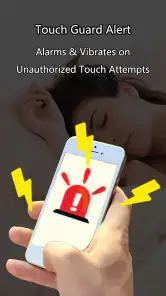


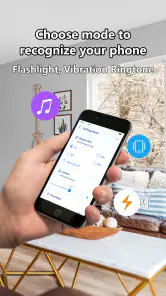
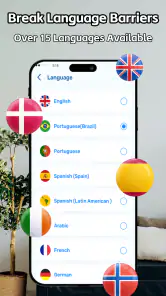

Analysis by Reviewed
When I first tried Find Phone Anti-theft No Touch, the appeal was immediate: it aims to make two familiar worries—misplacing a phone at home and leaving it exposed while out—feel easier to manage. That is a useful promise, but an app earns a lasting place on my phone only if I remember to use it and its alerts fit the way I live. My impression is that this one makes the most sense as a simple extra safeguard, not as a replacement for careful handling or the recovery tools already built into a phone.
The first-week appeal
The idea is easy to understand: use a phone-finding and anti-theft tool to make everyday mishaps feel less stressful. In the first few days, that promise can be reassuring, especially if you often put your phone down while cooking, getting ready, or working at a shared desk. The useful question is not whether an alarm sounds impressive once, but whether the app fits a routine you will actually keep using.
For a realistic test, I would start at home rather than in a crowded place. Put the phone somewhere safe, set up the app, and check how its alert behaves before relying on it in public. That simple trial helps you learn what to expect and avoid being surprised by a loud sound at an awkward moment. It also makes clear that an alert is a deterrent, not a guarantee that a lost or stolen phone will be recovered.
What is Find Phone Anti-theft No Touch?
Picture this: You’re in a bustling café, you place your phone on the table for a quick second, and in a blink, it’s gone. Terrifying, right? Find Phone Anti-theft No Touch is designed to prevent such nightmares. This app acts like a digital watchdog, ensuring that your phone remains secure wherever you are.
Features that Stand Out
One of the standout features of this app is its motion sensor. If someone dares to pick up your phone without your permission, the app will sound an alarm louder than your morning alarm clock! And trust me, it's loud enough to make anyone think twice before attempting a snatch.
Plus, the app is smart enough to send you an immediate notification. So, even if you’re not around, you’ll know something’s up. It’s like having a mini security guard in your pocket, only without the uniform.
Using it beyond the first few days
At home, the “find my phone” use case may be the one that earns its place over time. If you regularly misplace your device between rooms, an alert can be more practical than retracing every step in silence. I would make a habit of keeping the phone’s usual resting place consistent and checking the app’s setup before depending on it; a tool like this is most useful when you already know how to activate and respond to it.
You May Like

Clash of Clans Is Won Between the Battles

Android Auto Makes the Case for Quieter Car Software

MobiOffice: Transforming Mobile Productivity with Seamless Integration

EA SPORTS FC™ Mobile Soccer: Redefining Mobile Sports Gaming

How Microsoft OneDrive Became a Mobile Productivity Giant

How Google Translate Breaks Language Barriers Effortlessly
For travel, the trade-off is different. An alarm may draw attention if someone handles your phone, but it cannot replace keeping the device close, using a secure bag, or taking care with crowded transport. I’d treat it as one extra layer rather than a substitute for those habits. In a quiet library or meeting, the same sound that is helpful at home could be disruptive, so think about where you are before using an alarm-based safeguard.
A small routine that makes the alert more useful
I would connect the app to a specific moment in my day rather than expect to remember it whenever I leave the phone somewhere. For example, if I use it at a café, I would decide before setting the phone down whether an alarm is appropriate in that room. If I am at home, I would try the alert when the household is awake and tell anyone nearby what is happening. That avoids turning a useful test into a startling interruption for someone else.
It is also worth thinking through the response before activating an anti-theft alert. If a phone is picked up, the sound can attract attention, but the safest response is not necessarily to confront the person who has it. In a public place, I would prioritize my own safety, ask nearby staff for help if appropriate, and use the phone’s built-in security options when I can access another device. This distinction matters: the app can be a prompt to react, not a plan for recovering a phone by itself.
Easy to Use
Let's talk about usability. I’m no tech wizard, but setting up Find Phone Anti-theft No Touch was smoother than a fresh jar of Skippy. The interface is intuitive, guiding you through the setup process with ease. You don’t need a manual the size of a dictionary to get started—just a few taps, and you're good to go!
Who gets lasting value—and who may not
This is a better fit for someone who often leaves a phone on a desk, counter, or café table than for someone who wants a complete device-recovery service. A motion-triggered alarm offers a different kind of help from the built-in location and remote-management tools many phones already provide. Those built-in options are the stronger choice when the phone is actually lost somewhere outside your reach; this app is more suited to prompting a response when the device is nearby or being handled.
One practical tip is to test the alert in a controlled setting and decide in advance when you would use it. That helps avoid relying on a sound you have never heard in context. Another is to think about the people around you: a shared household, workplace, or study space may make a sudden alarm more of a nuisance than a benefit. If you rarely misplace your phone and are already comfortable with your device’s built-in security tools, you may not find enough recurring value to keep another app in your routine.
Where it fits beside built-in phone tools
The main alternative is not necessarily another personalization app; it is the location, lock, and recovery service that comes with the phone. Those tools are designed to help when the device is out of sight or has been left somewhere else. This app’s more immediate, attention-grabbing approach is aimed at a different moment: the phone is close enough for an alert to matter, or it is being handled while you are nearby. I would keep both approaches in mind rather than treating them as competitors.
There is a practical trade-off between convenience and discretion. A loud alert is more noticeable than quietly checking a location service, which may be helpful if someone is casually picking up a phone but awkward in a quiet room. If you mostly worry about forgetting your device at home, an alert-based finder may feel more relevant. If your concern is losing it during a commute or leaving it behind at a venue, the built-in recovery option is the more dependable first step.
Why You Need It
In today’s world, our phones are more than just gadgets; they’re extensions of ourselves. Losing a phone isn’t just about the cost of the device but losing contacts, photos, and personal data. This app provides peace of mind, allowing you to focus on the more important things in life, knowing your phone is protected.
And let’s not forget, it adds a layer of security in public places. Whether you’re at the gym, library, or meeting new friends, you can rest assured knowing your phone is safe from prying hands.
That reassurance is useful, but I would keep expectations grounded: an alarm can discourage casual handling and help draw attention, yet it does not make an unattended phone impossible to take. The best workflow is to combine the app with ordinary care, then use your phone’s own security and recovery tools for the situations an alarm cannot solve.
When an extra alert becomes a hassle
The weak point of any alarm-based routine is that the setting has to suit the situation. A phone moved by a family member, coworker, or friend may be harmless, but the app can still make that moment noisy. In a shared space, I would be cautious about leaving an alert active without telling people nearby. If you need your phone to remain quiet through meetings, study sessions, or appointments, frequent interruptions could outweigh the reassurance.
That makes the app less appealing for someone who rarely leaves a device unattended, or who dislikes adding another step to everyday phone use. It is also not the right answer to every kind of loss: an alert cannot tell you where a phone is after it has been carried away. I would skip it if what I really need is dependable remote tracking, or if my existing phone tools already cover the situations that worry me.
Cost, upkeep, and everyday friction
The app is free to install, with in-app purchases listed at $5.99 per item, so I’d try the basic experience before paying for anything. It is made by Esame Marketing Limited, sits in the personalization category, and is rated for Everyone. Its 4.3 average from around 68,000 ratings and more than 10 million installs suggest that plenty of people have tried it, though popularity alone does not tell you whether its particular alarm-based approach suits your habits.
Long-term value depends on whether you remember to use it and whether its alerts fit your surroundings. If you enable a protection routine and then forget it is active, the app can become a source of interruptions rather than reassurance. I would check its behavior after installing it and revisit the setup if your routine changes, rather than assuming an anti-theft tool works automatically in every situation.
What I would check before making it a habit
Before relying on it, I would confirm that I can start and stop the relevant alert in the way I expect, then try it with the phone placed somewhere safe. I would also consider whether the sound is suitable for my usual environments, because an alarm that is effective in a quiet room may be too disruptive in a busy shared office. These are small checks, but they prevent the first real use from becoming the first time I discover how the app behaves.
There is no need to treat every outing as a security drill. A more sustainable approach is to use the app only for the situations that genuinely make you uneasy, such as setting a phone down while you are occupied. That keeps the feature from becoming background noise in your routine. If you find yourself repeatedly turning it off or avoiding it because of the setting, that is a sign its ongoing value may be limited for you.
My Final Thoughts
All in all, Find Phone Anti-theft No Touch is a solid choice for anyone looking to beef up their phone’s security. It’s practical, easy to use, and, most importantly, it works! So, if you’re prone to leaving your phone unattended or just want that extra layer of protection, give this app a try. It might just be the security blanket your phone needs.
For me, its staying power comes down to a simple test: does it solve a recurring problem without becoming an annoyance? The current version is 1.6.5 and requires Android 7.0 or later. If you want a straightforward nearby-phone alert and are willing to build the habit of using it, it is worth considering. If you need dependable remote location or recovery features, start with your phone’s built-in tools instead.
So, what are you waiting for? Don't let your phone out of your sight—unless, of course, you've got this app installed. Happy guarding!
Find Phone Anti-theft No Touch Frequently Asked Questions
Can Find Phone Anti-theft No Touch help me locate a phone I have lost outside my home?
The app’s stated purpose focuses on finding a phone around the house and using an anti-theft alarm while you are on a trip. It is best understood as an alarm-based way to help notice when someone touches or moves your phone, rather than as a phone-location service for tracking a device after it has been lost elsewhere.
What should I consider before relying on its anti-theft alarm in public?
The alarm is intended to alert you and people nearby if your phone is touched or moved without permission. It can be useful when you leave a device on a table or in another place where you can keep it within reach, but it should be treated as an alerting aid, not a replacement for keeping your phone secure and paying attention to your surroundings.
Is Find Phone Anti-theft No Touch free to download, and are there in-app purchases?
Find Phone Anti-theft No Touch is free to download, so you can try the app without paying an upfront price. It also offers in-app purchases, with items priced at $5.99 each. Check the purchase options before buying anything, especially if you only want to use the basic app or are downloading it for someone else.
What age group can use Find Phone Anti-theft No Touch?
The app has an Everyone content rating, making it suitable for a broad audience. Its purpose is straightforward: it is a phone-personalization app centered on an alarm intended to help alert you if someone touches or moves your phone. Parents can still review its purchase options and the permissions requested during setup before a child uses it.
What is Find Phone Anti-theft No Touch and how does it work?
Find Phone Anti-theft No Touch is a security application designed to protect your smartphone from theft or unauthorized access. The app works by setting an alarm that is triggered if anyone attempts to move or touch your phone without your permission. This feature is particularly useful in public places, providing peace of mind by alerting you and others around to potential theft.
Pros
- User-friendly interface for easy navigation.
- Real-time alerts for unauthorized access.
- Low battery consumption for continuous use.
- Works offline without internet connection.
- Customizable security settings.
Cons
- Limited features in free version.
- Ads can be intrusive at times.
- May have false alarms occasionally.
- Requires access to sensitive permissions.
- No backup option for security settings.

- Category
- Personalization
- Version
- 1.6.5












