

Find my Phone - Family Locator
- 6.44K
- 4.4
- Installs
- 10.00M
- Price
- Free

Screenshots
Analysis by Reviewed
I’m wary of any family-location app that promises peace of mind without explaining the everyday trade-offs. Find my Phone - Family Locator is best understood as a shared location tool for people who agree to stay connected, with phone-finding and safety features alongside that central purpose. That makes it more useful for coordinating routines than for quietly monitoring someone, and it is worth deciding together what location sharing should mean before inviting anyone in.
Where the app fits today
Made by FAMILY LOCATOR LLC, this free Travel & Local app has been around since January 7, 2013, and its current version is 6.33.2. It has an average rating of 4.4 from around 832,000 ratings and over 10 million installs. Those figures suggest it has found a broad audience, but they do not tell me whether its approach suits every household. The app is rated for Everyone, while optional in-app purchases range from $2.99 to $59.99 per item, so I would check the purchase screen carefully before committing to anything beyond the free experience.
The name can make it sound like a tool solely for recovering a lost handset, but the family-circle idea is just as important. If your main need is to locate your own device, the built-in phone-finding option may be enough. If you want relatives to share whereabouts, the app is more relevant—but only when everyone involved understands the arrangement and is comfortable with it.
Useful routines, not just emergency moments
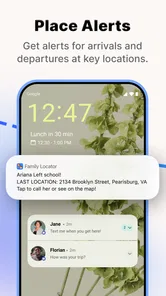
A realistic use is a parent checking whether a child has arrived at school, then using the shared map to avoid a string of “Are you there yet?” messages. Another is a family meeting in a busy place: instead of describing a corner or entrance over the phone, members can use location sharing to coordinate. These are small conveniences rather than guarantees of safety. A map can help people find one another, but it cannot replace a call, local emergency services, or an agreed plan for what to do when someone does not respond.
One practical habit is to agree on a clear purpose for each person’s sharing before setting up a circle. For example, a family might use it during commutes or outings rather than treat constant visibility as the default. That conversation matters because a location app can reduce routine check-in messages for one person while making another feel watched. I would also test the phone-finding flow at home before relying on it in a stressful moment, so everyone knows where to look and what action to take.
What the app’s history means for existing users
The long-running release history and the current version show that this is an established product rather than a newly launched experiment. That is useful context if you are considering it for an existing family routine, but it does not prove that every feature has changed in a particular way or that every device behaves identically. I would judge the current app by how reliably it works on the phones your family actually uses, and by whether its sharing controls match the boundaries you have agreed on.
For current users, the main value is continuity: a shared routine can make it easier to coordinate arrivals and find a misplaced phone without switching between several conversations. The trade-off is that location tools depend on people keeping the app usable and choosing to share. If someone’s phone is unavailable, the location is not a substitute for direct contact. I would keep a simple backup plan—such as a meeting point or a call—especially for children’s outings and unfamiliar places.
More From Our News Desk

 Prime Video
Switching to Prime Video: What Changes in Your Viewing Routine
Prime Video can make a compelling second home for streaming, but switching means learning a different catalog, rental layer, and route from browsing to playback.

 Universal TV Remote Control
Universal TV Remote Control Works Best as a Reliable Backup
A phone remote earns its place through quick setup and reliable habits. Here is how to get more from Universal TV Remote Control—and where its limits show.

 Weather - By Xiaomi
Weather by Xiaomi Review: Clear at a Glance, Less Clear Up Close
Xiaomi’s weather app makes everyday forecasts quick to scan, but its calm surface can leave useful details and recovery paths harder to find than they should be.

 X
XX Under Pressure: Can It Recover When Posting Goes Wrong?
A resilience-focused review of X, examining setup, mistaken posts, interruptions, weak connections, and the gaps that matter when recovery needs to be dependable.

 Clash of Clans
Clash of Clans Is Won Between the Battles
Its raids are quick; its community is a long-term project of coordination, teaching, rivalry, and shared responsibility—with all the friction that entails.

 Android Auto
Android Auto Makes the Case for Quieter Car Software
The car interface is no longer judged by how much it can do, but by how quietly it helps. Android Auto shows what drivers now expect—and what still gets in the way.
Latest News



Where I would be cautious
Location sharing is sensitive, so I would not install this on someone else’s phone or add them to a circle without their knowledge and consent. It is also not the right choice if your priority is a one-person phone-recovery tool and you do not want a family layer; your phone’s own locating service may be a simpler fit. Likewise, people who dislike ongoing location sharing may prefer occasional texts or calls, even if that takes a little more effort.
Battery use, connectivity, and location settings can affect how useful any live map feels in practice. Rather than assuming the map is always current, I would treat it as a helpful indication and confirm important plans directly. That distinction is especially important when a family member is travelling or when you are depending on the app to coordinate a time-sensitive pickup.
Compared with basic messaging, this app can make it easier to see where opted-in family members are without asking them to send a location each time. Compared with a device maker’s built-in locator, its family-circle approach may be more convenient when relatives use different phone ecosystems. The best choice depends on the job: use a built-in locator for a lost personal device, messaging for occasional check-ins, and a shared family app when several people want ongoing coordination.
Easy Peasy Setup
Let's talk about the setup because nobody wants to spend hours figuring out an app, right? With Find my Phone - Family Locator, it's as smooth as butter. Download it, follow the easy-peasy instructions, and boom, you're all set. The app syncs with your contacts and allows you to invite family members to join your circle. It's like creating a mini social network where everyone knows where everyone else is. No more "Where are you?" texts!
Features That Make Life Easier
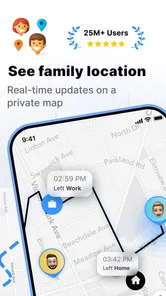
This app is packed with features that genuinely make life a little less stressful. First off, its real-time location tracking is pretty spot on. Whether your kid's at school, your partner's on their way home, or you're just trying to locate your misplaced phone, it's all there on the map. And if you're someone who constantly loses their phone in the couch cushions, the app can ring your phone even if it's on silent mode. How cool is that?
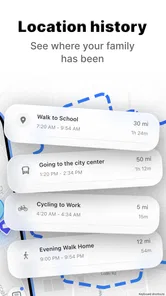
Another neat feature is the location history. It's like having a digital diary of where you've been. This can be particularly handy if you're trying to recall where you left your phone last or if you want to check out your family member's daily routes. Plus, it adds a layer of security knowing you can retrace steps if needed.
Safety First
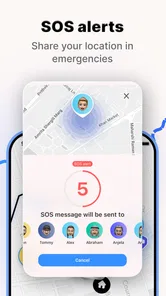
Safety is a big deal, and this app takes it seriously. One of the standout features is the SOS button. In case of emergencies, a family member can send an alert with their exact location. It’s reassuring to know that help is just a tap away. Plus, the app respects privacy by allowing you to customize who can see your location and when. So, no worries about being tracked 24/7 unless you want that level of vigilance!
Family Locator also integrates seamlessly with both Android and iOS devices, which is a huge plus if your family is like mine, with a mix of tech ecosystems. No need for multiple apps; this one's got you covered.
Final Thoughts
In a world where we're constantly on the move, having a reliable app like Find my Phone - Family Locator is a game-changer. It’s not just about keeping tabs on your devices but ensuring your loved ones are safe and sound. The peace of mind it brings is priceless. Whether you're a parent wanting to keep an eye on your kids or someone prone to misplacing their phone, this app is a must-have.
So, next time you're in a pinch trying to find your phone or need to make sure your family is safe, give this app a whirl. Trust me, you'll wonder how you ever lived without it!
Find my Phone - Family Locator Frequently Asked Questions
Is Find my Phone - Family Locator free to download, and are there optional purchases?
Find my Phone - Family Locator is free to download, so you can install it without paying upfront. The app also offers in-app purchases, priced from $2.99 to $59.99 per item. Check the purchase details shown in the app before confirming anything, and consider whether the free experience meets your needs before choosing an optional purchase.
Who develops Find my Phone - Family Locator, and what kind of app is it?
Find my Phone - Family Locator is developed by FAMILY LOCATOR LLC and is categorized as a Travel & Local app. Its short description is “Find my Phone,” while its store summary presents it as a way to link and locate family members for real-time child and family safety. That focus makes it most relevant to people looking for a family location tool.
What devices and operating systems can run Find my Phone - Family Locator?
Find my Phone - Family Locator is an app for locating connected phones and family members, and it requires Android 6.0 or later. Before downloading, check that your device meets this minimum requirement and that location services are available on the phone. The app is free to download, with optional in-app purchases ranging from $2.99 to $59.99 per item.
Who is Find my Phone - Family Locator designed for?
The app is intended for people who want to coordinate with family and check where connected family members are, particularly when keeping track of children is a concern. Its store description presents it as a GPS tracker for family safety. It is listed for everyone, but families should still discuss location sharing and agree on how they want to use it before setting it up.
What is Find my Phone - Family Locator and how does it work?
Find my Phone - Family Locator is a mobile application designed to help users locate their family members and their own devices in real-time. Utilizing GPS technology, it allows users to track the location of connected devices on a map. An essential safety tool, it provides peace of mind by ensuring you can always know the whereabouts of your loved ones and check if they have reached their destinations safely.
Pros
- Real-time location tracking feature.
- User-friendly interface design.
- Works on both Android and iOS.
- Provides alerts for location updates.
- Supports multiple devices.
Cons
- Requires constant internet connection.
- Consumes significant battery power.
- Privacy concerns with data sharing.
- Subscription needed for premium features.
- Occasional location inaccuracies.











