File Miner
- 378.00
- 4.2
- Installs
- 10.00M
- Price
- Free

Screenshots



Analysis by Reviewed
On a phone that has accumulated years of downloads, screenshots, and forgotten attachments, finding one specific file can feel harder than it should. File Miner is aimed at that everyday frustration: it’s a free productivity app by Cheryl Cook for locating files that seem to have disappeared into unfamiliar corners of a device. I’d treat it as a focused search helper, not as a replacement for every file-management tool.
What to expect when searching
The useful question is not whether a file can be found instantly, but whether you can narrow the hunt without manually opening folder after folder. File Miner’s purpose is to help surface misplaced items, so it makes the most sense when you have a clue about what you’re looking for, such as a document you downloaded or an image you saved some time ago. If you have no idea what the file was called or when it arrived, you may still need patience to identify the right result.
A practical habit is to search soon after noticing something is missing, while you can still remember its likely type or origin. For example, if a travel confirmation vanishes among browser downloads and messaging attachments, try looking for the document before saving another copy. That can prevent a second file from adding to the same clutter and gives you a clearer chance of recognizing the original.
When a phone is under pressure
File discovery and storage cleanup are related, but they are not the same job. Finding an overlooked file may help you decide what to keep, yet I would not assume that simply locating files will free space or make a phone run faster. Review anything you plan to remove first, especially documents that might be difficult to replace. A search tool is most helpful when it helps you make a deliberate choice rather than encouraging a rushed deletion.
This distinction matters most on a device that is already close to full. If your immediate problem is a lack of space, start by checking the phone’s own storage controls and reviewing large media or offline downloads. Use File Miner when the issue is “where did that file go?” rather than expecting it to act as a complete storage-maintenance system. That division of work keeps expectations sensible.
Who will get the most from it
I can see File Miner being useful to people who download documents frequently, keep files from several apps, or are not comfortable browsing a phone’s folder structure. It may also suit someone helping a less technical family member locate a misplaced item, provided they can describe what they are trying to find. If you already have a tidy filing routine and your phone’s built-in file browser works well for you, a separate app may add little.
Reliability and sensible boundaries
Search results are only useful when you can tell what they refer to. Before acting on a match, check its name and context rather than assuming that two similar-looking files are interchangeable. This is particularly important for forms, receipts, and work documents, where an older version may look almost identical to the one you need. I’d use the app to locate candidates, then make the final decision carefully.
You May Like

Clash of Clans Is Won Between the Battles

Android Auto Makes the Case for Quieter Car Software

MobiOffice: Transforming Mobile Productivity with Seamless Integration

EA SPORTS FC™ Mobile Soccer: Redefining Mobile Sports Gaming

How Microsoft OneDrive Became a Mobile Productivity Giant

How Google Translate Breaks Language Barriers Effortlessly
File Miner is rated for Everyone, has an average rating of 4.2 from around 31,000 ratings, and has passed 10 million installs. It was released on June 14, 2022, and version 1.5.5 is listed for devices running Android 7.0 or later. Those figures suggest it has reached a broad audience, but they don’t guarantee the same experience on every phone; available storage, device age, and the number of files you keep can all affect how comfortable a search feels.
Unpacking the Features
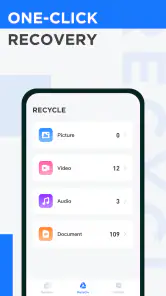
The first thing that caught my eye was the app's intuitive interface. You don't need a degree in tech to start using it. It's designed with simplicity in mind, allowing even the most tech-averse individuals to navigate seamlessly. The app categorizes your files into neat sections, making it a breeze to locate what you're hunting for, whether it’s that elusive PDF or a photo from last summer.
Performance and Speed
One of the standout features is its lightning-fast performance. Nobody enjoys an app that drags its feet, and thankfully, File Miner zips through your files with impressive speed. It takes mere seconds to scan and categorize your entire library, leaving you more time to do what you actually want to do—enjoy your phone rather than manage it.
Security and Privacy
In today's digital world, security is paramount, and File Miner takes this seriously. The app ensures that your data is kept secure with top-notch encryption. It’s comforting to know that while File Miner is sifting through your digital clutter, your personal information remains just that—personal.
Extra Handy Tools
Another feather in File Miner's cap is its array of additional features that go beyond simple file management. The app includes a handy duplicate finder, which scans for and helps you get rid of redundant files. This feature alone can save you heaps of storage space and keep your device running smoothly.
Moreover, the app offers cloud integration, allowing you to backup your essential files with ease. It supports a variety of cloud services, ensuring that you can access your files from anywhere, at any time.
The Verdict
After putting File Miner through its paces, I can genuinely say it lives up to its promises. It's a straightforward, efficient, and secure way to manage your files, declutter your device, and ensure you can always find what you're looking for. Whether you're tech-savvy or tech-shy, File Miner is a tool that can make your digital life a whole lot easier.
So, if your phone's storage is crying out for help, or if you're just looking for a way to keep things organized, give File Miner a try. It's one of those apps that once you start using, you'll wonder how you ever lived without it.
Choosing the right tool for the job
Compared with the phone’s built-in file browser, a dedicated finder is most valuable when you do not know where a download landed or would rather avoid stepping through folders one by one. The built-in option remains the better choice for routine moves, renaming, and checking a familiar folder, since it is already part of the device workflow. I’d keep both approaches in mind: use File Miner to locate a candidate, then use the ordinary file controls when you need to organize it carefully.
It is also not a substitute for a backup routine. If a file is important, finding it on the phone does not protect it from later loss, and searching for it is different from making a reliable copy. The app’s description identifies recovery as a goal, but I would not treat any search result as a guarantee that a deleted or damaged file can be restored. For irreplaceable material, keep a separate copy using a method you trust.
Practical limits on older or busy devices
On a phone with a large, mixed collection of files, allow a search a little time and avoid judging it by the first moment after opening the app. I’d also close out of a long cleanup session by checking the phone’s available space and confirming that anything important remains where expected. That small verification step is useful whenever you are reviewing duplicates or unfamiliar files, because a promising filename alone does not prove that an item is safe to discard.
For someone who rarely downloads files, or whose documents already live in a clearly named folder, the extra step of opening a separate finder may not be worthwhile. Likewise, if you need detailed file editing or a carefully structured archive, a full-featured file manager is a better fit. File Miner’s appeal is narrower: it is for the moment when you know an item is somewhere on the phone and want help tracking it down.
Making a search more useful
When I’m looking for a specific item, I try to recall more than just its broad category. A rough idea of when I downloaded it, which app I used, or whether it was an image or document gives me a better basis for judging possible matches. That matters because a phone can contain several files with similar names, and the newest-looking result is not automatically the right one. If I find a likely match, I check it before moving or removing anything.
A useful workflow is to treat the search as a short investigation rather than a cleanup session. First locate the candidate, then confirm that it opens and contains what I expect; only after that do I decide whether to keep it, move it, or remove a redundant copy. This separates the question “is this the file?” from “what should I do with it?” and reduces the chance of deleting something important while trying to solve a different problem.
When recovery is the real concern
The word recovery can mean different things to different people. If I have misplaced a file that is still stored somewhere on the phone, searching for it is a sensible first step. If I deliberately deleted it, or it has become damaged, that is a different problem: a finder should not be treated as a promise that the original can be brought back. I would check the phone’s own recovery options and any backups I maintain rather than relying on a search app alone.
This distinction is especially useful for work documents, identity paperwork, and anything that would be difficult to recreate. For those files, I’d make a separate copy as soon as I find the correct version, using a backup method I already trust. File Miner can help with discovery, but a search result is not itself a backup, and locating an item today does not protect it from being lost later.
A realistic everyday use
Imagine arriving at a hotel and realizing the confirmation you saved earlier is not in the folder you expected. Instead of downloading it again, I’d search for the original while I still remember whether it came from a browser or a message. If more than one plausible document turns up, I’d open each candidate and check the details before presenting one or deleting anything. That takes a little care, but it avoids adding another copy and makes the search more useful than simply browsing at random.
The same approach can help with a receipt needed for a return or a photo buried among old downloads. It is less suited to vague searches such as “find anything I might need,” because that leaves the user with a broad set of items to inspect. A specific goal and a quick verification step make the app’s role clearer: it helps narrow the location hunt, while you remain responsible for deciding which result is correct.
Choosing between a finder and a manager
For someone who mainly wants to rename folders, move documents into a filing system, or inspect a known directory, the phone’s standard file browser or a fuller file manager is likely the more natural choice. Those tools are built around handling and organizing files once you already know where they are. File Miner makes more sense when the starting point is uncertainty about location. I would choose according to the task rather than expect one app to cover both kinds of work equally well.
That also explains who may want to skip it. If you save very few files, rarely lose track of them, or already use a dependable folder routine, adding another utility may create more steps than it removes. On the other hand, people who collect attachments and downloads from multiple sources may appreciate having a dedicated way to look for something without manually walking through every folder.
My performance verdict
My overall recommendation is to try File Miner when lost-in-the-clutter searches are a recurring annoyance, while keeping expectations tied to locating rather than magically restoring or protecting files. Its free price makes experimenting straightforward, and its broad adoption is encouraging, but the right test is still a real search on your own device. If it helps you find a forgotten receipt or download with less folder-hopping, it has earned its place; if you need dependable backups, deep file editing, or a storage tool that handles every maintenance task, choose a companion built for that job.
File Miner Frequently Asked Questions
Can File Miner recover deleted photos, videos, or documents?
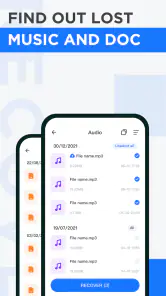
File Miner’s stated purpose is to find files hidden in less obvious places on your phone and help recover them. That may help when an item seems missing, but finding a file does not guarantee that every deleted or missing item can be restored. Review anything the app finds before choosing what to do, particularly if several similar files appear.
What should I check before installing File Miner on my phone?
Check that your phone runs Android 7.0 or later, which is the stated minimum requirement, and make sure you are comfortable using an app whose purpose is finding hidden files and helping recover them. File Miner is free to download and has an Everyone content rating. These basics can help you decide whether it suits your device and your intended use.
Can File Miner access every file on my phone?
File Miner is intended to locate files stored in less obvious places on a phone, so its usefulness depends on the files being available for the app to find. When Android asks for file access, read the permission prompt and consider whether it fits what you want the app to do. Only grant access you are comfortable with, and review the files it identifies before acting.
Is File Miner useful if I do not know where a file was saved?
That is the kind of situation File Miner is meant to address: its stated purpose is to find files hidden on your phone in unknown places and help recover them. It may be worth trying when ordinary browsing has not turned up the item you want. Check the results carefully, since locating a file does not guarantee that every missing item can be restored.
Can File Miner help me find files that seem to be missing from my phone?
Yes. File Miner is intended to help locate files hidden in less obvious places on a phone and recover them. It may be useful when you are looking for something you cannot readily find through your usual browsing, although finding a file does not guarantee that every missing item can be restored. Review what the app locates before taking action, especially if you are unsure which file you need.
Pros
- Efficient file organization tool
- User-friendly interface
- Supports multiple file formats
- Fast search capabilities
- Secure file encryption
Cons
- Limited cloud storage integration
- Ads in free version
- Requires frequent updates
- No offline mode
- Limited customer support

- Category
- Productivity
- Version
- 1.5.5












