

FetchKids - Organized Pickups
- 18.00
- 3.2
- Installs
- 10.00K
- Price
- Free

Screenshots
Analysis by Reviewed
Picking up students sounds simple until several families arrive at once, names change during the day, and school staff have to keep dismissal moving without losing track of who is leaving with whom. FetchKids is a free parenting app from Expanded Apps, Inc. built around that specific school-administration problem. I see it less as a general family organizer and more as a focused bridge between a school’s dismissal process and the adults responsible for collecting students.
That distinction matters. If you are a parent looking for a broad calendar, homework planner, messaging platform, or child-safety tracker, this is not trying to replace those tools. Its purpose is narrower: help schools manage student dismissal and make pickups more orderly. In my experience, the value comes from using it as part of a repeatable routine rather than expecting it to solve every communication problem around school transportation.
The app is listed in the Parenting category, carries an Everyone age rating, and supports devices running Android 5.0 or later. It has reached over ten thousand installs, with an average rating of 3.1 from a little over thirty ratings and eighteen written reviews. Those numbers suggest a small, mixed user base, so I would approach it as a practical specialist tool rather than a polished mass-market family app.
How the everyday pickup workflow fits together
The most useful way to approach FetchKids is to begin with the school’s actual dismissal routine. A parent should not treat it like a standalone checklist where opening the app automatically replaces the school’s established process. The school administration needs to use the same system consistently, and families need to understand what action is expected from them before they arrive.
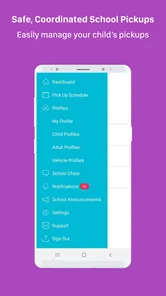
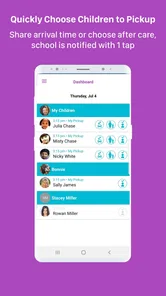
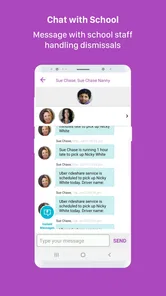
A realistic afternoon might look like this: I finish work, open the app before leaving, check the pickup information already associated with my child, and make sure the school knows I am the person arriving. At the school, staff can work through dismissal requests in a more organized way than relying only on shouted names, handwritten notes, or a stream of separate messages. The important benefit is not spectacle; it is reducing ambiguity at the moment when many small decisions happen quickly.
That makes the app particularly relevant for schools with car-line congestion, changing pickup arrangements, or a mix of parents and authorized adults. It can also be useful when a child is normally collected by one person but occasionally needs a different arrangement. The key habit is to make changes before the rush begins. Last-minute improvisation is exactly where any dismissal system becomes harder to trust.
For families, the first question is whether their school actually uses FetchKids as part of its process. Installing it independently will not create a useful pickup network. The app depends on the school’s organization and on the information being kept current. I would ask the school office how enrollment, pickup permissions, and daily changes are handled before relying on it for an important collection.
More From Our News Desk

 Gmail
GmailGmail in a Busy Inbox: Who Benefits Most?
From first account to crowded workday, Gmail earns its place through dependable search and flexible sorting—but its best fit depends on how much inbox maintenance you can tolerate.

 Prime Video
Switching to Prime Video: What Changes in Your Viewing Routine
Prime Video can make a compelling second home for streaming, but switching means learning a different catalog, rental layer, and route from browsing to playback.

 Universal TV Remote Control
Universal TV Remote Control Works Best as a Reliable Backup
A phone remote earns its place through quick setup and reliable habits. Here is how to get more from Universal TV Remote Control—and where its limits show.

 Weather - By Xiaomi
Weather by Xiaomi Review: Clear at a Glance, Less Clear Up Close
Xiaomi’s weather app makes everyday forecasts quick to scan, but its calm surface can leave useful details and recovery paths harder to find than they should be.

 X
XX Under Pressure: Can It Recover When Posting Goes Wrong?
A resilience-focused review of X, examining setup, mistaken posts, interruptions, weak connections, and the gaps that matter when recovery needs to be dependable.

 Clash of Clans
Clash of Clans Is Won Between the Battles
Its raids are quick; its community is a long-term project of coordination, teaching, rivalry, and shared responsibility—with all the friction that entails.
Latest News



For staff, the baseline workflow should be deliberately boring. Keep the student information current, review the day’s expected pickups, process changes in one place, and use the same routine for every family. A consistent procedure is more valuable than asking parents to perform complicated steps. When a system is used only by some staff members or only on busy days, confusion can return quickly.
The strongest use case is controlled dismissal, not general parenting. That focus is also the app’s first major trade-off. A narrow tool can be easier to understand when it matches the school’s needs, but it will feel limited to anyone expecting a full family-management suite.
What parents should clarify before depending on it
One practical question is who is responsible for entering or changing pickup information. Some schools may manage those details centrally, while others may expect families to provide updates through the app or through the office. I would not assume that a change made on a parent’s phone is automatically accepted as the final authority. The school’s own procedure remains important, especially for unusual arrangements.
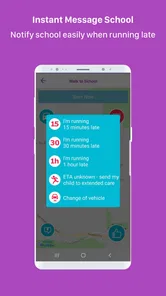
Another question concerns timing. A pickup request made early in the day is different from an urgent change made while students are already being dismissed. Experienced users should learn the school’s cutoff habits and avoid waiting until the last minute. Even when the app is working correctly, staff still need time to verify changes and organize students safely.
It is also worth clarifying what happens when a phone is unavailable, a battery is low, or a family member arrives unexpectedly. I would keep the school office’s normal backup procedure in mind rather than treating the app as the only possible route. That is not a criticism unique to FetchKids; it is sensible planning for any digital dismissal system.
Families with several children should pay close attention to how each student appears in the workflow. A parent may be collecting siblings together, but staff still need clear student-level information. Checking names carefully before confirming anything is a small habit that can prevent a rushed afternoon from becoming a correction exercise.
Settings and routines that deserve attention
Because FetchKids is a focused app, the most important “settings” are the details that shape how the school and family use it. I would start by checking the account and student information rather than immediately searching for advanced options. A wrong spelling, outdated pickup arrangement, or old contact detail can undermine confidence even when the rest of the workflow is straightforward.
Parents should review the information attached to their child whenever the school changes classrooms, pickup policies, or authorized arrangements. This is especially important after a move from regular pickup to an occasional alternative. Treating the app as something that is set once and forgotten is risky; dismissal details are naturally more changeable than a normal profile.
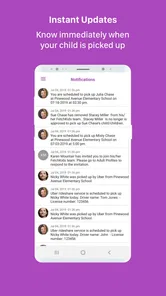
Notifications are another area worth checking on the device itself. I would make sure the app is allowed to alert me, then confirm that the phone is not silencing those alerts during the time I need them. The app’s usefulness depends on timely awareness, so a quiet notification setting can look like an app failure when the real issue is the phone configuration.
At the same time, I would avoid turning on every alert without thinking. Too many low-value notifications can make the important pickup message easier to miss. The better approach is to keep the app’s alerts noticeable during the school day and develop a simple habit of checking before leaving for pickup. That combination is more dependable than relying on a single notification.
Schools should also establish a shared staff routine around updates. If one administrator records a change while another continues using an older list, the problem is procedural rather than technical. FetchKids works best when everyone treats the app as the current working record and communicates clearly when an exception has been handled outside it.
A useful preparation step is to test the basic flow on a calm day. Parents can learn where the relevant pickup information appears, while staff can identify which parts of the process create hesitation. Doing this before a crowded dismissal exposes avoidable friction without placing real students in the middle of a rushed experiment.
The current version is 1.7.0.3, and the app was released on January 1, 2018. I would therefore pay attention to how it behaves on the particular phone and school setup being used, especially if the device is older or the operating system has changed over time. It supports Android 5.0 and newer, which covers a broad range of Android devices, but compatibility on paper does not guarantee the same experience on every handset.
Small habits that make the process calmer
I find that the most effective routine is to check pickup information before entering the school queue, not while standing at the front of it. That gives me time to notice a mistake, contact the office through the approved channel, or adjust my plan before staff are waiting for an answer.
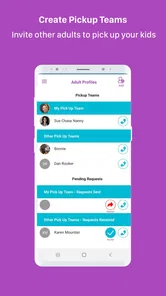
I would also use one primary account and one agreed family routine rather than having several relatives make separate changes without coordination. Grandparents, babysitters, and other authorized adults may all be involved, but the family should know who is responsible for confirming the day’s arrangement. This reduces duplicate updates and prevents two people from assuming the other person handled it.
For schools, a short internal checklist can help: review expected pickups, identify changes, keep the dismissal team aligned, and resolve exceptions through the designated office process. That kind of discipline is not a flashy feature, but it is where a tool like this earns its place.
Faster patterns for busy school days
Once the basic workflow is familiar, experienced users can make it faster by separating routine pickups from exceptions. A normal daily collection should require as little thought as possible. Changes, unusual adults, and schedule conflicts deserve deliberate attention. Mixing both types together makes every pickup feel urgent.
For a parent, the fastest reliable pattern is preparation followed by confirmation. I would check the arrangement at a predictable time, keep the phone accessible, and avoid making several unrelated changes in the middle of dismissal. If the plan changes, I would make one clear update and then verify that the school’s process recognizes it rather than repeatedly tapping or sending multiple requests.
For staff, grouping work by dismissal period can reduce mental switching. Deal with the expected list first, then handle exceptions with a clear review step. The app should support the school’s process, not encourage staff to improvise a new method every afternoon. A consistent sequence also makes it easier to train substitute or temporary staff.
There is a useful trade-off here. Speed is valuable, but speed without verification can create more work later. A parent may want a one-tap experience, while staff need enough information to make a safe decision. I would favor a quick confirmation step over an entirely frictionless action if the extra moment helps prevent the wrong student from being released to the wrong person.
Another practical pattern is to use FetchKids for the school-facing part of the process while keeping personal travel planning elsewhere. I would not expect it to replace a family calendar, navigation app, or direct conversation about a late arrival. Combining the tools is often more realistic than forcing one specialized app to manage every part of the afternoon.
When several children attend the same school, I would make the order of collection clear in my own routine. Even if the app presents the students together, I still want to know which child is expected first and whether any child has a different arrangement. This is a non-obvious advantage of thinking operationally: the app can organize the school’s record, but the family still needs a simple plan for the physical pickup.
Similarly, if another adult is collecting a child, I would communicate that change early and make sure the person arriving understands the school’s identification and check-in expectations. The app can help organize the request, but it does not remove the need for the adult to follow school rules.
Where it is quicker than familiar alternatives
The usual alternatives are phone calls, paper lists, verbal announcements, text messages, or a general school communication platform. Those methods can work, but each has a weakness. A call may interrupt office staff, a paper list can become outdated, and a text thread can scatter important details among unrelated conversation. A general school app may offer more features while making the specific dismissal task less direct.
FetchKids makes the most sense when the school wants a dedicated place for pickup coordination rather than another broad communication channel. Its advantage is focus. I would choose it over informal messages when the school is prepared to maintain one consistent dismissal process and families are willing to follow it.
The comparison changes when a school already has a mature all-in-one platform that handles attendance, announcements, permissions, and dismissal well. Adding a separate app may create another login and another place to check. In that situation, the specialized focus of FetchKids may not outweigh the convenience of keeping everything together.
Limits that matter before a school adopts it
The average rating of 3.1 indicates that the experience is not uniformly satisfying for everyone. With a little over thirty ratings, I would not treat that figure as a complete verdict, but it is still a reason to test the workflow carefully. A dismissal app has a high practical standard: even occasional confusion can matter more than a minor inconvenience in a casual app.
The small install base also suggests that this is not a universal platform every school and family will already understand. Adoption quality will depend heavily on local training and consistency. A school should not assume that parents will automatically know what each action means. Clear instructions, a short trial period, and an alternative procedure for problems are sensible parts of implementation.
I would be cautious about using it if the school has highly complicated transportation arrangements, frequent last-second changes, or many adults moving between different pickup groups. The app may still help, but the school’s process needs to be more precise as complexity increases. If staff cannot agree on who updates information and who approves exceptions, no interface will fully solve that organizational problem.
It may also be the wrong choice for a parent who wants extensive family features. FetchKids is not the app I would pick for meal planning, shared chores, child screen-time controls, schoolwork tracking, or broad household scheduling. Its value is tied to student dismissal, so its narrow scope should be viewed honestly rather than as a weakness to be hidden.
Privacy and account responsibility deserve everyday attention too. I would use the app only in the way the school instructs, keep access to my account controlled, and avoid sharing login details casually with relatives. When another adult needs to collect a child, the safer approach is to follow the school’s approved authorization method instead of passing around credentials.
Technical reliability is another reason to maintain a backup habit. A phone can lose power, a connection can fail, or a family member can arrive without the expected device. I would know how to contact the school office and would not enter the pickup line assuming the app alone guarantees a smooth handoff.
Which users should choose something else
I would skip FetchKids if my school does not officially support it, because the app cannot independently coordinate with staff who are using a different system. I would also look elsewhere if I needed a full parent-school communication suite and already had one reliable platform that includes dismissal management.
A school that wants a broad administrative system may prefer a larger product with many connected modules, even if that means a more complicated interface. FetchKids is better suited to an organization that values a focused pickup workflow and is willing to make it part of daily operations.
On the other hand, parents who are frustrated by disorganized verbal pickup procedures may appreciate having a dedicated process, provided their school has committed to it. The free price removes a direct purchase barrier for families, but the real cost is the time needed to learn and consistently follow the school’s routine.
The Everyone content rating makes it approachable for a broad family audience, but that label should not be confused with a promise that every child or every household needs the app. The relevant question is whether the school’s dismissal process benefits from it.
My verdict after looking at the complete routine
FetchKids is a specialized tool with a clear purpose: bring more structure to student pickups. I like that it does not pretend to be a complete parenting platform. When the school administration and families use the same process, it can replace scattered calls, paper notes, and improvised messages with a more repeatable dismissal routine.
My recommendation is conditional but positive for schools that genuinely need dedicated pickup coordination. Before adopting it widely, I would run a calm test, define who updates information, explain the parent workflow, check notification behavior, and keep a backup procedure ready. Those steps are more important than simply installing the latest version.
For parents, I would install it when the school directs me to, then build the habit of checking arrangements before leaving for pickup. I would keep changes clear, avoid duplicate updates from several relatives, and remember that the app supports the school’s process rather than replacing communication with the office.
Expanded Apps, Inc. has positioned this free app around a real and recurring school problem. Its modest rating and relatively small audience mean I would not recommend it blindly, but neither would I dismiss it because it lacks the breadth of a general family organizer. If your school uses FetchKids consistently, its focused design may make busy dismissal easier to manage; if your school does not, another established communication system will be the better choice.
In short, I see it as a practical coordination layer, not a magic solution. The people and procedures around it determine most of the result. Used with clear rules, early updates, and a dependable backup plan, it can earn a useful place in the afternoon routine. Used casually or inconsistently, it risks becoming just another app parents have to check.
FetchKids - Organized Pickups Frequently Asked Questions
Who publishes FetchKids, and what kind of app is it?
FetchKids - Organized Pickups is a parenting app developed by Expanded Apps, Inc. Its purpose is to help schools manage student dismissals and organize pickup arrangements. Whether it fits your needs may depend on how your school or organization handles dismissal and whether it uses FetchKids as part of that process.
What devices can I install FetchKids on?
FetchKids is available for Android devices running Android 5.0 or later. Before downloading, check your device’s operating system version and make sure you are using the app store for your platform. If you are setting it up for a school or family, it is also sensible to confirm that the relevant organization uses FetchKids for its pickup arrangements.
What is FetchKids - Organized Pickups, and who is it designed for?
FetchKids - Organized Pickups is a family transportation and pickup coordination app designed to help parents, guardians, schools, caregivers, and trusted drivers manage children’s scheduled pickups. It can be useful for organizing school runs, activities, appointments, and shared transportation arrangements, reducing the need for repeated calls and messages. Availability and specific features may vary depending on your location and the participating organization or service provider.
How does FetchKids help organize a child’s pickup?
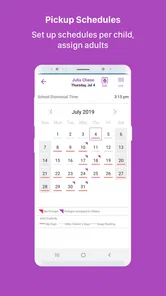
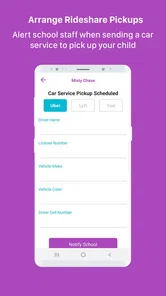
The app is intended to centralize pickup details such as the child, date, time, location, and assigned person responsible for transportation. Depending on the setup used by your school, caregiver, or family group, users may be able to view schedules, receive updates, and coordinate changes from one place. Before relying on it, confirm that all authorized adults have access and understand the pickup instructions.
Is FetchKids safe for managing children’s transportation?
FetchKids is designed around organized pickup coordination, but parents should still review every permission, invitation, and driver assignment carefully. Only add trusted adults and verify that pickup details are accurate before each trip. The app should complement, not replace, your school or organization’s safety procedures. Check the provider’s privacy policy to understand how children’s information, location data, and account details are handled.
Pros
- Clear pickup schedules help families stay organized.
- Useful reminders can reduce missed pickups and last-minute confusion.
- Shared access keeps parents and approved caregivers informed.
- Designed around school and childcare transportation needs.
- Simple coordination may reduce repetitive calls and messages.
Cons
- Availability may depend on participating schools or childcare providers.
- Some features could require invitations from an organization.
- Location and child data require careful privacy consideration.
- Notifications may be missed if permissions are disabled.
- Less useful for families without recurring pickup arrangements.











