Fast PDF Reader
- 22.00
- 3.4
- Installs
- 500.00K
- Price
- Free
Screenshots
Analysis by Reviewed
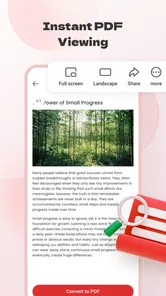
Opening a PDF on a phone should be a small task, yet it often becomes an annoying chain of taps: finding the file, waiting for another app to respond, dealing with a cluttered interface, and trying to read a page that was designed for a much larger screen. That recurring problem is where Fast PDF Reader makes sense. I tested it as a lightweight productivity app, and my impression is straightforward: it is aimed at people who want to open documents quickly rather than turn their phone into a complete office suite.
The app is developed by STARSPEED LIMITED and is available free of charge for everyone. It has reached over 500 thousand installs, which gives it a reasonable audience for a focused document viewer, although its average rating of 3.3 suggests that the experience will not satisfy every user. I would describe it as a practical reader first, not a replacement for a full document-management system.
Why a simple document viewer can save real time
My most common PDF problem is not editing. It is access. Someone sends a timetable, receipt, instruction sheet, application form, or work document, and I need to see it immediately. A reader that gets out of the way is more useful in that moment than a large suite filled with tools I will never touch.
Fast PDF Reader is built around that narrower job. Its store summary presents it as a tool for viewing PDFs and other documents, while its short description focuses on speed. That positioning matters because it sets a sensible expectation: I would install it for reading and checking files, not for creating polished reports or performing advanced document work.
The app belongs in the productivity category, but its value is very specific. It can be useful when the default file viewer on a phone is inconsistent, when documents are scattered across several folders, or when I want a dedicated place to open reading material. The benefit is less about adding impressive capabilities and more about reducing the number of steps between receiving a file and understanding what it says.
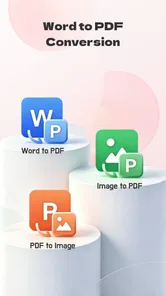
At the same time, the rating tells me to keep my expectations measured. A 3.3 average is not a reason to dismiss the app, but it is a reminder that a fast first impression may not equal a perfect long-term workflow for everyone. People who need dependable annotation, cloud collaboration, form filling, or document conversion should compare it with a broader tool before making it their main reader.
The first setup: keep the library manageable
My advice is to start with a small, realistic test rather than immediately treating the app as the home for every document on the phone. Open a few files that represent how you actually work: a text-heavy PDF, a document with tables, and a file received from another app. This quickly shows whether the reader fits your habits and whether its navigation feels comfortable on your device.
More From Our News Desk

Weather by Xiaomi Review: Clear at a Glance, Less Clear Up Close

X Under Pressure: Can It Recover When Posting Goes Wrong?

Clash of Clans Is Won Between the Battles

Android Auto Makes the Case for Quieter Car Software

MobiOffice: Transforming Mobile Productivity with Seamless Integration

EA SPORTS FC™ Mobile Soccer: Redefining Mobile Sports Gaming
Because the app is free and carries an Everyone content rating, it is easy to try without turning the decision into a major commitment. It supports devices running Android 8.0 or later, so compatibility should be checked before installation on an older phone. The current release is version 1.0.2, which also suggests that I would keep an eye on future updates if I planned to depend on it for important work.
A useful early habit is to give documents meaningful filenames before opening them whenever possible. A reader can make access easier, but it cannot fix a chaotic storage system. I found that the best results come from combining the app with a simple folder routine: keep active documents together, remove duplicates, and avoid using the reader as a substitute for backing up files.
Another practical tip is to test the app while the phone is busy. Open a document after receiving it through a messaging app, then try the same file from local storage. This is a better measure of everyday convenience than opening one file from a perfectly organized folder. The important question is whether the app shortens the complete path from file arrival to reading, not merely whether a document appears once it is already in front of you.
Everyday situations where it earns its place
Imagine receiving a travel confirmation while standing in a station. I do not need editing tools or a desktop-style workspace; I need to check a departure time, zoom into a code, and close the file again. A dedicated reader is useful in this situation because the task is brief and focused. The less visual clutter between the file and the information, the better.
It also suits study sessions where I am reviewing reference material rather than writing notes directly into the document. I can open a reading, move through its pages, and keep the phone available for a second task. For short study checks, a focused viewer is often less distracting than a full office application that continually presents editing and sharing options.
At work, I can see a role for it when checking attachments before forwarding them. A quick review helps catch an incomplete page, an unexpected blank sheet, or the wrong version of a document. This is a small workflow improvement, but it prevents the common mistake of sending a file without looking at it first.
It may also help families who frequently exchange manuals, school notices, invoices, and scanned forms. The Everyone rating makes the app approachable for a broad audience, and the free price removes the need to justify a subscription for occasional reading. I would still teach less technical users where their files are stored, because a reader alone does not make document organization automatic.
One less obvious use is temporary document triage. When several files arrive together, I can open each one, identify what matters, and then decide which documents deserve permanent storage. This keeps the phone from filling with files that were only needed for a minute. The app is most valuable here as a fast checkpoint in a larger routine, not as the final archive.
What friction it removes, and what it cannot remove
The main friction it targets is the gap between a document existing on the phone and being readable. A dedicated app gives that task a clear destination. Instead of searching through unrelated productivity features, I can approach it with one expectation: open the file and read it.
That focus can be especially helpful on a smaller screen. PDFs often require zooming, repositioning, and returning to a previous page. A reader needs to make those basic actions feel predictable. When navigation is uncomplicated, I spend more time looking at the document and less time figuring out the interface.
However, “fast” should not be interpreted as a promise that every file will behave perfectly. PDFs vary widely. A simple text document is very different from a scanned form, a brochure full of images, or a file with unusual fonts and complex layouts. The app’s usefulness will naturally depend on the documents I open, the phone I use, and how those files were created.
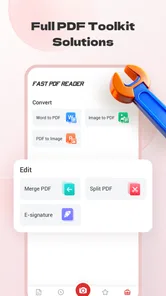
This is where I would separate a viewer from an office tool. If I need to sign a form, rearrange pages, extract content, add detailed comments, or collaborate with someone else, I would choose an app designed for that job. Using a basic reader for advanced document work creates unnecessary friction rather than removing it.
There is also a difference between opening a document and managing it. A reader may help me view a file, but I still need a sensible approach to naming, storage, duplicates, and backups. For important records, I would keep the original in a dependable storage location and treat the app as the viewing layer. That distinction is easy to overlook, especially when a document opens smoothly and gives the impression that the whole workflow is covered.
How it compares with familiar alternatives
The usual alternative is the PDF viewer already installed on the phone. That option has one clear advantage: there is nothing new to install. If the built-in viewer opens files reliably and offers the controls I need, switching may not be worthwhile. Fast PDF Reader becomes more appealing when the default option is hard to find, tied to an unrelated service, or awkward for repeated reading.
Another alternative is a full office suite. Those apps are better when reading is only one part of a larger task. They may make more sense for someone who regularly edits documents, works with spreadsheets, signs files, or moves between formats. The trade-off is that a larger suite can feel excessive when all I want is a quick look at a PDF.
Cloud-focused document apps are stronger for people who work across several devices and need synchronized files or shared access. I would choose that route for a team workflow or a document collection that must remain available everywhere. I would choose this reader instead for a simpler phone-centered routine where the immediate goal is viewing.
Dedicated advanced PDF tools are the better choice for professionals who annotate heavily or handle forms every day. Their extra controls can justify a more complicated interface. For occasional readers, however, those same controls may slow down the basic action of opening a file. The right choice depends on whether the document is the destination or merely the starting point for editing.
Small habits that make the experience better
First, I recommend testing the files you actually receive rather than relying on a generic sample. A reader can feel excellent with ordinary text and less convenient with scanned pages or dense layouts. This test also tells me whether I should keep a second app available for unusual documents.
Second, I would avoid opening every attachment directly from a temporary message thread if the document matters. Save important files into a recognizable location, then use the reader to view them. This makes them easier to find later and avoids confusing a document that is merely available with one that is safely organized.
Third, I would use the app as part of a two-step review process for work or administrative files. I first check that the document is the intended version, then I store or share it only after that check. This is more valuable than simply measuring how quickly the first page appears, because it connects the reader to a real error-prevention habit.
Finally, I would not judge the app only by its name. Speed is useful, but reliability across the files I care about matters more. If it opens my regular documents smoothly and keeps the reading process uncomplicated, it has done its job. If I repeatedly need another app for ordinary tasks, the supposed time saving disappears.
Who should use it, and who should skip it
I think Fast PDF Reader is a good fit for students, commuters, families, and workers who frequently need to inspect documents on an Android phone. It is also suitable for people who want a free, focused utility instead of installing a large office package. The strongest case is occasional or moderate reading where quick access matters more than advanced controls.
I would be more cautious about recommending it as the only document app for professionals. Anyone whose daily work depends on signatures, detailed markup, page rearrangement, conversions, or collaborative review will probably be happier with a specialized or full-featured alternative. The same applies to users who need a carefully synchronized document library across multiple devices.
Its current version, 1.0.2, makes me view it as a tool worth trying rather than one I would automatically place at the center of a mission-critical workflow. That is not a criticism of a focused reader; it is a sensible distinction between a convenient utility and a mature document platform. I would keep copies of important files elsewhere and verify the app against my own routine before relying on it.
After using it, my verdict is positive but measured. The real advantage is the time saved when the only job is to open and inspect a document. It avoids the weight of a full office suite and gives a clear purpose to a common phone task. The 3.3 average rating means I would not promise a flawless experience for every device or file type, but the free download makes testing straightforward.
If your recurring annoyance is getting to PDFs and other documents without unnecessary steps, I think this app is worth trying. If you need to transform documents, collaborate on them, or maintain a sophisticated archive, I would look elsewhere. For my own phone, I would keep it as a lightweight reading option: useful in the moments when a document needs attention now, without pretending that viewing is the same thing as managing an entire document workflow.
Fast PDF Reader Frequently Asked Questions
Who develops Fast PDF Reader, and how popular is it?
Fast PDF Reader is a productivity app developed by STARSPEED LIMITED. It has been installed over 500,000 times and has an average rating of 3.3 from around 1,200 ratings. Those figures offer a quick sense of its reach and user feedback, though individual experiences can vary. Its straightforward name and purpose make it easy to identify as a tool for viewing PDFs and other documents.
What is Fast PDF Reader, and what can I use it for?
Fast PDF Reader is a mobile application designed for opening, reading, and managing PDF documents on Android and iOS devices. It can be useful for viewing ebooks, invoices, forms, manuals, study materials, and downloaded files without needing a computer. Depending on the version, it may also include tools for searching text, zooming, rotating pages, bookmarking documents, and sharing PDFs with other apps.
Does Fast PDF Reader work offline?
Yes, Fast PDF Reader is primarily intended for reading PDF files stored on your device, so an internet connection is generally not required for opening documents that have already been downloaded. This makes it convenient for travel, school, or work situations where connectivity is limited. However, internet access may still be needed for downloading files, displaying advertisements, cloud features, updates, or other online services included in the app.
Can Fast PDF Reader open large or password-protected PDF files?
Fast PDF Reader can usually handle common PDF documents, including files containing multiple pages, images, and formatted text. Performance may depend on your phone or tablet, especially with very large files or documents packed with high-resolution graphics. Password-protected PDFs may open if you know the correct password, but encrypted files, restricted documents, or unusual PDF formats might not support every available feature.
Is Fast PDF Reader free to download and use?
Fast PDF Reader is free to download. The free version may contain advertisements, optional purchases, or limitations on advanced tools. Before installing, review the app’s current terms and payment information, and check whether any premium features are required for editing, converting, cloud storage, or removing ads.
Pros
- Opens large PDF files quickly with smooth page navigation.
- Supports offline reading without requiring an account or internet access.
- Simple interface makes essential reading tools easy to find.
- Remembers your last reading position when reopening documents.
- Useful search function helps locate words or phrases in long files.
Cons
- Advanced annotation and editing options may be limited.
- Some features may be restricted behind ads or in-app purchases.
- Document organization can feel basic for users with many files.
- Text reflow may not work perfectly on every PDF layout.
- Battery use can increase when viewing image-heavy documents.











