Fanatics: Shop NFL, NBA & MLB
- 7.61K
- 4.7
- Installs
- 1.00M
- Price
- Free

Screenshots
Analysis by Reviewed
Fan gear shopping often starts as a quick search and turns into a household debate: whose team deserves a new jersey, what size will fit, and whether the purchase can wait for a better deal. I like having one place to browse when those questions come up, and Fanatics: Shop NFL, NBA & More is built around that kind of sports shopping. It is a free sports app from Fanatics, Inc, with a 4.9 average from around 37,000 ratings and over a million installs. My main takeaway is that it suits fans who already know which team or league they want to shop for, while a general retailer may be simpler for someone looking for everyday clothing rather than official-looking team gear.
A shared phone can still mean separate shopping decisions
In a household where people follow different teams, I can see the app being useful as a browsing handoff: one person searches for a club, then passes the phone to someone looking for another league. That is different from sharing an account or letting several people move through checkout. I’d keep the person responsible for the order involved from the moment a product is selected, especially when saved preferences or payment details may belong to someone else.
A realistic use is planning what to wear to a game-day gathering. One person can look for a jersey, another can check hats or other team gear, and the group can compare choices before anyone buys. I’d treat the app as a way to explore options, not as a shared list or family organizer. If you want to keep choices straight, make a quick note outside the app with the team, item, and intended buyer; that avoids mixing up a fan’s preference with the account holder’s final decision.
Shopping for teams under one roof
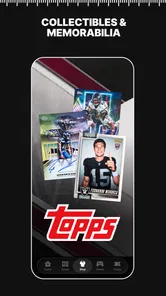
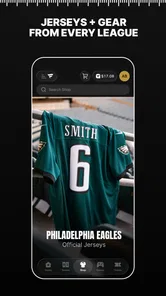
Imagine having a shopping mall dedicated entirely to sports gear right in your pocket. That’s exactly what the Fanatics: Shop NFL, NBA & More app offers. Whether you’re a die-hard fan of the NFL, NBA, MLB, or even the NHL, this app has got you covered. The first thing I noticed was the sheer variety of merchandise available. From jerseys and hats to collectibles and memorabilia, it’s like a candy store for sports fans.
Browsing works best with a team in mind
One of the standout features of this app is how easy it is to navigate. I’ve used quite a few shopping apps, and let me tell you, not all of them make it easy to find what you’re looking for. However, with Fanatics, I could effortlessly browse through different categories, filter by team, or search for specific items. The user interface is intuitive and the app runs smoothly, which makes the shopping experience so much more enjoyable.
For a shared-device household, that team filter is a practical starting point: one person can look up a club, then hand the phone to someone following a different league without needing to begin with a broad search. I’d still keep the buying decision with the person whose account and payment details are being used. Before ordering for another family member, check the item details and sizing together; a team choice is easy to agree on, but apparel fit is personal. This is more useful as a shared browsing space than as a substitute for clear account boundaries.
Team-first browsing versus general shopping
The app’s focus changes how I’d use it compared with a general retailer. If I already know the team, league, or kind of fan gear I’m after, starting here can save me from sorting through unrelated clothing and products. A broad shopping app may be a better first stop when I’m comparing everyday apparel, looking for the lowest price across many sellers, or still unsure what kind of item I want. Fanatics makes more sense when the team identity is part of the purchase, rather than an extra detail I need to filter in later.
More From Our News Desk

 Bolt: Request a Ride
Bolt and the Shift from One-Tap Rides to More Legible Trips
Bolt shows how ride-hailing is shifting from a one-tap taxi request toward a more legible, choice-driven trip, while leaving the hardest questions of price and reliability unresolved.

 Farm Land - Farming life game
Farm Land Review: A Small Island Farm with a Satisfying Loop
A bright, breezy island farm turns a few quick chores into a satisfying cycle of planting, harvesting, expanding, and deciding what to build next.

 Android Auto
’s Community Takes Shape in the Passenger Seat
Its most valuable network is not a public feed but a shared set of routes, voice habits, app integrations, and advice that make driving less isolating—and sometimes more complicated.

 My Talking Angela
 Makes the Virtual Pet Feel Personal
A polished pet-raising game built on small rituals, playful customization, and a character who gives everyday screen time a surprisingly personal rhythm.

 Google Translate
 Review: A Pocket Tool for the Small Frictions of Travel
From menus and signs to quick conversations, Google Translate earns its place by cutting the little delays that make unfamiliar language feel like a barrier.

 Shazam: Find Music & Concerts
Shazam’s Best Trick Is Turning a Song Into a Night Out
A few seconds of recognition can settle an argument, rescue a half-remembered chorus, and point toward a live show. Shazam’s real trick is what happens after the match.
Latest News



That trade-off is useful to keep in mind before browsing: a deep, sports-centered selection can make discovery more relevant, but it does not replace checking whether a particular item fits your budget and needs. I’d use a general retailer for a plain hoodie or broad price comparison, then return here when the team or league is central to the choice. For a gift, searching by the recipient’s team is a good narrowing step, but I’d still confirm their preferred style and size before checkout.
Deals need a little patience and a clear budget
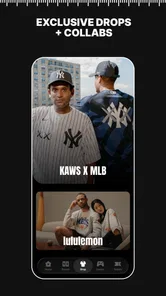
If you’re anything like me, you love a good deal. The app frequently updates with exclusive offers and discounts that are hard to resist. I managed to snag a limited edition jersey at a fantastic price, and trust me, it felt like I’d won the lottery. Plus, they have a nifty feature where you can get notifications about upcoming sales, so you never miss out on a bargain.
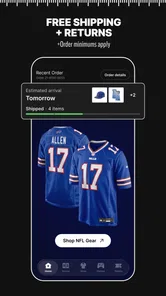
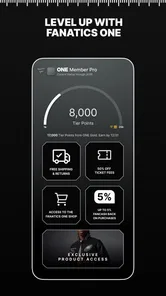
The store summary also points to free shipping on jerseys and a reduction in ticket fees, which can matter when a purchase involves more than clothing. I’d compare the final order details before deciding, rather than treating a promotion as an automatic saving: an offer only helps if it applies to the item or ticket you actually want. If you share a phone, notifications about sales can be useful for planning, but they can also tempt someone into an unplanned purchase. I’d agree on a spending limit before browsing together.
My practical tip is to decide what counts as a real saving before opening a sale alert. If the household is shopping for a specific jersey, check that the offer applies to that choice and compare the final order details before taking it as a reason to buy immediately. For tickets, the fee reduction mentioned in the app’s summary is worth considering as part of the total, but I’d still make the decision based on the event and budget rather than the promotion alone. That pause keeps a discount from turning into extra spending.
Favorites can make repeat visits more focused
What makes the app even cooler is its personalization feature. You can set your favorite teams, and the app will tailor the shopping experience to show you relevant merchandise. It’s like having your own personal sports shopping assistant. I loved how it kept me updated with the latest gear and offers for my teams without me having to search for them.
That setup is most helpful when you return for the same teams over time; it narrows the browsing task instead of making you scan every league again. In a household with different loyalties, I’d treat favorites as personal preferences, not a shared family setting, and check that the right person is browsing before placing an order. If you only shop once in a while, searching directly for a team or product may be quicker than spending time tailoring the feed.
For occasional shoppers, I’d start with a direct search rather than setting up preferences just to make one purchase. For repeat visits, team choices can help bring relevant merchandise forward, but they also make it important to notice whose preferences are shaping what appears. On a shared phone, I’d avoid assuming that a feed reflects everyone in the home; it may be more useful to browse deliberately for the person shopping that day.
Who will get the most from it
I’d recommend it to fans who buy jerseys, caps, or keepsakes often enough to care about team-focused browsing and sale alerts. It can also be handy before a game-day gathering: someone can check options for a favorite team while others decide what they actually want, rather than passing around several general shopping apps. Compared with a broad online retailer, this app puts sports merchandise and team selection at the center. That focus is its strength, but it is not necessarily the better choice for basic clothing, price comparisons across unrelated shops, or a one-off purchase where the first suitable item matters more than team-specific selection.
A useful habit is to separate browsing from checkout. I’d shortlist the team and item first, then review the size, price, delivery terms, and any offer together before buying. That small pause is especially worthwhile when a family member is shopping on someone else’s device: it helps avoid choosing the wrong team or committing to an order under the wrong account. The app is a shopping destination, not a household coordination tool, so a quick conversation still does the important work.
It is also a good fit for someone who enjoys browsing team merchandise even when they do not have a purchase planned. If that sounds like you, I’d keep sale alerts and browsing separate from a decision to spend: a reminder that something is available is not the same as a reason to buy it. If you only need one item and already know where you can get it, opening another shopping app just to browse may add an unnecessary step.
Age context and a sensible checkout boundary
The app is rated Mature 17+, so I would not treat it as a children’s shopping app or hand it over without considering who is using the device. A parent can browse merchandise with a younger sports fan, but I’d keep account access and purchase approval with an adult. That’s a straightforward boundary for any shopping app, and it matters here because sales and team gear can make impulse buying feel appealing. The app itself is free, but items are purchases; I’d make that distinction clear before inviting someone else to explore.
That age rating is also a useful prompt for families to decide who handles account access, not a substitute for making that decision. If a younger fan wants to choose a team item, I’d browse together and leave the final review and checkout to the adult responsible for the account. On a shared device, I would not assume that a child can safely make a purchase just because the app costs nothing to install. Free access and paid merchandise are separate parts of the experience.
Fanatics has been available since 2013, and version 4.25.1 supports devices running Android 8.0 or later. Its popularity is reflected in around 6,800 written reviews, but I’d still judge it by whether its focused selection and browsing style fit your own shopping habits. If you prefer to compare several retailers before buying or want a general-purpose clothing shop, another option may suit you better. If your household regularly shops for NFL, NBA, or other league gear, the team-first approach can make finding relevant items less of a chore.
The app is free to download, which makes it easy to browse before deciding whether its approach suits you, but that should not blur the difference between browsing and buying. I’d check the current device requirements before installing it on an older phone, and I’d keep the version and operating-system details in mind if the app will be used on a household device that is not updated often. That is a practical compatibility check, not a reason to install it on every phone in the home.
My household verdict
So, if you’re a sports lover looking to score some awesome gear, I’d definitely recommend giving the Fanatics app a try. It’s convenient, user-friendly, and packed with everything a sports fan could dream of. Happy shopping, and may your team always win!
For my household, its best role is a focused place to browse when a team or league is already part of the plan. I would not use it to manage family accounts or settle every shopping decision; it works better when people agree who is browsing, who is buying, and what the budget is before checkout. If you want team merchandise and a more direct route to relevant options, it is worth trying. If you want an all-purpose shop or prefer to compare every retailer before committing, I’d start elsewhere and use this when the sports connection matters most.
Fanatics: Shop NFL, NBA & MLB Frequently Asked Questions
Will Fanatics: Shop NFL, NBA & More work on my phone?
Fanatics: Shop NFL, NBA & More is available for Android and iOS. Android users need a device running version 8.0 or later. Before downloading, check that your phone’s operating system meets that requirement and that you have enough room for an additional shopping app. The app is in the Sports category and is designed for fans who want to browse merchandise from their mobile device.
What can I shop for in the Fanatics app?
Fanatics: Shop NFL, NBA & More is a sports shopping app for fans of major leagues, including the NFL, NBA, MLB, and NHL. Its range of merchandise includes jerseys, hats, accessories, and memorabilia for teams and players. It may suit you if you prefer browsing fan gear in one app rather than searching for each league or team separately.
Is Fanatics: Shop NFL, NBA & More free to download, and what costs should I expect?
The app is free to download, and you can browse its sports merchandise without a membership or subscription fee. You pay for items you choose to purchase, so the cost depends on your order. The app’s store summary highlights free shipping on jerseys, along with an offer for 50% off ticket fees; check the offer details while shopping to see what applies to your purchase.
What age group is Fanatics: Shop NFL, NBA & More intended for?
Fanatics: Shop NFL, NBA & More has a Mature 17+ content rating. It is a sports shopping app, so the rating is useful for families deciding whether it is appropriate for a younger user. If a teen will be using the app, consider the rating and the fact that it supports browsing and purchasing merchandise before installing it.
What is Fanatics: Shop NFL, NBA & More?
Fanatics: Shop NFL, NBA & More is an app designed for sports enthusiasts, providing a comprehensive shopping experience for fans of major sports leagues such as the NFL, NBA, MLB, NHL, and more. The app offers a wide array of officially licensed merchandise, including jerseys, hats, accessories, and memorabilia, for your favorite teams and players.
Pros
- Wide selection of sports merchandise
- User-friendly interface
- Secure payment options
- Regular discounts and promotions
- Fast shipping available
Cons
- Limited international shipping
- Occasional app crashes
- Limited customer support hours
- Some items may be overpriced
- Few personalized recommendations