

Family Tools: Family Organizer
- 48.00
- 4.2
- Installs
- 10.00K
- Price
- Free

Screenshots
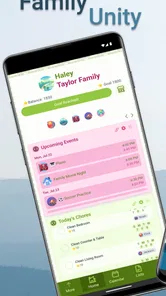
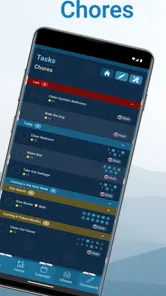
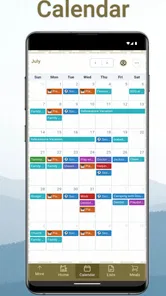

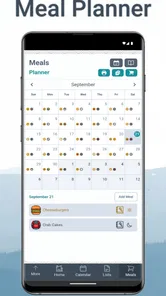

Analysis by Reviewed
I approached Family Tools: Family Organizer as the sort of parenting app that has to prove itself after the first enthusiastic setup. A shared family planner can look useful on day one, when everyone is adding chores, schoolwork, meals, and appointments, but its real test comes later: does the household still open it when the week becomes busy? In my experience, that is the right question for this app because its value depends less on novelty and more on whether family members build a repeatable habit around it.
Developed by Zerin Technologies, this free parenting app brings several ordinary household responsibilities into one shared space. It is aimed at families that are tired of scattered messages, handwritten reminders, and separate calendars that nobody checks consistently. The store short description calls it “Family Tools,” but I found its practical identity more specific: it is a lightweight coordination board for the routines that tend to fall between formal calendar events and casual conversation.
The app is rated for Everyone, which fits the straightforward family focus. It has a 4.2 average from around 165 ratings and has passed 10K+ installs, so it has a smaller footprint than the biggest general-purpose calendar services. That is not automatically a weakness. A focused tool can be easier for relatives who do not want to learn a complicated productivity system. Still, a smaller ecosystem also means you should judge it by how well your own household adopts it, rather than assuming it will replace every planning tool you already use.
What feels useful at first, and what survives regular family life
I find that the first impression matters less than whether the organizer can fit different people’s reading habits and routines. In the next section, I’ll look at how the way a household enters and checks information affects its usefulness, especially when not everyone approaches planning in the same way.
The first week: quick wins from putting household tasks together
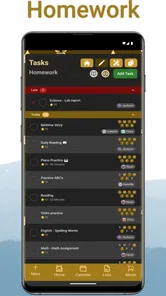
The strongest first impression comes from the combination of chores, homework, calendar events, and meals. These are not identical types of information, yet they often compete for attention in the same household. A child may need to finish an assignment, someone has to take out the rubbish, a parent has a medical appointment, and dinner needs planning. Keeping those items together can make the family’s immediate workload easier to see.
I especially like the idea of using different kinds of entries for different kinds of responsibility instead of forcing everything into a generic calendar. A calendar is good at telling me that something happens at a certain time. It is less helpful when the real question is who is expected to do a task before the evening. Family Tools: Family Organizer is more relevant in that gap between “this is scheduled” and “someone needs to handle it.”
During the first week, I would avoid trying to document the entire household. That creates work before anyone has experienced a benefit. A better starting point is one recurring pain point: the after-school period, morning chores, or meal decisions. Add only the items that regularly cause confusion, then let the family see whether the shared view changes behavior. If it does, expand gradually.
More From Our News Desk

 Gmail
GmailGmail in a Busy Inbox: Who Benefits Most?
From first account to crowded workday, Gmail earns its place through dependable search and flexible sorting—but its best fit depends on how much inbox maintenance you can tolerate.

 Prime Video
Switching to Prime Video: What Changes in Your Viewing Routine
Prime Video can make a compelling second home for streaming, but switching means learning a different catalog, rental layer, and route from browsing to playback.

 Universal TV Remote Control
Universal TV Remote Control Works Best as a Reliable Backup
A phone remote earns its place through quick setup and reliable habits. Here is how to get more from Universal TV Remote Control—and where its limits show.

 Weather - By Xiaomi
Weather by Xiaomi Review: Clear at a Glance, Less Clear Up Close
Xiaomi’s weather app makes everyday forecasts quick to scan, but its calm surface can leave useful details and recovery paths harder to find than they should be.

 X
XX Under Pressure: Can It Recover When Posting Goes Wrong?
A resilience-focused review of X, examining setup, mistaken posts, interruptions, weak connections, and the gaps that matter when recovery needs to be dependable.

 Clash of Clans
Clash of Clans Is Won Between the Battles
Its raids are quick; its community is a long-term project of coordination, teaching, rivalry, and shared responsibility—with all the friction that entails.
Latest News



A useful setup habit is to write entries so that another person can understand them without asking a follow-up question. “Homework” is vague; “finish reading and pack the workbook” is more actionable. “Dinner” may simply record a meal, while a clearer entry can help everyone know whether ingredients, preparation, or cleanup is the issue. The app cannot solve unclear family agreements, so the quality of what you enter matters more than the number of entries.
This is also where the app’s simplicity can work in its favor. Parents who have tried elaborate task-management systems may appreciate not needing to turn family life into a project plan. Children and relatives are more likely to participate when the information is recognizable and limited. I would not expect a young child to manage a complex workflow independently, but a parent can use the shared structure to make expectations more visible and consistent.
One realistic household routine
Imagine a family arriving home on a weekday afternoon. One child has homework, another has a chore, a parent needs to remember an evening event, and nobody has decided what to eat. Instead of sending several messages or relying on memory, the household can look at the shared organizer and identify the immediate priorities. The value is not that the app performs the work. The value is that it reduces the number of separate places where the family has to search for the plan.
For that scenario to work, I would use the app in two passes. In the morning, add or review the fixed events and school responsibilities. Later, use the meal area and chore information to decide what is realistic for the evening. This prevents the common mistake of treating every item as equally urgent. A meal plan that ignores homework and appointments is not really a plan; it is another source of pressure.
One less obvious benefit is that the shared view can expose overloaded days before they become a problem. If a child has a demanding school task on the same evening as a family commitment, the issue becomes visible early enough to adjust a chore or simplify dinner. That is a more valuable use than merely recording completed tasks. It turns the organizer into a conversation starter about capacity.
Month-to-month value: habit matters more than the initial setup
After the first week, the app has to earn its place repeatedly. I think it does this best for families with recurring coordination problems, not for people who only need an occasional reminder. When the same types of chores, school obligations, meals, and events appear every week, a shared organizer can become a dependable reference point.
The key is to create a small checking ritual. For example, a parent might review the coming days before the school week begins, while each family member looks at the current day at a predictable time. The exact timing should match the household, but the principle is important: an organizer is useful only when checking it becomes easier than asking everyone separately.
I would also keep a distinction between planning and record-keeping. If an entry no longer affects a decision, remove or update it rather than allowing old information to remain visible. A crowded screen can make a family feel behind even when the important work is under control. The app’s long-term success depends on keeping the shared view current enough that people trust it.
For meals, the recurring value is less about building an impressive menu and more about reducing daily negotiation. A family could use the meal area to identify the evening’s direction, then adjust it when schedules change. I would avoid treating it as a rigid promise. Flexibility is essential because a meal plan that becomes another obligation may create resistance instead of saving time.
Homework benefits from a similar approach. The app can help make school responsibilities visible alongside family commitments, but it should not become a surveillance tool. I would use it to clarify what needs attention and when support is available, rather than turning every assignment into a performance score. That distinction may determine whether children see the organizer as helpful or intrusive.
The app is currently at version 3.6.0 and requires an operating system version of 10 or later. For a family choosing devices, that requirement is worth checking before asking everyone to participate. A shared system is only as practical as its least-supported regular user. If one important family member cannot use the app comfortably, the household may drift back to messages and verbal reminders.
The maintenance burden: small, but impossible to ignore
Family Tools: Family Organizer is not a set-and-forget solution. Someone has to enter events, clarify chores, update homework, and keep meals relevant. That maintenance is manageable when the app replaces several conversations, but it feels pointless when the household continues to maintain a paper calendar and multiple chat reminders in parallel.
I recommend assigning ownership of the organizer itself, even if responsibilities inside it are shared. One adult can perform a weekly cleanup, while each family member remains responsible for reporting changes that affect them. This avoids the common failure where everybody assumes somebody else will update the plan.
There is a useful trade-off here. Centralizing information reduces duplication, but it also creates a single point of neglect. If the main organizer is not updated, its shared status can become misleading. That is why I would schedule a short reset rather than attempting constant maintenance. A regular review of upcoming events, unfinished chores, school items, and meals is more realistic than expecting perfect live updates.
Another practical tip is to avoid entering every minor household action. If an item takes less time to do than to record, it probably does not belong in the organizer unless it is frequently forgotten or needs accountability. The app becomes more valuable when it highlights meaningful coordination points instead of turning the family’s day into a long checklist.
Families should also agree on what “done” means. A chore may be complete only after cleanup; homework may include packing the required materials; a meal entry may include preparation. The application can display shared responsibilities, but the family still needs clear definitions. Without them, disagreements are likely to move from the kitchen or hallway into the app.
Where fatigue appears after the novelty fades
The main source of fatigue is repetition without visible payoff. If family members open the app and see information they already know, or if entries are routinely outdated, they will stop checking it. This is not unique to this product, but it matters more for a focused organizer because its entire purpose is shared attention.
There can also be resistance from family members who do not enjoy structured planning. A parent may welcome a central view while a teenager sees another obligation to monitor. I would introduce the app by solving a specific annoyance for that person, such as making homework expectations clearer or avoiding repeated questions about dinner. Participation is more likely when the benefit is personal and immediate.
Another limitation is that a family organizer may not replace a mature calendar for people with demanding professional schedules. If you need deep scheduling controls, extensive integrations, or a work-grade task system, a dedicated calendar or productivity service may remain the better primary tool. This app makes more sense as a family-facing layer, especially when the household’s needs are simple enough to explain in everyday language.
The same applies to families that already coordinate perfectly through a shared calendar and messaging group. Adding another destination can increase fragmentation rather than reduce it. I would choose this app only if the current arrangement regularly loses chores, homework, meals, or household responsibilities. If your existing system is trusted and used by everyone, the benefit of switching may be modest.
Cost is another point to consider over time. The app is free to use, while in-app purchases range from $2.49 to $24.99 per item. That makes it easy to try without an upfront payment, but I would decide carefully whether any optional purchase supports a genuine recurring need. A paid enhancement is worthwhile only if it saves enough confusion or maintenance to justify becoming part of the family’s routine.
Privacy and comfort also deserve a family conversation, particularly when children are involved. Even without turning the organizer into a formal tracking system, shared entries can influence how responsibilities feel inside the home. I would keep the information practical, avoid unnecessary personal detail, and make sure children understand what is being recorded and why. A tool that improves coordination should not quietly damage trust.
How it compares with familiar alternatives
Compared with a paper planner, the app’s shared nature is its clearest advantage. A paper calendar can be warm, visible, and satisfying, but it depends on everyone being in the same place and remembering to look at it. Family Tools is better suited to households where members need access from their own devices and where plans change during the day.
Compared with a standard shared calendar, it is more naturally suited to chores, homework, and meals. A regular calendar tends to organize time, while this app can organize the responsibilities surrounding that time. However, the standard calendar may remain superior for complex appointments, professional commitments, travel planning, or households that need more advanced scheduling behavior.
Compared with a family chat, the organizer should reduce the problem of important information disappearing beneath newer messages. Chat is excellent for quick questions and changes, but poor as a long-term reference. I would still use messaging for urgent updates and the app for the agreed plan. Trying to make either tool do both jobs can create unnecessary friction.
Compared with a full task-management platform, this app is likely to feel less intimidating for a family that wants a shared starting point. The trade-off is that users who enjoy detailed labels, complex dependencies, or highly customized workflows may find it limiting. Its strength is approachability, not professional project control.
Who should keep using it, and who should move on
I would recommend it to parents who repeatedly answer the same questions about chores, homework, dinner, and upcoming events. It is also a reasonable choice for households that want children to see responsibilities in one place without introducing a business-style productivity system. Families with changing schedules may find the shared overview particularly useful when they commit to a weekly review.
I would be more cautious for a household with only one device in regular use, because the shared advantage becomes smaller. I would also hesitate if family members already ignore a trusted calendar. Adding Family Tools will not fix a motivation problem by itself; it may simply create another abandoned list.
It is not the right choice for someone looking primarily for a personal planner, an advanced school-management platform, or a comprehensive professional calendar. The app’s value is collective. If the family does not agree on a simple routine for checking and updating it, a personal reminder tool may be less demanding and more effective.
My long-term verdict
My lasting impression is that Family Tools: Family Organizer earns space when it becomes the household’s agreed reference point, not when it contains the most information. Its first-week appeal comes from bringing familiar family concerns together. Its month-to-month value comes from preventing small responsibilities from becoming repeated conversations. That value is real, but it depends on restraint and consistency.
The best way to keep it useful is to start with a narrow routine, review it regularly, and remove anything that no longer helps a decision. Use it to make responsibilities visible, not to document every movement. Give each family member a reason to look at it, and keep the shared plan flexible enough to reflect real life.
At no cost to start, with a Everyone content rating and a focused parenting purpose, it is easy to test in a real household. I would give it a week or two with one clearly defined problem rather than filling it with every possible task immediately. If the app reduces reminders and makes busy days easier to discuss, it may deserve a permanent place. If it becomes another list that one parent alone must maintain, the usual calendar, paper planner, or family chat may be the more honest choice.
Family Tools: Family Organizer Frequently Asked Questions
Is Family Tools: Family Organizer suitable for children and parents?
Family Tools: Family Organizer is a parenting app intended to help a household coordinate shared plans and everyday responsibilities. Its content rating is Everyone, so it is presented as suitable for a general audience. Parents can use its family-oriented tools to bring chores, homework, calendar events, and meals into a shared organizer, while deciding which details are appropriate for each family member to see.
What can I organize with Family Tools: Family Organizer?
The app’s short description is “Family Tools,” and its focus is shared organization. Its listed uses include creating family chores, homework, calendar events, and meals. These features make it a practical option for households that want to keep common responsibilities and plans together rather than spread them across separate notes or conversations. How useful it feels will depend on the routines your family wants to coordinate.
What is Family Tools: Family Organizer used for?
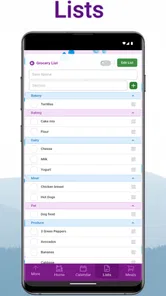
Family Tools: Family Organizer is designed to help households coordinate everyday responsibilities and shared plans in one place. After exploring its main functions, the app appears most useful for organizing family schedules, appointments, tasks, reminders, shopping needs, and other routine information. It can reduce the need for scattered messages and paper notes, especially when several family members need access to the same plans.
Can multiple family members use the same Family Tools account?
Yes, the app is intended for shared family organization rather than individual planning only. Family members can generally participate in a common household space, allowing everyone to view or contribute to relevant schedules, lists, and tasks. Before downloading, it is worth checking the current invitation and permission options, because available roles and collaboration features may vary between Android and iOS versions or change with future updates.
Is Family Tools: Family Organizer free to download?
Family Tools: Family Organizer is free to download, with optional in-app purchases priced from $2.49 to $24.99 per item. Users should review the purchase details before buying anything and consider whether the free experience covers their household’s needs. This gives families a chance to try the organizer without an upfront download cost, while keeping optional spending in mind.
Pros
- Shared calendars keep everyone aligned on school and family activities.
- Task lists make chores and household responsibilities easier to track.
- Useful reminders help reduce missed appointments and important deadlines.
- Centralized family information can simplify everyday household planning.
- Designed for collaborative use rather than managing schedules alone.
Cons
- Some features may require a subscription or in-app purchases.
- The app’s usefulness depends on every family member using it consistently.
- Busy households may need time to organize and maintain shared information.
- Notifications can become excessive when many tasks and events are added.
- Privacy settings should be reviewed carefully before sharing family details.











