Family Chore Manager
- 26.00
- 4.1
- Installs
- 10.00K
- Price
- Free

Screenshots
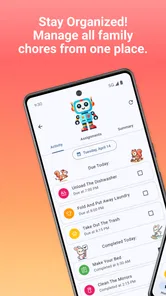
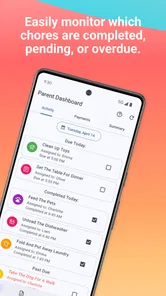
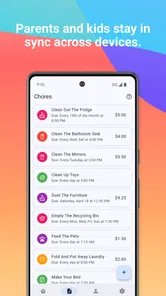
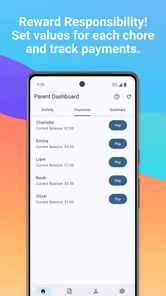
Analysis by Reviewed
Are you constantly struggling to get your kids to chip in around the house? Well, you're not alone! Managing family chores can be a real headache, but thanks to the Family Chore Manager, it doesn't have to be. Dive into this app with me and see how it can transform your household duties into a fun and collaborative effort.
Where it fits in a family routine
I see this parenting app as a practical fit for families who want children to take a more visible role in everyday home life. It is most useful when the problem is not deciding what needs doing, but remembering who agreed to do it and following through. A shared chore plan can give children a clearer sense of ownership while giving parents a concrete reference point for a reminder.
For example, imagine a school evening when dinner is finished, a child has a small task to complete, and a parent is trying to get everyone ready for the next day. A chore list with deadlines can make the responsibility easier to point to than another verbal request. I would still keep the task age-appropriate and explain what “done” means; points cannot replace showing a child how to tidy a room or load a dishwasher properly.
This approach is not ideal for every household. If your family prefers spontaneous, informal chores, a dedicated manager may feel like extra administration. It may also be a poor match if rewards and points tend to cause arguments between siblings. In that case, a simple conversation or a short paper list may create less friction.
Choosing a setup that stays manageable
One practical question is how much of family life to put into a chore app. I would treat this as a focused tool for recurring responsibilities, not a complete household planner. Start with chores that are easy to describe and have a clear finish, such as putting away toys or setting the table. Leave ambiguous jobs out until everyone agrees what completion looks like. That small decision can prevent a parent from having to inspect and reinterpret every task.
It can also help to separate routine work from occasional requests. If every extra favor becomes a points opportunity, children may start asking what they will get for helping at all. Keeping a few regular responsibilities as part of family life, while using rewards selectively for harder or less familiar jobs, can make the system feel more balanced. I would review that distinction with the children rather than assuming they will understand it automatically.
For a household with more than one caregiver, the useful test is whether everyone applies the same rules. A parent who accepts a chore as complete and another who keeps moving the standard can quickly undermine the reward plan. Before adding more tasks, agree on who can mark work as finished and how to handle a missed deadline. This is less exciting than choosing prizes, but it is the kind of groundwork that makes a shared routine fair.
More From Our News Desk

 Gmail
Gmail in a Busy Inbox: Who Benefits Most?
From first account to crowded workday, Gmail earns its place through dependable search and flexible sorting—but its best fit depends on how much inbox maintenance you can tolerate.

 Prime Video
Switching to Prime Video: What Changes in Your Viewing Routine
Prime Video can make a compelling second home for streaming, but switching means learning a different catalog, rental layer, and route from browsing to playback.

 Universal TV Remote Control
 Works Best as a Reliable Backup
A phone remote earns its place through quick setup and reliable habits. Here is how to get more from Universal TV Remote Control—and where its limits show.

 Weather - By Xiaomi
Weather by Xiaomi Review: Clear at a Glance, Less Clear Up Close
Xiaomi’s weather app makes everyday forecasts quick to scan, but its calm surface can leave useful details and recovery paths harder to find than they should be.

 X
X Under Pressure: Can It Recover When Posting Goes Wrong?
A resilience-focused review of X, examining setup, mistaken posts, interruptions, weak connections, and the gaps that matter when recovery needs to be dependable.

 Clash of Clans
 Is Won Between the Battles
Its raids are quick; its community is a long-term project of coordination, teaching, rivalry, and shared responsibility—with all the friction that entails.
Latest News



Transforming Chores into Fun Challenges
When I first heard about the Family Chore Manager, I was a bit skeptical. I mean, who really wants to do chores, right? But this app cleverly turns mundane tasks into exciting challenges. Each family member is assigned tasks based on age and ability, and they can earn points for completing them. These points can then be traded in for rewards that you set up, like extra screen time or a favorite treat. This reward system really adds a game-like element to chores, making them less of a bore and more of an engaging activity.
The reward idea works best when the family agrees on the rules before the first task is assigned. I would make the exchange clear, choose rewards that are realistic to deliver, and avoid changing point values after a child has completed a chore. That makes the system feel fair rather than like a negotiation every time. It is also worth treating points as encouragement, not as payment for every ordinary contribution; families may want some shared responsibilities to remain part of being a household.
Easy Setup and Customization
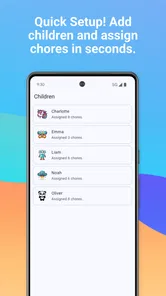
Setting up the app was a breeze! You just input the family members' names, assign chores, and set rewards. What I love most is the flexibility it offers. You can customize the chores according to your household needs and even adjust the points system to value more challenging tasks higher. This level of customization ensures that everyone stays motivated and feels their efforts are appreciated.
A useful way to start is to add only a handful of recurring chores, rather than trying to represent every job in the home from day one. That keeps the list readable and gives children a chance to learn the routine before it grows. Parents can then adjust the points if a task consistently takes more effort than expected. The trade-off is that customization needs occasional attention: a setup that once felt fair can become outdated as children’s abilities and schedules change.
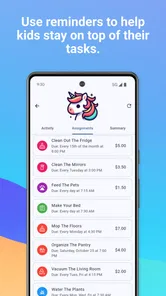
Another cool feature is the ability to set deadlines for each chore. This helps in teaching kids time management skills, as they learn to prioritize tasks and manage their schedules. Plus, there's a nifty calendar view that gives you a snapshot of what needs to be done and when. It's like having a personal assistant for your household tasks!
Deadlines are most helpful when they reflect the real rhythm of your home. A task that needs to happen before bedtime benefits from a clear cutoff, while a flexible weekend job may not need the pressure of a precise time. I would use the calendar to spot clashing expectations—for instance, several chores landing on the same busy evening—and spread tasks out before they become a source of stress.
Making the routine work on busy days
A realistic way to use the calendar is to check it during a calm moment rather than only when something has gone wrong. On a Sunday, for example, a parent and child could look at the coming week, notice which evenings are already full, and move a flexible chore to a less busy day. That turns the calendar into a planning aid instead of a scoreboard for missed work. It also gives children a chance to see that deadlines are connected to family routines, not just arbitrary pressure.
If a child is still learning a task, I would avoid assigning it with the same expectations as a familiar job. The first few attempts may need an adult alongside them, and a deadline should leave room for that teaching time. Once the child knows the steps, the task can become more independent. This gradual handover is one of the better ways to make responsibility meaningful: the app can remind everyone what is expected, but it cannot teach the practical skill by itself.
Families should also decide what happens when plans change. A child may be tired, a chore may become impossible because supplies are missing, or a family evening may run late. Rather than letting points turn a small disruption into a dispute, agree in advance whether a task can be moved or should simply be skipped that day. A flexible rule can preserve trust; constant exceptions, on the other hand, make deadlines less useful.
Building Responsibility and Teamwork
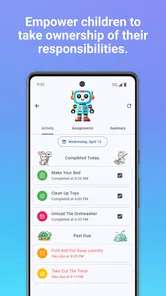
One of the standout features of the app is how it fosters a sense of responsibility and teamwork among family members. Kids learn that everyone has a role to play in keeping the house running smoothly. It's pretty amazing to see them take ownership of their tasks and even remind each other of pending chores. The app also allows for a bit of friendly competition, as family members can see each other's points. Who knew chores could be so much fun?
That visibility can motivate children who enjoy seeing progress, but it can also invite comparisons that are not helpful. I would pay attention to how siblings respond to shared points and keep the focus on completing their own responsibilities, rather than treating the totals as a measure of who contributes most. Different ages and chore types are not always directly comparable, so a cooperative household goal may suit some families better than a contest.
And let's not forget about the communication aspect. The app includes a message board where you can leave notes or reminders for each other. It's a great way to keep everyone in the loop and ensure that no chore is left undone.
The message board can be handy for a short, practical note, such as explaining where supplies are kept or flagging a change to a task. I would not rely on it for urgent communication: a chore note is not a substitute for telling someone directly when timing matters. Its value is in keeping routine details near the family’s chores, rather than scattering them across separate messages and verbal reminders.
When a simpler alternative is better
Compared with a paper chart or a whiteboard, a family chore manager can keep assigned tasks, timing, points, and notes in one place. That is useful when several people need to check the plan or when chores change from day to day. A paper list may still win for families who want something visible at a glance without asking children to use a device. A general calendar can handle dates, but it usually does not make the reward arrangement part of the same chore routine.
I would skip a dedicated app if the main issue is a disagreement about what counts as a fair share rather than forgetfulness. A shared list cannot settle that conversation, and making every responsibility measurable can make family life feel transactional. It is also a weaker fit for very young children who need an adult to guide each step; in that case, a visual prompt beside the task may be more useful than checking a screen.
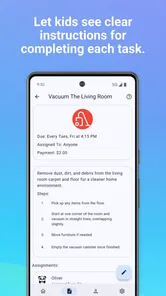
For families who do try it, I would ask children what makes a task feel achievable before assigning points. A short job with a clear result can be motivating, while a broad instruction like “clean your room” may invite confusion about where to start. Breaking that into a few concrete actions is more work at setup, but it makes later reminders less personal and gives children a fairer chance to finish independently.
What to expect as the app develops
Kronickel’s Family Chore Manager is free to install, has an Everyone age rating, and supports devices running Android 7.0 or later. It was released on October 28, 2024, and its current version is 1.5.3. The app has a 4.0 average from around 90 ratings, with over 10,000 installs. Those figures suggest that families are finding it, while the version number gives existing users a concrete point of reference when checking which release they have.
I would not assume that a newer version automatically changes a family’s routine; the practical test is whether the current tools continue to make assignments and follow-through easier. If you already use it, check that everyone understands the current chores, points, and deadlines before changing a routine. New users can begin with a small set of tasks and see whether the family likes this structure before investing time in a full household plan.
For an existing household, a version change is a good moment to check the routine rather than rebuild it without reason. Confirm that recurring tasks still suit each child, that point values have not become lopsided, and that deadlines fit the family’s current schedule. I would make one adjustment at a time so it is easier to tell whether a change improves cooperation or just adds another rule. The app’s ongoing usefulness depends less on novelty than on whether the plan remains understandable to the people using it.
There is also a cost trade-off to keep in mind. The app is free, while optional in-app purchases range from $3.99 to $19.99 per item. I would first decide whether the basic chore-and-reward approach suits your family, then consider any purchase only if its value is clear to you. Families looking for a completely paper-free system may appreciate keeping tasks together in an app; those who want a no-cost, no-screen routine may be happier with a whiteboard on the fridge.
One useful question before paying for anything is whether the family has actually settled into using the routine. If tasks are still being forgotten because the children do not check the plan, or if points are leading to repeated arguments, a purchase is unlikely to solve the underlying problem. I would give the basic approach time to show whether it fits, then weigh any optional spending against the specific benefit it brings to your household.
Final Thoughts
In an era where kids are glued to screens, the Family Chore Manager is a breath of fresh air. It not only encourages kids to participate in household duties but also teaches valuable life skills like responsibility, time management, and teamwork. As a parent, it's incredibly satisfying to see your kids not only help around the house but also enjoy the process. If you're looking to bring some order to your household chores while keeping it fun and engaging, this app is definitely worth a try.
So, if you're tired of nagging your kids to do their chores, give the Family Chore Manager a shot. It's a game-changer!
Family Chore Manager Frequently Asked Questions
What devices can run Family Chore Manager?
Family Chore Manager is an Android app for organizing household responsibilities. It requires Android 7.0 or later, so check your device’s operating system before downloading. The app is free to install, with optional in-app purchases available. Its Everyone content rating makes it suitable for a broad audience, though families should still decide together how they want to use chore reminders and rewards.
Who develops Family Chore Manager, and what kind of app is it?
Family Chore Manager is a parenting app developed by Kronickel. Its focus is reflected in the short description, “Family Manager,” and the promise to simplify household chores and reward responsibility. It has a 4.0 average rating from around 90 ratings, giving prospective users a general sense of how it has been received while they consider whether its approach suits their household.
What is Family Chore Manager and how does it work?
Family Chore Manager is an app designed to help families organize and distribute household chores effectively. It allows users to create tasks, assign them to family members, and set deadlines. The app includes features such as reminders and progress tracking, ensuring that everyone stays on top of their responsibilities. By centralizing task management, it aims to reduce stress and improve household efficiency.
Is Family Chore Manager suitable for all age groups?
Yes, Family Chore Manager is designed to be user-friendly and suitable for all age groups. The interface is intuitive, allowing even young children to easily understand and participate in managing chores. There are also parental controls to help guide children and ensure that tasks are age-appropriate, making it a versatile tool for families with kids of various ages.
What platforms is Family Chore Manager available on?
Family Chore Manager is available on both Android and iOS platforms. Users can download it from the Google Play Store or Apple's App Store. The app is optimized for both smartphones and tablets, providing a seamless experience across different devices. Regular updates ensure that it remains compatible with the latest operating systems and devices.
Pros
- User-friendly interface for all ages
- Customizable chore lists
- Syncs across devices
- Reward system for motivation
- Reminders for incomplete tasks
Cons
- Limited free features
- Occasional sync issues
- Ads in free version
- No offline access
- Requires account signup