Face Swap Magic: AI Avatars
- 972.00
- 4.5
- Installs
- 5.00M
- Price
- Free

Screenshots

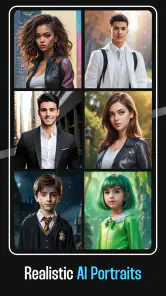
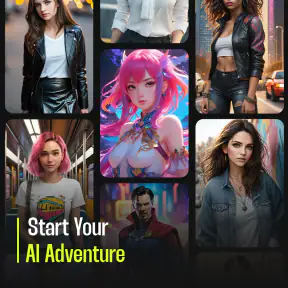
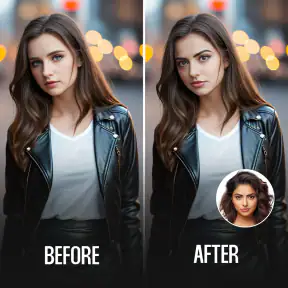
Analysis by Reviewed
I like photo apps best when they give me a quick way to make something amusing or imaginative without turning the process into a project. Face Swap Magic: AI Avatars is aimed at that kind of casual creativity: it uses AI face swapping and avatar transformations to give ordinary portraits a very different look. I’d consider it for playful edits and profile images, rather than as a replacement for a full photo-editing suite.
What you can reasonably expect before you start
The main decision is whether you want a quick visual experiment or a tool for carefully art-directing an image. I see this app as firmly in the first camp. Its appeal is the prospect of seeing a familiar face reimagined, not fine control over every pixel. That distinction helps set expectations: a result can be entertaining even when it is not a faithful portrait, while a polished business headshot calls for a different kind of tool.
For a low-pressure first try, I’d choose a portrait I already like and save the original separately. Then I’d compare the transformed image with the source before deciding whether it is suitable to share. This simple habit gives me a clean reference point and avoids treating an AI-generated variation as a replacement for the photo I started with.
How the creative tools fit everyday use
Right off the bat, Face Swap Magic: AI Avatars welcomes you with an easy-to-navigate interface. The app is designed with user-friendliness in mind, so even if you’re not tech-savvy, you’ll find your way around with ease. The setup is straightforward and doesn’t require a tech manual to get started.
The app's main attraction is its face-swapping capability, powered by advanced AI technology. You can swap faces with celebrities, fictional characters, or even your friends. The results are surprisingly realistic! Plus, it offers a variety of filters and editing tools to enhance your creations. Whether you’re looking to create a funny meme or a digital art piece, the possibilities are endless.
The Magic of AI Avatars
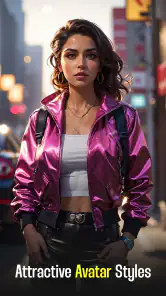
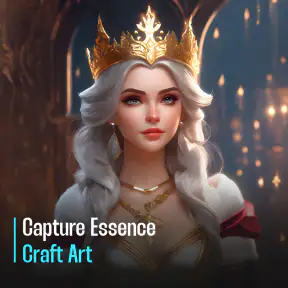
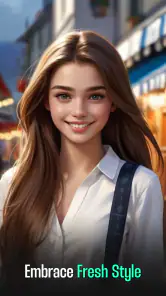
What truly sets this app apart is its AI Avatar feature. This isn't just about swapping faces; it's about transforming them. You can turn your selfies into fantastical avatars that look like they’ve stepped out of a video game or a fantasy novel. The AI does all the heavy lifting, analyzing your photo and applying intricate digital makeovers that maintain the essence of your image while adding a creative twist.
The detail and creativity that go into these avatars are impressive. You can customize everything from hairstyles to accessories, ensuring that your avatar is as unique as you are. It's like having a mini art studio right in your pocket.
More From Our News Desk

Weather by Xiaomi Review: Clear at a Glance, Less Clear Up Close

X Under Pressure: Can It Recover When Posting Goes Wrong?

Clash of Clans Is Won Between the Battles

Android Auto Makes the Case for Quieter Car Software

MobiOffice: Transforming Mobile Productivity with Seamless Integration

EA SPORTS FC™ Mobile Soccer: Redefining Mobile Sports Gaming
Where it earns a place in your routine
A practical way to get more from a face-swap tool is to choose a photo with one clearly visible face, good lighting, and a fairly direct angle. That gives the AI a cleaner starting point than a crowded group picture or a dim snapshot. I’d keep a few source photos handy and try the same one with different styles; it makes it easier to judge whether a result is genuinely useful or merely a funny first impression.
For example, if I wanted a new chat avatar before catching up with friends, I could try a stylized portrait, compare it with a face-swap joke, then save the version that still looks recognizably like me. That small comparison matters: a dramatic transformation can be entertaining, but it may not work as a profile image if people need to identify you at a glance. For a quick meme, the opposite may be true—the more unexpected the result, the better.
Another useful moment is a group chat that has gone quiet. I might make a playful image connected to an inside joke, then share it with a short note that makes clear it is an edit. That is a better fit for this kind of app than using a convincing-looking result as evidence of something that never happened. A little context keeps the joke enjoyable instead of confusing.
If I’m choosing an image for a profile, I’d also consider how it will look at a small size. Fine details in a highly stylized avatar can disappear when the picture is reduced to a tiny circle, so a simpler, more recognizable result may work better than the most elaborate one. I’d check the crop before using it: a face that looks balanced in a full-screen preview can feel cramped once the edges are cut off.
The app is a better fit for people who enjoy experimenting and sharing visual jokes than for anyone seeking precise retouching. A conventional photo editor is usually the stronger choice for carefully adjusting color, cropping, or removing small distractions. An avatar maker focused on hand-drawn illustration may also suit someone who wants a consistent art style rather than an AI reinterpretation of a selfie. Here, the appeal is the quick shift between a recognizable face and a playful new persona.
Sharing, expectations, and practical tradeoffs
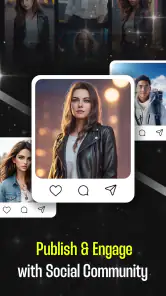
One of the most fun aspects of Face Swap Magic: AI Avatars is the social element. Once you’ve created your masterpiece, sharing it is a breeze. The app integrates seamlessly with social media platforms, so you can easily post your creations for your friends to marvel at. Trust me, the likes and comments will roll in.
For a more thoughtful sharing workflow, I’d review the finished image before posting and consider whether everyone shown would be comfortable with the joke. A convincing face swap can be mistaken for a real photo when it leaves the app, especially without context. That makes the tool most enjoyable when the people involved understand the playful intent; I’d avoid using an edit to embarrass someone or imply that they were somewhere they were not.
Another tradeoff is that AI results depend on the source image and the style being applied. A face can look less convincing when it is partly covered, turned away, or mixed into a busy scene. I’d treat the first output as a draft, not a guarantee, and switch to a clearer portrait if the facial details look off. That’s also why this is not my pick for a polished, consistent visual identity: generated styles can prioritize novelty over exact likeness.
There is a practical difference between a face swap and an avatar, too. A swap is most useful when the humor depends on placing a face into another visual context; an avatar is more suitable when I want a fresh personal image without pretending it is an untouched photograph. I’d choose between them based on where the result will go, rather than making whichever image looks most dramatic the default choice.
Moreover, the app is regularly updated with new features and content, keeping things fresh and exciting. Whether you’re looking to pass the time or want to create something share-worthy, this app delivers in spades.
Free access and what the price means
The app is free to install, while optional in-app purchases range from $0.49 to $54.99 per item. That gives curious users a way to try it without paying upfront, but the range is wide enough that I’d check the cost attached to any specific purchase before confirming it. I wouldn’t assume that every style or editing option is included at no charge, or that buying something is necessary to enjoy the basic idea.
Its value depends on how often you’ll make images and whether the available free experience meets your needs. If you only want to create one amusing portrait, free access may be all you need. If you expect to use it repeatedly, decide whether the particular paid option you’re considering adds enough value for your own routine; a higher price is not automatically worthwhile just because the app has several creative uses.
I’d judge any optional purchase by a specific task, not by the general promise of more creativity. Before paying, I’d ask myself whether I have a particular image in mind and whether the paid item is clearly relevant to making it. If I’m just curious, trying the free access first is the sensible route; if the app becomes part of a regular creative routine, then I can weigh an individual purchase against how much I actually use it.
The app comes from Hangover Studios and sits in the art and design category. It has a 4.5 average from around 56,000 ratings, with more than 5 million installs. It is rated for Everyone, and version 2.0.5 requires Android 8.1 or later. Those details make it easy to check whether it fits your device and household, but they don’t guarantee that every generated image will match your taste.
In a world where digital content is king, Face Swap Magic ensures you’re always ahead of the curve. The app is not just about fun and games; it’s about creativity and self-expression, allowing you to explore different personas and worlds with a simple click.
Who should try it—and who should skip it
I’d recommend giving it a try if you like turning selfies into conversation starters, making lighthearted edits for friends, or trying out a fantasy-style version of your own portrait. It also makes sense for someone who wants an easy creative diversion without learning a complicated editor. The strongest use case is casual experimentation, where a surprising result is more important than exact control.
It can also suit someone who needs a quick visual idea for a themed chat, a playful personal profile, or a one-off image to send to a friend. I’d keep the intended audience in mind: an avatar for a private conversation can be more exaggerated than one meant for a public-facing profile. Thinking about the destination first makes it easier to choose a style and avoid spending time polishing an image that does not fit its purpose.
I’d skip it if you need dependable professional portrait work, detailed manual adjustments, or a consistent set of avatars that all follow the same precise design. In those cases, a dedicated editor or an illustration tool is likely to be less frustrating. I’d also think twice if you’re uncomfortable with AI transforming personal photos; use images you’re comfortable working with and sharing, and be careful about posting edits of other people.
It is also not my first choice when accuracy matters more than novelty. For a carefully controlled brand identity, a set of matching character illustrations, or a photo that must preserve exact details, I’d use a tool built around manual editing or commissioned artwork instead. This app’s strength is a quick change in appearance, and that same creative unpredictability is a limitation when the output has to meet a strict brief.
My buy-or-skip verdict
My recommendation is to try the free access if the idea of transforming a portrait sounds fun, then decide about any optional purchase only after you know what you want to make. The app’s value is not that it replaces a full editor; it is that it lowers the effort involved in trying an imaginative face-based effect. If that kind of quick experiment is something you’ll revisit, it may earn a place on your phone. If you only need precise corrections or a dependable, repeatable style, I’d skip it and choose a more controlled alternative.
In conclusion, if you love experimenting with photos and enjoy being creative, this app is definitely worth checking out. It’s fun, intuitive, and offers endless possibilities to unleash your imagination. So why wait? Dive into the world of Face Swap Magic: AI Avatars and let your creativity shine!
Face Swap Magic: AI Avatars Frequently Asked Questions
What devices and operating systems can I use with Face Swap Magic: AI Avatars?
Before downloading, check that your device runs a compatible operating system. Face Swap Magic: AI Avatars requires Android 8.1 or later, so devices running an older version may not be able to install it. It is an Art & Design app for creating AI-powered face-swap avatars, and checking your device’s software version first can help avoid installation problems.
What is Face Swap Magic: AI Avatars?
Face Swap Magic: AI Avatars is an innovative app that allows users to seamlessly swap faces with friends, family, or celebrities using advanced artificial intelligence technology. The app provides a fun and creative way to create personalized avatars or share hilarious face swaps on social media. It’s designed for both casual fun and creative expression.
Is Face Swap Magic: AI Avatars free to use?
Face Swap Magic: AI Avatars is free to download, so you can try the app without paying upfront. In-app purchases range from $0.49 to $54.99 per item, which is worth keeping in mind if you plan to explore paid options. The app is developed by Hangover Studios and focuses on creating professional, comic, or cartoon avatars with AI face swapping.
How does the face swapping technology work in Face Swap Magic: AI Avatars?
The app uses advanced AI algorithms to detect and map facial features, allowing for accurate and realistic face swaps. By analyzing thousands of facial landmarks, the app ensures that the swapped faces align naturally with the original expressions and lighting conditions, resulting in highly convincing and entertaining images.
What are the device compatibility requirements for Face Swap Magic: AI Avatars?
Face Swap Magic: AI Avatars is compatible with most modern Android and iOS devices. To ensure optimal performance, it is recommended to use the app on devices with at least 2GB of RAM and running on Android version 8.0 or iOS 11.0 and above. Users should check their device specifications before downloading.
Pros
- AI-driven realistic avatars
- Easy to use interface
- Multiple customization options
- Fast processing speed
- Regular updates
Cons
- In-app purchases required
- Limited free features
- Occasional glitches
- Requires internet connection
- Privacy concerns with photo data
- Category
- Art & Design
- Version
- 2.0.5












