AI Room Planner: Home Design
- 5.00
- 4.3
- Installs
- 100.00K
- Price
- Free

Screenshots




Analysis by Reviewed
Redesigning a room is usually harder than it looks. I can imagine a color I like, but it is much more difficult to picture that color with my existing sofa, flooring, windows, lighting, and awkward corners. AI Room Planner: Home Design approaches that problem with one focused idea: use artificial intelligence to turn a photo of an interior, exterior, or garden into a visual starting point for a new design. After spending time with it, I see it less as a complete renovation tool and more as a fast way to explore possibilities before making real decisions.
That distinction matters. This is not a replacement for an architect, an interior designer, or a proper measuring app. It does not make a generated image physically accurate just because the result looks convincing. What it does well is reduce the blank-page problem. Instead of asking myself what a room might become, I can begin with an image and compare different directions. For anyone who has stared at paint samples or furniture catalogs without being able to connect them to a real space, that visual jump can be genuinely useful.
Why the photo-to-design capability makes a difference
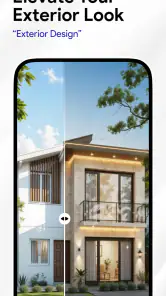
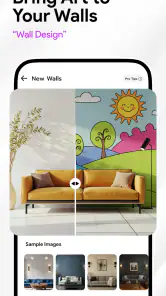
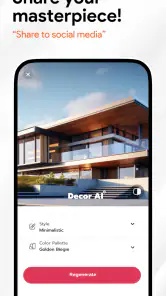
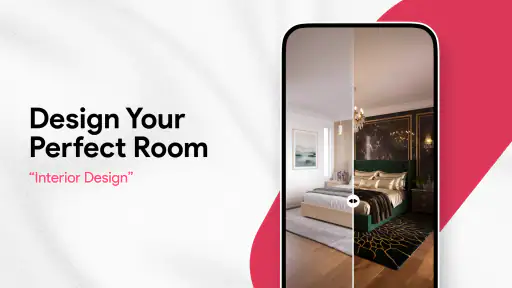
The central capability is the transformation of an ordinary space into an AI-generated design concept. The app sits in the House & Home category, and its purpose is clear from the first use: I provide a view of a room, outdoor area, or garden, then use the result to think through a new look. The appeal is not simply that the images can be attractive. The practical value is that the design is attached to my own space rather than a showroom picture.
That personal context changes how I judge an idea. A minimalist living room shown in a magazine may look perfect, but it tells me little about whether the style suits my narrow wall, low ceiling, dark floor, or existing furniture. A visual generated from my own room gives me something more relevant to react to. I can notice that a proposed palette feels too cold, that a seating arrangement would make the walkway look cramped, or that a garden concept does not fit the shape I actually have.
The strongest use of the app is comparison, not prediction. I treat each result as a conversation starter with myself. It helps me decide what direction feels right, but I do not treat every chair, plant, lamp, or structural detail as a shopping list. This is the most important mindset to bring to the experience, because AI imagery can look more certain than it really is.
AI Room Planner: Home Design is free to install, which makes experimentation easy at the beginning. It is rated for Everyone, so the concept is approachable for a broad household audience rather than being aimed only at professionals. Hangover Studios is the developer, and the app has reached over one hundred thousand installs with an average rating of 4.3 from roughly one hundred thirty-five ratings. Those figures suggest a modest but meaningful user base, while also reminding me that this is not a mature professional platform with a huge review history.
What happens when I use a real room
In practice, the quality of the starting photo has a large effect on how useful the result feels. I get better visual guidance when the room is reasonably tidy, the main walls are visible, and the camera is held steadily rather than pointed from an extreme corner. A dark, cluttered, or heavily cropped image gives the system less visual context, so the generated design becomes easier to misread.
More From Our News Desk

Weather by Xiaomi Review: Clear at a Glance, Less Clear Up Close

X Under Pressure: Can It Recover When Posting Goes Wrong?

Clash of Clans Is Won Between the Battles

Android Auto Makes the Case for Quieter Car Software

MobiOffice: Transforming Mobile Productivity with Seamless Integration

EA SPORTS FC™ Mobile Soccer: Redefining Mobile Sports Gaming
I recommend taking the photo in ordinary daylight and keeping the lens at a natural height. This is not about creating a beautiful photograph. It is about giving the app a clear view of the proportions and surfaces that matter. If I photograph only the sofa, the result may be visually interesting but less helpful for judging the whole room. If I include too much ceiling or floor, the important furniture and wall details become smaller. A balanced frame is a simple improvement that many first-time users overlook.
Once the app produces a concept, I look at broad decisions before small decorations. I ask whether the overall mood works, whether the colors are compatible with the existing floor, and whether the room still appears usable. This prevents me from getting distracted by attractive accessories. AI design images often make decorative details feel important, but the useful question is whether the main visual structure makes sense in daily life.
One practical workflow is to save the original room photo separately and compare it with each generated concept. I would not create a dozen versions without a plan. Instead, I would test a small set of distinct directions: for example, a lighter and calmer treatment, a warmer version, and a more dramatic option. The point is not to collect endless images. It is to identify the design decisions that keep appearing in the versions I prefer.
Using the output without being misled by it
The generated image is best understood as a mood board with your room as its background. It can communicate color relationships, atmosphere, and general styling more quickly than a written description. It is much less dependable for exact dimensions, construction feasibility, or the precise identity of a product. A sofa that appears to fit may be drawn at a different scale. A wall treatment may look simple but require preparation, tools, or permission in the real world.
That is why I separate visual decisions from purchasing decisions. I use the image to decide that I want warmer wood, fewer competing colors, or a more open feeling. Then I measure the room myself and check real furniture dimensions before spending money. For a renovation involving electrical work, plumbing, structural changes, or expensive materials, I would use the app only at the inspiration stage and rely on a qualified person for the practical plan.
There is also a useful emotional benefit. When I dislike a generated concept, that is still information. Perhaps the problem is not that the image is poor; perhaps I have learned that I do not want a completely white room, exposed shelving, or a crowded plant arrangement. The app makes preferences visible. That can be more valuable than finding one perfect design immediately.
A realistic everyday scenario
Imagine I am preparing a living room for a move or a small refresh. I already own a sofa, a television unit, and a rug, but I am unsure whether to repaint the walls or replace the lighting first. Rather than buying paint on impulse, I use a clear photo of the room and examine a few different visual directions. One concept may show a bright, quiet space; another may create a warmer, more intimate atmosphere; a third may make the room feel too busy.
From that comparison, I might discover that the sofa is not the main problem. The existing wall color could be making the room feel colder than it is, or the rug may be competing with too many other patterns. I can then test the most important change first in the real room, perhaps with removable samples or temporary accessories. The app has not solved the project by itself, but it has helped me avoid making several unrelated purchases at once.
This workflow is especially helpful when two people in the same household have different tastes. Instead of arguing from abstract descriptions such as “modern,” “cozy,” or “simple,” we can react to images based on the same room. One person may prefer the cleaner layout while the other likes the warmer colors. The conversation becomes more concrete, and compromises are easier to identify.
The same approach can work for an exterior or garden idea, but I would be even more cautious about treating the image as a plan. Outdoor spaces depend on sunlight, drainage, climate, maintenance, and the actual condition of the ground. A generated garden can help me choose a mood or planting style, yet it cannot replace checking whether a plant is suitable for the location or whether a proposed feature is practical.
Small habits that improve the results
My first tip is to photograph before cleaning the room into an unrealistic showroom state, but remove temporary clutter that hides the permanent features. The app needs to see the space I will really live with, while bags, loose laundry, and random objects can pull attention away from the design. This produces a more useful compromise between honesty and clarity.
My second tip is to judge the room at thumbnail size before zooming into details. If the overall color balance feels wrong from a distance, a beautiful lamp or decorative plant will not rescue the concept. This quick check keeps the focus on the capability that matters most: helping me understand the broad visual effect of a change.
My third tip is to use the app before visiting stores, not after. If I browse furniture first, I can become attached to individual pieces and force them into the room. If I explore the room first, I have a better chance of buying according to a coherent direction. I still verify dimensions and materials elsewhere, but the app helps me shop with a clearer purpose.
A fourth useful habit is to keep the original image and the chosen concept together when discussing the project with someone else. The contrast reveals what has actually changed. It also makes it easier to explain that the image is a visual reference rather than a promise of an exact final result.
Where the experience becomes less dependable
The biggest limitation is the gap between visual appeal and physical accuracy. AI can make a room look polished while quietly changing proportions, moving objects in ways that would be inconvenient, or presenting furniture that does not correspond to something I can buy. If I forget that, the app can encourage unrealistic expectations.
There is also a risk of over-designing. Because generated rooms often contain coordinated accessories and carefully balanced surfaces, I may feel that my real home is unfinished simply because it does not look like an image. I prefer to use the app to identify one or two meaningful improvements rather than chase every detail. A livable room does not need to resemble a rendered scene.
Another trade-off is cost. The app is free, but in-app purchases range from $5.99 to $399.93 per item. That wide range makes it important to pay attention before committing to anything inside the app. For casual inspiration, I would begin with the free experience and decide whether the additional value is clear for my particular project. Someone planning only one small change may find paid options difficult to justify, while a person using the tool repeatedly for several spaces may evaluate them differently.
The current version is 17.0.0, and it requires Android 8.0 or later. That makes the app accessible to many existing Android phones, although the quality of the experience can still depend on the device’s camera and screen. On an older phone, I would be more patient with image processing and inspect results on a larger display when making important visual judgments.
How it compares with ordinary alternatives
The usual alternative is browsing Pinterest-style inspiration, furniture catalogs, or design magazines. Those sources are often better for discovering styles and products, but they are less personal. A catalog can show me a beautiful dining area; it cannot automatically show me how that direction relates to my own walls and furniture. AI Room Planner fills that gap by placing the design conversation closer to my actual space.
Another alternative is manually building a room in a traditional planning tool. Manual planners are generally better when I need exact measurements, repeatable layouts, or a dependable floor plan. They can be slower to learn, but their strength is control. I would choose one of those tools when the project depends on fitting a specific table, checking walking clearance, or planning cabinetry.
Hiring a designer remains the better option for a complex renovation or for anyone who wants a complete, practical specification. A professional can account for materials, lighting behavior, building constraints, and the way a household uses the space. The app is more suitable before that stage, when I am still deciding what I like and how to explain it.
In other words, this app is not trying to replace every design method. Its advantage is speed and personal context. Its weakness is that the visual result can appear more exact than the underlying information allows. I get the best outcome when I use it as the fast visual layer and keep measurement, budgeting, sourcing, and technical decisions separate.
Who will gain the most from it
I think the strongest audience is renters and homeowners who know that a room feels wrong but cannot identify why. The app gives those users a way to test atmosphere before touching the walls or moving heavy furniture. It is also useful for people preparing a conversation with a contractor, decorator, partner, or family member because an image communicates a preferred direction faster than a paragraph.
It can help first-time decorators who feel overwhelmed by too many choices. Instead of beginning with every possible color and furniture style, they can start with their own room and notice which broad changes feel comfortable. That makes the process less abstract and may reduce impulse purchases.
Garden and exterior enthusiasts may also enjoy the creative side, particularly when they are collecting ideas for a neglected area. Still, they should treat those results as visual inspiration and check local conditions independently. The more the project depends on weather, soil, safety, or construction, the less the image should be treated as a finished answer.
I would skip this app if I need precise architectural planning, exact furniture placement, a shopping-ready inventory, or professional construction guidance. I would also skip it if I am likely to compare endless generated designs without making decisions. In that situation, a measured floor-plan tool or a consultation with a designer would be more productive.
My final take
AI Room Planner: Home Design succeeds when I ask it a focused question: “What could this real space feel like if I changed its visual direction?” It is quick to understand, approachable for everyday home projects, and more useful than generic inspiration when I need to see an idea in my own surroundings. The photo-based approach turns vague preferences into something I can discuss and compare.
Its limitations are just as important. The images are concepts, not measurements, product guarantees, renovation instructions, or proof that a layout will work in daily life. The in-app purchase range also means I would examine the cost carefully before using paid options. For serious work, I would pair the app with measurements, real samples, and professional advice where necessary.
My recommendation is simple: use it early, use it selectively, and judge the room as a whole before falling in love with details. If you want a fast way to explore how your interior, exterior, or garden might look in a different style, this free House & Home app is worth trying. If you need certainty rather than inspiration, choose a more precise planning method instead. That balance is where the app feels most honest and most valuable.
AI Room Planner: Home Design Frequently Asked Questions
Who makes AI Room Planner: Home Design, and what kind of app is it?
AI Room Planner: Home Design is a House & Home app developed by Hangover Studios. It focuses on helping people explore ideas for interior spaces, exteriors, and gardens through AI-assisted visual design. If you are looking for an app to spark decorating ideas and compare possible looks, its home-design focus may suit you; it is not a substitute for professional architectural or construction advice.
What is AI Room Planner: Home Design?
AI Room Planner: Home Design is an interior-design app that uses artificial intelligence to help visualize room makeovers. After providing a room image or selecting a suitable space, users can experiment with different decorating styles, furniture arrangements, colors, and layouts. It is designed for inspiration and planning, rather than replacing professional architectural or construction advice.
How does AI Room Planner create room designs?
The app generally analyzes a photo or room concept and generates redesigned versions based on the style, furniture, and visual preferences selected by the user. Results may include modern, minimalist, Scandinavian, traditional, industrial, or other themes. The quality depends on the original image, lighting, room visibility, and the instructions provided, so generated designs should be treated as creative suggestions rather than exact renovation plans.
Is AI Room Planner: Home Design free to use?
The app is free to download, but in-app purchases are available, with items priced from $5.99 to $399.93. It may offer free access to selected design generations, styles, or basic tools, while additional features can be restricted by advertisements, credits, subscriptions, or in-app purchases. Before using premium functions, check the current pricing and renewal terms shown in the app store and payment screen. Availability and limits can vary between Android and iOS versions or change after updates.
Can I use my own room photos in the app?
Many of the app’s most useful features are intended for users who want to upload or capture photos of their existing rooms. For the best results, take a clear image in good lighting and include as much of the room as possible. Users should review the app’s privacy policy before uploading images, especially when photographs contain people, personal belongings, addresses, or other identifying information.
Pros
- Generates multiple room concepts quickly from a single photo.
- Useful for comparing different furniture layouts before redecorating.
- Supports inspiration across several interior design styles.
- Can help visualize color and furnishing combinations at low cost.
- Simple interface makes it accessible to users without design experience.
Cons
- AI results may distort room dimensions or place furniture unrealistically.
- Some design styles and customization options may require payment.
- Generated concepts can look repetitive after extended use.
- Uploading room photos may raise privacy concerns for some users.
- Results depend heavily on lighting
- camera angle
- and image quality.
- Category
- House & Home
- Version
- 17.0.0