

EZChildTrack Parent Portal
- 10.00
- 3.0
- Installs
- 10.00K
- Price
- Free

Screenshots
Analysis by Reviewed
Managing childcare is rarely difficult because parents forget that their child attends a program. The harder part is keeping everyday details organized while moving between work, school, transport, family members, and the provider’s own routines. EZChildTrack Parent Portal is designed for that narrow but important space: it is a parenting app from EZChildTrack that connects families with childcare management software. I approached it less like a general family organizer and more like a parent-facing doorway into a childcare service.
That distinction matters. This is not an app I would install for meal planning, developmental activities, or shared household calendars. Its value depends on whether a childcare provider uses EZChildTrack and expects parents to interact with that system. When that relationship is in place, the app can reduce the need to chase information through separate messages or paper notes. When it is not, there is little reason to choose it over familiar communication tools.
The app is free, has an Everyone content rating, and works on Android devices running at least version 6.0. It was released in April 2023, and the current version is 2026.0.0623. Its average rating is around 3.0 from roughly 21 ratings, while the app has more than 10K installs. Those figures suggest a small, mixed user base rather than a universally polished consumer app, so I think expectations should stay practical: this is a focused portal, not a beautifully designed all-purpose parenting companion.
How EZChildTrack Parent Portal feels in everyday use
I find the everyday experience easiest to judge by how quickly I can locate the childcare detail I came to check, rather than by how many screens the portal offers. A useful habit is to agree with other caregivers on which information they should check here and which changes still need direct confirmation, so a routine lookup never gets mistaken for an urgent message.
Readability and navigation for busy parents
My first impression is that the app’s usefulness comes from direct access to childcare information rather than from visual flair. A parent opening a portal app usually wants to complete a task quickly: check what the provider has posted, review an account-related detail, or confirm something connected with the child’s care. The best experience is therefore one in which the route from opening the app to finding the needed information is short and predictable.
That is also where I would judge the app carefully. A portal can be technically functional while still feeling tiring if labels are vague, screens are crowded, or important actions are buried among administrative details. Parents often use these tools with one hand, during a commute, at pickup, or while supervising another child. Clear wording and a stable layout matter more here than decorative design.
I found it helpful to treat EZChildTrack Parent Portal as a task tool rather than browse through it casually. I would open it with one question in mind, handle that question, and leave. That approach reduces the mental load created by switching between childcare information and other responsibilities. It also exposes a practical limitation: if the provider’s setup is not organized clearly, the app cannot fully compensate. The portal can present information, but it cannot make a confusing childcare process understandable by itself.
More From Our News Desk

 Gmail
GmailGmail in a Busy Inbox: Who Benefits Most?
From first account to crowded workday, Gmail earns its place through dependable search and flexible sorting—but its best fit depends on how much inbox maintenance you can tolerate.

 Prime Video
Switching to Prime Video: What Changes in Your Viewing Routine
Prime Video can make a compelling second home for streaming, but switching means learning a different catalog, rental layer, and route from browsing to playback.

 Universal TV Remote Control
Universal TV Remote Control Works Best as a Reliable Backup
A phone remote earns its place through quick setup and reliable habits. Here is how to get more from Universal TV Remote Control—and where its limits show.

 Weather - By Xiaomi
Weather by Xiaomi Review: Clear at a Glance, Less Clear Up Close
Xiaomi’s weather app makes everyday forecasts quick to scan, but its calm surface can leave useful details and recovery paths harder to find than they should be.

 X
XX Under Pressure: Can It Recover When Posting Goes Wrong?
A resilience-focused review of X, examining setup, mistaken posts, interruptions, weak connections, and the gaps that matter when recovery needs to be dependable.

 Clash of Clans
Clash of Clans Is Won Between the Battles
Its raids are quick; its community is a long-term project of coordination, teaching, rivalry, and shared responsibility—with all the friction that entails.
Latest News



For relatives or backup caregivers, readability has another dimension. A grandparent may only need to locate one current item, while a parent may use the portal more regularly. I would recommend showing another caregiver the exact path to the information they need instead of assuming they will explore the whole interface. This small handoff can prevent mistakes when someone else is collecting a child or helping with a schedule.
The app’s age rating of Everyone makes sense for a family-facing service, but that does not automatically mean every adult will find it equally comfortable. Age suitability and practical accessibility are different things. Older users, people with limited digital confidence, or anyone who finds small interface elements difficult may still need a short demonstration from the primary account holder or childcare provider.
Motor and sensory considerations
Parenting apps are often used in imperfect physical conditions. I can imagine checking a portal while holding a toddler, standing in a hallway, carrying bags, or trying to finish a task before work begins. That makes large enough touch targets, straightforward scrolling, and forgiving interaction especially valuable. A complicated sequence of taps is more frustrating in this setting than it would be at a desk.
I would not describe EZChildTrack Parent Portal as a replacement for a phone call when a parent needs immediate confirmation. A portal is better suited to reviewing information at a manageable pace than to handling urgent uncertainty. If a child’s pickup arrangement changes unexpectedly, I would contact the childcare provider through the channel they normally monitor rather than rely on an app notification being seen at the right moment.
Sensory needs also deserve a realistic look. A parent who is sensitive to visual clutter may prefer opening the app only when necessary and keeping the process focused on one task. Someone who relies on larger system text, screen magnification, or a screen reader should test the portal with their own device settings before depending on it for time-critical information. I can recommend checking whether text remains understandable when enlarged and whether controls are announced clearly, but I would not assume that every accessibility aid behaves perfectly without trying it.
A useful personal workflow is to review non-urgent portal information at a calm time, then keep urgent communication separate. This divides the app’s role sensibly: EZChildTrack Parent Portal becomes the place for checking the childcare account or provider-facing information, while direct contact remains the fallback for situations where delay could matter. That is a more inclusive approach because it does not force every parent to interact with a small screen under pressure.
Families also differ in how many people share childcare responsibilities. One household may have a single parent handling every update; another may involve two parents, a grandparent, and an occasional caregiver. The portal is most useful when everyone agrees on who checks it and how changes are communicated. Otherwise, the app can create a false sense that “someone must have seen it.” I would make one adult responsible for routine checks and tell other caregivers where to get confirmation when something changes.
Situational access beyond the home
The strongest use case is a normal weekday in which a parent needs to consult childcare information between other commitments. Imagine leaving home in a hurry, dropping one child at school, and then needing to confirm a detail related to the childcare program before reaching work. A dedicated parent portal is more focused than searching through old messages, and it keeps the childcare relationship in one recognizable place.
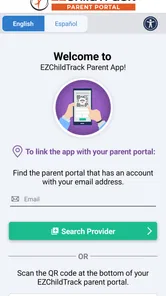
That convenience is conditional, though. The app depends on the childcare provider’s use of EZChildTrack and on the parent having the right account access. Installation alone does not create a useful record. Before spending time troubleshooting, I would first confirm with the provider that the family has been enrolled correctly and that the login details match the information held by the center. Many “app problems” in childcare portals are actually account-linking or setup problems.
It is also worth deciding which device should be used. A parent with a newer phone may have a smoother experience than someone using an older handset, even though the minimum operating-system requirement is relatively broad. A family tablet may be easier for a caregiver with vision difficulties, while a phone is more convenient when traveling. I would choose the device that makes text and touch interaction easiest, not automatically the smallest or most portable one.
Situational access includes language, attention, and confidence. If a parent is tired, stressed, or reading in a second language, short labels and familiar terms become more important. I would avoid relying on memory for important steps and instead keep a simple household note explaining where to find the relevant area of the portal. That is not glamorous, but it can make the system more usable for a family with several caregivers.
The app can also be useful when a parent wants a more orderly alternative to scattered conversations. Text messages, email threads, and handwritten notes are flexible, but they are easy to lose or overlook. A childcare portal has a clearer connection to the provider’s administrative process. On the other hand, messaging apps are often better when a family needs a quick back-and-forth conversation. I see EZChildTrack Parent Portal as the structured option, not the universal replacement for every form of contact.
Where the experience still has barriers
The most important barrier is dependence on the childcare organization. If the center does not use EZChildTrack actively, a parent cannot turn the app into a complete childcare hub through personal effort. This makes the app very different from a general calendar or note-taking app, which can be useful immediately in almost any household.
The second barrier is that a portal may reflect administrative priorities more than a parent’s natural way of thinking. Parents tend to ask questions such as “What do I need to know today?” A management system may organize information around records, accounts, or provider workflows instead. That structure can be sensible behind the scenes but less intuitive at the moment a parent is rushing. I would give the app a fair trial using real tasks from the childcare routine rather than judging it only by its first screen.
Another limitation is the possibility of uneven experiences between providers. The developer, EZChildTrack, supplies the platform, but the childcare organization determines much of the practical context in which parents use it. One provider may keep information current and explain the process well; another may offer little guidance. This means the app cannot be evaluated entirely apart from the center’s communication habits.
I would also avoid treating the portal as the only source of truth during urgent situations. A parent who cannot comfortably read the screen, is using a poor internet connection, or is dealing with a time-sensitive change needs another route to the provider. Keeping the childcare center’s phone number or usual contact method easy to reach is a sensible safeguard. Inclusive design is not just about whether an app opens; it is about whether a family can still act when the ideal digital path breaks down.
Families looking for rich customization may also prefer a different category of tool. A shared calendar can handle activities from several children, medical appointments, transport plans, and household reminders in one view. A messaging service may be more natural for quick questions. EZChildTrack Parent Portal is the better fit when the childcare provider’s own system is the central source of information. It is the weaker choice when parents want to build their own flexible family-management system from scratch.
An inclusive verdict for the right childcare relationship
After using EZChildTrack Parent Portal as a focused childcare companion, I see a useful but narrow product. Its best quality is the connection between a family and a provider that already relies on EZChildTrack. That connection can replace some scattered checking and give parents a more direct way to interact with childcare administration.
I would recommend it to parents whose childcare center has adopted the platform, especially those who want a dedicated place for provider-related information instead of mixing it with personal notes and unrelated messages. I would also recommend setting it up when the household has several caregivers, but only after agreeing on who checks updates and how urgent changes will be confirmed.
I would be more cautious for parents who need highly flexible planning, strong customization, or a communication tool for immediate conversation. A family calendar, direct messaging, or a provider’s established phone process may serve those needs better. I would also ask a caregiver with vision, motor, or sensory requirements to test the actual screens on their device before making it the sole route to important childcare information.
The app’s free availability lowers the barrier to trying it, and its broad Everyone rating makes it appropriate as a family-facing service. Still, the modest average of around 3.0 shows that the experience has not been flawless for everyone. I would interpret that as a reason to test the account setup, readability, and daily workflow early rather than dismissing the app or depending on it blindly.
My final view is that EZChildTrack Parent Portal works best when expectations match its purpose. It is not a complete parenting assistant, and it does not remove the need for clear provider communication. What it can do is give families a dedicated digital doorway into childcare management. For a parent whose center uses EZChildTrack consistently, that focused role may be exactly enough. For everyone else, a more flexible family organizer or a direct communication channel will probably feel more natural.
EZChildTrack Parent Portal Frequently Asked Questions
Is EZChildTrack Parent Portal free, and what devices can run it?
EZChildTrack Parent Portal is a free parenting app from EZChildTrack. It is intended for devices running Android 6.0 or later, so check your device’s operating-system version before downloading. The app is rated for Everyone, and its store summary describes it as childcare management software. Your childcare provider’s use of EZChildTrack determines which portal services are available to your family.
What is EZChildTrack Parent Portal used for?
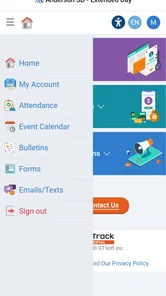
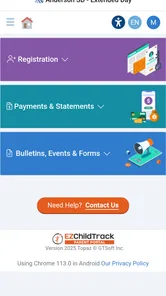
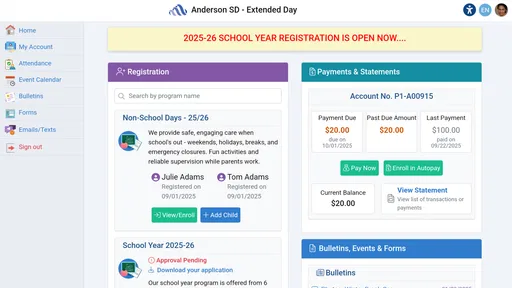
EZChildTrack Parent Portal is designed to help parents and guardians manage childcare or after-school program information in one place. Depending on the provider’s setup, you may be able to view schedules, attendance details, account balances, invoices, payment history, messages, and important announcements. The exact features can vary because each childcare organization controls which services and information are available through its portal.
How do I sign in to EZChildTrack Parent Portal?
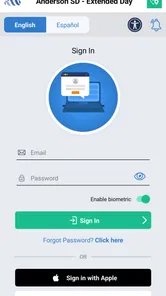
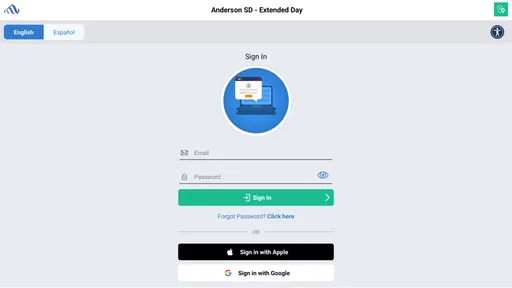
To use the portal, you generally need login credentials supplied by your childcare provider, such as an email address, username, password, or organization-specific access details. If you cannot sign in, check that you are using the correct provider account and that your password is entered accurately. Password recovery options may be available, but some account issues must be handled directly by the childcare center or program administrator.
Can I make childcare payments through the EZChildTrack Parent Portal?
Many providers use EZChildTrack to let families review charges and make online payments, although payment availability depends on the organization. If enabled, parents may see current balances, invoices, payment deadlines, and previous transactions, and may be able to pay using an accepted card or electronic method. Before submitting a payment, review the amount and any applicable processing fees shown by your provider.
Can I manage my child’s schedule, attendance, or authorized contacts in the portal?
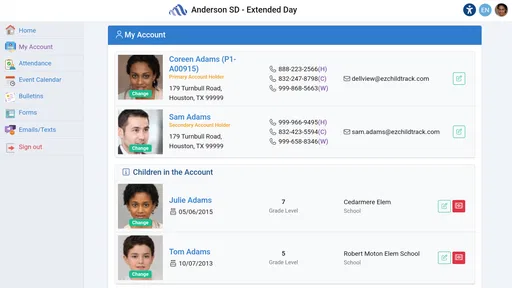
The portal may provide access to useful family and program-management tools, including enrollment information, attendance records, schedules, pickup details, or authorized contacts. However, not every provider activates every feature. Some changes may require approval from the childcare office, especially updates involving emergency contacts, pickup permissions, medical information, or enrollment arrangements. Always confirm important changes with the program directly.
Pros
- Quick access to attendance
- schedules
- and enrollment details.
- Secure parent portal for managing child-related information.
- Helpful notifications keep families updated on important changes.
- Online payments can simplify tuition and fee management.
- Available on mobile devices for convenient access anywhere.
Cons
- Some features may depend on your childcare provider’s setup.
- Occasional login or password issues can slow access.
- The interface may feel basic compared with newer parent apps.
- Limited functionality outside participating EZChildTrack programs.
- Notifications may be inconsistent if app permissions are disabled.











