EverythingWeather
- 145.00
- 4.4
- Installs
- 10.00K
- Price
- Free

Screenshots
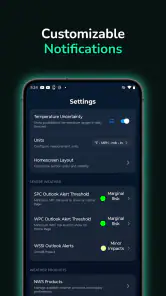
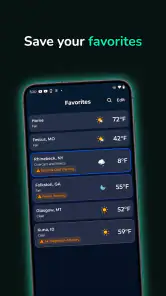
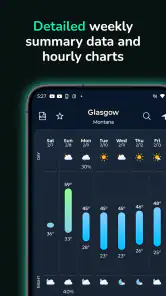
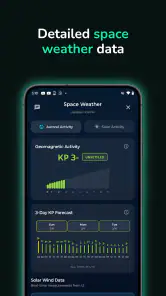
Analysis by Reviewed
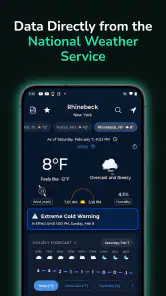
I tend to judge a weather app by what happens when someone in the house asks a simple question: “Do we need an umbrella, or can we leave now?” EverythingWeather is aimed at that everyday moment, but it takes a more focused route than many general-purpose weather apps. Developed by corymottice, it uses information from NOAA’s National Weather Service, which gives the app a practical identity for people who prefer official weather-service information over a busy feed of lifestyle content, alerts, and advertising.
After spending time with it, I see the appeal clearly. This is a free weather app for Android, rated for Everyone, and its straightforward approach makes it easy to imagine on a shared household phone or tablet. It is not trying to become a social network, a news reader, or a complete travel assistant. Instead, its value comes from making weather information available in a direct, familiar way. That simplicity is helpful, although it also means the right expectations matter before you replace a more feature-heavy weather service.
How EverythingWeather works in an everyday household
The most convincing use case is a home where several people make plans around the same forecast. One person may be leaving for work, another may be taking children outside, and someone else may be checking conditions before starting a long drive. On a shared device, a weather app has to be readable quickly and understandable without a personal account or a complicated routine. EverythingWeather fits that kind of handoff better than an app that assumes one highly customized user.
I like the idea of keeping it available on a kitchen tablet or an older spare phone. A person can check the weather without opening a personal inbox, signing into a family profile, or sorting through unrelated notifications. That does not turn the app into a household management tool, but it does make it useful as a common reference point. When everyone looks at the same weather source, conversations about plans become less dependent on one person relaying a screenshot or summarizing a forecast from memory.
There is also a practical advantage to its NOAA connection. In the United States, people who already trust the National Weather Service may appreciate having that source at the center of the experience. I would be more comfortable using it as one input for decisions involving outdoor work, school runs, or local plans than relying on a vague weather widget whose source is not obvious. The important distinction is that official-source presentation is useful for confidence, but it does not remove the need to read the forecast in context.
For example, imagine a household preparing for a weekend park visit. I would check the app before breakfast, look at the expected conditions, and then check again before leaving rather than treating the first glance as a promise. If the forecast looks uncertain, the family can agree on a backup activity instead of arguing over different apps. That small workflow is one of the app’s strongest real-world benefits: it encourages a shared check rather than a private guess.
Still, shared use has boundaries. If several people need separate saved places, personalized alerts, or individualized layouts, a more mature weather platform may be a better fit. EverythingWeather makes sense when the priority is accessible weather information, not a collection of personal dashboards. I would recommend it for a household that wants a common weather reference, but not for one that expects every family member to have a distinct planning workspace.
More From Our News Desk

Weather by Xiaomi Review: Clear at a Glance, Less Clear Up Close

X Under Pressure: Can It Recover When Posting Goes Wrong?

Clash of Clans Is Won Between the Battles

Android Auto Makes the Case for Quieter Car Software

MobiOffice: Transforming Mobile Productivity with Seamless Integration

EA SPORTS FC™ Mobile Soccer: Redefining Mobile Sports Gaming
What setup feels like on a shared device
The first thing I would decide is where the app belongs. On a personal phone, it can serve as a quick check before commuting or going outside. On a shared tablet, I would place it somewhere visible and agree that people use it as a general reference rather than assuming it knows every person’s plans. That simple boundary prevents a common mistake: treating one screen as if it were a complete household calendar.
EverythingWeather is available at no charge, which lowers the barrier to trying it on an extra device. There are in-app purchases ranging from $1.99 to $39.99 per item, so I would still review any purchase screen carefully before handing the device to a child or guest. The existence of optional purchases does not make the app unsuitable for shared use, but it does make device-level purchase protections worth checking independently. I would not assume that a free download means every part of the experience is free.
The app supports Android 7.0 and later, which makes it relevant for some older phones and tablets that can no longer run newer software. That can be valuable in a household where a retired device becomes the weather screen. Before relying on it, I would install it on the intended device and confirm that the display is comfortable to read from the place where it will sit. An older screen may technically support the app while still being inconvenient for a group to use.
One useful setup habit is to keep the weather check tied to a routine. I would use it before leaving in the morning, before outdoor activities, and again when conditions are likely to change. That is more reliable than opening it only after the sky already looks threatening. A weather app is most useful when it becomes part of a decision process, not when it is treated as a crystal ball.
I would also explain to other users what the app is for. “This shows the weather information we are checking” is a better household rule than “this tells us exactly what will happen.” Forecasts describe expected conditions, and the person making a decision still needs to consider location, timing, clothing, transport, and the consequences of being wrong. That explanation is especially important when a shared device is used by younger family members.
Coordinating plans without turning weather into a group project
EverythingWeather can support coordination simply because it gives people a common place to look. If one person checks the weather and another person is responsible for the plan, the handoff is easy to understand: check the current information, discuss the timing, and decide whether the activity needs a change. I find that more useful than an app overloaded with unrelated features that slow down a basic decision.
A good household workflow is to check the forecast at two different points: once during planning and again near departure. The first check helps decide what to pack or whether to make a reservation. The second helps catch a change that could affect clothing, travel, or safety. This approach also avoids blaming the app when conditions shift. The forecast is a snapshot of expected weather, not a guarantee that the sky will follow a fixed script.
For a shared device, I would keep coordination verbal rather than assuming the app will manage everyone’s responsibilities. One person can say, “The weather looks unsettled later,” while another decides whether to bring rain gear. That division is healthy because the app supplies information and the household supplies judgment. I would not choose EverythingWeather expecting built-in family scheduling, task assignment, or shared planning features; its strength is the weather check itself.
There is a subtle advantage to using a source associated with the National Weather Service when people disagree. Instead of comparing screenshots from several apps, the household can agree to consult one consistent source first. That does not mean every forecast question disappears, especially in areas where local conditions change quickly, but it reduces confusion caused by different layouts and different interpretations of the same day.
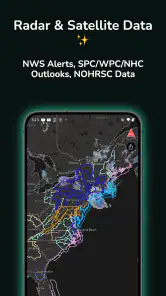
The trade-off is that people who enjoy visual maps, extensive radar tools, travel planning, or highly detailed customization may feel constrained. Many mainstream weather apps compete by adding layers of information, animated graphics, lifestyle recommendations, and notification systems. Those extras can be useful when they solve a specific problem, but they can also distract from the question a shared household usually asks: what should we do next?
Age, trust, and sensible expectations
The Everyone content rating makes the app approachable for a broad audience, including households where a child may occasionally check the weather. I would still teach younger users how to interpret the information rather than simply handing over responsibility. A child can learn to look for conditions and timing, but an adult should remain responsible for decisions involving storms, travel, water, heat, or other serious risks.
This is where trust needs to be separated into two parts. I can trust the app as a way to access weather information from NOAA’s National Weather Service, while still recognizing that no forecast can replace situational awareness. If the sky is changing rapidly, local warnings are active, or an outdoor activity carries real risk, I would seek the most relevant official guidance and make a conservative decision. The app can support that process, but it should not be the only safety step.
For a family device, I would also keep account boundaries clear. The app should not be treated as a place to share personal household information, and a weather check does not require turning the device into a communal personal profile. If the phone belongs to one person, other users should understand that they are borrowing the device rather than assuming they have access to everything on it. This is not a special feature of EverythingWeather; it is simply good shared-device practice.
The purchase range deserves similar attention. A child using a shared Android device might tap through a purchase prompt without understanding its consequence, so I would enable the device’s purchase safeguards and make the household rule clear. Since the app is free to install but includes optional purchases, adults should decide whether those options are useful before allowing unsupervised use. That is a small amount of preparation, but it avoids an unpleasant surprise later.
I also appreciate that the app’s identity is easy to explain. A parent can tell a child that it is a weather tool based on National Weather Service information, rather than presenting it as an all-knowing prediction engine. That wording encourages better judgment. It teaches the difference between checking information and outsourcing a decision, which is a valuable habit for anyone who uses weather technology regularly.
Where it stands beside familiar weather alternatives
Compared with the default weather widget on a phone, EverythingWeather has a clearer identity because its store summary specifically centers NOAA’s National Weather Service information. A built-in widget may be faster for a glance, especially when it is already on the home screen, but it may not give every user the same confidence in the underlying source. I would choose EverythingWeather when source transparency matters more than shaving a second off the check.
Compared with large commercial weather apps, it is easier to imagine EverythingWeather serving a focused role. Big alternatives often provide more layers, more personalization, and more ways to follow weather over time. That can be the better choice for a frequent traveler, a photographer planning around light, or someone who needs advanced map-based monitoring. I would not pretend this app is automatically superior simply because it is simpler.
On the other hand, simplicity can be a feature for a shared household. A crowded interface creates friction when one person is helping another find the forecast, and a long list of options can make a quick decision feel like research. EverythingWeather is more appealing when several people need the same basic weather reference and nobody wants to maintain separate preferences. The best alternative depends on whether the household values depth or clarity.
There is also a difference between a weather source and a notification system. If your main concern is receiving immediate warnings without opening an app, you should evaluate the alert tools already available on your phone and from local authorities. I would not select EverythingWeather solely on the assumption that it replaces every emergency communication channel. For routine planning it can be useful; for urgent safety information, I would use the appropriate official warning channels as well.
Who will appreciate it, and who should look elsewhere
I think EverythingWeather is a good match for someone who wants a focused Android weather app with a National Weather Service foundation, especially if that person prefers a calm, direct check over a stream of extras. It also suits a household that wants to place a weather reference on a shared device without building a complicated family system around it.
It is less convincing for users who need a deeply personalized experience. If you want several saved locations for frequent travel, specialized visualizations, extensive historical context, or a dense collection of advanced tools, I would compare it with a more feature-rich alternative before switching. The app’s narrow purpose is part of its appeal, but that same focus can feel limiting when your weather habits are more demanding.
I would also skip it as the sole tool for high-consequence decisions. Outdoor professionals, people monitoring severe conditions, and anyone responsible for vulnerable family members should use the most relevant official warnings and local information available. EverythingWeather can be one convenient way to check the forecast, but convenience should not be confused with complete coverage.
The app has built a respectable audience for a relatively recent release, with an average rating of 4.4 from around 338 ratings and more than 10K installs. Those figures suggest that its focused approach resonates with a meaningful group of users, although they do not tell me whether it will match your preferred workflow. I would treat the rating as encouragement to try it, not as a substitute for deciding what weather features your household actually needs.
My household verdict after using the app
EverythingWeather works best when I treat it as a shared weather reference rather than a complete household command center. Its direct connection to NOAA’s National Weather Service gives it a clear reason to exist, and its free availability makes it easy to test on a personal phone, spare device, or common household tablet. The Everyone rating and support for Android 7.0 and later also make it approachable for a broad range of users and devices.
The current version is 1.6.0, and I would keep the app updated through the normal device process rather than assuming an older installation will always behave the same way. For a shared device, I would pair that basic maintenance with clear purchase safeguards, an agreed routine for checking weather, and a simple explanation of what forecasts can and cannot promise.
My recommendation is positive but specific: choose it if you want a focused app for checking official weather-service information and coordinating ordinary plans at home. I would recommend something else if you need advanced weather analysis, extensive personalization, or a dedicated emergency-alert solution. For the right household, the lack of distraction is a genuine strength. EverythingWeather is most useful when it helps people make one clear decision together, without pretending to make every decision for them.
EverythingWeather Frequently Asked Questions
What weather data does EverythingWeather use?
EverythingWeather is a weather app that uses data directly from NOAA’s National Weather Service. That source can be useful if you want weather information connected to a national forecasting service, particularly when checking conditions and planning your day. As with any forecast, local conditions and changing weather can affect what you experience, so use the app as a helpful guide rather than a guarantee.
Which devices can run EverythingWeather?
EverythingWeather is available for Android, and its minimum operating-system requirement is Android 7.0. Before downloading, check your device’s Android version and make sure it meets that requirement. The app is listed as suitable for everyone, making it an option for a broad range of users who want a weather app; compatibility and performance can still depend on the device itself.
What is EverythingWeather, and what does the app offer?
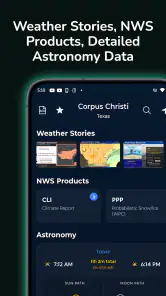
EverythingWeather is designed to provide convenient access to current conditions, forecasts, and other useful weather information in one place. Depending on your location and the version available on your device, you may be able to view temperature, precipitation, wind, humidity, alerts, and forecast details. Its main appeal is giving users a quick overview while also offering information for planning commutes, trips, outdoor activities, and everyday routines.
Does EverythingWeather require access to my location?
The app may request location permission so it can automatically identify your current area and display relevant local weather conditions. You can usually choose whether to allow location access while using the app, allow it continuously, or deny it and enter a city manually. If privacy is important to you, review the permission request carefully and check the app’s settings to determine how location data is used and whether background access is necessary.
How accurate are the forecasts in EverythingWeather?
Forecast accuracy can vary according to your location, the forecast period, local geography, and the weather data provider used by the application. Short-term forecasts are generally more dependable than predictions several days ahead, while rapidly changing conditions can affect results even within a few hours. EverythingWeather should be treated as a helpful planning tool rather than a replacement for official emergency alerts or local weather authorities.
Pros
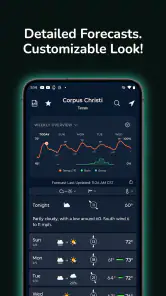
- Clean interface makes forecasts easy to scan quickly.
- Provides useful weather details beyond basic temperature readings.
- Helpful for planning commutes
- trips
- and outdoor activities.
- Forecast information is presented in a practical
- readable format.
- Lightweight design should feel responsive on most modern devices.
Cons
- Forecast accuracy can vary depending on location and weather conditions.
- Some features may require an internet connection to update properly.
- Weather data may be less detailed in smaller or remote areas.
- Frequent alerts could become distracting if not configured carefully.
- Users seeking advanced radar tools may find the feature set limited.
- Category
- Weather
- Version
- 1.6.0











