

EveryParent
- 30.00
- 4.4
- Installs
- 10.00K
- Price
- Free

Screenshots

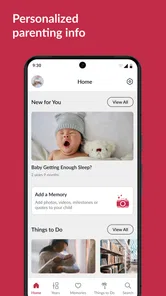
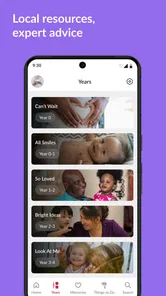
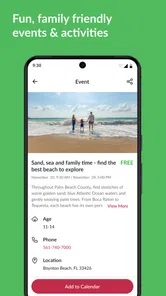
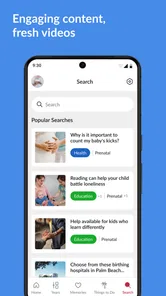
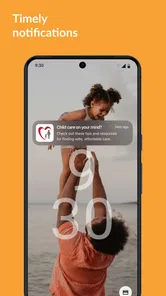
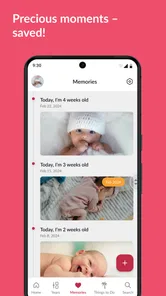

Analysis by Reviewed
When I first opened EveryParent, I understood its main appeal quickly: it is meant to help families in Palm Beach County find useful local information without having to search through unrelated national parenting sites. That local focus changes the experience. Instead of treating parenting as a general topic, the app points its attention toward the place where a family actually lives, works, studies, and looks for support.
EveryParent is a free parenting app from the Children's Services Council of Palm Beach County. It is rated for Everyone, runs on iOS versions 10 and later, and has built a modest but meaningful audience, with over ten thousand installs. Its average rating is 4.4 from around one hundred ratings, alongside roughly thirty written reviews. Those figures suggest that it has found a useful role for local families, although they also tell me to approach it as a focused community resource rather than a massive all-purpose parenting platform.
My overall impression is positive, especially for someone who has recently moved to the county, is expecting a child, or wants to understand what family support exists nearby. The important qualification is that its value depends heavily on location. If I lived outside Palm Beach County, I would not install it expecting a general parenting library. For local families, however, the app can turn a vague question such as “Where can I get help with this?” into a more practical starting point.
A practical first look at what EveryParent is for
I see EveryParent as a local starting point, not a general parenting guide, and that distinction is what makes it useful. In this section, I’ll look at how its Palm Beach County focus shapes the way I’d approach the app and what kinds of questions it is best suited to help with. That local purpose also sets up the next question: who is most likely to benefit from keeping it on their phone?
Local information instead of broad parenting advice
Many parenting apps concentrate on baby development, feeding schedules, sleep routines, pregnancy tracking, or discussion communities. Those tools can be helpful, but they often leave out the local part of family life. EveryParent takes a different route. Its purpose is to gather information connected to Palm Beach County families, making it more useful when the question involves nearby services, activities, or community resources.
That distinction matters in everyday situations. General advice can tell me what kind of support a child might need, but it cannot by itself tell me what is available in my area. A local resource app is more relevant when I am trying to plan a family activity, understand available support, or find information tied to the county. I see it as a bridge between online research and the real places a family may need to contact or visit.
The app is developed by the Children's Services Council of Palm Beach County, which gives its local identity more weight than a generic parenting product with a location filter added later. I would still treat each listing or piece of information as a starting point for checking practical details before making a trip, but the county-specific focus is the reason to keep this app available on a phone.
More From Our News Desk

 Gmail
GmailGmail in a Busy Inbox: Who Benefits Most?
From first account to crowded workday, Gmail earns its place through dependable search and flexible sorting—but its best fit depends on how much inbox maintenance you can tolerate.

 Prime Video
Switching to Prime Video: What Changes in Your Viewing Routine
Prime Video can make a compelling second home for streaming, but switching means learning a different catalog, rental layer, and route from browsing to playback.

 Universal TV Remote Control
Universal TV Remote Control Works Best as a Reliable Backup
A phone remote earns its place through quick setup and reliable habits. Here is how to get more from Universal TV Remote Control—and where its limits show.

 Weather - By Xiaomi
Weather by Xiaomi Review: Clear at a Glance, Less Clear Up Close
Xiaomi’s weather app makes everyday forecasts quick to scan, but its calm surface can leave useful details and recovery paths harder to find than they should be.

 X
XX Under Pressure: Can It Recover When Posting Goes Wrong?
A resilience-focused review of X, examining setup, mistaken posts, interruptions, weak connections, and the gaps that matter when recovery needs to be dependable.

 Clash of Clans
Clash of Clans Is Won Between the Battles
Its raids are quick; its community is a long-term project of coordination, teaching, rivalry, and shared responsibility—with all the friction that entails.
Latest News



Who will get the most from it
I would recommend EveryParent first to parents and caregivers who live in Palm Beach County and want one recognizable place to begin looking for family information. It may also be useful for grandparents, foster caregivers, relatives helping with childcare, and people who have recently arrived in the area. A person who does not yet know the local service landscape can benefit more from this kind of guide than someone who already has a complete list of trusted contacts.
The Everyone content rating also makes the app approachable for a broad household audience. That does not mean every item will be equally relevant to every family. A parent of a toddler, a caregiver of a school-age child, and someone preparing for a new baby will naturally use a local resource differently. The strength is not that the app replaces every specialized tool; it is that it can help me discover what local direction I should take next.
I would skip it if I wanted a detailed daily tracker, a private parenting journal, medical diagnosis, or a highly personalized child-development program. Those are different jobs. EveryParent is better understood as a local information companion. Expecting it to behave like a sleep tracker or a pediatric consultation service would lead to disappointment.
What the first launch should feel like
Because the app is free, there is little financial risk in trying it. I would install it with one specific question in mind rather than opening it aimlessly. For example, I might want to learn what family-oriented opportunities exist near me, identify a type of support, or get a clearer picture of local resources for a child. Having that question ready makes the first session much more productive.
The current version is 15.0.0.0-prod, while the app itself dates back to April 27, 2017. That combination tells me this is an established local project that has continued through version changes rather than a brand-new experiment. I would still allow a few minutes to become familiar with the current layout, because an app that has evolved over time may organize its information differently from newer, simpler tools.
Getting through the initial setup without overthinking it
My advice for a first-time user is simple: start by confirming that the app is relevant to your household and location, then explore before trying to customize your entire experience. The most useful first session is not necessarily the one in which I open every menu. It is the one in which I find one piece of information that answers a real family question.
If the app presents local categories or resource areas, I would scan them slowly and note the labels that match my situation. Parents often search using informal language, while community organizations may describe the same need differently. For instance, I might look for “help with childcare,” while the relevant section may be organized around family services, early childhood, or community support. Learning the app’s vocabulary is an important part of setup because it improves later searches.
I would also avoid assuming that the first screen represents everything the app offers. Local resource apps can place their most visible material in a broad overview, while more specific information sits behind categories or additional navigation. A quick, deliberate tour is worthwhile: look at the main areas, open one or two entries, and notice how the app expects me to move from general information toward a useful local option.
The fastest route to a meaningful first result
The first successful action should be concrete. Rather than reading general parenting material for several minutes, I would choose one local need and follow it until I reach an actionable piece of information. That might mean identifying a relevant community resource, finding a family activity that fits my circumstances, or learning which kind of local organization is associated with a question I have.
This approach prevents a common mistake: judging the app after only looking at its opening screen. The app’s purpose is discovery, so its value appears when I use the information to make a decision. If I find something worth saving in my notes, discussing with another caregiver, or checking before contacting an organization, that is a better test than whether the first screen feels exciting.
A realistic example would be a parent who has just moved into Palm Beach County and is trying to build a support network. Instead of searching the wider internet with several unrelated phrases, I would open EveryParent, browse the local family information, and identify two or three possibilities connected to my child’s age or my immediate need. I would then verify the practical details before leaving home. The app reduces the uncertainty of where to begin, even though the final step may still involve contacting a provider directly.
Another useful workflow is to use it before a planning conversation. If two caregivers are discussing activities, support, or family services, one person can explore the app while the other explains the household’s priorities. This makes the search less abstract. The app becomes a shared starting point rather than another source of information that one parent has to interpret alone.
How to judge information responsibly
Local information is valuable precisely because it can influence real decisions, so I would not treat an app entry as the end of the process. Before arranging an appointment, visiting a place, or relying on a service, I would check the current details through the relevant organization. This is not a criticism unique to EveryParent; local programs can change schedules, eligibility, locations, or availability.
The practical insight is to separate discovery from confirmation. Use EveryParent to narrow the field and understand what kind of help may exist, then confirm the details that matter for your family. That two-step habit makes the app more useful and avoids the frustration of treating a directory-style resource as a live guarantee of availability.
Where first-time users may become confused
The biggest possible confusion is expecting a local resource guide to answer a personal parenting question in the same way as a specialist app. If I open it looking for a personalized sleep plan or a precise developmental explanation, I may conclude too quickly that it is not useful. The better question is: “What local path can help me with this?”
Another point to remember is that location is not a minor setting here; it is the app’s reason for existing. A user outside Palm Beach County may find the content much less relevant. Even someone within the county may need to think in terms of local services rather than broad internet advice. The app’s narrow geography is both its clearest strength and its most important limitation.
I would also avoid judging the app solely by how much content appears during a short visit. Community information can be most valuable when it solves one specific problem, not when it provides endless scrolling. If I am looking for entertainment, a national parenting community may feel busier. If I am looking for a local starting point, a more focused experience can be preferable because it reduces irrelevant results.
How it compares with familiar alternatives
Compared with a general search engine, EveryParent offers a more focused route into Palm Beach County family information. A search engine may return a larger number of results, but I would need to sort through advertisements, outdated pages, unrelated national advice, and organizations that are not appropriate for my situation. The local app has a clearer purpose, which can save time at the beginning of the search.
Compared with parenting forums, it is less about conversation and personal anecdotes. A forum may be better when I want to ask other parents what worked for them or hear several opinions about a routine. EveryParent is more suitable when I want to discover local information without relying on an anonymous recommendation. I would use the two differently rather than expecting one to replace the other.
Compared with specialized pregnancy, health, or child-tracking apps, EveryParent is less personal and less focused on daily measurement. Those alternatives are better when I want reminders, records, milestones, or structured routines. EveryParent wins when the missing piece is not a schedule but a connection to the surrounding community.
That trade-off is important. A family could keep a specialized app for personal tracking and use EveryParent when the question shifts from “What should I record?” to “What local option should I investigate?” In my view, that combination makes more sense than asking a single app to handle every part of parenting.
Small habits that make the app more useful
I would begin each search with a narrow phrase describing the immediate need, then broaden it only if the first route is unhelpful. Local information is often organized by service type rather than by the exact wording used at home. Trying a second wording can reveal a more suitable category without requiring a long search elsewhere.
I would also keep a short personal list outside the app of resources that seem relevant, including why each one caught my attention. This is especially useful when several family members share the responsibility of researching options. The app helps me discover possibilities, while my notes preserve the reasoning behind them. That workflow prevents the common problem of finding something useful and then forgetting where it was.
A third habit is to revisit the app when a child’s circumstances change. A resource that is irrelevant to a newborn may become useful when the child reaches school age, and a family that once needed activity ideas may later need a different kind of support. Because the app is local rather than tied to one narrow parenting stage, its usefulness can change over time.
What I would want before relying on it regularly
For regular use, I would look for a clear way to return to information that matters to my family and a simple path from a general category to a local action. I would also pay attention to whether the app’s organization matches the way I think about family needs. If I repeatedly find myself leaving the app to clarify basic context, then a general search or direct contact may be faster for that particular task.
The app’s rating of 4.4 indicates that many users see value in it, but I would interpret that rating alongside my own needs. A local resource app can be excellent for one family and unnecessary for another. The rating does not remove the need to ask whether Palm Beach County is relevant to me and whether I am looking for community information rather than personal tracking.
Privacy-conscious users may also prefer to keep their use simple and purposeful. I would avoid entering sensitive family details unless the app clearly requires them for a function I actually need. Browsing local information can often be useful without turning the app into a detailed record of household life. That is a sensible approach for any parenting resource.
My recommendation after using it
EveryParent earns a place on my recommended list for Palm Beach County parents who want a local, free way to begin finding family information. Its strongest feature is not flashy technology; it is the decision to focus on one community and make that focus central. That makes it more relevant than a broad parenting app when the next step involves a nearby resource, activity, or service.
I would recommend installing it before a need becomes urgent. Exploring the categories while things are calm gives me a better chance of recognizing the right section later, when I am tired or short on time. The most reassuring path is to open it with one modest goal, find one relevant local lead, and then confirm the details before acting.
At the same time, I would not make it my only parenting app. It does not replace specialized health guidance, a personal tracker, a direct conversation with a qualified professional, or the experience of other parents. Its role is narrower and more practical: helping families in Palm Beach County understand where to start locally.
For that audience, the focus is a real advantage. For everyone else, it is the reason to skip the download. If you live in the county and want a clearer route through local family information, I think EveryParent is worth trying. Use it as a discovery tool, verify important details, and let one successful local find prove its value.
EveryParent Frequently Asked Questions
Is EveryParent useful if my family lives outside Palm Beach County?
EveryParent is described as a local resource for Palm Beach County families, so its information and services are likely to be most relevant to people in that area. Families elsewhere may still find general parenting content useful, but local resources may not apply to their location. Consider whether Palm Beach County information fits your needs before downloading.
Which devices and operating systems can run EveryParent?
EveryParent is available for Android and iOS devices, with a minimum operating system requirement of version 10. Before downloading, check your device’s operating system and available storage, and make sure your phone or tablet meets the platform’s requirements. Keeping your device’s software current can also help with compatibility and access to the app’s features.
What is EveryParent, and who is the app designed for?
EveryParent is a family-focused parenting app designed to help parents and caregivers organize everyday responsibilities, access practical parenting information, and stay connected with resources that support children’s wellbeing. It may be especially useful for families looking for guidance on routines, communication, activities, and local support. Before downloading, parents should check whether the available content and services match their child’s age, location, and specific family needs.
What features can parents use in EveryParent?
EveryParent generally brings parenting tools and helpful information together in one place, making it easier to find suggestions, resources, and guidance for common family situations. Depending on the version and region, users may find articles, activity ideas, developmental information, family planning tools, or links to community services. The exact feature set can change over time, so reviewing the current app listing and permissions is recommended before installation.
Is EveryParent free to download and use?
EveryParent is free to download. Families can explore it as a parenting resource without paying an upfront download fee, which makes it easy to try if its local information suits their needs. Some linked programs, appointments, products, or third-party resources may have separate conditions or fees. Users should read the app’s description and review any terms related to outside services before committing to them.
Pros
- Centralizes school updates
- activities
- and family information in one app.
- Helps parents stay informed about important dates and announcements.
- Supports communication between families
- schools
- and local communities.
- Useful for discovering nearby family events and child-friendly activities.
- Simple layout makes key information quick to find and review.
Cons
- Availability and features may vary depending on your local area.
- Some content requires participation from schools or community organizations.
- Frequent notifications may feel excessive unless notification settings are adjusted.
- The app may have limited value in regions with few listed events.
- Requires personal and location-related information for some features.











