Evernote - Note Organizer
- 197.56K
- 3.5
- Installs
- 100.00M
- Price
- Free

Screenshots


Analysis by Reviewed
I judge a note-taking app less by how many tools it can list and more by how well I can use it when I’m busy, tired, or switching between tasks. Evernote is built for collecting different kinds of information in one place, and that can make it a handy home for class notes, project details, errands, and ideas that arrive at inconvenient moments. Its flexible approach is useful, though it also means you need to decide how much structure you actually want.
Who benefits from a flexible notebook
I’d recommend Evernote to people who regularly move between quick reminders and longer reference notes. A student might keep lecture notes beside a checklist for an assignment; someone coordinating a household could collect meal ideas, appointment details, and shopping reminders. The advantage is not that every task becomes effortless, but that varied information can live in a system you can search and sort.
It is less compelling if all you need is a bare text pad or a simple task list. A lightweight notes app may feel faster when you only want to capture one sentence, while a dedicated task manager may be clearer if your day depends on due dates, priorities, and recurring reminders. I see Evernote as a broader notebook first, not a reason to abandon every specialist tool.
A practical way to keep notes findable
In everyday use, I’d create a small number of notebooks around durable areas—such as work, personal plans, and reference material—rather than making a new notebook for every short-lived project. Then I’d give important notes specific titles and put the key words I’m likely to search for near the top. That habit matters because a large archive is only useful when retrieval stays easier than recreating the information.
For a busy day, imagine finding a repair estimate in your email, noting a question for the contractor, and adding a reminder to compare options later. Putting the estimate and your own notes together gives you one place to revisit the decision. The trade-off is that collecting everything without a cleanup habit can turn a tidy notebook into another pile; I’d set aside a brief weekly review to rename, file, or remove notes that no longer matter.
Choosing the right capture method
Text is the most straightforward way to record information, but images and voice memos can help when typing would interrupt what you’re doing. I’d use a checklist for a repeatable packing routine, a photo when the detail is visual, and a voice memo when I need to capture a thought while my hands are occupied. These formats are most useful when I add enough context to recognize them later: a short title or a line explaining what the image or recording is for.
Search within images can make an old scan or photographed page more useful than a folder of pictures, but it shouldn’t replace clear filing for material I’ll need quickly. When a document is important, I’d keep a descriptive note title and a related keyword as well as relying on image text recognition. That gives me more than one route back to it if my original wording slips my mind.
More From Our News Desk

Clash of Clans Is Won Between the Battles

Android Auto Makes the Case for Quieter Car Software

MobiOffice: Transforming Mobile Productivity with Seamless Integration

EA SPORTS FC™ Mobile Soccer: Redefining Mobile Sports Gaming

How Microsoft OneDrive Became a Mobile Productivity Giant

How Google Translate Breaks Language Barriers Effortlessly
Readable navigation across different situations
On a small screen, a deep notebook structure can take more effort to browse than a few broad categories and a good search habit. I’d keep the most frequently used areas obvious and avoid elaborate nesting unless it solves a real problem. This is particularly helpful when I’m checking a note in a hurry or handing my phone to someone who needs to find one piece of information.
For readers who prefer a less crowded workspace, a restrained layout and consistent note titles can reduce the amount of visual scanning. Still, a clean-looking screen does not automatically make every long note easy to read. I’d break meeting notes or study material into short sections with descriptive headings and checklists where a sequence of actions matters. That also makes later editing less daunting.
Motor, sensory, and situational access
Different capture methods offer useful flexibility, but they do not suit every moment equally. Voice memos can reduce typing when someone is moving or has difficulty entering text, while a checklist can make a series of steps easier to follow than a dense paragraph. In a quiet shared space, though, recording aloud may be awkward; typing a brief phrase and expanding it later can be more practical. The best method depends on the person, the environment, and the task.
Large collections can also create friction for anyone who finds prolonged scrolling or precise navigation tiring. My practical response is to keep the active workspace small, use clear labels, and avoid turning every thought into a separate item. If a particular interface or interaction style feels uncomfortable, I would test the core actions I expect to use most—capturing a note, finding it again, and checking a task—before committing to moving an entire archive.
What to weigh before settling in
Evernote is free to start, and its in-app purchases range from $1.00 to $254.89 per item. The app is rated for Everyone, and it is developed by Evernote by Bending Spoons. Its current version is 11.4.2 and it requires Android 9 or later. I’d check that your device meets that requirement and review the available plan details in the app before building a workflow around features you expect to use.
Its average rating is 3.5 from around 1.9 million ratings, and it has over 100 million installs. Those figures show that it is widely used, but they cannot tell me whether its organization style fits an individual. I would begin with a few real notes and tasks, then judge whether finding and maintaining them feels easier than using the tools I already have. If accessibility is a deciding factor, I’d also try those everyday actions directly on my own device rather than assuming one capture method or layout will suit everyone.
A useful test before moving your whole archive
Before I make a notebook the center of my routine, I’d try one complete loop: capture something, give it a title I can recognize, find it again by search, and update or remove it. That reveals more than simply creating a few sample notes. It shows whether the organization choices I made hold up when I’m returning to information under time pressure.
I’d also test a mixed note rather than only plain text. For example, a home project note could hold a written question, a checklist of options to compare, and a photo that helps identify the item being discussed. The practical benefit is context in one place; the trade-off is that the note can become harder to scan if every detail is added without labels. I’d keep the first screen of the note useful and move supporting detail below it.
When collaboration and portability matter
If I’m collecting material for a group project, I’d distinguish personal working notes from information other people need to act on. A shared plan is easier to use when it has clear headings, an owner or next step written plainly, and a concise summary near the top. This reduces the chance that collaborators have to read a long running note just to understand what is current.
For people who frequently switch between tools, Evernote’s connections with services such as Google Calendar, Slack, and Microsoft Teams may make it fit more naturally into an existing routine. I would still avoid assuming that every detail belongs in every connected service. Keeping the notebook as the reference point and using integrations only where they remove a repeated step can prevent a scattered workflow from becoming even more scattered.
Getting value from search without creating clutter
Search is most dependable when I give it clues. Instead of naming a note “Meeting,” I’d use a title that includes the project or person and a meaningful topic. If I save a photographed receipt, a page, or a document, I’d add a sentence explaining why I kept it. Text recognition can help surface words within images, but a short human-written description tells me why that result matters.
I’d be cautious about treating the notebook as an automatic filing cabinet. Search can rescue a note whose location I’ve forgotten, but it does not decide which version is current or whether an old item is still useful. A simple naming convention—such as putting the project name first for related notes—can make browsing and searching work together rather than forcing me to depend on one method.
How it compares with simpler tools
Compared with the notes app already on a phone, Evernote makes more sense when I want a broader collection with notebooks, varied note contents, and searching across saved material. The built-in option may be the better choice if speed and familiarity matter more than building an organized archive. I wouldn’t move every quick thought just because a more capable app exists; extra structure has a cost if I never use it.
Against a dedicated to-do app, Evernote is better suited to keeping the background around a task: research, reference material, and notes that explain a decision. A task manager usually wins when the central need is to monitor dates, priorities, and recurring work. I’d use both only if the boundary is clear—for instance, the task manager holds the next action while the notebook stores the supporting information. If I find myself copying the same details back and forth, one simpler system may be better.
Who may want to skip it
I’d steer away from Evernote if I wanted nothing more than a quick scratchpad, if I disliked maintaining categories, or if a task list is the only tool I need. Someone who depends on a very specific accessibility interaction should test the app’s everyday controls personally before transferring important material. Being able to choose text, images, checklists, or voice memos gives flexibility, but it doesn’t guarantee that every method will be comfortable in every situation.
It may also be a poor fit for anyone who expects an app to impose a complete organizational system automatically. The freedom to shape notebooks is useful, but it puts some responsibility on me to name, review, and prune what I save. If I know I won’t revisit an archive or establish simple naming habits, a smaller collection in a simpler app may stay more usable.
Have you ever found yourself juggling sticky notes, to-do lists, and random scribbles on the back of receipts? Well, that's precisely where Evernote swoops in to save the day. I've spent some quality time with this app, and I’m here to spill all the beans about my experience with it.
Getting Started with Evernote
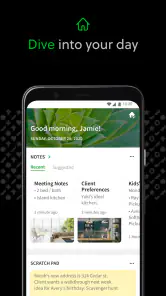
First things first, let's talk about getting started. Setting up Evernote is like a breeze. You’ll need to create an account, and once you’re in, the interface greets you with a friendly vibe. It's clean, intuitive, and doesn't bombard you with too many options right out of the gate.
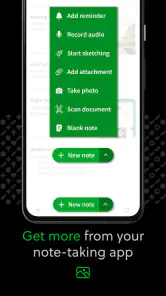
Note-taking is the heart of this app, and boy, does it deliver. You can quickly jot down text, add images, create checklists, and even record voice memos. It’s like having a digital Swiss Army knife for your thoughts!
Features That Stand Out
One of the standout features is the ability to organize notes into notebooks. This might sound pretty basic, but trust me, it's a game-changer. Whether you're planning a vacation or managing a work project, keeping everything neatly sorted is a lifesaver.
And let’s not forget the search functionality. Ever struggled to find an old note buried deep in your files? With Evernote, you can search by keyword or even text within images, thanks to their nifty OCR (Optical Character Recognition) technology. It’s like having a personal assistant who never forgets anything.
Integration and Syncing
Evernote plays well with others, too. It integrates with a bunch of apps like Google Calendar, Slack, and Microsoft Teams. So, if you’re like me and love having everything interconnected, this feature is a real treat.
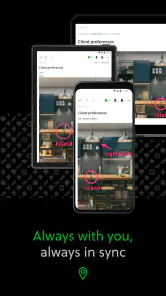
Syncing across devices is seamless. Whether I’m on my phone, tablet, or desktop, my notes are always up-to-date. It’s perfect for those "aha" moments when inspiration strikes at the most unexpected times.
Design and Usability
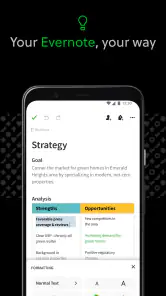
The design is minimalistic yet functional. You can customize the layout to your liking, choose different themes, and even change the appearance of the notes. It’s all about making you feel at home while you’re organizing your life.
Now, while the app is generally smooth, there are occasional hiccups. Sometimes the syncing can have a slight delay, especially if you're adding large files. But honestly, it's a minor blip in an otherwise stellar performance.
Pricing and Plans
Let’s talk cash. Evernote offers a free tier, which is surprisingly robust. However, if you’re a power user, their premium plans unlock advanced features like offline access, increased storage, and better collaboration tools.
The free version might suit casual users just fine, but if you’re diving deep into productivity, the premium plan could be worth the investment. They even offer a business plan for teams, which is great for collaborative projects.
Final Thoughts
All in all, Evernote is a powerhouse for anyone looking to streamline their note-taking and organization game. Whether you’re a student, professional, or just someone who loves being organized, this app is a must-try.
So go ahead, give Evernote a whirl. Who knows, it might just become your go-to digital notebook. It definitely has for me!
Evernote - Note Organizer Frequently Asked Questions
Can I use Evernote offline?
Evernote is built around keeping notes and planning materials together, which can be useful when you need to refer back to information while away from your usual routine. Before relying on it without an internet connection, check how the notes you need are made available in the app. For everyday use, it can still serve as a place to collect ideas, lists, and other information.
Is Evernote a good choice for managing daily tasks and to-do lists?
Evernote can help with everyday planning because it supports daily tasks and to-do lists alongside notes. You can keep a list with related information instead of separating your reminders and reference material across different places. Whether that approach suits you depends on how you like to plan; users who want a dedicated task manager may prefer to compare its workflow with their needs before downloading.
Can I use Evernote for both personal notes and work tasks?
Yes. Evernote is designed for everyday note-taking and planning, so you can use it to keep personal notes alongside to-do lists and work-related information. Its notebooks, tags, and search tools can help keep different kinds of material organized. Whether you use it for a simple list or a larger collection of notes, the app is intended to bring those items together.
What does Evernote help me organize?
Evernote is a productivity app for notes, daily tasks, and to-do lists. You can collect information in notes and arrange it with notebooks and tags, then use search to find it again. It may suit people who want a single place for written ideas and planning, though how useful its organization tools feel will depend on the way you prefer to structure your information.
What features does Evernote offer for note-taking?
Evernote provides a wide range of features including the ability to create text notes, to-do lists, and voice memos. It supports image and document attachments, handwriting recognition, and even integrates with calendars. The app also offers organizational tools like notebooks, tags, and a powerful search function to help manage and retrieve your notes efficiently.
Pros
- Cross-platform syncing for seamless access.
- Robust search functionality for quick retrieval.
- Multiple note formats
- including text and audio.
- Collaborative features for team projects.
- Customizable templates to streamline note-taking.
Cons
- Free version has limited features and storage.
- Occasional syncing issues reported by users.
- User interface can feel cluttered at times.
- Premium pricing may be high for casual users.
- Some advanced features have a learning curve.
- Category
- Productivity
- Version
- 11.4.2











