

Evenflo
- 99.00
- 4.6
- Installs
- 50.00K
- Price
- Free

Screenshots
Analysis by Reviewed
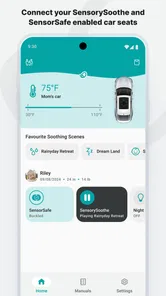
Evenflo is a parenting app from Evenflo that takes a practical approach to safer, more informed car-seat use. I found its focus easy to understand: it brings together SENSORYSOOTHE and SENSORSAFE, two ideas intended to make the car-seat experience more responsive for families. That makes it less like a general parenting planner and more like a companion for parents who want extra awareness around journeys with a child.
What I appreciate is that the app sits close to a real daily routine. A car seat is used during rushed school runs, long drives, visits to relatives, and those awkward moments when a child falls asleep before arriving home. An app connected to that routine can be genuinely useful, but only if it remains clear when the phone has a connection, what information is being shown, and what the parent still needs to check physically. That distinction matters throughout the experience.
Evenflo is free, aimed at Everyone, and belongs in the parenting category rather than entertainment or general vehicle software. It was released on December 5, 2022, and the current version is 5.0.0. On the app store, it has a 4.6 average from around 1.3 thousand ratings, with over 50 thousand installs. Those figures suggest that it has found a real audience among families, although they should not replace careful attention to how it fits your particular car-seat routine.
How the app feels when connectivity is part of the routine
The most important thing to understand is that a connected parenting tool changes the way you prepare for a trip. Instead of treating the car seat as something you check only while buckling a child in, the phone becomes another point of attention. That can be convenient, especially when a parent is already carrying a phone everywhere, but it also means the quality of the experience depends on more than the seat itself.
In my experience, the best time to use an app like this is before the vehicle moves. I would check the app while parked, make sure the relevant information is visible, and then put the phone aside. That habit prevents a useful safety aid from becoming a distraction. The app should support the parent’s attention, not compete with the child, traffic, mirrors, or the physical buckle.
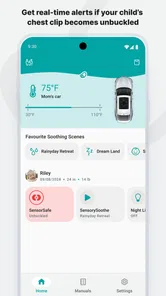
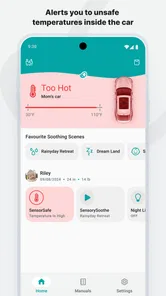
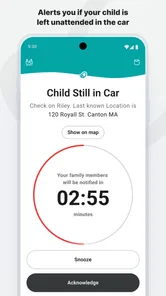
SENSORSAFE gives the app its most clearly connected character. The appeal is not simply seeing another screen; it is having a digital layer that can help a family stay more aware of the car-seat situation. That can be reassuring during a long drive, but reassurance is strongest when it is used alongside ordinary checks. A phone cannot replace confirming that the child is positioned correctly, the harness is secure, and the seat is installed as directed.
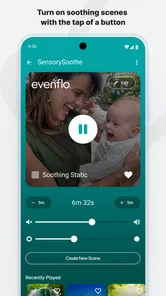
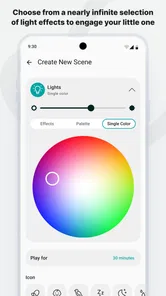
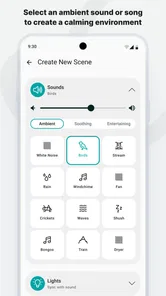
SENSORYSOOTHE gives the experience a different purpose. It is aimed at making the journey more comfortable for a child, which matters because a calmer passenger usually makes the entire trip easier for everyone. I see this as especially relevant for parents who are trying to build a predictable travel routine rather than solve one isolated difficult ride.
More From Our News Desk

 Gmail
GmailGmail in a Busy Inbox: Who Benefits Most?
From first account to crowded workday, Gmail earns its place through dependable search and flexible sorting—but its best fit depends on how much inbox maintenance you can tolerate.

 Prime Video
Switching to Prime Video: What Changes in Your Viewing Routine
Prime Video can make a compelling second home for streaming, but switching means learning a different catalog, rental layer, and route from browsing to playback.

 Universal TV Remote Control
Universal TV Remote Control Works Best as a Reliable Backup
A phone remote earns its place through quick setup and reliable habits. Here is how to get more from Universal TV Remote Control—and where its limits show.

 Weather - By Xiaomi
Weather by Xiaomi Review: Clear at a Glance, Less Clear Up Close
Xiaomi’s weather app makes everyday forecasts quick to scan, but its calm surface can leave useful details and recovery paths harder to find than they should be.

 X
XX Under Pressure: Can It Recover When Posting Goes Wrong?
A resilience-focused review of X, examining setup, mistaken posts, interruptions, weak connections, and the gaps that matter when recovery needs to be dependable.

 Clash of Clans
Clash of Clans Is Won Between the Battles
Its raids are quick; its community is a long-term project of coordination, teaching, rivalry, and shared responsibility—with all the friction that entails.
Latest News



When the phone is useful before leaving
A realistic example is a parent preparing for an early appointment. The child is tired, the car is packed, and there is little patience for troubleshooting. This is where I would open Evenflo before starting the engine, review the connected experience, and deal with anything that needs attention while still parked. The small but important insight is that the app is more valuable as a preparation tool than as something you constantly watch during a journey.
For a second scenario, imagine grandparents borrowing the family car seat. An app can help make the routine more familiar, but I would not hand over the phone and assume the digital guidance covers everything. I would walk through the physical setup with them first, then explain what the app is intended to add. That approach avoids a common mistake: treating connected feedback as a substitute for teaching another caregiver the basics.
Connectivity also shapes what happens when the family is moving between places. A parent may begin at home, drive through areas with inconsistent reception, stop at a busy parking lot, and continue later. I would not plan a safety decision around a signal appearing at exactly the right moment. The sensible workflow is to prepare while connected and treat any live app interaction during travel as secondary to safe parking and direct observation.
Using it in real mobile situations
Evenflo makes the most sense for families who already keep a phone nearby during everyday travel. That includes parents managing several children, caregivers who share pickup duties, and households that want a more structured approach to car-seat awareness. The mobile format is convenient because it follows the parent rather than requiring a separate device, but convenience comes with a cost: the phone has to be charged, available, and used responsibly.
I would be particularly careful during short trips. A two-minute drive can feel too brief to justify preparation, yet short journeys are exactly when people tend to rush. My preferred routine would be to make the same quick physical check every time and use the app before departure when needed, rather than deciding that a familiar route deserves less care.
Longer drives are where the connected concept feels more natural. Parents have more time to establish a routine, and the child’s comfort can become a continuing concern rather than a one-off problem. Even then, the driver should not interact with the phone while driving. If something needs attention, the vehicle should be safely stopped or a passenger should handle it.
The app may also be useful in a shared-care arrangement, but families should agree on one simple process. If one adult relies on the app and another relies only on memory, the result can be inconsistent. I would use the same pre-trip sequence for every caregiver: inspect the seat, secure the child, check the phone-based information while parked, and only then begin the journey.
That sequence highlights a trade-off. Evenflo can add awareness, but it also adds another step. Parents who dislike notifications, device setup, or anything that makes a quick trip feel more complicated may prefer a simpler routine built around the seat’s physical indicators and the manufacturer’s printed guidance. The app is not automatically better just because it is digital.
What happens when the connection or routine goes wrong
The most useful way to judge a connected parenting app is not by imagining a perfect trip. It is by asking what a parent does when the phone is unavailable, the connection is unreliable, or the child needs attention at the same time. My advice is to create a fallback that works without depending on immediate app feedback: stop safely, check the child and seat directly, and continue only when the situation is clear.
This is also why I would avoid testing new settings or unfamiliar parts of the experience on the way to an appointment. Try the routine while parked at home. If the app behaves differently from what you expected, you have time to understand the screen instead of making decisions under pressure. That preparation is a more valuable advanced tip than simply installing the app and opening it once.
Another practical point is recovery after a phone change or a long period without use. Before an important trip, I would open Evenflo and confirm that the experience is ready rather than assuming everything will work because it worked previously. This is especially sensible when several adults share responsibility or when the app has not been used since a previous season.
If the app is unavailable, I would not interpret that as evidence that the physical seat is unsafe, nor would I interpret a normal app view as proof that every physical detail is correct. The two layers answer different needs. The seat, harness, installation, and child’s position remain hands-on responsibilities; the app is an additional digital aid.
This separation also helps with false confidence. A parent may see a reassuring status and relax too much, or see an unexpected message and panic. The right response is to pause and inspect the situation calmly. If the issue is not immediately understandable, stop in a safe place and consult the relevant Evenflo instructions rather than improvising while the vehicle is moving.
Being sensible about mobile data and attention
Families often think about connectivity only in terms of whether an app works. I think attention and data use belong in the same conversation. A parenting app should not encourage a driver to keep checking the screen, and a family may also prefer to limit how much mobile activity happens during a trip. The practical answer is to do as much preparation as possible before leaving and keep the phone interaction brief.
I would also avoid placing the phone where it can become a loose object or tempt the driver to reach for it. A secure, ordinary phone habit matters more than a clever setup. If a passenger is present, that person can manage the app while the driver concentrates on the road. When travelling alone with a child, the safest default is to stop before interacting with the screen.
For families with limited mobile data, the cautious approach is to use home Wi-Fi for setup and routine checks whenever convenient. I am not claiming that every part of the app requires a connection or that every feature behaves in the same way offline; that is exactly why I would test the workflow in advance instead of making assumptions. The important point is to know what you can see before departure and what you would do if live information is not available.
Battery planning is just as ordinary and just as easy to overlook. Parents already depend on phones for navigation, calls, school messages, and emergency contact. Evenflo should not be the reason a phone reaches a critically low charge during a trip. I would charge the device before a long drive and keep the app from becoming one more reason to stare at the screen continuously.
There is also a privacy-minded habit worth adopting: use only the information and access needed for the car-seat routine, and review the app’s current device prompts carefully when setting it up. I would not grant broad access automatically just because an app is related to safety. Read what the phone requests, decide whether it makes sense for your use, and remember that a connected tool should earn its place in the family routine through clear value.
Who will get the most from Evenflo
I think Evenflo is a strong fit for parents who use compatible Evenflo car-seat technology and want a phone-based layer around their existing routine. It is also appealing to caregivers who appreciate reminders or connected awareness more than they appreciate managing everything from memory. The combination of SENSORYSOOTHE and SENSORSAFE gives the app a broader purpose than a single setup screen: it addresses both the child’s travel experience and the adult’s awareness.
It may be especially helpful for a first-time parent who wants a repeatable checklist before driving. The app cannot make every decision for you, but it can encourage a more deliberate process. That is valuable when sleep deprivation and rushed departures make small oversights more likely.
On the other hand, I would skip it if you do not use an Evenflo seat that works with the experience, or if you want a completely offline, no-phone approach to car-seat safety. I would also hesitate to recommend it to someone who finds connected devices stressful. An app that creates confusion or invites constant checking is not an improvement over a calm physical routine.
Families comparing it with ordinary parenting apps should understand the difference. A general family organizer may be better for appointments, meals, reminders, and shared calendars. A dedicated car-seat companion is narrower, but that narrow focus is its advantage when the problem is travel awareness rather than household scheduling. Meanwhile, a printed manual and direct physical checks remain better for installation details and situations where the phone is unavailable.
My overall view after weighing convenience against dependence
I like Evenflo because it addresses a specific family moment instead of trying to become an entire parenting system. Its value comes from adding digital awareness to a physical car-seat routine, while SENSORYSOOTHE recognizes that a child’s comfort can affect the whole journey. The app feels most useful when it is prepared in advance, used while parked, and treated as support rather than authority.
The main limitation is the extra dependence on a phone and a connected workflow. That does not make the app a poor choice, but it means parents should plan for imperfect conditions. A low battery, distracted driver, unfamiliar caregiver, or uncertain connection can all reduce the benefit. The answer is not to abandon the app; it is to keep a dependable manual routine alongside it.
Evenflo is free, carries an Everyone rating, and comes from the seat manufacturer itself, which makes it easy to try for families already interested in its connected features. I would recommend giving it a calm test at home, involving every regular caregiver, and deciding after that trial whether it simplifies travel or adds friction. The best use of Evenflo is not constant monitoring; it is turning safer preparation into a repeatable habit.
My final verdict is positive but practical. If you want a connected companion for an Evenflo car-seat routine and are comfortable keeping the phone secondary to direct checks, this app is worth exploring. If your priority is absolute simplicity or a workflow that never depends on connectivity, the traditional alternatives may suit you better. For the right family, though, Evenflo can make the moments before and during a drive feel more organized, more attentive, and easier to handle without pretending that technology replaces good judgment.
Evenflo Frequently Asked Questions
What is the Evenflo app’s rating, and what do users say about it?
Evenflo is a parenting app with an average rating of 4.6 from around 1.3 thousand ratings, alongside 99 written reviews. Those figures offer a quick sense of how it has been received, but individual experiences can vary depending on a family’s product, needs, and region. Reading recent comments can help you judge whether its product information and connected features are relevant to you.
Does Evenflo work with SENSORYSOOTHE and SensorSafe products?
The app is presented as a way to make car seats smarter and families safer through SENSORYSOOTHE and SensorSafe. If you are considering downloading it for one of these features, check that the product you own is compatible and follow the instructions for that specific product. The app is intended to complement product guidance, not replace the safety directions that come with your car seat.
What is Evenflo, and what can I use the app for?
Evenflo is a parenting-focused app designed to help families manage information and resources related to Evenflo products, including car seats, strollers, feeding accessories, and other baby gear. Depending on the available features and your region, you may be able to browse products, review safety and installation guidance, access manuals, register purchases, and contact customer support. Its usefulness largely depends on which Evenflo products you own and the services currently supported in your country.
Does Evenflo provide car seat installation instructions and safety information?
The app can be useful for finding product manuals, installation guidance, and safety-related information for compatible Evenflo car seats, but it should not replace reading the complete manual supplied with your specific model. Car seat requirements vary by product, child age, height, weight, and local regulations. Before relying on any instructions, confirm that the app identifies your exact model and always follow the manufacturer’s latest guidance.
Can I register my Evenflo product through the app?
If product registration is supported in your location and for your particular item, the app may allow you to submit details such as the model number, serial number, purchase date, and retailer information. Registration can make it easier to receive important product updates or recall notifications. However, availability may vary, so check the product packaging, official Evenflo website, or in-app account section if registration options are not visible.
Pros
- Simple interface makes everyday use easy for new users.
- Useful tools help parents organize feeding
- sleep
- or care routines.
- Content is presented in a clear
- family-friendly format.
- Works well for users seeking practical parenting guidance.
- Regular updates may improve features and overall reliability.
Cons
- Some features may require an account or personal information.
- The app may feel limited for families needing advanced tracking tools.
- Notifications could become distracting if too frequently enabled.
- Compatibility and performance may vary across older devices.
- Available content may not fully replace professional parenting advice.











