Erie Weather
- 107.00
- 4.8
- Installs
- 5.00K
- Price
- Free
Screenshots
Analysis by Reviewed
I find a local forecast most useful when it helps me make a small decision quickly: whether to take a coat, adjust a route, or move an outdoor plan indoors. Erie Weather is a free weather app from Lilly Broadcasting, built for people whose routines are centered on northwestern Pennsylvania. That regional focus gives it a clearer purpose than a broad forecast tool, but it also means the app is most compelling when the places you care about are in its home area.
Who gets the most from a regional forecast
If you live in or regularly visit the Erie area, the app is worth considering as a convenient local point of reference. A forecast is only useful when it relates to the places where you actually spend time, so I’d start by checking whether your home, workplace, school, and usual errands fit the region it serves. For occasional visitors, it may help with a short stay; for someone whose week takes them across several states, a broad weather service is likely to be a more practical everyday default.
One useful habit is to check the forecast for the destination, not just the place where you happen to be standing. A morning commute, an afternoon appointment, and an evening walk can involve different conditions and different decisions. Before leaving, I’d use a local forecast to think through what I need to carry, then check again before a longer outdoor stretch. That turns the app into a planning aid rather than a promise that the weather will behave exactly as expected.
Readable at a glance, with a local focus
The clearest reason to consider this app is its regional perspective. If your routine is centered on Erie and nearby communities, a local weather source can feel more relevant than a broad national app, especially when you want to check conditions before leaving home. The app has a 4.8 average from around 290 ratings, but the useful question is whether its coverage matches your everyday locations. For someone outside northwestern Pennsylvania, a familiar all-purpose weather app may be the more practical choice.
In a real morning routine, I’d check the forecast before choosing clothes and then look again before a walk, school run, or drive. That second check matters: weather can change between the time you leave and the time you return. Rather than treating any forecast as a guarantee, I use it as a prompt to decide whether I need a backup plan. A locally oriented app is most valuable when it helps me make that decision for the places I actually go.
Reading and navigation in the moments that matter
Weather checks tend to happen in short bursts: at the door, beside a car, or while juggling other tasks. I value an interface that lets me find the relevant information without having to study the screen for long. The app’s local purpose is easy to understand, but the practical test is whether its layout makes sense to you on your own phone. I would spend a little time learning where the information you check most often appears, so a rushed glance later is less demanding.
That small bit of preparation can make a difference for anyone who finds dense screens tiring. Try checking the same forecast at home and outdoors, where glare and movement can make reading harder. If you use larger system text, test that too; a screen that looks comfortable at its default size may feel different after your phone’s display settings are changed. I would not judge readability from a quick indoor look alone.
More From Our News Desk

Weather by Xiaomi Review: Clear at a Glance, Less Clear Up Close

X Under Pressure: Can It Recover When Posting Goes Wrong?

Clash of Clans Is Won Between the Battles

Android Auto Makes the Case for Quieter Car Software

MobiOffice: Transforming Mobile Productivity with Seamless Integration

EA SPORTS FC™ Mobile Soccer: Redefining Mobile Sports Gaming
Using the forecast in everyday situations
Weather information also needs to work in different contexts. If I’m checking it outdoors, in a hurry, or while sharing a phone with someone else, I want the key details to be easy to find and read. The app’s description as a straightforward local weather option suggests a focused role, but anyone who depends on particular visual, audio, or interaction settings should test the interface on their own device before relying on it. I wouldn’t assume a specific accessibility feature is available without checking it directly.
Motor and sensory considerations
For someone who finds complicated navigation tiring, a weather app is most useful when a quick check does not require a long sequence of taps. I’d try opening the forecast one-handed, increasing the phone’s text size if needed, and checking whether important information remains comfortable to read. Bright outdoor light, glare, small text, and color-based weather cues can all affect how easily a screen can be used. These are practical checks, not claims about a particular setting in Erie Weather.
Alerts can be helpful when looking at the screen is inconvenient, but notification volume is a personal trade-off. If you prefer fewer interruptions, keep only the notifications you find useful where the app allows that choice, and review your phone’s notification controls as well. If spoken output or other assistive tools are essential to your routine, test the steps you use most before depending on the app during a time-sensitive weather change.
A realistic day-to-day workflow
Imagine planning a family outing that begins in Erie and lasts through the afternoon. I’d check the local forecast while deciding what to pack, then make a second check before leaving rather than assuming the morning view will remain useful all day. If the conditions look uncertain, I’d treat that as a reason to keep an indoor alternative in mind. For a caregiver or anyone coordinating with another person, sharing the decision in plain language—“let’s bring an extra layer” or “we’ll decide again before lunch”—can be more useful than forwarding a screen full of weather details.
For people who work outdoors, the same approach can reduce avoidable surprises. Check before a shift or task, identify the part of the day when conditions could change, and decide when you’ll reassess. A phone forecast cannot replace workplace safety procedures or official emergency guidance, but it can help with ordinary planning. If severe weather is a concern, I would use the app as one source of awareness and follow local instructions rather than relying on a single screen.
Where a local app fits—and where it doesn’t
Compared with a general-purpose weather app, Erie Weather makes the most sense when local coverage is your priority. A national service may suit people who move between regions frequently or want one familiar source for many destinations; a local option can be easier to trust for routine decisions close to home. I’d keep a broader forecast source handy for a road trip beyond the region, rather than expecting one regional app to cover every travel need equally well.
It can also be useful to keep your expectations distinct: a local app is a convenient daily check, while a national app may be better for comparing destinations across a long itinerary. If you are planning a drive well outside northwestern Pennsylvania, check the forecast along the route and at the destination using a service designed for broader travel. For someone who only needs a quick local answer, carrying two weather apps may be unnecessary; for frequent travelers, the extra option can prevent a regional focus from becoming a blind spot.
Compatibility, cost, and who should skip it
The app is rated for Everyone and has more than 5,000 installs. It was released on December 12, 2023, and its current version is 5.17.715, with Android 9 as the minimum operating-system requirement. Those details help set expectations about compatibility, but the best test is still to install it on the device you plan to use and see whether the display and controls suit you. I’d skip it if I needed a single weather tool for locations far beyond northwestern Pennsylvania, or if its presentation proved difficult to use with my preferred phone settings.
Its free price makes it easy to try without making a purchase decision, but free is not the same as a guaranteed fit. The app has 107 reviews as well as its rating, giving prospective users more feedback to consider, though I would still judge it by how well it serves my own locations and habits. If you mainly want worldwide travel planning, a detailed map-based view, or a particular assistive interaction that you have not tested here, compare alternatives before making it your only weather source.
Motor and sensory considerations
For someone who finds complicated navigation tiring, a weather app is most useful when a quick check does not require a long sequence of taps. I’d try opening the forecast one-handed, increasing the phone’s text size if needed, and checking whether important information remains comfortable to read. Bright outdoor light, glare, small text, and color-based weather cues can all affect how easily a screen can be used. These are practical checks, not claims about a particular setting in Erie Weather.
Alerts can be helpful when looking at the screen is inconvenient, but notification volume is a personal trade-off. If you prefer fewer interruptions, keep only the notifications you find useful where the app allows that choice, and review your phone’s notification controls as well. If spoken output or other assistive tools are essential to your routine, test the steps you use most before depending on the app during a time-sensitive weather change.
First Impressions and Usability
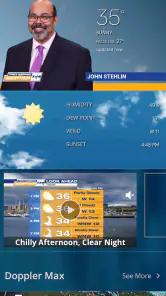
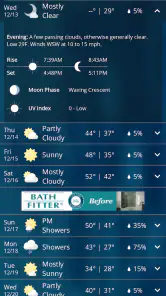
From the moment I downloaded Erie Weather, I was impressed by its sleek and user-friendly interface. The app is intuitive, and even if you’re not tech-savvy, navigating through it is a breeze. The home screen is clutter-free and provides all the essential information at a glance. You have your current location’s weather at the top, followed by a five-day forecast. It’s simple, yet so effective!
Features that Stand Out
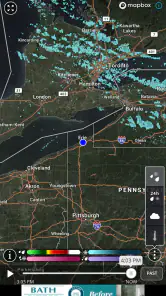
One of the standout features of Erie Weather is its hyper-local weather updates. The app uses advanced technology to provide weather forecasts that are accurate to your exact location. No more generic city-wide updates; this app knows precisely what’s happening in your neighborhood! Plus, the radar feature is a lifesaver. You can see real-time changes in weather patterns, which is fantastic if you’re planning a day out or need to know when to bring in the laundry.
The app also offers customizable alerts. I love that I can set it to notify me only for specific weather conditions, so I’m not constantly bombarded with notifications. It’s perfect for those who want to stay informed but not overwhelmed.
Why Erie Weather Deserves a Spot on Your Phone
Aside from its functional features, Erie Weather is also aesthetically pleasing. The design is minimalistic with a soothing color palette that doesn’t strain the eyes. It’s clear that a lot of thought went into making this app both effective and enjoyable to use. Moreover, the app is lightweight and doesn’t hog your phone’s resources, which is always a plus in my book.
And let’s not forget the social sharing feature. If you’re like me and love to share quirky weather updates with friends, you’ll appreciate this feature. You can easily share forecasts or any interesting weather tidbits directly from the app to your social media platforms.
The Verdict
All in all, Erie Weather is an app that does what it promises without overcomplicating things. It’s like having a personal weather station in your pocket, always ready to give you the most accurate updates. If you’re tired of generic weather apps and need something more tailored and reliable, Erie Weather is definitely worth checking out.
Whether you’re planning a trip, hosting an outdoor event, or just want to know if you need an umbrella for the day, this app has got you covered. Don’t just take my word for it; give it a try and see how it transforms your daily routine.
Erie Weather Frequently Asked Questions
Who develops Erie Weather, and who is it intended for?
Erie Weather is a weather app from Lilly Broadcasting, described as Northwestern Pennsylvania's only local weather app. Its regional focus makes it a natural choice for people who want weather information connected to the Erie area, whether they live nearby or are planning a visit. The app is rated for Everyone, so its intended audience includes users of all ages.
What devices and software versions can run Erie Weather?
Erie Weather is offered for Android and iOS devices, so you can look for it in the app store for the platform you use. On Android, the listed minimum operating system is version 9. Checking that your device meets this requirement before downloading can help avoid compatibility surprises. The app’s current version is 5.17.715.
What features does Erie Weather offer?
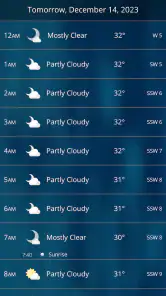
Erie Weather provides real-time weather updates, including temperature, humidity, and precipitation forecasts. It offers radar maps, severe weather alerts, and daily and weekly forecasts. The app also includes features like sunrise and sunset times, wind speed, and direction reports, making it a comprehensive tool for staying informed about the weather conditions in Erie.
Is Erie Weather app available for both Android and iOS devices?
Yes, Erie Weather is available for download on both Android and iOS platforms. Users can find it on the Google Play Store for Android devices and the Apple App Store for iOS devices. The app is designed to work seamlessly across both operating systems, offering a consistent user experience.
Does Erie Weather provide severe weather alerts?
Absolutely! Erie Weather is equipped with a robust alert system that notifies users of any severe weather conditions in their area. These alerts cover a range of weather phenomena, including thunderstorms, snowstorms, and flood warnings. The app ensures that users are well-prepared for any adverse weather by providing timely and accurate alerts.
Pros
- Accurate local forecasts
- Real-time severe weather alerts
- User-friendly interface
- Customizable notifications
- Detailed radar imagery
Cons
- Occasional ad interruptions
- Limited free features
- Premium version pricey
- Slow loading times
- Requires constant internet
- Category
- Weather
- Version
- 5.17.715











