

Enhance Pro
- 768.00
- 4.4
- Installs
- 100.00K
- Price
- Free

Screenshots
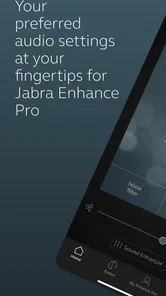
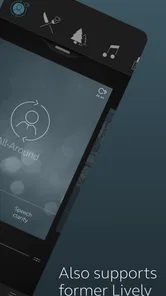
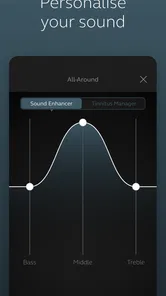
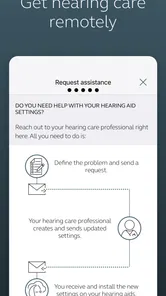
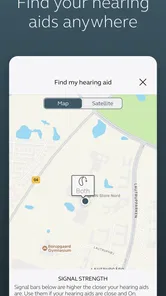
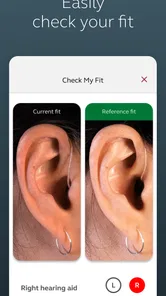
Analysis by Reviewed
When a hearing-aid companion app feels slow or unreliable, the problem is more than an inconvenience. It can interrupt a conversation, make a quiet adjustment frustrating, or leave you wondering whether a change actually reached your devices. I spent time looking at Enhance Pro as a practical medical app from GN Hearing, focusing less on its short store label and more on how it fits into an everyday hearing routine.
Enhance Pro is built specifically for compatible Jabra Enhance Pro hearing aids, so its value depends heavily on whether your hearing devices belong to that family. It is free to download, aimed at Everyone, and available for Android devices running Android 8.0 or later. That makes the entry barrier fairly low, although compatibility with the hearing aids themselves matters more than the phone requirement.
My overall impression is that this is a focused control app rather than a general hearing-health toolkit. It is most useful when you want your phone to act as a convenient bridge between you and your hearing aids. It is not the right choice for someone looking for a standalone hearing test, broad medical guidance, or an app that can control unrelated hearing hardware.
How Enhance Pro feels during everyday use
I find the most useful way to judge Enhance Pro is by asking whether it makes a hearing routine feel more manageable, not whether it offers a long list of controls. In this section, I’d focus on the small practical choices that can make opening a companion app feel worthwhile, then turn to the question of how much confidence to place in it during more sensitive moments.
Speed expectations when making a quick adjustment
The first thing I would expect from an app like this is a short path between noticing a problem and correcting it. If a television sounds too sharp, a restaurant feels too loud, or speech needs a little more attention, opening the app should feel simpler than searching through physical controls or asking someone else for help. Enhance Pro is designed around that kind of direct interaction with supported hearing aids.
In practice, the useful measure of speed is not just how quickly the app opens. The whole chain matters: the phone must recognize the hearing aids, the control screen must be ready, and the adjustment must feel reflected in what you hear. That is why I would judge this app less like a social or entertainment app and more like a remote control. A brief delay may be tolerable for browsing, but it becomes noticeable when you are trying to follow a sentence.
The app’s focused purpose works in its favor. There is less reason for a hearing-aid companion to be crowded with unrelated screens, feeds, or decorative content. A simpler control path can make routine changes feel more immediate. Still, users should keep expectations realistic: the app cannot remove the need for the hearing aids to be properly fitted, charged, and within a workable connection range.
More From Our News Desk

 Instagram
Instagram’s Power Comes From Its Place in Your Phone
A close look at how Instagram turns Meta’s reach, recommendation systems and everyday camera habits into durable platform power—and what that costs users.

 Gmail
GmailGmail in a Busy Inbox: Who Benefits Most?
From first account to crowded workday, Gmail earns its place through dependable search and flexible sorting—but its best fit depends on how much inbox maintenance you can tolerate.

 Prime Video
Switching to Prime Video: What Changes in Your Viewing Routine
Prime Video can make a compelling second home for streaming, but switching means learning a different catalog, rental layer, and route from browsing to playback.

 Universal TV Remote Control
Universal TV Remote Control Works Best as a Reliable Backup
A phone remote earns its place through quick setup and reliable habits. Here is how to get more from Universal TV Remote Control—and where its limits show.

 Weather - By Xiaomi
Weather by Xiaomi Review: Clear at a Glance, Less Clear Up Close
Xiaomi’s weather app makes everyday forecasts quick to scan, but its calm surface can leave useful details and recovery paths harder to find than they should be.

 X
XX Under Pressure: Can It Recover When Posting Goes Wrong?
A resilience-focused review of X, examining setup, mistaken posts, interruptions, weak connections, and the gaps that matter when recovery needs to be dependable.
Latest News



A useful habit is to open the app before entering a demanding listening situation rather than waiting until the middle of a conversation. I would check that the hearing aids are connected while still at home, especially before a meeting, appointment, or family gathering. That small step turns the app from an emergency fix into part of a calmer routine.
What happens during heavier listening moments
The most revealing situations are not quiet rooms. They are places where several sounds compete: a busy café, a car ride with multiple passengers, a supermarket, or a family table. In those moments, the app is valuable because it gives you a way to respond without constantly touching the hearing aids themselves.
That convenience has a trade-off. A phone-based control is only helpful if you can reach the phone comfortably and make a change without losing track of the conversation. If you need to navigate several layers every time, the process may be too distracting. I would therefore treat Enhance Pro as a tool for deliberate adjustments, not as something to operate continuously while listening.
One practical workflow is to create a short mental checklist for difficult places. Before sitting down, confirm the hearing aids are connected, keep the phone accessible, and make one change at a time. Then pause and listen instead of repeatedly tapping. This avoids chasing the sound with constant adjustments, which can make it harder to tell whether the change helped.
Another realistic use case is a television evening with another person. Hearing needs can differ between viewers, and a phone-based control can be less disruptive than changing the television volume for everyone. I would use the app to refine the hearing-aid experience while leaving the shared room volume alone. That is a small but meaningful advantage over relying only on the television remote.
For phone calls or conversations where timing matters, I would avoid experimenting with several settings at once. The best approach is to make changes before the call when possible, then keep the phone available as a backup. If the connection or response feels uncertain, concentrating on the conversation is more important than trying to perfect every sound in real time.
Stability matters more than a polished first impression
With a medical companion app, reliability is measured over repeated ordinary moments. I want it to behave predictably when I open it in the morning, after switching between rooms, or after the phone has been idle. A visually clean interface is welcome, but it matters less than knowing whether the app and hearing aids are still communicating.
Enhance Pro has a strong reason to be kept on the phone: it provides a dedicated control point for compatible hearing aids. That can make it more useful than a generic audio app, because the app’s purpose is tied to the hearing routine rather than occasional experimentation. The developer, GN Hearing, is also clearly associated with the hearing-aid ecosystem the app serves, which gives the product a more specific role than a general sound-amplification utility.
At the same time, a dedicated companion app introduces another link in the chain. If something feels wrong, you may need to determine whether the issue comes from the phone, the app, the wireless connection, or the hearing aids. That is not a criticism unique to this product, but it is an important part of deciding whether app-based control suits you.
When the app does not respond as expected, I would start with the simplest recovery steps: move the phone closer, check that the hearing aids are active, close and reopen the app, and confirm that the phone is using the intended connection. If the issue continues, restarting the phone or hearing aids may help. These are ordinary recovery actions, but having a clear order prevents unnecessary changes to settings.
I would also avoid treating a failed connection as evidence that the hearing aids themselves are malfunctioning. A single interruption can come from the phone or wireless link. Conversely, if the same problem returns often, it is worth seeking support rather than repeatedly reinstalling or changing settings at random. A hearing professional can distinguish a fitting issue from a connectivity issue more effectively than trial and error.
Resource demands and the phone experience
Enhance Pro is not the kind of app I would expect to place a heavy burden on a phone through constant browsing, video playback, or social activity. Its purpose is narrower, and that usually supports a lighter day-to-day role. Still, the important resource for this type of app is not only battery or storage. It is dependable access to the phone’s wireless communication with the hearing aids.
If your phone is older but still runs Android 8.0 or later, the operating-system requirement is relatively accommodating. However, an older phone may still differ in wireless behavior, background handling, or general responsiveness. I would not assume that meeting the minimum operating-system requirement guarantees an identical experience on every handset.
People who keep their phones in aggressive battery-saving modes should pay attention to how that affects companion apps. Restricting background activity can sometimes make connected accessories less convenient, even when the app itself is installed correctly. I would begin with the phone’s normal settings and only investigate battery restrictions if connection behavior becomes inconsistent.
Storage is unlikely to be the main decision point for this app. The more relevant question is whether you already depend on the phone for many connected accessories. If you regularly use a smartwatch, earbuds, a car system, and other wireless devices, troubleshooting can become more complicated simply because there are more connections competing for attention. Enhance Pro may still work well, but the surrounding phone setup deserves consideration.
Device constraints you should understand first
The biggest constraint is straightforward: this is not a universal hearing-aid remote. It is intended for Jabra Enhance Pro hearing aids, so someone using a different brand or model should not download it expecting broad compatibility. That single point determines whether the app is useful at all.
The Android requirement is also worth checking before installation. The app supports Android 8.0 and newer, which covers a wide range of devices, but users with very old phones should verify the operating system before planning around it. On iOS, the relevant question is likewise whether the specific hearing aids and phone combination are supported, not simply whether the phone is modern.
Another constraint is physical and practical rather than technical. A phone must be available when you want to make an adjustment. If you prefer a completely hands-off routine, or if you dislike carrying a phone around the house, an app-controlled approach may feel less natural than using controls on the hearing aids or relying on a hearing professional’s fitting.
This also affects older users or people who are not comfortable with smartphone menus. The app can provide independence, but only if the person using it can recognize the connection state and make changes confidently. In some families, the best setup may involve a relative helping with the initial arrangement and then leaving the user with a small number of familiar actions.
Enhance Pro should not replace professional hearing care. An app can make daily control easier, but it cannot stand in for an assessment when hearing changes, discomfort, feedback, or persistent difficulty understanding speech appears. If you are constantly compensating with app adjustments, that may be a sign that the hearing-aid fitting needs attention rather than proof that you need more aggressive settings.
How it compares with usual alternatives
The most obvious alternative is using the hearing aids without a companion app. That approach is simpler in one sense: there is no phone connection to manage. It can also be preferable for someone who wants minimal technology. The disadvantage is reduced convenience when making changes that are easier to see and control on a phone.
Another alternative is a general sound-amplification or hearing-support app. Those products may appeal to people who do not own compatible hearing aids, but they solve a different problem. Enhance Pro is tied to dedicated hearing hardware, so its purpose is more specific and potentially more useful for owners of the supported devices. Someone without those hearing aids would be better served by an option designed for their actual equipment.
Professional adjustment is the stronger alternative when the issue is persistent rather than situational. A hearing specialist can address comfort, speech clarity, and fitting in a way that a control app cannot. I see Enhance Pro as a daily convenience layer, not a substitute for that relationship.
The app is also different from a streaming or music-control application. Its success should be judged by whether it helps manage hearing aids during real conversations, not by entertainment features or the number of things it can do. That narrow focus is a strength for the right owner and a reason to skip it for everyone else.
Who will get the most from it
I think Enhance Pro is best for a Jabra Enhance Pro hearing-aid owner who wants more control during changing environments. It makes particular sense for someone who moves between quiet rooms, television, outdoor spaces, and group conversations and prefers adjusting from a phone rather than touching the devices directly.
It can also suit a caregiver or family member who helps another person establish a comfortable routine. The important part is keeping the workflow simple: connect the hearing aids, learn the main control path, and avoid making frequent experimental changes. The app becomes more useful when it supports confidence rather than creating another technical task.
I would be more cautious recommending it to someone who does not own compatible Jabra hardware, rarely carries a phone, or wants an app to diagnose hearing problems. It is also not ideal for a person who becomes anxious when a wireless connection is interrupted. In that case, a simpler device-first routine, supported by professional fitting, may feel more dependable.
Current app details and my performance verdict
Enhance Pro is a free medical app from GN Hearing, with an average rating of 4.4 from around 7,400 ratings and over 100,000 installs. It was released on May 18, 2021, and the current version is 1.43.1. Those figures suggest that it has found a real audience, while the Everyone age classification makes it broadly approachable from a content standpoint.
My verdict is positive but deliberately specific: this is a useful companion for the right hearing-aid owner, not a universal hearing solution. Its performance value comes from giving compatible users a practical control route during everyday listening, while its main weaknesses come from dependence on supported hardware, phone availability, and a stable connection.
The smartest way to use it is as a prepared backup and adjustment tool, not as a replacement for good hearing-aid fitting. Set it up in a calm environment, learn the few actions you will actually use, and test the workflow before relying on it in a crowded place. If your hearing aids are compatible and you want phone-based control, Enhance Pro is worth trying. If they are not, or if you need diagnosis and treatment rather than daily control, another path will serve you better.
Enhance Pro Frequently Asked Questions
What permissions does Enhance Pro need, and can I control access to my photos?
Enhance Pro is a medical app from GN Hearing, with the store summary describing it as an app for Jabra Enhance Pro hearing aids. Before installing, check the permissions it requests and consider which features need access to your device. You can manage app permissions in your phone’s settings, including access to photos or other device features, and adjust them if your preferences change.
What is Enhance Pro and what does it do?
Enhance Pro is a photo-editing application designed to improve the quality and appearance of images using enhancement tools, filters, and adjustment controls. Depending on the version available on your device, it may help sharpen details, improve lighting, reduce imperfections, and create a more polished result. It is aimed at users who want quick improvements without needing advanced desktop editing software.
Is Enhance Pro free to download and use?
Enhance Pro may be available as a free download, but some editing tools, effects, export options, or advanced enhancement features can be restricted to premium users. The exact pricing and available features may vary between Android and iOS, as well as by region. Before subscribing, check the in-app purchase screen carefully, including the billing period and whether the subscription renews automatically.
Can Enhance Pro improve blurry or low-quality photos?
Enhance Pro can often make photos look clearer by adjusting sharpness, contrast, brightness, and other visual elements. However, it cannot perfectly restore information that was never captured, so extremely blurry, dark, or heavily compressed images may still have limitations. Results also depend on the original photo, the selected enhancement settings, and whether the required tools are included in the version you use.
Does Enhance Pro require an internet connection?
Some basic editing functions in Enhance Pro may work directly on your device, while certain enhancement effects, artificial-intelligence processing, cloud tools, or premium features may require an active internet connection. If you plan to edit photos while traveling or using mobile data, test the app beforehand. Also remember that online processing can involve uploading images, so review the app’s privacy information before using personal photos.
Pros
- Personalized brain-training exercises adapt to your performance.
- Short daily sessions are easy to fit into a busy schedule.
- Progress tracking helps you monitor improvements over time.
- Wide range of exercises targets memory
- focus
- and problem-solving.
- Clean interface makes the app simple to navigate and use.
Cons
- Most advanced features require a paid subscription.
- Some exercises may feel repetitive after extended use.
- Results depend heavily on consistent
- regular practice.
- Limited offline functionality can be inconvenient while traveling.
- The app may feel too basic for experienced brain-training users.











