Enfamil: Baby Rewards Tracker®
- 801.00
- 3.8
- Installs
- 100.00K
- Price
- Free

Screenshots

Analysis by Reviewed
When I decide whether a parenting app is worth keeping, I look for a clear job it can do without adding another chore. Enfamil: Baby Rewards Tracker® is most appealing if Enfamil is already part of your household: it brings brand-related rewards together with pregnancy and baby guidance. I’d treat it as a useful companion, not as the one place to manage every part of family life.
Who gets the most from it
This free parenting app is aimed at moms and caregivers who want product-related savings alongside baby-focused content. It comes from Reckitt Benckiser Group plc and is rated for Everyone. Its 4.2 average from around 3.3 thousand ratings suggests many people find a reason to use it, while the 100 thousand-plus installs show it has reached a sizeable audience. Those figures are context, not a guarantee that its rewards or advice will suit every family.
The best fit is a caregiver who already buys Enfamil and wants a convenient place to check relevant guidance and manage rewards. It may also be worth trying during pregnancy if you prefer bite-sized information to searching across several sites, or after a baby arrives when feeding questions and shopping errands compete for attention. I’d be less enthusiastic if you want a completely brand-neutral parenting hub, or if you rarely buy the products connected to its rewards.
A practical way to use it is to check the guidance when you have a specific question, then look at the rewards area when you have an eligible purchase to track. I wouldn’t open it expecting a complete medical record or a substitute for advice from a pediatrician. For symptoms, feeding concerns, or decisions about a baby’s health, a qualified clinician is the better source.
Where it fits among parenting tools
Compared with a general baby-tracking app, Enfamil’s clearest distinction is its connection to the brand’s rewards and formula-focused material. A neutral tracker may make more sense if your main goal is to record routines across different products or keep a broad household log. A parenting book, health-service resource, or direct conversation with a clinician may be better when you need deeper, personalized guidance rather than quick tips.
There is also a useful trade-off to keep in mind: a rewards program is most relevant when you already buy the associated products, while a family that uses other formula or feeding options may get less practical value from that side of the app. I’d decide based on whether the guidance and rewards match what you already do, rather than changing a feeding choice just to use an app.
Making the rewards useful without extra work
For a busy household, the main question is not just whether rewards exist, but whether claiming them fits naturally into shopping. I’d decide on a simple routine before relying on the app: keep receipts in one agreed place, check them after an errand, and avoid submitting the same purchase twice if another caregiver also uses the account. That small bit of coordination can prevent a reward feature from turning into a shared chore.
More From Our News Desk

 Gmail
Gmail in a Busy Inbox: Who Benefits Most?
From first account to crowded workday, Gmail earns its place through dependable search and flexible sorting—but its best fit depends on how much inbox maintenance you can tolerate.

 Prime Video
Switching to Prime Video: What Changes in Your Viewing Routine
Prime Video can make a compelling second home for streaming, but switching means learning a different catalog, rental layer, and route from browsing to playback.

 Universal TV Remote Control
 Works Best as a Reliable Backup
A phone remote earns its place through quick setup and reliable habits. Here is how to get more from Universal TV Remote Control—and where its limits show.

 Weather - By Xiaomi
Weather by Xiaomi Review: Clear at a Glance, Less Clear Up Close
Xiaomi’s weather app makes everyday forecasts quick to scan, but its calm surface can leave useful details and recovery paths harder to find than they should be.

 X
X Under Pressure: Can It Recover When Posting Goes Wrong?
A resilience-focused review of X, examining setup, mistaken posts, interruptions, weak connections, and the gaps that matter when recovery needs to be dependable.

 Clash of Clans
 Is Won Between the Battles
Its raids are quick; its community is a long-term project of coordination, teaching, rivalry, and shared responsibility—with all the friction that entails.
Latest News



It is also sensible to check the app’s own eligibility details before assuming every purchase will count. The useful habit is to treat rewards as a possible extra, not as a reason to buy more or to plan a family budget around a future redemption. If an eligible purchase earns something, that is a welcome return; if the process feels fiddly or the benefit does not suit your needs, it is fine to skip that step and use the app only for its content.
What’s the Buzz About?
Let’s face it, parenting can be a wild ride, and keeping track of everything can feel like juggling flaming torches while riding a unicycle. That’s where the app steps in. It is designed to bring baby-related guidance and Enfamil rewards into one place, which is most useful when those are already part of your routine. I wouldn’t call it a complete solution to the many moving parts of parenting, but it can make a few recurring tasks easier to approach.
User-Friendly Interface
First off, the app’s interface is like a warm hug on a chaotic day. It’s intuitively designed, making navigation a breeze. Whether you’re tracking feedings, diaper changes, or sleep schedules, everything is laid out clearly. No more fumbling around trying to figure out where to log that 3 a.m. feeding!
One realistic use is a quick check during a quiet moment: after a night when feeding felt unusual, I’d note only the detail I might want to explain at a routine appointment, rather than trying to reconstruct the whole night later. That keeps a record focused and easier to discuss. If your clinician already has a preferred way for you to track feeding, I’d follow that approach instead of keeping competing notes in multiple places.
It is worth thinking about who will actually maintain any log. If one parent records entries and another relies on them, agree on a consistent shorthand and on which events matter. Otherwise, a log can look complete while leaving out the context that makes it useful. If the app is mainly serving as a reward tool for one caregiver, there may be no need for everyone in the household to enter routine details.
Rewards Galore
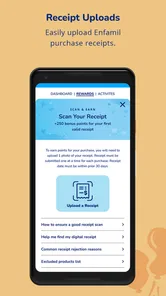
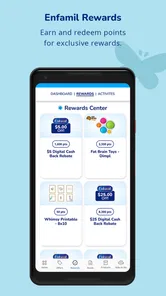
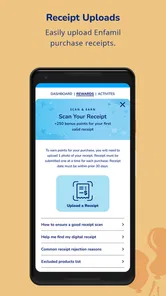
One of the standout features is the rewards system. Every time you purchase an Enfamil product, you can scan the receipt to earn points. These points can then be redeemed for discounts, gifts, and even donations to charities. It’s a feel-good factor that not only benefits you but can also contribute to a greater cause. Who knew buying formula could be so rewarding?
The receipt step is easiest to handle while the proof of purchase is still easy to find. I’d make a small habit of checking the rewards section after shopping, rather than leaving several receipts to sort through later. That is especially helpful if you shop for another caregiver or split errands, because you can decide together who will submit purchases and keep track of what has already been entered.
I would also keep expectations practical: a points balance is useful only if the available redemption choices are something you would genuinely use. Before making a special trip or changing what you buy, check the reward options and the requirements in the app. This is a better fit for people who see the program as a bonus attached to ordinary shopping, not for anyone hoping it will reliably cover a particular household expense.
Milestone Tracking
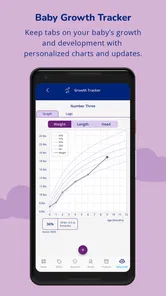
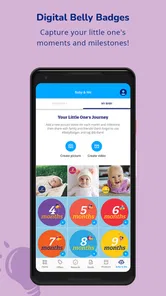
For new parents, keeping track of all those baby milestones can be overwhelming. This app lets you log all the precious moments, from the first smile to the first steps. Plus, it provides personalized content and tips to support your parenting journey. It’s like having a parenting guru in your pocket!
Milestone notes are most valuable when they preserve a detail you might otherwise forget, not when they turn development into a race. Babies reach new skills on different timelines, so I’d use a log to remember and share observations, not to judge whether a child is “ahead” or “behind.” For advice about a development concern, take your observations to a clinician instead of relying on an app entry alone.
For example, a caregiver could record when a new behavior first appeared and add a short note about the situation, then bring that memory to a checkup if it becomes relevant. The point is to make the conversation more concrete, not to treat an app’s milestones as a test. If recording dates starts making you anxious or encourages constant comparison, stepping away from that part is a reasonable choice; the rewards or guidance may still be useful on their own.
A Few Extra Perks
Let’s not forget the additional features that make this app a keeper. You get access to a community of parents, expert advice, and the latest parenting news. It’s like a one-stop-shop for all things baby. And with push notifications, you’ll never miss a beat, ensuring you’re always in the loop.
I’d be selective about how much of that stream I let into the day. A community can be reassuring when you want to hear that other caregivers have faced a similar everyday challenge, but personal stories vary and do not establish what is right for a particular baby. I’d use them for perspective and conversation, then take health questions to a professional rather than treating popular advice as a recommendation for my own child.
Notifications are a matter of preference, especially during an already busy day. I’d keep only the reminders or updates I find useful and turn off anything that interrupts rest or family time. The app’s current version is 1.7.5, and it supports devices running Android 7.0 or later; that makes checking compatibility worthwhile before installing it on an older phone. It is free, so trying it carries no purchase cost, but the real test is whether its content and rewards earn a regular place in your routine.
A practical first week does not need a complicated setup: open the guidance when a real question comes up, try the rewards process with a purchase you have already made, and decide whether you want to keep any tracking. That gives you a fair sense of the app without creating a new daily checklist. If you find yourself opening it only to clear notifications or feeling obliged to log every detail, simplify your use or remove it from your routine.
When I’d choose something else
If you want a product-neutral record of feeds, sleep, and care tasks, I’d compare dedicated tracking tools before settling on a brand-linked option. If you mainly need pregnancy information, a trusted health resource may be a better fit; if you want community discussion, remember that other parents’ experiences are not a replacement for professional care. Enfamil makes the most sense when its own guidance and rewards are useful together, rather than when you need one app to cover every parenting need.
The cost of switching is mostly about what you have already built into your habits. If you have been using it for reward submissions or notes, check what you want to keep before moving to a different tool, and avoid maintaining parallel logs unless there is a clear reason. A dedicated tracker may be better for a family that needs flexible records across caregivers or feeding choices; a simple paper note may be enough for someone who only wants to remember a question for the next appointment. The right alternative is the one that fits your actual routine, not the one with the longest feature list.
I’d also skip it if you are looking for individualized medical guidance, a complete shared family calendar, or a neutral resource that covers every feeding approach equally. Those are different jobs. There is no need to install a brand-focused app simply because it is free: if its rewards do not apply to your shopping and its material does not answer the questions you actually have, a clinician, a trusted health resource, or a more general-purpose tracker is likely a better use of your attention.
In conclusion, the app is a practical companion for caregivers who already use Enfamil products and want related rewards and baby-focused material close at hand. Its strongest case is convenience: it can bring a few brand-specific tasks together without requiring a purchase to try it. I’d keep my expectations measured, use any logs as personal notes rather than medical records, and let the rewards remain a bonus instead of a reason to change what I buy.
If that matches your situation, I think it is worth trying and judging by whether it makes an existing routine easier. If you need neutral tracking or tailored health advice, choose a tool or professional suited to that purpose instead. That distinction is what makes Enfamil: Baby Rewards Tracker® a sensible option for some families, rather than an automatic recommendation for every new parent.
Enfamil: Baby Rewards Tracker® Frequently Asked Questions
What phones and operating systems can run Enfamil: Baby Rewards Tracker®?
Enfamil: Baby Rewards Tracker® is a parenting app for Android and iOS, and its listed minimum operating-system requirement is version 7.0. Before downloading, check that your device meets the requirement and that you have enough space for an app. The app is free, so you can install it without paying a download fee and explore its baby-tracking and Enfamil rewards features.
Who makes Enfamil: Baby Rewards Tracker®, and what is it designed for?
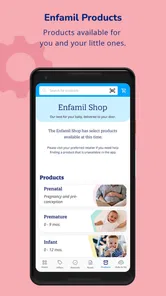
The app is developed by Reckitt Benckiser Group plc and is intended for parents looking for pregnancy and baby formula tips, along with Enfamil coupons and cash back. It brings brand-related guidance and rewards into a mobile experience, so it may appeal most to families who use or are considering Enfamil products. Its parenting focus makes it relevant to people looking for practical support alongside product offers.
What is Enfamil: Baby Rewards Tracker® and how does it work?
Enfamil: Baby Rewards Tracker® is a mobile application designed to help parents track their baby's nutrition and growth while earning rewards. Users can log their baby's feeding, sleeping, and diaper changes. The app also provides personalized guidance based on the baby's developmental milestones. By purchasing Enfamil products and submitting receipts, users can accumulate points to redeem for rewards, making it a practical tool for both tracking and incentivizing healthy parenting.
Is Enfamil: Baby Rewards Tracker® free to use?
Yes, Enfamil: Baby Rewards Tracker® is free to download and use on both Android and iOS devices. However, while the app itself is free, the rewards program requires users to purchase Enfamil products to earn points. These points can then be redeemed for various rewards within the app. This allows parents to gain benefits from products they already use, making it a cost-effective addition to their parenting toolkit.
What kind of rewards can be earned through the Enfamil: Baby Rewards Tracker® app?
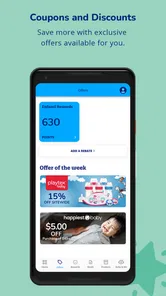
The Enfamil: Baby Rewards Tracker® app offers a variety of rewards that can be earned by accumulating points through purchases of Enfamil products. These rewards include discounts on Enfamil products, gift cards, and other exclusive offers. The app is designed to provide added value to parents who are already purchasing Enfamil products, enhancing their overall experience by rewarding their loyalty and engagement with the brand.
Pros
- Tracks baby's growth milestones efficiently
- Customizable feeding and diaper logs
- Provides tailored nutritional advice
- User-friendly interface for busy parents
- Secure data storage and privacy controls
Cons
- Limited features in free version
- Requires internet for full functionality
- Occasional sync issues with devices
- Ads can be intrusive at times
- Limited compatibility with older devices