

Endoscope Camera Connector
- 1.28K
- 3.6
- Installs
- 100.00K
- Price
- Free
Screenshots
Analysis by Reviewed
Have you ever been curious about those hard-to-reach places in your home, like inside the pipes or behind heavy appliances? Well, let me introduce you to the Endoscope Camera Connector, a nifty little app that turns your smartphone into a powerful inspection tool. This app is a game-changer, especially if you're into DIY projects or just love getting into the nitty-gritty of home maintenance.
Why the connection matters before you begin
An endoscope app is only useful when the phone, camera, and connection cooperate. I would first check the camera’s own instructions and test it somewhere open and easy to reach, rather than discovering a mismatch after threading a probe into a narrow space. The phone can be a convenient screen and control point, but it does not remove the need for compatible hardware or a reliable connection.
That first test also helps me understand the practical limits of the setup: how close I need to stay to the camera, whether the cable can move freely, and how much the picture changes when I turn the probe. Those details matter more than they might seem. A view that works on a table may be harder to keep steady behind an appliance, so I would plan the route before beginning and avoid pulling or bending the cable unnecessarily.
Getting Started with the Endoscope Camera Connector
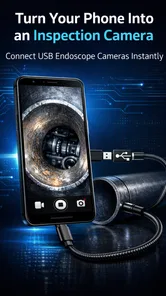
First things first, setting up the Endoscope Camera Connector is a breeze. You just need to connect your endoscope camera to your smartphone via USB or Wi-Fi, and voila, you’re ready to explore the unknown! The app interface is super user-friendly. Even if you're not tech-savvy, you'll find it easy to navigate through the features. The app supports a variety of camera resolutions, ensuring you get a clear and detailed view of whatever you're inspecting.
The connection is the part I would plan around before starting a job. An endoscope camera has to be compatible with the phone and the way it connects, so I would check the camera’s own instructions and test the pairing somewhere easy to reach first. That quick test can save frustration when the cable is already threaded into a tight gap. A phone connection is useful because the screen and controls travel with you, but the camera and its connection still determine what you can actually inspect.
Features that Stand Out
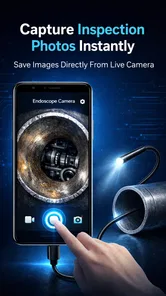
One of the standout features of this app is its ability to take snapshots and record videos in real-time. This means you can document your inspection process, which is great for sharing with friends or even a professional if you need advice. The app also boasts an adjustable LED light setting, which is crucial for illuminating those dark nooks and crannies. I found this particularly helpful when checking the plumbing under my sink.
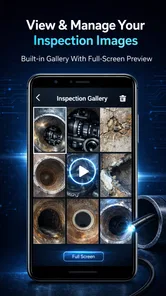
Another feature worth mentioning is the app's support for various camera angles. You can easily adjust the angle of view, which is perfect for getting those tricky shots. Additionally, the app allows you to save and organize your images and videos efficiently, so you never lose track of your findings.
More From Our News Desk

 Gmail
GmailGmail in a Busy Inbox: Who Benefits Most?
From first account to crowded workday, Gmail earns its place through dependable search and flexible sorting—but its best fit depends on how much inbox maintenance you can tolerate.

 Prime Video
Switching to Prime Video: What Changes in Your Viewing Routine
Prime Video can make a compelling second home for streaming, but switching means learning a different catalog, rental layer, and route from browsing to playback.

 Universal TV Remote Control
Universal TV Remote Control Works Best as a Reliable Backup
A phone remote earns its place through quick setup and reliable habits. Here is how to get more from Universal TV Remote Control—and where its limits show.

 Weather - By Xiaomi
Weather by Xiaomi Review: Clear at a Glance, Less Clear Up Close
Xiaomi’s weather app makes everyday forecasts quick to scan, but its calm surface can leave useful details and recovery paths harder to find than they should be.

 X
XX Under Pressure: Can It Recover When Posting Goes Wrong?
A resilience-focused review of X, examining setup, mistaken posts, interruptions, weak connections, and the gaps that matter when recovery needs to be dependable.

 Clash of Clans
Clash of Clans Is Won Between the Battles
Its raids are quick; its community is a long-term project of coordination, teaching, rivalry, and shared responsibility—with all the friction that entails.
Latest News



For a more useful record, I’d take a still image before moving the probe, then capture a short video only when movement explains what the still cannot. That makes it easier to compare a suspicious spot later without scrubbing through a long recording. I’d also label or sort saved material right after the inspection, while the location is fresh in my mind; otherwise, several similar-looking views of a pipe or cavity can become hard to distinguish. These are small habits, but they make the phone’s capture tools more valuable than simply pointing the camera and hoping to remember what appeared on screen.
Where a Phone-Based Inspection Helps
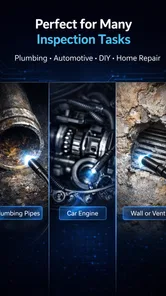
A realistic use is checking beneath a sink after noticing a damp patch: I could guide the camera toward joints and corners, use the light to see into the darker area, and save a view to show a plumber if I cannot identify the source. The same approach can help with a dropped object behind furniture or a quick look into an accessible part of a vehicle. It is best treated as a way to see and document, not as proof that a hidden space is safe or that a repair is unnecessary.
Compared with a flashlight and mirror, a connected endoscope can reach farther and provide an image that is easier to keep for later. Compared with a dedicated inspection monitor, using a phone may be convenient if the camera works with it, but it also means the phone is part of the setup and must remain close enough for the connection. For a one-off household check, that trade-off can make sense. For frequent professional inspections, someone who needs a purpose-built system may prefer equipment designed around that workflow.
There is also a useful distinction between looking around and making a decision. A phone image can help me locate a stain, obstruction, or loose-looking part, but perspective and lighting can make depth difficult to judge. I would use the view to decide what to inspect next or what to explain to a professional, not to assume that a component is sound simply because it looks fine from one angle. When a problem could affect safety or cause expensive damage, a qualified inspection is the better next step.
Making a small inspection easier to interpret
Before inserting the probe, I would clear enough space to keep the phone in a comfortable viewing position and arrange any needed lighting or tools within reach. That reduces the temptation to steer the camera while also juggling the phone. If I am looking under a sink, for example, I would first note which side of the cabinet I am facing and take a quick reference image before moving deeper. A consistent starting point makes the saved views easier to understand later.
For a longer inspection, I would work in short passes rather than trying to explore every direction in one continuous movement. Pause, capture a still, and then change the angle deliberately. This approach helps separate one area from another and makes it easier to retrace the route if the connection or picture becomes unreliable. It is a simple workflow choice, but it can prevent a confusing pile of similar clips and reduce unnecessary handling of the cable.
When the Connection Gets in the Way
If the picture disappears or the app does not show the camera, I would first pull the probe back to an open position and check the physical connection, then reconnect before trying the inspection again. This avoids forcing a cable deeper while troubleshooting and makes it easier to tell whether the problem is with the connection or the difficult angle. Testing the camera in an accessible spot before a longer task is another practical safeguard. I would not count on a stable view around every corner: movement, cable position, and the camera’s own compatibility can all affect a hands-on inspection.
When it does not connect, I would change one thing at a time: reseat the connector, check that the phone and camera are set up as their manufacturers intend, and try again in an open position. If the same problem persists, I would stop rather than keep moving the probe blind. A camera that is not displaying an image cannot guide a safe inspection, and repeated attempts in a cramped spot can turn a small inconvenience into a stuck or awkward cable.
Network-dependent setups deserve a little extra patience. If a particular camera relies on a wireless link, I would test the connection in the exact area where I plan to work, since walls, distance, and the phone’s position may affect the experience. With a wired setup, I would make sure the cable reaches without pulling the phone off a stable surface. These are not guarantees of perfect performance; they are practical checks that help identify whether the weak point is the setup or the space being inspected.
Because this is a camera-connection tool, I would also be deliberate about what I save and share. Inspection images can reveal private details of a home, so I’d keep only the pictures or clips that serve a purpose and review them before sending them to someone else. If I’m working in a rental or someone else’s property, I’d get permission before inspecting or sharing images. That is a simple data-conscious habit, particularly when the images seem routine at the time but include more of a room than intended.
Who Will Get the Most from It
Honestly, the app is a must-have tool for anyone who likes to keep their home in tip-top shape. It's not just for professionals; even hobbyists will find it incredibly useful. Whether it's inspecting your car engine, checking for leaks, or simply satisfying your curiosity about what's going on behind your walls, this app has got you covered.
I’d recommend it most to people who already have a compatible endoscope camera and want to use their phone as the viewing point. It is less suitable if you expect an app by itself to inspect hidden spaces, or if you need a guaranteed diagnosis rather than a visual check. The app is free and is rated for Everyone; it is listed in the Libraries & Demo area, which fits its practical, utility-like purpose better than entertainment. FastSoft develops it, and the current version is 14.0. Its average rating is 3.7 from around 7,300 ratings, with over 1,300 written reviews and more than 100,000 installs. Those figures suggest that it has found an audience, though I’d still judge it by whether it works with the specific camera I plan to use.
The best everyday fit is someone who occasionally needs to see around a corner and already owns the inspection camera. A renter checking an accessible space, a DIY-minded homeowner documenting a concern, or a hobbyist looking into a hard-to-see part of a project could all benefit from carrying the viewing screen they already use. By contrast, I would skip it if I had no compatible camera, wanted a complete inspection kit in one purchase, or needed a dependable professional workflow where interruptions would be costly.
One thing I really appreciate about this app is its reliability. I've used it multiple times and it hasn't let me down. The connection between the camera and the app is stable, and the image quality is consistently sharp. Plus, the app receives regular updates, which means the developers are actively working to improve user experience and add new features.
For someone deciding whether to try it, the key question is whether the camera they own can connect to their phone in the intended way. A free app can be a low-cost way to put existing hardware to use, but it cannot make an incompatible camera compatible. I would check the camera’s connection requirements before installing and starting a job, then test the arrangement before relying on it to inspect a place that is difficult to reach.
For me, the main decision is not whether a phone can make an inspection convenient, but whether the camera, connection, and task are a good match. I’d choose this over a flashlight for a narrow, awkward space where a saved image could help me explain what I found. I’d choose another setup if I needed equipment built for repeated, demanding inspections or if my camera could not connect reliably. The app was released on July 2, 2020, and its minimum Android requirement is 7.0, so it may suit older Android devices that meet that requirement, though camera compatibility remains important.
In conclusion, if you're looking for a practical, easy-to-use tool that enhances your smartphone's capabilities, this connector is definitely worth trying out. It's a small investment for a huge payoff in terms of convenience and functionality. So, go ahead, download it, and start exploring the hidden corners of your world!
My Connectivity Verdict
I see this app as a useful bridge between a compatible inspection camera and a phone, rather than a replacement for the camera or a specialist inspection system. Its appeal is the chance to view and capture hard-to-reach places on a device you already know how to use. The sensible approach is to test the connection first, work carefully, and treat saved footage as evidence to review or share—not as a final diagnosis. If that matches what you need, it is a practical tool to try; if dependable connectivity is essential for high-stakes work, I would choose equipment built specifically for that job.
Endoscope Camera Connector Frequently Asked Questions
What should I check before downloading Endoscope Camera Connector?
Endoscope Camera Connector is a free app in the Libraries & Demo category, developed by FastSoft. Before downloading, make sure your phone runs Android 7.0 or later and that you have an endoscope camera you intend to connect. The app’s purpose is to connect a phone with an endoscope camera, so having compatible hardware is an important part of getting started.
Is Endoscope Camera Connector suitable for beginners?
The app is intended to connect a phone with an endoscope camera, which makes it relevant for people who want to use their phone as a viewing screen during inspections. If you are new to this kind of setup, check that your camera and phone can work together before relying on it for a task. The app is rated for Everyone, so its content rating is suitable for a general audience.
What is the Endoscope Camera Connector app used for?
The Endoscope Camera Connector app is designed to connect your smartphone to various endoscope cameras. This allows users to view live video feeds directly on their mobile devices, making it ideal for inspections, repairs, and other tasks that require visual assistance in hard-to-reach areas. It's a handy tool for both professional and personal use.
Is the Endoscope Camera Connector app compatible with all smartphones?
The Endoscope Camera Connector app is generally compatible with most Android and iOS devices. However, some smartphone models may not support the app due to hardware limitations or software requirements. It's recommended to check the app's compatibility information on the download page or contact the developer for specific device compatibility questions.
What types of endoscope cameras can be connected using this app?
The app supports a wide range of endoscope cameras, including USB and Wi-Fi models. It works with various brands and models, enabling users to connect their preferred endoscope easily. For best performance, users should ensure their endoscope camera is compatible with the app, as detailed in the app's specifications.
Pros
- Easy to connect and set up with various devices.
- Provides real-time video streaming.
- Supports high-resolution imaging.
- Compatible with most USB and OTG cables.
- Portable and lightweight design.
Cons
- Limited compatibility with some older devices.
- Requires specific apps for full functionality.
- Short cable length may restrict movement.
- Image quality may vary with lighting conditions.
- Potential connectivity issues in certain environments.










