

Empower Driver
- 522.00
- 4.8
- Installs
- 100.00K
- Price
- Free

Screenshots
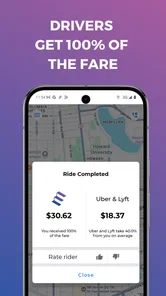
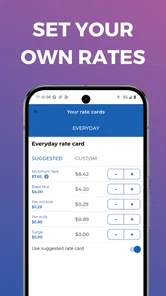
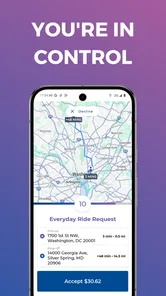
Analysis by Reviewed
I approached Empower Driver as a working driver rather than as another travel app to browse casually. That distinction matters. Its focus is not helping passengers discover places or compare holiday plans; it is built around the driver’s side of the journey. My overall impression is that it makes the most sense for people who want a driver-centered tool and are willing to judge each trip by its practical value, not by a long list of flashy extras.
The app comes from Yazam Inc and sits in the Travel & Local category. It is free to install, rated for Everyone, and has reached more than one hundred thousand installs. Those details suggest a fairly accessible starting point, especially for someone who wants to try the service without committing money upfront. Still, “free” should be read as the cost of downloading the app, not as a promise about earnings, trip availability, or every real-world expense involved in driving.
What using Empower Driver feels like in practice
The clearest way to understand the app is to think of it as a work companion. A driver opens it when preparing to accept or manage driving work, checks the information available for the current situation, and uses that information to decide whether the next trip fits their plans. That sounds simple, but the value of a driver app often comes from reducing small decisions during a busy day.
I found the driver-first approach more important than the basic label. Many travel applications are designed around the passenger’s questions: where to go, how to get there, or what a destination offers. Empower Driver reverses that viewpoint. The driver is treated as the primary user, so the useful question becomes, “Does this trip work for me right now?” That is a much more practical mindset for someone managing fuel, time, traffic, vehicle wear, and personal commitments.
A realistic example would be a driver who has a short window before picking up a child or attending an appointment. Instead of treating every possible trip as automatically worthwhile, the driver can evaluate whether accepting work would create an awkward detour or leave them too far from the next obligation. The app cannot remove those trade-offs, but a driver-focused workflow can make them easier to consider before a small decision becomes a much larger scheduling problem.
This is also where I think the app’s strongest idea appears: the driver’s time is part of the product. A trip is not only a route from one point to another. It is also the time spent reaching the pickup, waiting, completing the ride, and deciding what to do afterward. Anyone testing Empower Driver should develop the habit of looking beyond the immediate trip and asking where that trip leaves them next.
A useful tool for making calmer decisions
When I review a driver platform, I pay attention to whether it encourages rushed acceptance. Empower Driver’s driver-centered identity gives it a more useful starting point than a passenger-only travel app because it speaks to the person doing the work. The best use is not blindly following every prompt. It is using the available trip information as one part of a broader decision process.
More From Our News Desk

 Weather - By Xiaomi
Weather by Xiaomi Review: Clear at a Glance, Less Clear Up Close
Xiaomi’s weather app makes everyday forecasts quick to scan, but its calm surface can leave useful details and recovery paths harder to find than they should be.

 X
XX Under Pressure: Can It Recover When Posting Goes Wrong?
A resilience-focused review of X, examining setup, mistaken posts, interruptions, weak connections, and the gaps that matter when recovery needs to be dependable.

 Clash of Clans
Clash of Clans Is Won Between the Battles
Its raids are quick; its community is a long-term project of coordination, teaching, rivalry, and shared responsibility—with all the friction that entails.

 Android Auto
Android Auto Makes the Case for Quieter Car Software
The car interface is no longer judged by how much it can do, but by how quietly it helps. Android Auto shows what drivers now expect—and what still gets in the way.

 MobiOffice: Word, Sheets, PDF
MobiOffice: Transforming Mobile Productivity with Seamless Integration
MobiOffice: Word, Sheets, PDF is redefining mobile productivity with a surprising blend of functionality and innovation.

 EA SPORTS FC Soccer Mobile 26
EA SPORTS FC™ Mobile Soccer: Redefining Mobile Sports Gaming
Dive into EA SPORTS FC™ Mobile Soccer, where immersive gameplay and strategic depth transform mobile sports gaming.
Latest News



That process can be surprisingly concrete. Before starting a shift, I would decide what kind of work I actually want: short local trips, a route toward a particular area, or a limited period of driving. During the shift, I would compare each opportunity with that plan instead of allowing the app to dictate the entire day. This makes the tool more valuable for an independent driver who wants control, rather than someone looking for a completely hands-off system.
Another practical habit is to check the destination’s effect on the next hour, not just the current ride. A trip that appears convenient may end in an area where returning to a preferred zone is difficult. Conversely, a modest trip may be worthwhile if it places the driver close to home or near a regular destination. This kind of location strategy is easy to overlook when concentrating only on the next notification.
There is also a useful distinction between using the app as a primary work platform and using it as one option among several. Drivers who already work with other services may value the ability to compare opportunities and timing across their routine. However, comparison only helps when the driver can do it safely and without splitting attention while moving. I would treat the phone as something to check while parked, not as a screen to study in traffic.
Why the driver-first angle stands out
The store summary, “Drive Empower - Drivers are our customers,” captures the app’s central attitude, but the practical consequence is more important than the wording. A driver is not merely a vehicle attached to a passenger request. The driver has preferences, limits, and costs. That perspective makes the app more appealing to people who dislike systems that treat every available trip as equally attractive.
In my experience, this kind of approach is especially helpful for part-time drivers. A full-time driver may already have a detailed routine and may judge a platform by the depth of its operational tools. A part-time driver often needs something easier to fit around another job, family responsibilities, or a changing weekly schedule. The ability to approach each driving session with a clear personal boundary can be more valuable than a complicated collection of settings.
It may also suit drivers who are still learning their own working pattern. During the first few sessions, I would record simple observations outside the app: how long trips take in practice, which areas are comfortable to drive in, and whether certain destinations make it difficult to continue working. Empower Driver can then be used within that growing personal knowledge. The app is not a replacement for local experience; it becomes more useful when paired with it.
The rating is a positive sign as well. It holds a 4.8 average from around 3.3 thousand ratings, with roughly 520 written reviews. I would not treat those figures as proof that every driver will have the same experience, but they do indicate that many users have found the app worthwhile enough to rate. The more important question is whether its driver-centered design matches your own expectations.
Where the experience can become frustrating
The main limitation is not necessarily a missing button or a particular screen. It is the gap between a clean driver-focused idea and the messy reality of driving. An app can present an opportunity, but it cannot guarantee that the opportunity fits your costs, traffic conditions, personal schedule, or preferred area. Drivers who expect the app to make all those judgments for them may come away disappointed.
That means the app rewards active judgment. You still need to think about fuel, vehicle maintenance, unpaid movement between trips, parking, traffic, and the time required to reach a pickup. A driver who focuses only on the visible trip may overestimate its value. I would keep a simple personal record of driving time and expenses, then use that record to judge whether the work is worthwhile over several sessions rather than after one attractive-looking request.
There is a second trade-off involving attention. Driver apps are useful precisely when a person is on the move, but that is also when the phone can become a distraction. I would set up the app before leaving, keep the phone mounted safely, and only handle decisions when stopped. If the workflow requires frequent reading or tapping while driving, the problem is not just inconvenience; it becomes a safety concern. The right tool is one that supports a disciplined routine, not one that encourages constant screen checking.
Drivers who need extensive navigation, detailed accounting, or a broad set of fleet-management controls may also find that a dedicated alternative serves them better. Empower Driver’s appeal is its role as a driver-oriented work app, not the assumption that one application should replace every driving tool. I would be comfortable using it as part of a setup, while still relying on the tools I trust for navigation, budgeting, and vehicle records.
Another point worth considering is local suitability. A driver’s experience depends heavily on where they work, how much demand exists, and what kinds of trips are common there. The same workflow can feel useful in one area and less compelling in another. Before reorganizing your schedule around the app, I would test it during several different periods and compare the results with your existing routine. That is a better way to judge fit than relying on the rating alone.
Small habits that make the app more useful
My first recommendation is to define a stopping rule before opening the app. Decide how long you intend to drive, how far you are willing to move from your preferred area, and what kind of trip would make you end the session. This prevents a common problem with on-demand work: continuing simply because another request might appear.
My second recommendation is to judge trips by the complete chain, including the approach to pickup and the likely next position. A short ride is not automatically efficient if reaching the passenger takes a long time. A longer ride is not automatically better if it leaves you with an expensive or inconvenient return. Thinking in chains rather than isolated requests is one of the most useful ways to get more value from a driver-centered platform.
Third, I would separate app performance from business performance. If the interface feels smooth, that does not mean the shift was profitable. If a quiet session produces few opportunities, that does not necessarily mean the app itself failed. Keep those questions separate. Evaluate whether the app is easy to use, then evaluate whether the work available through your routine makes sense financially and personally.
Finally, protect the beginning and end of every shift. Before driving, confirm that the phone is charged, the route setup is comfortable, and your personal destination is clear. At the end, take a minute to note total time, fuel, and where the final trip left you. This makes the app part of a repeatable process instead of an isolated source of notifications.
Who should try it, and who should look elsewhere
I would recommend Empower Driver to a driver who wants a free entry point into a driver-focused service and prefers to make independent decisions. It is particularly interesting for part-time drivers, people testing a new driving routine, and users who care about being treated as the customer rather than as an invisible part of the platform.
It is less suitable for someone who wants guaranteed income, a fully automated schedule, or a single application that handles every aspect of professional driving. It may also be a poor fit for a driver who already has a highly optimized workflow and would gain little from adding another platform to the phone. In that case, the extra switching and attention may outweigh the potential benefit.
Passengers should also understand that this is not the normal choice for planning a holiday, discovering local attractions, or comparing sightseeing options. Its purpose is narrower and more work-oriented. If your goal is simply to find a route or explore a destination, a conventional navigation or travel app will usually be the more natural option.
Compatibility is reasonably broad for older devices because the current version, 2.19.3, requires Android 7.0 or later. That makes it approachable for drivers who are not using the newest phone. Even so, I would judge the experience on the actual device you plan to keep in the car. A phone that struggles with multitasking, loses battery quickly, or has an unreliable connection can make any driver workflow feel worse than it should.
My verdict after weighing the trade-offs
Empower Driver succeeds because it starts with a clear thesis: the driver deserves a service designed around the driver’s working reality. I like that emphasis. It encourages a healthier way to think about trip requests, where time, location, and personal plans matter alongside the immediate opportunity.
Its weakness is equally clear. The app cannot turn uncertain, location-dependent driving work into a predictable job, and it should not be judged as though it can. The driver still needs a plan, financial discipline, local knowledge, and safe phone habits. People expecting the platform to solve those issues automatically should choose a different kind of tool or adjust their expectations.
For me, the best recommendation is conditional but positive: try it if you want a driver-first option and are prepared to evaluate it over several real sessions. Use it deliberately, compare complete driving time rather than isolated trips, and keep your own records. With that approach, the free Travel & Local app from Yazam Inc has a sensible place in a part-time or independent driver’s toolkit. Its 4.8 average and growing user base make it worth investigating, but its real value comes from how well its driver-centered approach fits your own schedule and working style.
Empower Driver Frequently Asked Questions
Is Empower Driver free to download, and what devices can run it?
Empower Driver is free to download, so you can install it without paying an upfront app fee. It is available for Android devices running version 7.0 or later. Before downloading, check that your phone’s operating system meets this requirement and that you have enough storage and a dependable mobile connection for using the app while working.
Who develops Empower Driver, and what kind of app is it?
Empower Driver is developed by Yazam Inc and belongs to the Travel & Local category. Its store summary describes the service with the phrase “Drive Empower - Drivers are our customers,” reflecting its focus on the driver side of the Empower transportation platform. The app is intended for drivers rather than passengers looking to request a ride.
What is Empower Driver, and who is it designed for?
Empower Driver is the driver-side application for the Empower transportation platform. It is designed for professional and independent drivers who want to receive ride requests, manage trips, communicate with passengers, and monitor their driving activity from a mobile device. Before downloading it, drivers should confirm that Empower operates in their city and that they meet the platform’s vehicle, licensing, insurance, and background-check requirements.
What permissions does Empower Driver require?
Empower Driver may request access to location services, notifications, mobile data, and sometimes phone or camera functions depending on the features being used. Location access is particularly important because the app needs to show your position, match you with nearby requests, support navigation, and update trip status. Review each permission carefully and enable only what is necessary for reliable operation while driving.
How do drivers receive and manage ride requests in Empower Driver?
After signing in and going online, drivers can generally receive available ride requests through the app. The request information may include pickup details, estimated trip information, and passenger-related instructions. Drivers can accept or decline requests according to the platform’s rules, then use the trip screen to navigate to the pickup location, begin the ride, update its status, and complete the journey correctly.
Pros
- Simple interface makes trip and delivery details easy to check.
- Real-time notifications help drivers stay updated on new assignments.
- Built-in navigation can reduce the need to switch between apps.
- Earnings and completed-trip information are conveniently accessible.
- Useful status controls help keep driver availability organized.
Cons
- Requires a stable internet connection for reliable updates and dispatches.
- Battery usage may increase when location tracking runs continuously.
- Some features depend on the fleet or company using the platform.
- Notification delays can affect response times for time-sensitive jobs.
- The app may feel limited for drivers seeking advanced earnings tools.












