Email - Fast & Secure Mail
- 24.55K
- 4.5
- Installs
- 10.00M
- Price
- Free

Screenshots

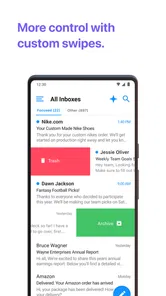

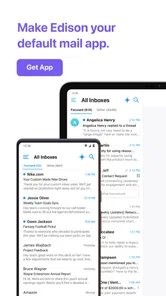
Analysis by Reviewed
I judge an email app less by how polished its inbox looks than by what happens when I need a message right now and the connection is unsteady. Email - Fast & Secure Mail is built for handling several accounts in one place, which can make everyday checking more convenient, but it still depends on the mail services and network access behind those accounts. That distinction matters: a tidy combined inbox helps me find my way around, while a delayed connection can still affect when messages appear or send.
When the connection becomes part of the job
On a normal day, I might glance at a personal Gmail account and a work Outlook account between errands, then search for a confirmation before arriving at an appointment. A single email app can reduce the account-hopping in that routine. The practical trade-off is that syncing can vary by provider and connection, so I would not treat a message that has not appeared yet as proof that nobody sent it. If timing matters, I check the relevant account again once the connection is stable.
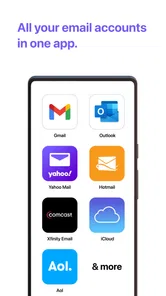
For anyone deciding whether to try it, Email - Fast & Secure Mail is a free productivity app from Edison Software. It works with common services including Gmail, Hotmail, Yahoo Mail, AOL, and Outlook. Its broad account support is useful if your inboxes are spread across providers, while someone who uses only one service and already likes that provider’s own app may not gain enough from switching. The app is rated for Everyone, and its established user base makes it a familiar option rather than an obscure experiment.
Small-screen routines and account choice
On a phone, combining accounts can be most helpful during short gaps: checking a delivery update on the bus, finding a meeting address while walking, or clearing a few messages before starting work. I would set up the accounts I actually use, then decide whether a unified view or checking one mailbox at a time suits me better. That choice matters because a combined inbox saves navigation, but it can also make personal and work mail feel like one stream. If you rely on clear boundaries, account-by-account checking may be the calmer routine.
A useful habit is to make notification choices deliberately after setup rather than letting every account interrupt you by default. I would keep alerts for time-sensitive mail and reduce attention to newsletters or routine notices where the app’s controls allow it. That makes a multi-account inbox more manageable without pretending that notifications can replace a quick check when a deadline is close.
What to do when mail seems stuck
The occasional provider-specific sync delay is worth keeping in mind. If a message seems missing, I first check whether the phone has a reliable connection, then refresh or reopen the mailbox and give the account a moment to catch up. For a message that must go out immediately, I would verify that it has actually appeared in the sent folder rather than assuming a tap completed the send. These simple checks are useful with any mobile email client, but they matter more when several providers are feeding one inbox.
Compared with using each provider’s separate app, this approach can save time and reduce switching. The provider’s own app may still be the better choice if you prefer its specific layout, account tools, or direct troubleshooting path. I would also avoid moving every mailbox at once: starting with a less critical account lets you learn how the combined view behaves before making it part of a work-critical routine.
More From Our News Desk

Weather by Xiaomi Review: Clear at a Glance, Less Clear Up Close

X Under Pressure: Can It Recover When Posting Goes Wrong?

Clash of Clans Is Won Between the Battles

Android Auto Makes the Case for Quieter Car Software

MobiOffice: Transforming Mobile Productivity with Seamless Integration

EA SPORTS FC™ Mobile Soccer: Redefining Mobile Sports Gaming
First Impressions Matter
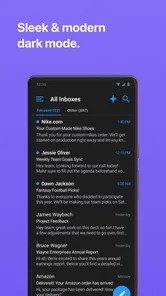
From the moment I installed Email - Fast & Secure Mail, I was impressed by its sleek and modern interface. Setting up my email accounts was a breeze, thanks to its seamless integration with major providers like Gmail, Yahoo, and Outlook. The user-friendly design is immediately apparent, making navigation through the app a cinch.
Features That Stand Out
One of the standout features of the app is its unified inbox. This allows me to view all my emails from different accounts in one place, saving me the hassle of switching between apps. The search function is super fast, which is a lifesaver when you're trying to find that one email from months ago.
The app also supports customizable notifications, so I only get alerted about the emails that matter to me. No more constant pings from spam or promotional emails! And speaking of spam, the spam filter is highly effective, ensuring my inbox stays clutter-free.
Security You Can Trust
In today's digital age, security is paramount, and the app doesn’t disappoint. The app offers end-to-end encryption for your emails, providing peace of mind that your communications are private and secure. Additionally, the app supports biometric login, adding an extra layer of protection.
Performance and Reliability
Performance-wise, the app is lightning fast and reliable. I experienced no lag or crashes, even with multiple accounts synced. It efficiently handles high volumes of emails without compromising on speed, which is crucial for those who rely heavily on email for work or personal communication.
If there's one thing to nitpick, it would be the occasional delay in syncing with certain email providers. However, this is a minor issue that doesn’t detract from the overall functionality of the app.
There is one practical wrinkle for people comparing email apps: the free download does not mean every option is necessarily free, since in-app purchases range from $0.99 to $129.99 per item. I would check the purchase details in the app before paying for anything and decide whether its everyday convenience is worth the extra cost to me. The current version is 1.66.02, and it requires Android 7.0 or later, a useful compatibility check before installing it on an older phone.
Choosing a setup that stays manageable
For a household with separate personal and shared addresses, the main benefit is being able to check those accounts from one place without maintaining a stack of email apps. I would still label the purpose of each mailbox in my own routine: for example, check the shared address at a set time, then switch to personal mail when I have a moment. That small boundary helps prevent a busy combined inbox from turning every incoming message into one undifferentiated queue.
There is also a useful middle ground between putting everything in one stream and keeping every provider in its own app. I would add the accounts I check often, but leave a rarely used address in its existing app until there is a reason to bring it over. That keeps the main view focused and makes it easier to notice whether a sync problem is tied to one provider rather than the whole setup. For someone juggling multiple inboxes, this is a more practical starting point than importing every address on day one.
Search, triage, and the cost of a single inbox
Search is most valuable when I remember the subject, sender, or rough timing of a message but not which account received it. A combined search can cut down the mental work of guessing the right mailbox first. I would use it to find a booking confirmation or an older work thread, then check the account context before replying. The convenience of one search should not erase the distinction between personal and professional conversations.
A unified inbox also changes how I triage. If I am clearing routine mail quickly, I can scan across accounts in one pass, but that can make a work message appear alongside a personal newsletter and invite a careless reply from the wrong address. Before sending anything sensitive or work-related, I would pause to confirm the sender account shown in the compose view. That extra glance is a small but worthwhile habit in any multi-account client.
Where it fits among email alternatives
Compared with a provider’s own app, this one makes the strongest case when the account mix is the problem. If Gmail and Outlook are both part of my day, having a shared place to check them is more useful than repeatedly switching applications. But a dedicated provider app may offer a more familiar experience for someone who relies on its particular organization or account-specific controls. Convenience is not automatically an upgrade if it removes a tool or workflow you depend on.
Compared with a desktop email program, a phone client is better suited to quick checks, short replies, and finding a message while away from a desk. I would not expect a small-screen inbox to replace a deliberate desktop session for lengthy correspondence or careful sorting. The most sensible arrangement may be to use this app for mobile access while keeping a provider’s app or desktop workflow for tasks that need more focused handling.
Connectivity, recovery, and careful sending
When I am moving between Wi-Fi and mobile data, the important question is not whether the inbox looks current but whether the specific action I just took has completed. If a reply is urgent, I wait for it to appear in the sent folder; if a new message is missing, I check the account directly once the connection settles. I would avoid repeatedly tapping send while a connection is unreliable, because that can leave me uncertain about whether the message went through.
For a trip or a long commute, I would prepare while connected: open the mailbox, locate any messages I know I will need, and make sure key details are easy to find before leaving. This is not a promise that mail will remain available without a connection; it is simply a sensible way to reduce last-minute searching when service is patchy. If I need guaranteed access to a particular detail, I would keep an appropriate copy somewhere I can reach reliably rather than relying on a fresh inbox sync.
Data-conscious use is mostly about controlling how often the phone and accounts need attention. I would limit unnecessary notifications and avoid opening the app repeatedly just to see whether something changed when no reply is expected. For a large archive, searching with a specific sender or subject in mind is more practical than scanning long lists on a small screen. These habits make mobile email less distracting and can be helpful when network access or data is limited, without assuming the app has a special offline mode.
Who should give it a try
I think the app is best for people who check several supported accounts regularly and want one mobile starting point for them. It is also a reasonable fit for someone who often needs to find a message quickly while away from a computer, provided they are comfortable checking which account they are using before replying. The combination of a unified inbox, search, and notification controls addresses everyday friction rather than asking users to rebuild how email works.
I would skip it if I only use one mailbox and already find that provider’s app simple, or if I depend on provider-specific functions that I do not want to give up. It may also be a poor fit for anyone who strongly prefers a strict separation between personal and work mail and knows that a combined list will make that boundary harder to maintain. In those cases, separate apps can be a feature, not an inconvenience.
Final Thoughts
Overall, this is a strong choice for anyone looking to manage email efficiently and securely. Its combination of an approachable design, practical multi-account handling, and useful inbox tools makes it stand out in a crowded market. Whether you're a professional who needs to keep several mailboxes organized or someone who simply wants fewer app switches, it is worth considering. I would skip it if I depend on provider-specific tools or want every account kept in a separate app, and I would test an important mailbox before relying on it for urgent work. The app has a 4.5 average rating from around 304,000 ratings, with more than 10 million installs, but the best test is whether its workflow fits yours. If you want one place to check several supported accounts, give it a try; just keep provider sync delays in mind and confirm time-sensitive sends.
Email - Fast & Secure Mail Frequently Asked Questions
Is Email - Fast & Secure Mail suitable for everyday email use?
Email - Fast & Secure Mail is a productivity app built around accessing email from a mobile device. It works with several familiar email services, including Gmail, Hotmail, Yahoo Mail, AOL, and Outlook, so it may suit people who want to manage supported inboxes through an email-focused app. Whether it fits your routine depends on the services you use and the way you prefer to handle email.
Can I download Email - Fast & Secure Mail for free, and are there purchases?
The app is free to download, and optional in-app purchases are available. Those purchases range from $0.99 to $129.99 per item, so it is worth checking the purchase details in the app before choosing anything. You can start with the free download and decide whether the app meets your needs before considering any optional purchases.
Is Email - Fast & Secure Mail compatible with my device?
Email - Fast & Secure Mail is available for devices running Android 7.0 or later. It is a productivity app from Edison Software, and its simple email-focused description makes its purpose clear: bringing email into a dedicated mobile app. Before downloading, check your device’s operating system version so you can confirm that it meets the minimum requirement.
Which email services can I use with Email - Fast & Secure Mail?
The app works with Gmail, Hotmail, Yahoo Mail, AOL, and Outlook email accounts. This makes it a practical option if your inbox is hosted by one of these services and you would like to access it through a single email app. Email - Fast & Secure Mail is free to download, with optional in-app purchases ranging from $0.99 to $129.99 per item.
What features does Email - Fast & Secure Mail offer?
Email - Fast & Secure Mail provides a comprehensive suite of features designed for efficiency and security. Users can manage multiple email accounts from one interface, enjoy a user-friendly design, and access strong spam filters. The app supports push notifications, customizable alerts, and offers end-to-end encryption to protect your emails. Additionally, it includes calendar integration and file attachment support, making it a great tool for personal and professional use.
Pros
- User-friendly interface
- easy to navigate.
- Supports multiple email accounts seamlessly.
- Fast email syncing and notifications.
- Advanced security features for privacy.
- Customizable settings for personalized use.
Cons
- Advertisements can be intrusive.
- Limited features in free version.
- Occasional syncing issues reported.
- Some users experience app crashes.
- Complex setup for non-tech users.











