Email: Fast, Manage All Mails
- 781.00
- 4.6
- Installs
- 10.00M
- Price
- Free

Screenshots





Analysis by Reviewed
Before installing Email: Fast, Manage All Mails, I’d set one modest goal: bring your everyday email accounts together and complete one useful task, such as replying to a message without switching between apps. That’s the app’s clearest appeal as a productivity tool. It is free, developed by BizApp Innovators, and aimed at an Everyone audience; its listing shows a 4.6 average from around 65,000 ratings and over 10 million installs. Those figures suggest a widely used option, but your own experience will depend on whether its account handling fits your routine.
What to expect from a combined inbox
The basic promise is convenience: several email accounts can be handled in one place rather than through separate provider apps. That can make a real difference if you check a personal address alongside a work or shopping inbox. It does not automatically make every account easier to manage, though. If you rely on a provider’s specialized tools or distinctive layout, a combined view may feel less tailored than its dedicated app.
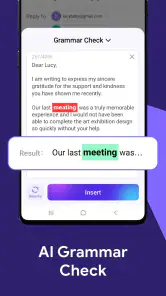
I’d treat the AI-assisted writing as a starting point, not a substitute for judgment. For a routine reply, a suggested draft may help me get past a blank screen; before sending, I’d still check names, dates, attachments, and tone. That small review matters most when a message is sensitive or sounds unlike me. The app’s current version is 1.4.9, and it requires Android 6.0 or later, making compatibility worth checking before you plan to move your daily email routine over.
Getting set up and reaching the first useful result
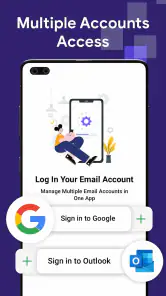
On first opening, take the account setup one address at a time. Use the sign-in flow for the account you want to test, then confirm that its messages appear before adding more. I find this approach less confusing than connecting every address at once: if something looks unexpected, you know which account to check first. Start by opening a recent, low-stakes email and sending a short reply. That gives you a practical test of the central workflow before you depend on the app for something urgent.
A realistic first win might be answering a delivery question while you’re away from your desk, then checking your other inboxes from the same app instead of reopening several mail clients. If your inboxes are already busy, begin with one account and keep the original provider app available until you’re comfortable. This is especially sensible for work email, where an incorrect recipient or missed thread can matter more than the convenience of a unified view.
Where the convenience can fall short
A single inbox can save app switching, but it can also blur boundaries. I’d keep an eye on which address is selected before replying, especially when a personal message and a work conversation sit close together. Treat account identity as part of the send check, just like the recipient and message text. If you organize your day around provider-specific labels, folders, or workflows, compare those tasks directly before making this your only email app.
The same caution applies to AI suggestions: speed is useful for routine wording, while accuracy and personal context remain your responsibility. I wouldn’t paste sensitive details into a suggested draft without considering whether that is appropriate. A dedicated provider app may be a better fit if its particular features are essential to you; this app makes most sense when the main problem is managing several accounts in one place.
You May Like

Clash of Clans Is Won Between the Battles

Android Auto Makes the Case for Quieter Car Software

MobiOffice: Transforming Mobile Productivity with Seamless Integration

EA SPORTS FC™ Mobile Soccer: Redefining Mobile Sports Gaming

How Microsoft OneDrive Became a Mobile Productivity Giant

How Google Translate Breaks Language Barriers Effortlessly
All-in-One Email Management
One of the standout features of Email: Fast, Manage All Mails is its ability to consolidate all your email accounts into one seamless interface. Whether you're using Gmail, Yahoo, Outlook, or any other service, this app lets you view and manage all your emails without the hassle of switching between different apps. It's like having a personal assistant for your inbox!
User-Friendly Interface
Let me tell you, the interface is as smooth as butter. The developers really nailed it with their intuitive design, making it easy for anyone to navigate through their emails. I especially appreciated the customizable themes, which allowed me to personalize the app to my liking. Whether you're a fan of dark mode or prefer a lighter, brighter look, the options are all there.
Efficient Email Sorting
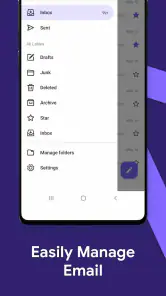
Another feature that caught my eye is the app's smart sorting capabilities. It automatically categorizes emails into different folders, so you can quickly find what you're looking for. The app uses advanced algorithms to prioritize important emails and filter out the spam, which means you spend less time sifting through junk and more time focusing on what truly matters.
Security and Privacy
In today's digital age, security and privacy are top concerns for anyone using email. The app boasts end-to-end encryption, ensuring that your emails stay between you and the sender. It's reassuring to know that your sensitive information is being handled with care. Plus, the app regularly updates its security protocols to protect against the latest threats.
Overall, Email: Fast, Manage All Mails offers a comprehensive solution for anyone looking to streamline their email management. With its user-friendly interface, smart sorting features, and robust security measures, it stands out in the crowded field of email apps. If you're tired of the chaos in your inbox and want to regain control, I highly recommend giving this app a try.
Making the switch at your own pace
For a first-time user, I’d avoid treating installation as an all-or-nothing move. Try it first for messages you can comfortably revisit, and keep using your usual mail app for anything time-critical while you learn how the combined inbox behaves. If you find yourself repeatedly returning to a provider’s app for routine tasks, that is useful evidence that consolidation may not be worth the extra step for your particular setup.
It is a better match for someone who values one place to check multiple addresses and wants help drafting ordinary replies. It is less compelling for a person who uses only one account and already likes that provider’s app, or for anyone who needs a very specific provider workflow to be front and center. The free price makes a low-commitment trial practical, but convenience should be judged by whether it reduces friction in your actual day, not simply by the number of accounts it can bring together.
A practical way to judge the fit
After your first reply, try a second small test: find an older message you know is in one of your accounts, then check whether the app’s organization makes it easy for you to locate and act on it. This tells you more than browsing the interface does. If sorting helps you distinguish useful mail from clutter, keep testing with another account. If the categories don’t match how you think about your messages, rely on your familiar provider app instead of forcing a new routine.
One question worth answering early is whether you can comfortably tell which account you’re viewing before sending. Make that a habit whenever you switch between addresses. Another is whether AI writing genuinely saves you time: compare a suggested draft with the reply you would have written yourself, and edit anything that feels generic or too formal. These quick checks help you decide whether the app is a dependable daily hub or simply a handy secondary inbox.
Choosing the right role for the app
I’d think of this as a practical hub rather than a reason to abandon every existing mail tool immediately. If you handle several addresses that mostly need reading, basic organization, and everyday replies, combining them can make checking mail feel less fragmented. It may be particularly useful for someone who manages a personal account and a small side-business inbox, or for a household that wants to keep shopping and personal correspondence visible without opening separate clients.
By contrast, people who spend much of the day handling complex work threads may prefer a dedicated provider app if its labels, search habits, or account-specific controls are central to their process. A single-account user may also gain little from consolidation and could find the provider’s own app more direct. The useful comparison is not which client has the longest feature list; it is whether the combined view reduces the number of small interruptions in your real routine.
A calmer daily email routine
One way to make the combined inbox more useful is to assign it a narrow job at first. For example, use it to scan for messages that need a quick response, then handle a complicated conversation in the provider app you already trust. That division avoids forcing every task into one interface before you know how its organization suits you. It also gives you a clear test: if the app reliably helps you catch ordinary messages across accounts, it has earned a place in your routine.
For a realistic workday, imagine checking messages between errands. You could review a personal note, spot a delivery update, and draft a brief response without moving between mail apps. Later, when a work conversation requires careful context, you can switch to the established client rather than rushing a detailed reply on a small screen. I like this gradual approach because convenience should not come at the cost of overlooking which conversation or sender you are dealing with.
Questions to settle during your trial
Before relying on it for important mail, I’d check whether the accounts you actually use connect and display messages in a way that makes sense to you. Then test a reply from each address, paying attention to the sender identity shown before you send. This is a simple, concrete way to answer the most important setup question: will the app make it clear which account is active when you need to act?
I’d also test how you find an older message, not just how the newest email appears. Search or sorting is only helpful if it fits the way you remember and retrieve information. If the app’s automatic organization makes a receipt or ongoing conversation harder for you to locate, that is a meaningful trade-off, even if the general inbox looks tidy. Keep the original client available until those everyday checks feel dependable.
My recommendation
Email: Fast, Manage All Mails is most appealing when switching between inboxes is the part of email that slows you down. Its combination of account consolidation and AI-assisted writing gives a newcomer a clear place to begin: connect one address, verify a message, and send a straightforward reply. The app has a 4.6 average and around 781 written reviews, but I’d use those as context rather than a guarantee that its workflow will suit every account or user.
My advice is to judge it by a few ordinary tasks rather than by a quick tour: read across your accounts, locate a message you need, and send a simple reply from the intended address. If those steps feel clear and save you from app-hopping, it could become a useful everyday option. If account-specific controls or a familiar provider layout matter more, keeping your existing mail app as the main tool is a perfectly sensible choice.
Email: Fast, Manage All Mails Frequently Asked Questions
Can I use Email: Fast, Manage All Mails on an iPhone or iPad?
Email: Fast, Manage All Mails is presented as an Android app, so check that you are viewing the version intended for your device before downloading. If you are choosing an email app for an iPhone or iPad, make sure it is available for your specific platform rather than assuming an Android app will run on iOS. This helps avoid installing an app that is not compatible with your device.
Who develops Email: Fast, Manage All Mails?
Email: Fast, Manage All Mails is developed by BizApp Innovators. Knowing the developer can help you distinguish this app from other email tools with similar names when searching for it. It is a productivity app designed to bring email access together in one place, with AI-assisted writing and an emphasis on speed. Check the app name and developer before downloading so you select the intended app.
Is Email: Fast, Manage All Mails free to download, and what devices can run it?
Email: Fast, Manage All Mails is a free productivity app from BizApp Innovators. It runs on Android devices with version 6.0 or later, so it is worth checking your device’s operating system before downloading. The app is rated for Everyone, making its stated age rating suitable for a broad audience. You can use these details to decide whether it fits your device and needs.
What features does the Email: Fast, Manage All Mails app offer?
The Email: Fast, Manage All Mails app offers a comprehensive suite of features designed to streamline your email management. Users can integrate multiple email accounts into one unified inbox, utilize powerful spam filters, and enjoy a user-friendly interface for both reading and composing emails. Additionally, the app supports advanced search functions, push notifications, and customizable alerts to ensure you never miss important emails. Its store summary also highlights AI-assisted email writing and a focus on speed, which may help when composing messages or keeping up with a busy inbox.
Is the Email: Fast, Manage All Mails app secure?
Yes, the Email: Fast, Manage All Mails app prioritizes user security by implementing robust encryption protocols to protect your information. The app also offers two-factor authentication to add an extra layer of security. Regular updates are provided to fix vulnerabilities and enhance the app's security features, ensuring that your emails and personal data remain safe from unauthorized access. As with any email app, it is sensible to use a strong password and keep your device protected.
Pros
- Unified inbox for multiple accounts.
- High-speed email synchronization.
- Customizable notifications.
- User-friendly interface.
- Supports various email clients.
Cons
- No offline mode available.
- Limited advanced features.
- Occasional sync issues.
- Ads in free version.
- No dark mode option.

- Category
- Productivity
- Version
- 1.4.9











