Elevate - Brain Training Games
- 50.02K
- 4.6
- Installs
- 10.00M
- Price
- Free

Screenshots



Analysis by Reviewed
If you’re opening a brain-training app for the first time, it helps to know what kind of experience you’re signing up for. Elevate - Brain Training Games is an education app from Elevate Labs built around short, interactive exercises in areas such as language and math. I like the idea of having several kinds of challenges in one place, especially when I want a more purposeful break than scrolling through a feed. It’s free to download, rated Everyone, and has a 4.6 average from around 501,000 ratings, so it’s clearly found a large audience.
What to expect from the exercises
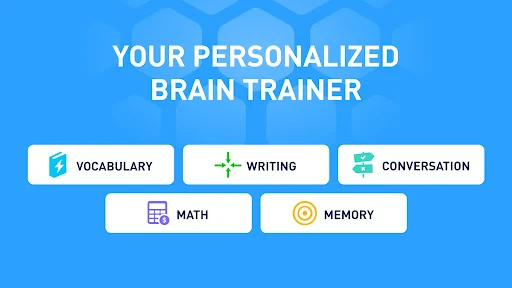
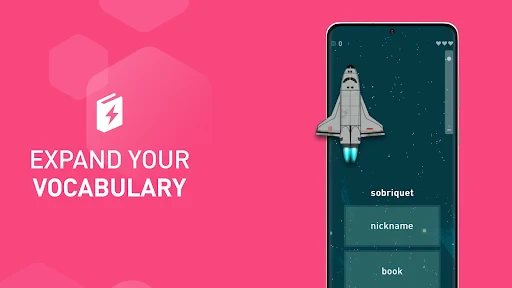
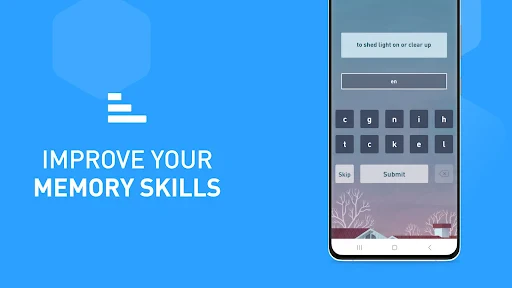
The app’s main appeal is variety: activities can touch on reading, writing, grammar, vocabulary, math, and memory rather than asking you to repeat one puzzle format. That makes it easier to find a type of challenge that suits your mood. I’d think of it as a structured practice routine, not a replacement for reading, studying, or professional support if you have a specific learning or memory concern.
Compared with a basic puzzle app, Elevate gives the exercises a more learning-oriented frame and presents performance feedback. Compared with a focused language or arithmetic course, it spreads attention across several skills instead of following one subject in depth. That breadth is useful if you want variety, but it may frustrate you if your goal is to master a particular topic through a carefully sequenced curriculum.
Getting started without overthinking it
On your first visit, follow the opening prompts and try the initial assessment at a comfortable pace. Treat it as a starting point, not a verdict on your ability: a result can reflect how alert you feel that day as much as what you know. Once the app suggests activities, try a small session before deciding whether its style works for you. The current version is 5.218.0, and the app requires Android 9 or later.
A practical first-session goal is simply to complete an exercise carefully and notice what kind of feedback it gives you. Don’t rush to chase a high score. If a task feels unfamiliar, read its instructions again and focus on understanding the rule before trying to go faster. That approach makes the first success feel earned, and it gives you a clearer sense of whether you enjoy this kind of practice.
How I’d fit it into an ordinary day
I’d use Elevate in a small gap that already exists: while waiting for an appointment, for example, rather than promising myself a long study session I may not keep. One useful habit is to pick a consistent cue, such as finishing lunch, and open the app then. If a reminder helps you remember, keep it; if notifications become another demand, turn the habit into a time you choose yourself. Regularity matters more than turning a short exercise into a test of willpower.
One non-obvious trade-off is that variety can make it tempting to chase whichever activity feels easiest. I’d occasionally choose a less comfortable exercise, but not every day; the point is useful practice, not making every session unpleasant. Also, treat rising scores as feedback about performance within the app, not proof that every real-world skill has improved. For broader learning, pair an activity with something practical, such as applying a vocabulary word in a message or checking a calculation in a real task.
More From Our News Desk

Clash of Clans Is Won Between the Battles

Android Auto Makes the Case for Quieter Car Software

MobiOffice: Transforming Mobile Productivity with Seamless Integration

EA SPORTS FC™ Mobile Soccer: Redefining Mobile Sports Gaming

How Microsoft OneDrive Became a Mobile Productivity Giant

How Google Translate Breaks Language Barriers Effortlessly
Making the first session useful
A common first-time question is whether you need to be good at puzzles before starting. I don’t think so. The more useful starting point is patience with the instructions: some exercises ask you to respond quickly, while others reward careful reading or spotting a pattern. If your first result feels uneven, try another activity before deciding that the whole app is or isn’t for you. A single type of task can be a poor sample of a collection that spans words, numbers, and memory.
I’d also avoid treating the opening assessment as a school exam. Take it when you can give it reasonable attention, and don’t compare a tired, interrupted session with a later one as though the difference were a precise measure of progress. A helpful workflow is to notice which instruction you misunderstood, retry with that rule in mind, and then see whether the exercise feels clearer. That small adjustment is a more concrete early win than chasing a particular score.
A Dive into the World of Elevate
When I first opened the Elevate - Brain Training Games, I was greeted with a sleek and user-friendly interface that immediately made me feel like I was in good hands. The app promises to improve your focus, processing speed, and memory, among other cognitive skills. It starts with a quick test to gauge your current skill levels and then customizes a training program just for you. How cool is that?
Engaging Games and Exercises
The games in Elevate are not just fun—they're addictively rewarding. I found myself particularly hooked on the reading and writing exercises, which are designed to improve comprehension and eloquence. Each section feels like a mini-challenge, and there's nothing quite like the satisfaction of seeing your progress chart climb upwards.
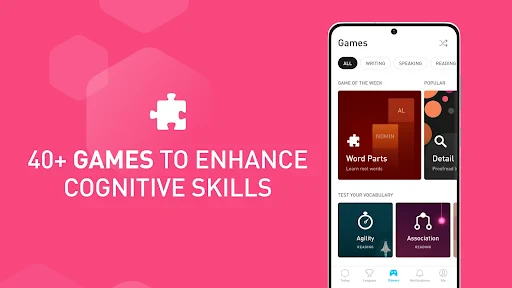
One of the things that struck me most was the variety. The app doesn’t just stick to one type of exercise. From math to language, each game targets different aspects of brain function. This keeps things fresh and ensures you're getting a well-rounded mental workout. Plus, the app gives you immediate feedback, so you always know what areas need a little extra attention.
Customization and Tracking
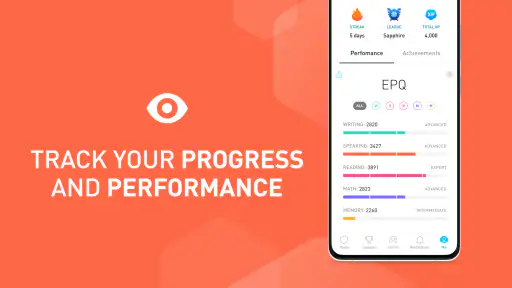
Customization is where Elevate really shines. The app adjusts its difficulty based on your performance, ensuring that you're always being challenged just the right amount. It feels like the app is learning with you, which is pretty impressive. And for those who love data (like me!), the performance tracking is a dream. You can see detailed statistics on your strengths and weaknesses, and even compare your progress over time.
What's even better is that Elevate sends you reminders to train daily, making it easy to build a habit. I found these little nudges quite helpful, especially on those days when my motivation was lacking. It’s this attention to detail that makes the app not just a tool, but a companion in your journey to better cognitive health.
Using feedback without overreading it
Tracking is most useful when I treat it as a prompt for what to try next, rather than a judgment of my general ability. If a performance chart highlights a weaker area, I can use that as a reason to revisit a related exercise and pay closer attention to its instructions. It doesn’t tell me whether I’ll remember a name at work or calculate a bill faster in real life; those outcomes depend on practice beyond the app, too.
There’s a practical trade-off in checking progress often. Looking at feedback can help me stay engaged, but checking after every small session can make normal ups and downs feel more important than they are. I’d review it occasionally, then choose one modest focus for the next few sessions. That makes the tracking actionable and keeps the app from turning into a scoreboard I feel obliged to satisfy.
Final Thoughts
All in all, Elevate is more than just a brain training app—it's an investment in your mental agility. Whether you're looking to sharpen your skills for professional reasons or just want to keep your brain in top shape, this app has something to offer everyone. The combination of engaging content, personalized programs, and the ability to track your progress makes it a standout choice in a crowded market.
If you're ready to take your brain fitness to the next level, give Elevate a try. It's like having a gym for your mind, right in your pocket. And who knows? You might just find yourself looking forward to those daily training sessions as much as I did!
Choosing the right role for the app
For someone who wants an easy way to add short, varied challenges to the day, the mix of activities is the main reason I’d recommend trying Elevate. It can suit a student who wants a change of pace between study blocks, or an adult who enjoys word and number puzzles but wants feedback alongside them. A realistic routine might be opening it after lunch, completing an exercise while waiting for a meeting, then putting the phone away rather than stretching a quick break into a long session.
It is less suitable if you want a quiet, unscored puzzle with no performance tracking, or if you need a proper course that teaches a subject from basics through advanced material. In those cases, a conventional puzzle game or a dedicated language, math, or writing course is a better match. Elevate sits between those options: broader than a single-subject learning tool, but more directed than a collection of casual puzzles.
Keeping the routine flexible
One easy mistake is to turn a reminder into a promise that you must complete a full routine every day. I’d use the nudge as an invitation, not a streak obligation. On a busy day, a brief visit can be enough to keep the habit familiar; on a day when I’m distracted, skipping is more sensible than tapping through exercises without paying attention. The app is most valuable when I’m mentally present for the task, not merely recording that I opened it.
If you’re choosing between this and studying from a book or course, think about the kind of result you want. The app can make practice feel approachable and give quick feedback, while a lesson or workbook is better for building a complete explanation of a topic. I’d use Elevate as a supplement: try an activity, then carry its lesson into something real, such as revising a sentence or checking a calculation. That keeps the screen-based practice connected to a purpose without expecting it to do all the teaching.
Costs, access, and a sensible next step
The app has over 10 million installs, but popularity doesn’t mean every exercise will suit every learner. If you mainly want a relaxing game with no emphasis on scores or self-monitoring, a conventional puzzle app may feel lighter. Likewise, if you need detailed lessons in a school subject, a dedicated learning course is likely a better fit than a broad set of short challenges.
There is also a cost decision to keep in mind. Elevate is free to download, while in-app purchases range from $0.99 to $399.99 per item. I’d explore the free experience first and check the purchase details in the app before committing to anything; the wide range makes it sensible to confirm exactly what an offer includes rather than assuming every exercise or option is covered.
For a first-time user, the most reassuring measure of success is not a dramatic score jump. It’s finding one or two activities you understand, enjoy, and can return to without pressure. Elevate works best for curious adults and students who like quick feedback and mixed practice. If that sounds like you, start gently, use the results as a guide rather than a label, and keep the exercises in perspective: they can make a focused break more engaging, but real-world learning still comes from using the skills beyond the screen.
Elevate - Brain Training Games Frequently Asked Questions
Is Elevate suitable for someone who wants short, varied practice rather than one long lesson?
Elevate centers on interactive math, word, grammar, vocabulary, and memory puzzles, making it a fit for people looking for variety in their cognitive practice. Its daily training approach is intended to provide a structured routine rather than a single extended lesson. If you prefer focused activities that challenge different skills, the mix of exercise types may appeal to you.
Who develops Elevate, and what kind of app is it?
Elevate is an education app developed by Elevate Labs. It uses fun puzzles and games focused on math, words, grammar, vocabulary, and memory to support cognitive-skill practice. The app is free to download, and its content rating is Everyone. Its emphasis is on interactive training, so it is best approached as a learning and practice app rather than as a conventional game.
Can I use Elevate offline, or do I need an internet connection?
Elevate is built around daily personalized training, games, and progress tracking, so an internet connection may be needed for some parts of the experience. If you expect to use it while traveling or away from Wi-Fi, check that the exercises you want are available before going offline. The app focuses on math, word, grammar, vocabulary, and memory puzzles.
Is Elevate - Brain Training Games free to download?
Elevate is free to download, and it offers both free and premium subscription options. The free version provides limited access to games, while in-app purchases range from $0.99 to $399.99 per item. If you plan to use the premium features, review the available purchase options in the app before deciding which training setup suits you.
What is Elevate - Brain Training Games and how does it work?
Elevate - Brain Training Games is an educational app designed to improve focus, speaking abilities, processing speed, and more through daily customized games. The app creates a personalized training program that adjusts over time to maximize results. Users engage in a variety of exercises that challenge cognitive skills, helping them track their progress and achieve mental growth.
Pros
- Enhances cognitive skills effectively.
- Interactive and engaging user interface.
- Personalized training sessions.
- Tracks progress with detailed stats.
- Offers a wide range of exercises.
Cons
- Requires subscription for full access.
- Can be time-consuming for busy users.
- Limited features in free version.
- May not suit all learning styles.
- Occasional technical glitches.
- Category
- Education
- Version
- 5.218.0











