Eko: Digital Stethoscopes
- 340.00
- 4.9
- Installs
- 100.00K
- Price
- Free

Screenshots
Analysis by Reviewed
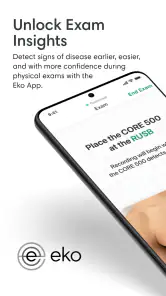
I approached Eko: Digital Stethoscopes as a medical app rather than a general wellness tool, and that distinction matters from the first use. Its purpose is to work alongside compatible Eko hardware and make the physical examination more connected and easier to review. The app is developed by Eko Health, Inc, and its store summary, “Amplify Your Physical Exam,” is a fair description of the role it aims to play: it adds a digital layer to listening-based examination instead of trying to replace clinical judgement.
My overall impression is that this is most useful when the phone is part of an established clinical routine. It can make an examination easier to document, revisit, or discuss, but it is not the sort of medical app I would recommend downloading casually and expecting it to function as a standalone diagnostic instrument. The hardware relationship, the quality of the surrounding workflow, and the way a clinic handles connectivity all shape the experience.
How the connected examination feels in practice
The most important thing to understand is that Eko sits between a traditional stethoscope and a broader digital record-keeping workflow. With an ordinary acoustic instrument, the examination is immediate and private: place it, listen, interpret, and move on. A connected setup introduces another layer. The sound can become easier to handle on a phone, but the phone also becomes part of the examination itself.
That change is valuable in situations where a clinician wants to pay closer attention to a finding or communicate what was heard. It can also make teaching more practical, because the person listening is not limited to a single moment at the bedside. Still, the app does not turn an uncertain sound into a certain diagnosis. I found it more helpful as an aid to attention and communication than as an authority.
The app belongs to the medical category, carries an Everyone content rating, and is free to install. Those details may make it appear approachable to any phone owner, but the practical audience is narrower. A compatible Eko device and an appropriate clinical purpose are central to getting value from it. Without that context, the app is unlikely to offer much reason to remain installed.
The current release is version 5.48.0 and requires a phone running at least operating system version 12. That requirement is worth checking before planning a deployment across a team. A clinic with mixed or older devices may discover that the newest phone is ready while an older work handset is not. In a personal setting, the operating-system requirement is a small detail; in a shared clinical environment, it can affect consistency.
When a network improves the workflow
Connectivity changes the experience most when an examination needs to move beyond the person holding the phone. A connected workflow can be useful during supervision, consultation, or education because the examination is no longer confined to the clinician’s memory of a brief sound. The benefit is not simply “more technology.” It is the ability to make a moment easier to revisit or explain when the situation calls for it.
More From Our News Desk

Clash of Clans Is Won Between the Battles

Android Auto Makes the Case for Quieter Car Software

MobiOffice: Transforming Mobile Productivity with Seamless Integration

EA SPORTS FC™ Mobile Soccer: Redefining Mobile Sports Gaming

How Microsoft OneDrive Became a Mobile Productivity Giant

How Google Translate Breaks Language Barriers Effortlessly
That is especially relevant for a clinician who is still refining listening skills. A senior colleague may be able to discuss what was heard, why it mattered, and what should be checked next. In that context, the app supports a conversation around the examination. It does not remove the need for the conversation, and it should not be treated as a shortcut around training.
Network-dependent moments also introduce a practical trade-off. If the workflow expects a connection at the exact time a patient is being examined, weak coverage or a congested network can become a distraction. The examination itself should remain the priority. I would not build a time-sensitive clinical routine around the assumption that every connected step will be instant. A sensible team should know which parts of its process can wait and which parts must be completed directly at the bedside.
This is where Eko differs from a conventional stethoscope. The acoustic option is simpler and less dependent on a phone, while the digital option can support richer review and communication. Neither is automatically better. The connected approach earns its place when the extra information handling solves a real problem rather than adding another screen to an already busy encounter.
Using it in mobile clinical settings
A phone-based medical workflow is naturally attractive for people moving between rooms, clinics, wards, or community visits. The app is designed around that mobile reality, but mobility is not the same as convenience. A phone may be easy to carry, yet it also brings battery, handling, notifications, and network considerations into a task that used to involve one instrument.
In an everyday scenario, imagine a clinician moving through several appointments and using a compatible digital stethoscope during a respiratory assessment. The useful habit would be to prepare the phone before entering the room, keep the examination focused, and avoid making the patient wait while troubleshooting a connection. Afterward, the clinician can decide whether the captured or reviewed information genuinely adds value to the assessment. That small pause prevents the technology from taking over the encounter.
I also think the app is better suited to deliberate use than constant experimentation. If every examination becomes an excuse to handle the phone, the patient may feel that attention is being divided. A traditional stethoscope can be less impressive technologically but more discreet socially. Eko makes the strongest case when the digital capability has a clear reason to be present: teaching, comparison, consultation, or a need to examine a sound more carefully.
For mobile teams, device preparation matters. I would check the phone’s operating-system compatibility, confirm that the relevant Eko hardware is available, and establish a simple routine for what happens if the connection does not behave as expected. That preparation is more important than learning every menu. In clinical use, a predictable fallback is often more valuable than an ambitious workflow that only works under ideal conditions.
The app can also be a good fit for clinicians who already think in terms of connected tools. Someone comfortable moving between a phone, examination equipment, and digital documentation will probably find the transition less disruptive. Someone who wants a completely self-contained instrument may prefer a traditional setup or a device whose workflow does not rely so heavily on a mobile companion.
What to do when the connection or workflow fails
Any connected examination tool needs a recovery plan. I would not treat a failed pairing, delayed response, or unavailable network as a reason to postpone a necessary physical examination. The safest approach is to separate the clinical task from the convenience layer: continue the examination using the available method, then return to the app only if doing so is useful and appropriate.
This is also why I would introduce the app gradually in a professional setting. Start with a low-pressure use case, such as supervised education or a non-urgent review, and learn where the workflow slows down. That reveals whether the real problem is the phone, the hardware, the network, or simply an unclear process. Once the team understands the weak points, it can decide whether the connected step belongs in routine care or only in selected cases.
Recovery should include more than restarting the app. The person using it needs to know how to pause without losing focus on the patient, how to switch back to the ordinary examination approach, and how to avoid making an unsupported interpretation from an incomplete or interrupted session. The technology is helpful only when the clinical reasoning remains in control.
There is a further human factor that is easy to overlook. A patient may interpret a connection problem as a sign that something is wrong with their examination. Calmly explaining that the clinician can continue with the physical assessment helps preserve trust. In my view, this is one of the strongest arguments for training with the app before using it in demanding situations. Familiarity reduces the visible uncertainty that can make a patient uncomfortable.
The app’s free entry point lowers the barrier to trying it, but the broader setup may still involve paid items. In-app purchases are listed at $119.99 per item, so I would examine the complete hardware and purchasing requirements before making a team-wide decision. The free download should not be confused with a fully cost-free clinical system. That distinction is particularly important for students, small practices, and organizations working with fixed equipment budgets.
Being careful with examination data and phone use
A digital examination naturally raises questions about handling information. Even without turning the app into a records system, a clinician should treat the phone as part of the professional environment. I would avoid mixing clinical material with personal phone habits, keep the device under appropriate control, and follow the organization’s own rules for patient information and shared equipment.
Data-conscious use begins with deciding whether a digital capture or connected review is actually needed. If the only goal is to complete a routine examination, adding another digital step may bring little benefit. If the goal is teaching, consultation, or a closer look at a finding, the additional handling may be justified. This simple decision rule prevents unnecessary accumulation of material and keeps the workflow centered on patient care.
I would also make a habit of checking the recipient and context before sharing anything through a connected workflow. A hurried mobile environment makes it easy to direct information to the wrong place or discuss a case where others can overhear. The app cannot replace professional judgement about confidentiality. It is a tool inside that responsibility, not a substitute for it.
Another practical tip is to keep clinical and personal use separate whenever possible. A dedicated work phone or a clearly managed professional device can make expectations easier to follow than a phone filled with unrelated accounts and notifications. This is not a claim about a particular app permission or storage policy; it is simply good discipline whenever a personal mobile device enters an examination workflow.
Connectivity can also affect how much confidence a user places in the result. A smooth interface may make a sound feel more official, while a technical interruption may make a useful examination seem less trustworthy. I would resist both reactions. The quality of the clinical conclusion still depends on positioning, listening skill, patient context, and interpretation. The app can support those steps, but it cannot make them unnecessary.
Who gets the most from Eko
I see the strongest fit for clinicians and learners who already have a reason to use digital auscultation and want their phone to support that process. It may be particularly useful in teaching situations, in practices where consultation matters, or for professionals who value being able to revisit an examination rather than relying entirely on memory.
It can also suit a team willing to standardize its workflow. That means deciding when to use the connected feature, who is responsible for the phone, what happens during a network problem, and how clinical information is handled afterward. Without those agreements, the app may be used inconsistently, with some staff relying on it heavily and others avoiding it because it interrupts their routine.
I would be more cautious about recommending it to someone looking for a general-purpose health app, a home diagnostic solution, or a replacement for medical advice. The Everyone rating describes the age suitability of the app, not the level of medical training needed to interpret what a stethoscope reveals. A curious patient may download it, but that does not make self-assessment reliable or appropriate.
The same caution applies to students who expect the app to teach auscultation automatically. It can make learning more interactive, but the learner still needs instruction, repeated practice, and feedback from someone qualified to explain what matters. The digital layer may improve access to an example or discussion; it does not create expertise by itself.
How it compares with ordinary alternatives
The ordinary alternative is an acoustic stethoscope, and its strengths are easy to underestimate. It is direct, familiar, and less exposed to phone-related friction. For a quick bedside check where no recording, consultation, or teaching step is needed, the traditional tool may be the better choice. It keeps the clinician’s hands and attention focused on the patient.
Eko’s advantage appears when connectivity adds a meaningful second layer. If a clinician needs to discuss what was heard, support a learner, or fit examination information into a broader digital routine, a connected app can offer more flexibility than an acoustic instrument alone. The trade-off is a more complicated chain of dependencies: compatible equipment, a suitable phone, a prepared user, and a workflow that can tolerate interruptions.
It is also different from a generic symptom checker. A symptom checker begins with what a person reports and usually guides them through questions. Eko is tied to a physical examination and is therefore more relevant to trained users working with appropriate equipment. Comparing the two as if they served the same audience would be misleading. One organizes reported symptoms; the other supports listening as part of examination.
Compared with a purely offline clinical habit, the connected approach is more valuable when collaboration matters and less valuable when speed and independence matter more. I would choose the app for selected examinations, education, and situations where digital review has a clear purpose. I would not choose it merely because a phone is available.
Value, support, and the long-term decision
The app has an average rating of 4.9 from around 5.2 thousand ratings, with roughly 340 written reviews, and it has passed 100 thousand installs. Those figures suggest that it has found a real audience, but they should be read alongside the intended use. Positive reactions from people already invested in Eko’s ecosystem may not predict the experience of someone seeking a standalone medical tool.
Its release history reaches back to February 3, 2017, while the current version shows that the product is still being maintained as a living mobile application. For me, that matters because connected medical tools need more than a one-time download; they need a workflow that remains usable as phones and operating systems change. At the same time, every update is another reason for an organization to test its equipment and routine rather than assuming yesterday’s setup will behave identically forever.
The purchase structure deserves attention before adoption. Installation is free, but individual in-app purchases can reach $119.99 per item. I would treat the app as one part of a broader equipment decision and calculate the cost per clinician, not just the cost of downloading it. A free app can still lead to a substantial investment when the connected hardware and team requirements are included.
For an individual clinician, the decision is fairly simple: if compatible Eko equipment is already part of the working environment, trying the app makes sense. If not, the app alone is unlikely to justify changing an established examination routine. For a clinic, the better question is not whether the technology looks impressive, but whether it improves a specific process enough to repay the added complexity.
My connectivity verdict
I came away viewing Eko as a focused companion for connected physical examination, not as a universal medical app. Its best moments happen when a clinician needs more than a one-time listen: a teaching conversation, a careful review, or a structured mobile workflow. Its weakest moments appear when the phone becomes an obstacle, when network conditions are uncertain, or when users expect the app to provide clinical certainty on its own.
The key trade-off is simple: Eko can make auscultation more shareable and reviewable, but it also makes the examination more dependent on a prepared digital workflow. That is a worthwhile exchange for the right professional setting and an unnecessary complication for many casual users.
I would recommend it to clinicians, educators, and practices that already have a clear use for connected stethoscope technology and are willing to plan for interruptions and responsible data handling. I would skip it if I wanted a standalone home health app, a completely phone-free examination, or an automatic answer to a medical question. Used with realistic expectations, it can amplify the physical exam; used as a replacement for judgement or preparation, it is much less convincing.
Eko: Digital Stethoscopes Frequently Asked Questions
What devices and operating systems can run Eko: Digital Stethoscopes?
Eko: Digital Stethoscopes is a medical app developed by Eko Health, Inc. It requires a compatible mobile device and a supported version of its operating system; the current release requires iOS 12 or later. Device compatibility matters particularly for connecting an Eko stethoscope, so check that your phone and hardware work with the app before relying on it for clinical use.
Who is Eko: Digital Stethoscopes intended for?
The app is designed mainly for healthcare professionals who use compatible Eko digital stethoscopes during examinations, documentation, education, or remote collaboration. It may also be relevant to learners working with clinical equipment. Although the app is rated for Everyone, its medical tools are not a substitute for professional training, clinical judgment, or a healthcare professional’s evaluation.
What is Eko: Digital Stethoscopes used for?
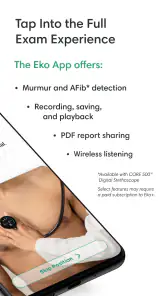
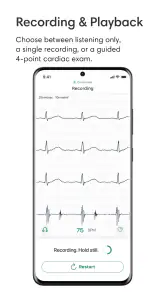
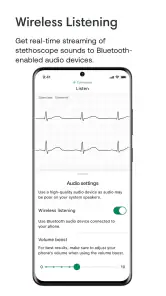
Eko: Digital Stethoscopes is a companion app for compatible Eko digital stethoscopes. It can capture, amplify, visualize, and record heart and lung sounds, depending on the connected device and account configuration. The app is primarily intended to support clinical examination, documentation, education, and remote collaboration. It should complement, not replace, a qualified healthcare professional’s judgment or a complete medical evaluation.
Do I need an Eko stethoscope to use the app?
In most cases, the app’s main recording, listening, and visualization features require a compatible Eko digital stethoscope or approved Eko hardware. Without the device, some informational or account-related functions may be limited or unavailable. Before downloading, check the current compatibility list, supported operating-system versions, and any regional restrictions, because features can vary between Eko products and app releases.
Can Eko diagnose heart or lung problems automatically?
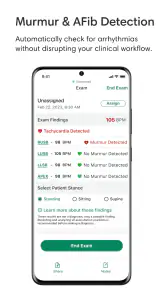
Eko may provide sound visualization and, on supported devices or plans, software-assisted analysis intended to help identify certain findings. These tools are not a definitive diagnosis and should not be treated as a substitute for a clinician, ECG, imaging, laboratory testing, or other appropriate examinations. Any concerning result, symptom, or recording should be reviewed by a qualified medical professional before making treatment decisions.
Pros
- Amplifies subtle heart and lung sounds for clearer auscultation.
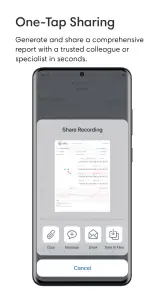
- Digital recordings can be reviewed later or shared with other clinicians.
- Useful for remote consultations and telemedicine workflows.
- Compact design is easier to carry than many traditional stethoscopes.
- May support more consistent documentation during patient assessments.
Cons
- Requires a compatible Eko stethoscope and may not work as a standalone app.
- Some advanced features may require a paid subscription or account.
- Bluetooth pairing and device setup can be inconvenient in busy clinical settings.
- Electronic audio can be affected by battery level
- noise
- or connection issues.
- Not a replacement for professional training or a complete clinical examination.
- Category
- Medical
- Version
- 5.48.0











