eDrawings
- 312.00
- 2.5
- Installs
- 100.00K
- Price
- $1.99

Screenshots
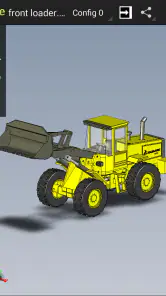
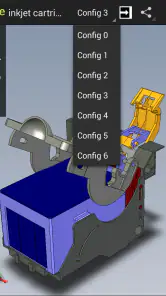
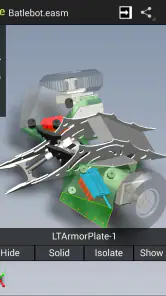
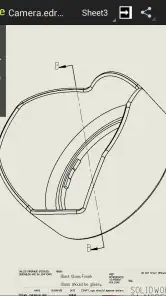
Analysis by Reviewed
I judge a mobile CAD viewer by whether it helps me answer a real question without turning a quick check into a fiddly session. With eDrawings, the useful mindset is to treat the phone as a portable inspection and communication tool, not a small workstation. That distinction matters: it helps me decide which file to open, what to verify, and when to stop and return to a desktop. This paid productivity app from SolidWorks is aimed at people who need to bring design files into meetings, workshops, or the field.
A sensible workflow for checking a model
My best approach is to treat a phone session as a focused inspection, not a replacement for desktop work. Open the relevant file, orient the model before discussing it, and zoom in on the area that answers the question at hand. On a small screen, rotating a complex assembly without a goal can become fiddly; deciding whether I am checking overall shape, fit, or a particular feature keeps the review manageable.
For example, if a colleague asks whether a bracket will clear a nearby component, I can open the design during a conversation, inspect the relationship visually, and use a measurement where the available model information makes that useful. I would still confirm a critical manufacturing dimension in the engineering source of record. A mobile viewer is helpful for quick decisions and communication, but it should not become the only basis for approving a safety-critical or tightly toleranced part.
Using eDrawings as a practical design companion
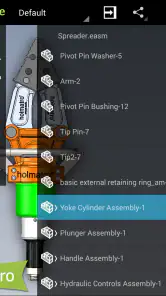
Jumping into the world of eDrawings is pretty straightforward. The user interface is clean and intuitive, which means you don’t have to be a tech wizard to navigate it. Once I downloaded the app, I was immediately struck by how easy it was to open and view different types of CAD files. The app supports a variety of formats, so whether you’re dealing with DWG, DXF, or even native SolidWorks files, you’re covered.
Habits that make mobile review clearer
One small habit pays off: before sharing a view, I check what is actually visible on screen and whether the orientation communicates the point. A technically correct model view can still confuse someone if a feature is hidden behind another part. I also keep comments tied to a specific question rather than sending a broad “please review” request. That makes the exchange easier to act on and reduces the chance that a recipient has to guess what I meant.
Another useful trade-off is choosing when to use the phone and when to switch to a larger display. A phone is convenient for a quick look beside a machine or at a client meeting; a tablet gives more room to inspect geometry and read detail. Neither makes prolonged, fine-grained CAD work comfortable in the way a desktop does. For teams that already exchange design files, the app can be a convenient viewing companion, while a general file viewer or a full CAD package may suit different needs better.
Features That Stand Out
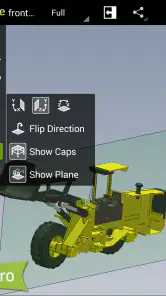
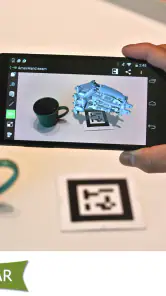
One of the standout features of eDrawings is its augmented reality capabilities. I mean, how cool is it to see your 3D model in the real world through your device camera? It’s not just a gimmick; it’s genuinely useful for visualizing designs in their intended environment. Plus, the app’s measure tool is a lifesaver. With just a few taps, I could take precise measurements of any part of the model.
More From Our News Desk

Clash of Clans Is Won Between the Battles

Android Auto Makes the Case for Quieter Car Software

MobiOffice: Transforming Mobile Productivity with Seamless Integration

EA SPORTS FC™ Mobile Soccer: Redefining Mobile Sports Gaming

How Microsoft OneDrive Became a Mobile Productivity Giant

How Google Translate Breaks Language Barriers Effortlessly
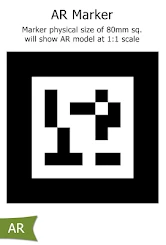
For a useful AR check, I would focus on scale, placement, and whether the proposed object seems to occupy the space as expected. I would not treat a camera-based preview as proof of exact fit: it is a quick visual aid, not a substitute for a measured installation check. This distinction makes the feature more valuable, not less, because it sets a realistic boundary around what a phone-based preview can tell you.
Another thing I loved about eDrawings is the ability to share your designs easily. Whether you want to send a quick snapshot or a detailed review with markups, the app makes collaboration seamless. You can even create a discussion right within the app, which is perfect for getting feedback from team members or clients.
Settings, access, and practical limits
Before relying on a file during a site visit, I would check the app version and make sure the intended design is already accessible on the device. That simple preparation avoids turning a short inspection into a hunt for the right file. I also recommend checking which tools are available in your current setup before planning a workflow around them: some capabilities may sit behind paid access, and the app includes in-app purchases priced at $7.99 per item. The app itself costs $1.99, so I would decide based on how often I expect to inspect designs rather than assuming every advanced option is included.
On Android, it is listed for devices running version 10 or later. It is rated for Everyone, and its current version is 33.3.0008. The app has been available since August 11, 2013, and it has passed 100K installs. Its average rating is 2.5 from around 2.8K ratings, with 312 written reviews. That mixed reception is worth taking seriously: I would try it against a real file and task before making it part of a team’s routine, especially if consistent performance or a particular format is essential.
Making a quick review repeatable
For a recurring task, I find it useful to prepare the question before opening the model: identify the component, the relationship I need to inspect, and the person who needs the answer. Then I can keep the session narrow, orient the part consistently, and capture or share only the view that supports the discussion. This is a simple habit rather than a special feature, but it reduces unnecessary spinning and makes follow-up easier when several people are reviewing the same design.
A realistic example is a technician asking about a guard or bracket while I am away from my desk. I can open the relevant design, look at the clearance and surrounding geometry, and use a visual reference to explain what I see. If the question turns into a tolerance decision, a final fit check, or an approval that depends on exact engineering records, I pause the mobile review and move to the authoritative desktop workflow. The app is most useful when it helps me resolve the straightforward part of a conversation quickly, while making the boundary of that quick answer clear.
User Experience and Performance
In terms of performance, eDrawings runs smoothly without any noticeable lag, even when handling large files. The developers have done a commendable job ensuring the app is optimized for mobile devices without sacrificing functionality. The graphics are sharp and detailed, making it easy to spot even the tiniest details in your designs.
My experience would not lead me to promise the same result with every device or every large assembly. File complexity, screen size, and the job you are trying to do can change how comfortable a review feels. If a model is slow to navigate or too dense to interpret on a phone, I would simplify the question, switch to a tablet, or return to the desktop file rather than mistake a cramped view for a design problem.
Who will get the most from it
I would recommend this app to SolidWorks users, project reviewers, and clients who mainly need to inspect or discuss existing designs away from a workstation. It makes particular sense for someone who regularly receives CAD files and wants a portable way to look at shape, communicate a concern, or show a concept in context. If your work is primarily drafting, editing geometry, or managing a large engineering project, a full CAD application on a computer is the better tool; this is a companion for review, not a mobile design studio.
Compared with a generic document viewer, a CAD-focused app is the more natural choice when the important information is three-dimensional geometry rather than a flat page. Compared with full desktop CAD software, the trade is obvious: less room and less depth for authoring, but far more convenience for a quick look. I would choose between them by task, not by expecting one tool to replace the other.
Choosing it for the right kind of work
The main decision is whether you need to understand and discuss a design or change the design itself. For a supplier call, a customer conversation, or a quick check beside equipment, a dedicated CAD viewer is easier to justify than carrying a laptop into every interaction. If your day involves building geometry, revising drawings, or comparing complex design states, the smaller-screen convenience is not enough to offset the limits of a viewer. I would also be cautious about adopting it as the only review route for a team until the files and tools used in that team have been tried in practice.
Before paying, I would ask myself how often a mobile inspection would save time and whether the tools I need are part of the access I intend to use. The one-time app price and the separate per-item purchases make it sensible to check the relevant capabilities rather than assuming the initial purchase covers every workflow. A person who opens a design only occasionally may be better served by an existing desktop option; someone who repeatedly needs to show or inspect CAD away from a workstation has a clearer reason to keep a mobile viewer ready.
User Experience and Performance
In terms of performance, eDrawings runs smoothly without any noticeable lag, even when handling large files. The developers have done a commendable job ensuring the app is optimized for mobile devices without sacrificing functionality. The graphics are sharp and detailed, making it easy to spot even the tiniest details in your designs.
However, one thing to keep in mind is that some advanced features require a premium subscription. While the free version is quite robust, if you’re a professional or someone who needs those extra bells and whistles, it might be worth considering the upgrade.
Final Thoughts
All in all, eDrawings is a must-have tool for anyone involved in CAD projects. Its blend of powerful features, ease of use, and the ability to view models in augmented reality makes it a standout app in its category. Whether you’re a seasoned designer or just dipping your toes into the world of 3D modeling, this app has something to offer.
If you’re looking for a reliable way to manage your CAD files on the go, give eDrawings a try. You might just find it becomes an indispensable part of your toolkit. Happy designing!
eDrawings Frequently Asked Questions
Who is eDrawings designed for, and what can it help me do?
eDrawings is a productivity app from SolidWorks for people who need to view and share SolidWorks designs on an Android phone or tablet. It can be useful when you want to look at a design away from your main workstation or show it to someone on a mobile device. Its focus is design viewing and sharing rather than replacing a full desktop CAD workflow.
What is eDrawings and what platforms is it available on?
eDrawings is a collaborative tool designed for engineers and designers to view, print, and review 2D and 3D CAD models. It is available for both Android and iOS platforms, making it accessible on a wide range of devices including smartphones and tablets, allowing users to access their designs anywhere, anytime.
Can eDrawings open all types of CAD files?
eDrawings supports a variety of CAD formats, including DWG, DXF, and native SolidWorks files, among others. However, it's important to check the specific version compatibility as not all file types might be supported in every update. Users should verify if their CAD files are compatible with the app to ensure seamless functionality.
Is an internet connection required to use eDrawings?
While an internet connection is not strictly required to open and view files that are already downloaded on your device, an active connection is necessary for features like sharing files with others, accessing cloud storage, and receiving updates. Therefore, for full functionality, having an internet connection is beneficial.
Does eDrawings offer any collaboration features?
Yes, eDrawings provides several collaboration features that enable users to share their CAD models easily with others. Users can send files via email or use cloud services to share links. The app also allows reviewers to provide feedback directly on the models, making it a great tool for collaborative design reviews.
Pros
- User-friendly interface
- Supports various file formats
- Collaborative features
- Cross-platform compatibility
- Interactive 3D models
Cons
- Limited free version
- Occasional lag with large files
- Requires internet for full features
- Not ideal for complex designs
- Lacks advanced editing tools
- Category
- Productivity
- Version
- 33.3.0008











