

EdgeAura
- 903.00
- 3.9
- Installs
- 1.00M
- Price
- Free
Screenshots
Analysis by Reviewed
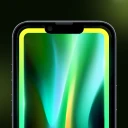
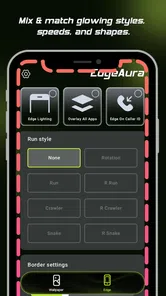
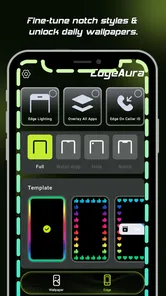
I think EdgeAura makes the most sense for someone who wants a coordinated, luminous look for their phone rather than another general wallpaper library. Its focus is personalizing the screen with glowing edges, wallpapers, and a caller screen, so the appeal is visual and practical: several parts of the phone’s appearance can share one style. I’d consider it when I’m ready to refresh a familiar device, but not if I want a deep theme editor or a purely minimal home screen.
A visual refresh, not a full redesign
That distinction shapes my overall recommendation. EdgeAura is best approached as a way to give a phone a more recognizable visual identity, not as a tool for rebuilding the entire interface. If you enjoy seeing a consistent look across different moments—unlocking the screen, glancing at the display, or receiving a call—the combination is the point. If your main goal is a new app grid, different icons, or a reorganized home screen, the more useful choice is likely a launcher or a broader theme tool.
I’d also think about where and how you use your phone before leaning into a dramatic style. A bold display can be fun on a personal device that you check often, but it may be less welcome if you need the screen to stay visually quiet in meetings, shared spaces, or late at night. The customization is most successful when it feels like a pleasant detail rather than something that demands attention every time the phone lights up.
What the personalization is built around
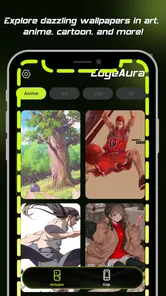
EdgeAura is a free personalization app from developer Zachary Holt. The central idea is to bring its edge effects together with wallpaper and caller-screen customization. That combination is more useful than it may sound: instead of choosing a striking wallpaper and then finding that the rest of the phone feels unrelated, I can think about the lock screen, visible edges, and incoming-call look as parts of one visual choice.
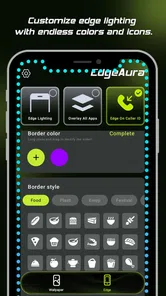
The key decision is how much of that glow you want in everyday use. A bright edge treatment can make a phone feel distinctive at a glance, while a calmer wallpaper can keep icons and text from competing with it. I’d start with the wallpaper I plan to look at most often, then tune the edge effect around it, rather than choosing each element independently. That simple order helps avoid a screen that looks impressive in a preview but feels busy every time I unlock the phone.
Making it work in daily routines
A realistic use case is setting up a fresh look before a busy week: choose a background that stays readable, keep the edge styling noticeable but not distracting, and make the caller screen fit the same general mood. The result is personal without requiring a new launcher or a complete change to how I use the phone. If I’m often checking notifications or answering calls in a hurry, readability and quick recognition matter more than maximizing visual effects.
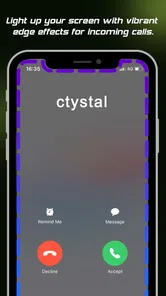
I’d also treat the caller screen as a separate decision rather than assuming the boldest design is automatically best. A distinctive call appearance can be enjoyable, but it should remain easy to understand when an incoming call interrupts something else. For a work phone or a device used around other people, a restrained look may be a better fit than an effect that draws attention every time the screen lights up.
More From Our News Desk

 Instagram
Instagram’s Power Comes From Its Place in Your Phone
A close look at how Instagram turns Meta’s reach, recommendation systems and everyday camera habits into durable platform power—and what that costs users.

 Gmail
GmailGmail in a Busy Inbox: Who Benefits Most?
From first account to crowded workday, Gmail earns its place through dependable search and flexible sorting—but its best fit depends on how much inbox maintenance you can tolerate.

 Prime Video
Switching to Prime Video: What Changes in Your Viewing Routine
Prime Video can make a compelling second home for streaming, but switching means learning a different catalog, rental layer, and route from browsing to playback.

 Universal TV Remote Control
Universal TV Remote Control Works Best as a Reliable Backup
A phone remote earns its place through quick setup and reliable habits. Here is how to get more from Universal TV Remote Control—and where its limits show.

 Weather - By Xiaomi
Weather by Xiaomi Review: Clear at a Glance, Less Clear Up Close
Xiaomi’s weather app makes everyday forecasts quick to scan, but its calm surface can leave useful details and recovery paths harder to find than they should be.

 X
XX Under Pressure: Can It Recover When Posting Goes Wrong?
A resilience-focused review of X, examining setup, mistaken posts, interruptions, weak connections, and the gaps that matter when recovery needs to be dependable.
Latest News



A practical setup routine
One way I’d evaluate the app is to make a small change first, then live with it during ordinary phone use before adjusting anything else. Check the screen in the situations that matter to you: reading a message, finding an app, glancing at the display outdoors, or recognizing a call while doing something else. This is more revealing than judging a design only while browsing customization options, because a look that seems balanced in a preview can compete with real content once your usual icons and information are on screen.
I’d keep a simple baseline in mind while experimenting: the wallpaper should support legibility, the edge treatment should be an accent, and the call appearance should be easy to interpret quickly. If one element feels too prominent, change that element rather than restarting the whole setup. This makes it easier to tell what is actually improving the experience and avoids the common trap of adding several vivid choices at once, then not knowing which one made the screen feel crowded.
Where it sits among alternatives
Compared with the usual approach of installing a wallpaper app and leaving the rest of the interface alone, EdgeAura’s draw is the connection between glowing edges, backgrounds, and the call screen. That makes it appealing if you want those visual elements to feel related. On the other hand, someone who only wants a new background may find a wallpaper-focused option more direct, while a user who wants broad control over icons and the overall home-screen layout may prefer a dedicated launcher or theme tool.
This distinction is worth considering before installing: EdgeAura is for changing the phone’s visual presentation, not for replacing the way Android works. I wouldn’t choose it to organize apps, add productivity features, or radically redesign every part of the interface. Its narrower focus can be a strength when you want a polished visual accent, but it also means it may not satisfy someone who expects one tool to handle every aspect of customization.
Why a coordinated look can be useful
The less obvious benefit of treating the edge effect, wallpaper, and caller screen as a group is that each choice can be restrained. You do not need every element to be equally vivid for the phone to feel personalized. A quieter background can give the glow room to stand out, while a more subtle edge effect can let a distinctive wallpaper do the work. I’d use this relationship to create contrast rather than stacking strong visual treatments on top of one another.
There is a trade-off, though: a coordinated appearance is only worthwhile if you like seeing it repeatedly. A striking setup may be satisfying when you first choose it, but the phone is something you interact with throughout the day, not a picture you look at once. I’d favor a style that remains comfortable during quick, practical checks over one that looks dramatic only when I stop to admire it.
How I’d judge the experience beyond the preview
Upon launching EdgeAura, I was greeted with a visually stunning interface that immediately set the tone for an immersive experience. The developers have done a phenomenal job with the graphics, creating an environment that feels both magical and real. It’s like stepping into a beautifully illustrated book, where every page turn reveals something new and exciting.
The app’s storyline is equally compelling. It’s not just a game; it’s an adventure where every decision counts. You get to choose your character’s path, making choices that affect the outcome of the game. It’s this element of choice that makes EdgeAura stand out from other apps in its genre. I found myself completely engrossed, eagerly anticipating the consequences of each decision.
Gameplay Mechanics
Now, let’s talk about the gameplay mechanics. The controls are intuitive and easy to master, which is a huge plus for someone like me who doesn’t want to spend ages figuring out how to navigate. Whether you’re casting spells, embarking on quests, or interacting with other characters, everything flows seamlessly. The learning curve is gentle, yet the game still offers enough challenges to keep things interesting.
Another aspect I really appreciated is the variety of quests and challenges available. They're not just random tasks; they’re intricately tied to the storyline and help in character development. Each quest you undertake rewards you with new skills, making your character stronger and more versatile.
Sound and Music
Sound plays a critical role in enhancing the gaming experience, and EdgeAura doesn’t disappoint. The background music is soothing yet suspenseful, perfectly complementing the game’s mystical theme. Sound effects are crisp and add a layer of realism to the adventure. Trust me, when you hear the rustling leaves or the distant roar of a dragon, you’ll feel like you’re right there in the heart of the action.
Community and Social Features
One of the cool things about EdgeAura is its community aspect. The app includes social features that allow you to connect with other players. You can form alliances, participate in group quests, and even compete in challenges. It’s a fantastic way to meet like-minded adventurers and adds a social dimension to this already rich game.
Moreover, the developers seem quite receptive to feedback. There’s a vibrant community forum where players can share their experiences, suggest improvements, and report any bugs. It’s clear that the team behind EdgeAura is committed to creating a game that evolves with its players.
What to check during a normal day
For a useful trial, I would not change every visual element at once and then decide whether I like the result. I’d begin with one background and one restrained edge style, then pay attention to the moments when I actually use the device: quick checks between tasks, reading something at a glance, and handling an incoming call. That gives a better sense of whether the customization supports everyday use or merely looks appealing while I’m setting it up.
Another small but useful test is to consider the phone in both focused and distracted moments. When I have time to look at the screen, a vivid effect may feel expressive; when I’m rushing, I want the important information to remain obvious. If the design makes me pause to work out what I’m seeing, it is doing too much. I’d treat that as a cue to simplify the combination rather than assuming that a brighter effect is automatically a better one.
Final Thoughts
In conclusion, EdgeAura is more than just an app; it’s an experience. It offers a perfect blend of engaging gameplay, breathtaking visuals, and an intriguing storyline. Whether you’re a seasoned gamer or a newcomer looking for an adventure, this app has something for everyone. The choices you make truly matter, and the world of EdgeAura feels alive and full of possibilities.
If you’re ready to embark on a journey where your imagination leads the way, give EdgeAura a try. It’s available for download on both Android and iOS, and I promise it’s worth every moment of your time. So, what are you waiting for? Dive into the magical world of EdgeAura and see where your adventures take you!
Practical details before you decide
The app is rated for Everyone, and its current version is 1.26.30, with Android support starting at version 8.0. It has reached over a million installs, with an average rating of 3.9 from around 2,100 ratings and 903 reviews. Those figures suggest a sizeable audience, but they don’t guarantee that its visual style will suit your phone or taste, so I’d approach it as a specific aesthetic choice rather than a must-have utility.
EdgeAura is free to install, with optional in-app purchases priced from $1.99 to $24.99 per item. I’d explore the free experience first and decide whether its look fits my routine before spending anything. That is especially sensible for personalization: a design can feel exciting at setup and less appealing after several days of seeing it repeatedly. Taking time to assess comfort and readability is more useful than buying extra styling immediately.
One practical trade-off with any vivid screen treatment is that visual impact and everyday clarity don’t always go together. I’d check the appearance against the icons and text I actually use, not just judge it on an uncluttered setup screen. If the glow competes with important information, simplifying the wallpaper or easing back on the effect is a better fix than accepting a look that becomes tiring. For people who prefer understated screens, this may simply be the wrong style of personalization.
Who will enjoy it most
I’d recommend EdgeAura to someone who likes a noticeable, coordinated phone appearance and wants more than a background swap, especially if caller-screen styling is part of the appeal. It is less suited to people who prioritize minimal design, want extensive control over icons and layouts, or would rather avoid optional purchases altogether. As a personalization app, its value is ultimately how well its look fits the way you use your phone, not how dramatic it seems in a single preview.
My verdict is that the idea has a clear audience: people who enjoy expressive screen styling and are willing to balance the glow with practical readability. The strongest reason to try it is that it brings several visual touchpoints into the same customization experience; the main reason to pass is if you want broader interface control or a quieter phone. I’d start with a restrained setup, use it through ordinary calls and screen checks, and keep it only if the look still feels comfortable after the novelty wears off.
EdgeAura Frequently Asked Questions
What is EdgeAura and what does it do?
EdgeAura is a cutting-edge productivity app designed to enhance your workflow on both Android and iOS devices. It offers features like task management, scheduling, note-taking, and seamless integration with other apps. Users can customize the interface to suit their preferences and optimize their daily routines effectively.
Is EdgeAura free to use, or does it require a subscription?
EdgeAura offers a freemium model. The basic features are available for free, allowing users to access essential tools without cost. However, for advanced functionalities such as premium templates, additional integrations, and enhanced support, a subscription is required. Various pricing tiers cater to different user needs.
How secure is my data on EdgeAura?
EdgeAura takes data security seriously, employing end-to-end encryption to protect user information. Regular security updates are implemented to safeguard against vulnerabilities. Users can also enable two-factor authentication for an extra layer of protection, ensuring that their data remains private and secure.
Does EdgeAura integrate with other apps and services?
Yes, EdgeAura offers seamless integration with a wide range of popular apps and services. Users can connect it with calendar apps, email services, and cloud storage platforms to enhance productivity. This interoperability ensures that all your tools work together smoothly, reducing the need for constant app switching.
What kind of support is available for EdgeAura users?
EdgeAura provides comprehensive support through multiple channels. Users can access an extensive knowledge base, video tutorials, and a community forum for advice and tips. For personalized assistance, premium subscribers have access to priority email support and live chat options, ensuring quick and effective help when needed.
Pros
- Smooth and intuitive user interface.
- Highly customizable settings.
- Efficient battery usage.
- Supports multiple file formats.
- Fast and reliable performance.
Cons
- Limited offline functionality.
- Occasional in-app ads.
- Requires frequent updates.
- No dark mode available.
- Some features behind paywall.











