ebtEDGE
- 3.48K
- 3.7
- Installs
- 1.00M
- Price
- Free

Screenshots
Analysis by Reviewed
If you rely on EBT benefits, having a phone-based way to check your account can be useful when you are away from home or planning a purchase. I find ebtEDGE most valuable as a practical account companion: it brings balance and transaction information together, with a retailer locator for moments when you need to check where to shop. It is a focused finance app from Fidelity Information Services LLC, rather than a general-purpose budgeting or banking tool.
Readability and navigation in everyday use
The app’s basic purpose is easy to understand: check your EBT balance and review account activity without relying on a phone call or an ATM visit. That focus can make it less intimidating than a full banking app, especially for someone who only needs a quick answer before paying. The original article’s praise for a clean, intuitive interface fits that narrow job, though simple navigation does not guarantee that every task will feel effortless for every user.
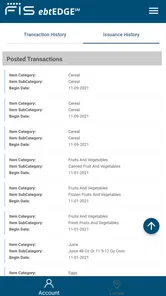
A useful habit is to check the balance before leaving for a grocery trip, then use the transaction history afterward to compare what the account shows with what you expected to spend. That turns two separate visits to the app into a small routine: plan with the balance, and review activity when the shopping is done. I would not treat a phone display as a replacement for checking a receipt, but it can help you spot a mismatch sooner and decide what to investigate.
Motor and sensory considerations
For someone who finds in-person errands tiring, or who prefers to avoid a call just to get a balance, a mobile account view may reduce a bit of friction. The app’s limited focus is also a trade-off: fewer competing tools can make the main task easier to locate, but the experience still depends on being comfortable using a smartphone and navigating its controls. I would try the main actions at home first, when there is time to learn the flow without holding up a checkout line.
At a noisy store, checking a balance quietly on a phone may be more convenient than making a call. But a small screen, glare, or the need to tap accurately can make a quick check harder in some conditions. If using a phone is uncomfortable or difficult, a trusted person or another account-access route may be a better fit. I would avoid assuming that an app is automatically accessible just because its interface looks uncluttered.
Situational access and shopping decisions
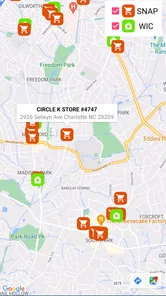
The store locator is most useful when you are in an unfamiliar area and want to narrow down nearby retailers before making a trip. I would use it as a starting point, not as a guarantee that a specific item is available or that every detail about a retailer is current. If the trip is important, checking with the store before setting out is a sensible extra step.
Picture arriving at a grocery store after a busy day and wanting to know whether the remaining balance will cover the items you planned to buy. A quick account check can help you adjust the basket before reaching the register. If the app feels slow at that moment, though, it is wise to have a rough plan rather than depend on an instant response. The app has been noted to lag at times, particularly during busy periods, so I would not make it the only way I prepare for an essential purchase.
More From Our News Desk

 Instagram
’s Power Comes From Its Place in Your Phone
A close look at how Instagram turns Meta’s reach, recommendation systems and everyday camera habits into durable platform power—and what that costs users.

 Gmail
Gmail in a Busy Inbox: Who Benefits Most?
From first account to crowded workday, Gmail earns its place through dependable search and flexible sorting—but its best fit depends on how much inbox maintenance you can tolerate.

 Prime Video
Switching to Prime Video: What Changes in Your Viewing Routine
Prime Video can make a compelling second home for streaming, but switching means learning a different catalog, rental layer, and route from browsing to playback.

 Universal TV Remote Control
 Works Best as a Reliable Backup
A phone remote earns its place through quick setup and reliable habits. Here is how to get more from Universal TV Remote Control—and where its limits show.

 Weather - By Xiaomi
Weather by Xiaomi Review: Clear at a Glance, Less Clear Up Close
Xiaomi’s weather app makes everyday forecasts quick to scan, but its calm surface can leave useful details and recovery paths harder to find than they should be.

 X
X Under Pressure: Can It Recover When Posting Goes Wrong?
A resilience-focused review of X, examining setup, mistaken posts, interruptions, weak connections, and the gaps that matter when recovery needs to be dependable.
Latest News



Compared with calling an account service or using an ATM simply to learn a balance, a mobile check can be more convenient when you already have your phone and a usable connection. Compared with a conventional budgeting app, ebtEDGE is narrower: it is centered on EBT account information, not on combining all household spending into a broad budget. That makes it a better fit for checking benefits than for tracking every bill, cash purchase, or bank account.
Getting Started with ebtEDGE
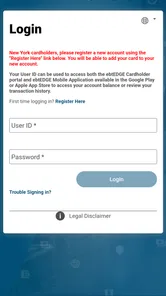
First things first, downloading the app is a breeze. Available on both Android and iOS platforms, you can find it on the Google Play Store or the Apple App Store. Once installed, setting up your account is straightforward. You'll need to create a username and password, and if you're anything like me, you'll appreciate the app's friendly prompts guiding you through the process.
Key Features that Make Life Easier
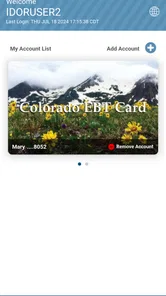
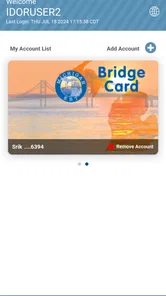
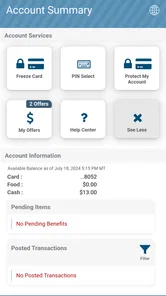
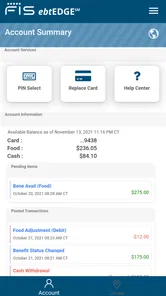
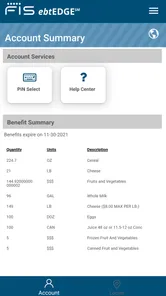
One of the standout features of the app is its real-time access to your account balance. Say goodbye to those tedious phone calls or visits to the ATM just to check how much you have left. With a few taps, you can view your current balance and even track your transaction history. It's like having a mini-bank in your pocket.
Another great feature is the store locator. Have you ever been out and about, wondering which stores accept EBT? The app's built-in locator helps you find nearby retailers, ensuring you never have to play the guessing game again. Plus, the map interface is user-friendly, which means even tech newbies can navigate it with ease.
User Experience and Interface
Now, let's talk about the user experience. The interface is clean and intuitive, which is a breath of fresh air in the world of financial apps. The developers clearly understand the importance of simplicity, and it shows. The app doesn't overwhelm you with unnecessary features but focuses on what truly matters for EBT users.
However, no app is perfect, right? While using ebtEDGE, I did notice that the app could occasionally be a bit slow, especially during peak times. But hey, a little patience goes a long way, and considering the benefits, it's a small price to pay.
Planning a purchase when conditions are imperfect
The most useful workflow, in my view, is to separate preparation from the pressure of checkout. At home, check the balance and note a comfortable spending limit; at the store, use the app only if you need to confirm a detail. That way, a delayed screen is an inconvenience rather than the thing deciding whether you can complete an essential shop. This is especially helpful when you are shopping with children, carrying bags, or trying to move through a busy aisle.
There is also a practical reason to look at the transaction history after shopping rather than repeatedly refreshing the balance during a trip. A receipt gives you a record of what you attempted to buy, while the account activity gives you another view of what was processed. If the two do not seem to match, comparing them later, when you can concentrate, is often more useful than trying to troubleshoot at the register. I would keep the receipt until the account activity makes sense.
Choosing the right tool for the task
People sometimes expect a finance app to combine account monitoring, spending plans, bill reminders, and a complete household picture. That is not the role I would assign to this one. Its advantage over a broad budgeting app is that it keeps attention on EBT account details; its disadvantage is that you still need another method for cash purchases, ordinary bank accounts, and a full monthly plan. If you already use a budget notebook or a separate finance app, ebtEDGE can sit alongside it rather than replace it.
Against calling or visiting an ATM, the phone option is most compelling when you want a quick check without changing your route. The alternatives can be preferable when your phone battery is low, connectivity is unreliable, or you have difficulty reading and operating a small screen. I would not install it expecting it to solve every access problem: it is a convenient route to account information, not a guarantee that account access will always be immediate.
Who should use it, and where it falls short
I’d recommend this to people who regularly need to check their EBT balance or look up participating retailers while out. It is free, rated for Everyone, and has an average rating of 3.6 from around 7,800 ratings, with more than 1 million installs. Those figures suggest a widely used app with mixed experiences, so I would set expectations accordingly rather than assume every session will be smooth. It is version 4.5 and supports Android 5.0 or later.
If you want a complete household budget, detailed spending categories, or one place to manage unrelated bank accounts, this is not the right tool. Its strength is the specific EBT workflow, not broader financial planning. For someone who rarely checks an EBT balance on a phone, the setup and occasional delays may outweigh the convenience; for frequent shoppers, keeping the account view close at hand can be worthwhile.
Before relying on it for a time-sensitive purchase, I’d sign in at home and make sure I can reach the balance and transaction history. If a number looks unexpected, check the transaction details and keep any relevant receipt so you have something concrete to compare. And if the app is slow, waiting a moment or using another account-access method is more sensible than making a purchase decision based on a screen that has not refreshed.
Access needs and everyday trade-offs
For a person who reads more comfortably on a larger display, or who finds small touch targets difficult, the phone format may be less useful than it first appears. I would test the main account-checking steps with the device settings and controls that already work best for you, and see whether the text and navigation remain comfortable in a real shopping situation. A family member can help with setup if needed, but account credentials should be handled thoughtfully; convenience should not mean sharing private access casually.
It can also help to decide in advance what you will do if the app does not load. That might mean using another established way to check the account, postponing a non-urgent purchase, or shopping from a list based on a balance checked earlier. Having a fallback is not a criticism of the app so much as sensible planning around any phone-based service. The most dependable use is as one useful route, not as the only route.
A practical inclusive verdict
Released in 2018, ebtEDGE remains a focused option for people who want mobile access to EBT account details, rather than a substitute for every way of managing benefits. The app’s balance view, activity history, and retailer map can help with ordinary shopping decisions, while occasional slowness and the demands of using a phone remain real limitations. I’d suggest it to someone comfortable with mobile apps who values checking details on the go; if screen-based navigation is a barrier, or dependable access is essential at a particular moment, keep another way to check the account in mind.
Final Thoughts: A Handy Tool for EBT Users
In conclusion, ebtEDGE is a handy companion for anyone using EBT services. Its ability to provide real-time balance updates and locate EBT-friendly stores makes it an invaluable tool. While it has some minor glitches, the overall convenience it brings to managing your benefits is undeniable. So, if you're looking for a way to simplify your EBT experience, give ebtEDGE a try. It's like having a personal assistant for your benefits, and who wouldn't want that?
ebtEDGE Frequently Asked Questions
Is ebtEDGE free to download, and what devices can run it?
ebtEDGE is free to download and is intended for Android and iOS smartphones. On Android, it requires version 5.0 or later, so checking your device’s operating system before installing can help avoid compatibility problems. The app is listed for everyone and focuses on viewing EBT balances, making it a finance app for users who want access to benefit information on a phone.
What is ebtEDGE and how does it work?
ebtEDGE is a mobile application designed for users who receive benefits through Electronic Benefit Transfer (EBT). It allows users to easily manage their benefits directly from their smartphones. With ebtEDGE, users can check their account balance, view transaction history, and find nearby retailers that accept EBT. The app is user-friendly and provides real-time updates to ensure users have the most current information regarding their benefits.
Is ebtEDGE available for both Android and iOS platforms?
Yes, ebtEDGE is available for both Android and iOS platforms. Users can download the app from the Google Play Store for Android devices and the Apple App Store for iOS devices. The app is designed to be compatible with most smartphones and provides a seamless experience across both platforms. Be sure to check the system requirements before downloading to ensure compatibility with your device.
How secure is the ebtEDGE app?
The ebtEDGE app prioritizes user security and employs multiple layers of protection to safeguard your personal information. It uses encryption technology to protect data transmitted between your device and the app's servers. Additionally, the app requires users to log in with secure credentials, ensuring that only authorized individuals can access your account details. Regular updates are also provided to address any security vulnerabilities.
Can I manage multiple accounts with ebtEDGE?
Yes, ebtEDGE supports the management of multiple accounts, which is particularly useful for households receiving benefits for more than one individual. Users can easily switch between accounts within the app, allowing for convenient monitoring and management of each account's balance and transactions. This feature helps ensure that users have a comprehensive view of their household's benefits in a single app.
Pros
- User-friendly interface for easy navigation.
- Real-time balance updates and transaction history.
- Secure login with multi-factor authentication.
- Supports multiple languages for wider accessibility.
- Available on both Android and iOS platforms.
Cons
- Limited customer support options available.
- Occasional app crashes reported by users.
- Requires internet access for most functions.
- Advertisements can be intrusive at times.
- Limited features compared to desktop version.