

ebtEDGE NEW!
- 420.00
- 3.1
- Installs
- 100.00K
- Price
- Free

Screenshots
Analysis by Reviewed
Managing SNAP, childcare, or WIC benefits is not something most people want to turn into a daily project. I tried ebtEDGE NEW! with that in mind: not as a flashy finance tool, but as a practical way to keep benefit information closer at hand. The app is free, aimed at everyone, and developed by Fidelity Information Services LLC. Its purpose is focused, which is helpful when you need to check a benefit card rather than sort through a general banking app.
My first impression was that its value depends less on novelty and more on whether it fits into a routine. A benefits app can be useful when it answers a small question quickly: whether a card is ready to use, whether a recent transaction looks familiar, or whether checking the account is easier than finding another way to access the same information. That narrow role is also the key to judging it fairly. This is not a replacement for a full bank account, budgeting platform, or benefits office. It is a dedicated companion for eligible state benefit programs.
What using ebtEDGE feels like beyond the first week
The app is listed in the finance category, but I would think of it more specifically as a benefits-management tool. The store summary identifies it as the official app for SNAP, childcare, and WIC benefits in your state. That wording matters: its usefulness is connected to the programs and card services available where you live, rather than to general financial management.
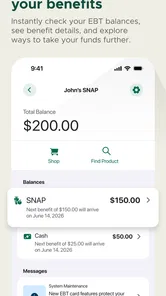
During the first week, the appeal is easy to understand. Instead of treating benefit information as something you only check when a payment is declined, the app encourages a more deliberate habit. I found the strongest use case to be a quick check before shopping or before trying to understand an unfamiliar change in available funds. That can remove some uncertainty from an otherwise ordinary errand.
A realistic example is a grocery trip planned around a limited balance. Before leaving home, I would use the app to review the relevant account information and make sure my expectations match what is available. If a previous purchase seems to have affected the balance differently than expected, checking before reaching the checkout is less stressful than discovering the problem in front of a queue. The app cannot make benefits stretch further, but it can make the information easier to consult at the moment it matters.
That is also where the official nature of the app becomes important. People often end up using search results, saved web pages, or unofficial budgeting tools when they need benefit information. A dedicated application from Fidelity Information Services LLC gives the experience a clearer identity than a random third-party utility. Still, I would keep the app’s role in perspective: it helps you access and monitor benefit-related information, while questions about eligibility, case decisions, or program rules may require the appropriate state or agency channel.
The current release is version 4.0.0, and the app supports devices running Android 7.0 or later. Those details make it accessible to people who do not own a recent phone, which is a practical advantage for a service that should not feel limited to expensive hardware. On the other hand, older devices can still vary in speed and reliability, so the experience may feel less immediate on a phone with little free storage or an aging operating system.
More From Our News Desk

 Instagram
Instagram’s Power Comes From Its Place in Your Phone
A close look at how Instagram turns Meta’s reach, recommendation systems and everyday camera habits into durable platform power—and what that costs users.

 Gmail
GmailGmail in a Busy Inbox: Who Benefits Most?
From first account to crowded workday, Gmail earns its place through dependable search and flexible sorting—but its best fit depends on how much inbox maintenance you can tolerate.

 Prime Video
Switching to Prime Video: What Changes in Your Viewing Routine
Prime Video can make a compelling second home for streaming, but switching means learning a different catalog, rental layer, and route from browsing to playback.

 Universal TV Remote Control
Universal TV Remote Control Works Best as a Reliable Backup
A phone remote earns its place through quick setup and reliable habits. Here is how to get more from Universal TV Remote Control—and where its limits show.

 Weather - By Xiaomi
Weather by Xiaomi Review: Clear at a Glance, Less Clear Up Close
Xiaomi’s weather app makes everyday forecasts quick to scan, but its calm surface can leave useful details and recovery paths harder to find than they should be.

 X
XX Under Pressure: Can It Recover When Posting Goes Wrong?
A resilience-focused review of X, examining setup, mistaken posts, interruptions, weak connections, and the gaps that matter when recovery needs to be dependable.
Latest News



The small habits that create recurring value
The best way to use this app is not necessarily to open it constantly. I would use it at predictable points: before a major shopping trip, after a transaction that needs checking, and whenever I want to reconcile what I remember spending with what the account shows. That approach turns it into a reference tool instead of another notification-heavy obligation.
One useful, non-obvious habit is to check information before making a plan that depends on the benefit balance. For example, if a household is dividing shopping between SNAP and another payment method, looking first can help avoid building a basket around an outdated assumption. This is especially useful when several people share responsibility for shopping and one person may not know what the last purchase changed.
A second practical insight is to treat transaction review as a memory aid, not merely a security check. A benefit card may be used across several errands, and small purchases can become difficult to remember. Looking back at the activity can help connect a balance change with a particular trip. That makes it easier to spot a genuine concern while the details are still fresh, rather than relying on a vague feeling that the numbers look wrong.
A third is to make the app part of a monthly routine without letting it become the only record you trust. I would still keep important notices and agency correspondence separately. The app is convenient for checking the account, but a long-term household system works better when benefit information, shopping plans, and official case documents are not all dependent on one phone application.
These habits show why the app may earn a permanent place after the first-week novelty disappears. Its recurring value is modest but real: it reduces the friction of checking benefit information. That benefit becomes more noticeable for people who regularly need to plan purchases carefully, manage more than one eligible program, or share shopping duties with another adult.
Where the routine becomes tiring
The main source of fatigue is that a focused app can feel limited when you want a broader financial picture. I would not choose ebtEDGE as my primary budgeting tool because its purpose is tied to benefit accounts rather than household income, bills, savings, and spending across every payment method. A general finance app is better for seeing the whole month. A state website or agency contact is better for questions about case status and program administration.
There is also a mental cost to maintaining another account-based service. Even a useful app can become frustrating if you have to stop and recover access, confirm details, or repeat a process you only perform occasionally. This is not a reason to reject it, but it is a reason to keep expectations realistic. The app earns its space when its convenience is greater than the effort of opening it and keeping access available.
For someone who rarely uses a supported benefit card or already has a reliable way to check the same information, the benefit may be too small to justify another app. In that situation, a browser-based option or the established method provided by the relevant program may be simpler. I would also be cautious about recommending it as the sole tool for a household where several people need access but only one person manages the phone account. The app can support a routine, but it does not automatically solve communication between family members.
Its average rating is 3.2 from around 595 ratings, with roughly 380 written reviews. I read that as a sign to approach it practically rather than expect a universally smooth experience. A middling rating does not tell me that the app is useless, but it does reinforce the importance of testing the exact workflow that matters to you: access, account visibility, and the type of benefit information you need to consult.
How it compares with usual alternatives
Compared with a general banking app, ebtEDGE is more narrowly relevant. A bank app may offer stronger tools for checking account balances, categorizing purchases, moving money, and managing bills, but it is not designed around SNAP, childcare, or WIC benefits. If your question concerns a benefit card, a dedicated service is more natural than trying to force that information into an unrelated banking dashboard.
Compared with a budgeting app, the difference is even clearer. Budgeting software helps you plan across income and expenses, while this app is useful for checking a particular benefits context. I would use both only if I genuinely needed both views. Trying to make ebtEDGE perform the job of a full budget planner would create disappointment, not efficiency.
Compared with a state website, the choice depends on your routine. A website may be preferable when you are already using a computer, need to read broader program information, or are handling an administrative task. The app makes more sense when the immediate need is a phone-based check during everyday life. Neither option replaces the other completely, and I would keep the web or agency route available for issues that go beyond account viewing.
The most important trade-off is focus versus breadth. ebtEDGE does not need to become a complete financial center to be useful. Its strength is that it is centered on benefit access. Its weakness is that the same focus leaves it with less value for anyone looking for a complete picture of household finances.
Who will keep using it after the novelty fades?
I think the app is best suited to people who actively use supported SNAP, childcare, or WIC benefits and want a convenient way to check related information from a phone. It is particularly practical for a person who shops on a tight plan, shares shopping duties, or wants to review activity soon after using a benefit card. The free price removes an obvious barrier, and the Everyone age rating makes it appropriate as a household utility rather than an app aimed at a narrow age group.
It is less suitable for someone seeking investment tools, bank transfers, credit monitoring, bill reminders, or a complete spending dashboard. It is also not the app I would rely on alone for resolving eligibility disputes or understanding every program rule. Those needs call for a broader financial service or direct contact with the relevant official program.
For long-term maintenance, I would keep the app updated when a new release is available, protect access to the phone and account, and avoid treating a single balance check as a complete record of household finances. The maintenance burden is reasonable when the app is used for a clear purpose. It becomes unnecessary clutter when installed without a recurring need.
With over 100,000 installs, it has clearly reached a meaningful audience, but popularity is not the deciding factor here. The right question is whether you personally need repeated access to the benefit information it is designed to handle. If the answer is yes, its narrowness becomes an advantage. If the answer is no, the app will probably sit unused after the initial test.
My long-term verdict
After the first-week appeal wears off, ebtEDGE NEW! survives on usefulness rather than excitement. I would recommend it to a friend who needs a straightforward, phone-based way to stay aware of supported benefit accounts, especially before shopping or when checking an unexpected balance change. I would not recommend it as a replacement for a general banking app, a household budget, or official help with program decisions.
The honest verdict is that this is a maintenance app in the best sense: its job is small, recurring, and practical. It earns lasting space when it prevents avoidable uncertainty during everyday benefit use. The strongest strategy is to open it at meaningful moments, compare what you see with your own household records, and keep broader questions directed to the appropriate agency or financial tool.
At no cost, with support for older Android devices and a clear focus on SNAP, childcare, and WIC benefits, it is worth trying for eligible users. Just judge it by the problem it solves, not by what a full finance platform might offer. Its real strength is reducing the effort of checking benefit information; its real limitation is that it cannot be the whole financial picture.
ebtEDGE NEW! Frequently Asked Questions
Is ebtEDGE NEW! free to download, and which devices can run it?
ebtEDGE NEW! is a free finance app from Fidelity Information Services LLC. It is listed for devices running Android 7.0 or later, so check your device’s operating-system version before installing. Downloading the app does not replace the need for an eligible EBT account, and the features available after signing in may depend on the state and program connected to your card.
Which benefit programs is ebtEDGE NEW! designed to support?
The app is described as the official app for SNAP, Childcare, and WIC benefits in your state. It is intended as a mobile way to access supported EBT account services, but the programs and tools available to you depend on the agency and state that issued your benefits. Check that your particular program is supported before relying on the app to manage account information.
What is ebtEDGE NEW! used for?
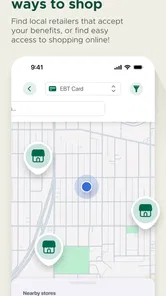
ebtEDGE NEW! is a mobile companion for people who use eligible Electronic Benefit Transfer programs. After signing in with the required account details, users can generally review available benefit balances, check recent transactions, locate participating retailers or service points, and manage certain account settings. The exact tools shown may depend on the state or program connected to your EBT account.
How do I sign in to ebtEDGE NEW!?
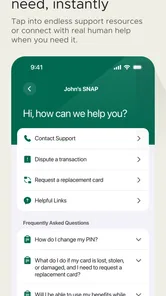
To use the app, you normally need an active EBT account and the login information requested during setup. Depending on your location, this may include your card number, PIN, username, password, or additional verification details. Enter information carefully and use the in-app recovery options if available. Never share your PIN or sign-in credentials with another person.
Can ebtEDGE NEW! show my current EBT balance and transactions?
One of the main reasons to install ebtEDGE NEW! is to check account information without relying only on a receipt or customer-service call. The app may display your available balance, benefit deposits, and recent card activity. Keep in mind that balances can change quickly after purchases or deposits, and displayed information may occasionally be delayed or affected by maintenance.
Pros
- Quickly check EBT balances and recent transactions.
- Shows benefit deposits and spending activity in one place.
- Supports multiple EBT accounts for easier household management.
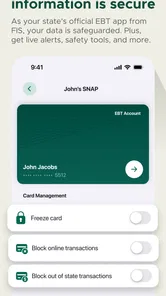
- Useful card-lock option can help prevent unauthorized purchases.
- Official app reduces the need to call customer support for basic details.
Cons
- Availability and features may vary by state or benefit program.
- Some users may experience login or verification issues.
- Transaction updates can be delayed after a purchase or deposit.
- Requires internet access for most account information and tools.
- The interface may feel less intuitive for first-time EBT users.












