EasyLine Business Phone Number
- 467.00
- 4.0
- Installs
- 100.00K
- Price
- Free

Screenshots
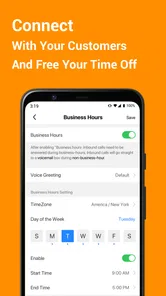
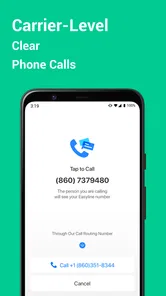
Analysis by Reviewed
Keeping work calls separate from personal calls sounds simple until the same phone starts carrying everything: clients, delivery contacts, marketplace buyers, appointment requests, and friends. I have found that the real problem is not owning a second device; it is protecting my attention and keeping a professional contact point from getting mixed into my private life. EasyLine Business Phone Number approaches that problem by giving the phone a second number for business use.
That makes it a practical business phone number app rather than a full office phone system. I would recommend it to someone who wants a sideline number on an existing phone and does not want to carry two handsets. I would not treat it as a replacement for a company-managed communications platform, but for a freelancer, seller, contractor, or small operator, the basic idea is immediately useful.
Why a second number can save time every day
My first impression is that the value comes from reducing small interruptions. Without a separate number, every new work contact has to be judged against a private call. A message from a customer can arrive beside a family conversation, and returning a call later means checking context before speaking. A dedicated line gives those contacts a clearer purpose from the start.
EasyLine is listed as a free app in the Business category, developed by TalkU International Inc. It has reached over one hundred thousand installs and holds a 4.0 average from around one thousand three hundred ratings, with more than four hundred reviews. Those figures suggest a useful, established sideline tool rather than an obscure experiment, although they do not guarantee that it will suit every calling routine.
The important distinction is between separation and replacement. The app helps separate business communication from your ordinary mobile number, but it does not automatically turn a personal phone into a complete receptionist service. If your needs involve several employees, formal call routing, central administration, or a company-wide record of conversations, I would look at a more specialized business phone system instead.
The first setup should be planned around your work identity
Before choosing how to use the second line, I would decide what it represents. A freelancer might use it for new enquiries, while a local seller could reserve it for listings and pickup arrangements. A tradesperson may want it on invoices and vehicle signage. This small decision matters because changing the purpose later can create confusion for people who already have the number.
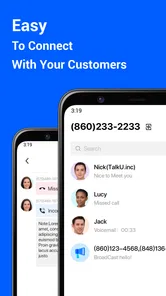
The app’s store summary describes a local second phone number used as a sideline. That is the central workflow: install it, establish the additional business contact point, and use that number when dealing with customers instead of handing out the personal one. The current version is 1.7.0, and it supports Android 7.0 or later, so compatibility is broad enough for many older phones as well as newer devices.
More From Our News Desk

Weather by Xiaomi Review: Clear at a Glance, Less Clear Up Close

X Under Pressure: Can It Recover When Posting Goes Wrong?

Clash of Clans Is Won Between the Battles

Android Auto Makes the Case for Quieter Car Software

MobiOffice: Transforming Mobile Productivity with Seamless Integration

EA SPORTS FC™ Mobile Soccer: Redefining Mobile Sports Gaming
I would test the complete path before publishing the number anywhere. Call it from another phone, send a message if that is part of your intended routine, and check how quickly you notice the incoming activity. This is not glamorous testing, but it prevents a common mistake: advertising a new number before confirming that the phone’s notifications and sound settings make it easy to catch.
There is also a useful privacy habit here. I would keep the EasyLine number for work contacts and avoid mixing it into personal accounts unless there is a strong reason. A second number only creates a boundary if I consistently maintain that boundary. Saving customers under recognizable names and adding a short note about where I met them can make later callbacks much faster than relying on memory.
The app is free to install, but in-app purchases range from $2.99 to $149.99 per item. That makes it especially important to check the purchase screen carefully and decide which parts of the service are actually necessary for your workflow. Someone who only needs a separate contact number should not assume that every optional purchase improves the experience in a meaningful way.
Where the second line fits into real routines
A realistic example is a person who sells furniture locally. Their private number may already be known by family, banks, and existing contacts. Posting it in a public listing creates unnecessary exposure and makes it harder to distinguish serious buyers from unrelated calls. Using EasyLine for listings gives that person a business-facing number that can be shared more freely, while the personal line remains private.
The same arrangement works for a cleaner, tutor, photographer, dog walker, or independent repair worker. I would put the second number on a simple business card, an online listing, or an appointment reminder. When the work slows down, I can identify which calls belong to the job without scanning the entire personal call history. That is a modest improvement, but repeated several times a day it removes a surprising amount of mental sorting.
For appointment-based work, I would use the line as the contact point for new bookings and rescheduling. The practical advantage is not that the app magically manages a calendar; it is that the incoming conversation starts in the correct place. I would still record appointments in a separate calendar or notebook, because a phone number app should not be mistaken for scheduling software.
For online selling, the second line is useful when a listing is visible to strangers. I would give buyers a clear window for calls and keep the conversation focused on the item, location, and timing. If a listing attracts too many calls, the separate number makes it easier to review that activity without exposing the number I use for personal life. That is one of the less obvious benefits: the line can act as a buffer for public-facing work, not just as a second identity.
Remote workers can also use it for short-term projects. If I am helping with an event, taking temporary orders, or handling a seasonal service, I can use one number for that role instead of adding every unfamiliar contact to my main line. The trade-off is that temporary work still requires an exit plan. I would tell active contacts when the project ends and stop promoting the number rather than allowing an old business channel to remain indefinitely active.
Small habits that make the setup more reliable
The first habit I recommend is a dedicated contact label. I would use a consistent prefix such as “Work” or the project name when saving new callers. That makes it easier to recognize the purpose of a call at a glance and reduces the chance of replying in an overly casual way. It also helps when a customer calls weeks after the original conversation.
The second is to create a short response routine. If I miss a business call, I would return it with a sentence that identifies the service and asks how I can help. This sounds obvious, but a separate line is most valuable when it changes how quickly and confidently I respond. The app can provide the channel; the workflow still depends on the person using it.
Third, I would review notification behavior after phone updates or changes to battery settings. A second-number app is only useful when incoming activity is visible and audible at the right time. If the phone silently delays notifications, the apparent problem may not be the number itself but the way the operating system is treating the app in the background. Checking this early is more useful than waiting for a customer to complain about a missed reply.
I would also keep the number out of places where I do not want long-term contact. Public listings, one-off sales, and short projects are sensible uses; personal accounts and permanent identity records may not be. The more widely a number travels, the harder it becomes to preserve the boundary it was meant to create.
What EasyLine removes, and what it leaves in place
The biggest friction it removes is the need to buy and carry another physical phone. A second handset means another battery, another device to update, and another object to remember when leaving home. Keeping the extra line on the phone I already use is much easier for casual business activity.
It also reduces the awkwardness of giving a personal number to strangers. That matters for anyone whose work involves public listings or first-time enquiries. I can present a professional contact point without immediately opening my private communication channel to every potential customer.
At the same time, I would not expect the app to solve every business communication problem. A second number does not automatically provide a shared inbox for a team, a formal customer relationship history, or a sophisticated call-management structure. If two people need to answer the same line, or if missed calls must be assigned and tracked, a dedicated business platform may save more time despite being more complex.
There is another trade-off: one phone can still become noisy. A separate number creates identity separation, but both lines arrive on the same physical device. During evenings or weekends, I would use the phone’s notification controls and personal routine to protect downtime. If I need a hard physical boundary, a separate handset remains more effective, even though it is less convenient.
Cost also deserves attention. The free entry point is attractive for trying the concept, while the in-app purchase range means the total cost can vary depending on what I choose to add. I would begin with the smallest setup that handles my actual calls and only spend more if a specific need appears. That approach avoids paying for a business identity that I rarely use.
Who should use it, and who should choose something else
I think EasyLine is best for individuals who want a local second number without maintaining another phone. Freelancers, independent service providers, casual sellers, and people testing a small side business are the clearest matches. It is also useful for anyone who wants to publish a contact number while keeping a personal number less exposed.
I would be more cautious if reliability is mission-critical. A person whose income depends on never missing an urgent call should test the app thoroughly in their own environment before moving all business communication to it. Phone model, notification settings, network conditions, and personal habits can all affect the experience. For critical operations, a professionally managed phone service with clear support and administration may be the safer choice.
I would also skip it if the main requirement is a full team system. A growing company may need extensions, shared call handling, employee permissions, reporting, or a central history. EasyLine’s appeal is its simplicity as a sideline number; adding it to a complicated business process may create another channel to monitor rather than reducing work.
It is less suitable for someone who wants complete separation from their personal device. Because the purpose is to place another number on the phone already in use, it improves convenience at the cost of physical separation. If work calls must never appear during private hours, a second device or a service designed around business-hours controls may fit better.
My verdict after looking at the whole workflow
EasyLine Business Phone Number is most convincing when the problem is simple but recurring: I need a business-facing number, I want to keep my personal one private, and I do not want to carry another phone. In that situation, the app can save time by making incoming work calls easier to recognize and by giving public-facing activities their own contact point.
I like the practical trade-off. The app does not ask a solo worker to build an elaborate phone system just to separate two kinds of calls. Its free availability makes experimenting straightforward, while the purchase range means I would pay attention during setup and avoid buying features that do not support a real need. The Everyone age rating also makes it broadly approachable for ordinary personal and small-business use.
My recommendation is to treat it as a focused tool rather than a complete business suite. Choose a clear purpose for the number, test calls before sharing it, establish a notification routine, and decide how you will handle evenings and short-term projects. Those steps are what turn a second number into a useful boundary instead of another source of noise.
For a solo operator, the convenience is real. For a team, a high-volume operation, or anyone requiring guaranteed professional call management, I would compare it with a more structured alternative. But if your recurring frustration is simply mixing customer calls with personal communication, EasyLine addresses that exact pain with less equipment and less setup than the usual two-phone solution.
EasyLine Business Phone Number Frequently Asked Questions
What devices and operating systems can run EasyLine Business Phone Number?
EasyLine Business Phone Number is a mobile app for handling a business line from a smartphone. Its listed minimum operating-system requirement is version 7.0, so check your device’s software version before downloading. The app is free to download, and it is rated for Everyone. Keeping your operating system up to date can also help you get the best experience from the app.
Who develops EasyLine Business Phone Number?
EasyLine Business Phone Number is developed by TalkU International Inc. It is a business app focused on providing a local second phone number as a sideline, which can be useful when you want work calls and messages kept apart from personal communication. The app has a 4.0 average rating from around 1,300 ratings, giving prospective users a quick sense of its overall store feedback.
What is EasyLine Business Phone Number used for?
EasyLine Business Phone Number is designed for small businesses, freelancers, and professionals who need a separate business line without carrying another phone. After setting it up, you can use the app to manage business calls and messages independently from your personal number, helping you keep work communications more organized and maintain a more professional presence with customers.
Can I choose a business phone number with EasyLine?
The app generally allows users to set up a dedicated business number, with availability depending on the country, area code, and current inventory. During registration, you may be able to select a local or suitable number rather than using your personal line. Before downloading or subscribing, check whether EasyLine supports your location and the type of number your business requires.
Does EasyLine Business Phone Number require a separate SIM card?
No, EasyLine is intended to provide a business communication line through the app, so you normally do not need to purchase or install a second SIM card. Calls and messages are handled through your smartphone and internet connection. However, performance can depend on Wi-Fi or mobile data quality, and carrier charges may apply if your data plan has limitations.
Pros
- Separate business number keeps work calls apart from your personal line.
- Call forwarding helps you stay reachable when away from the office.
- Voicemail features make it easier to manage missed customer calls.
- Useful for freelancers and small teams needing a professional phone presence.
- A mobile-based setup avoids buying and installing traditional phone equipment.
Cons
- Some advanced calling features may require a paid subscription.
- Call quality depends heavily on your internet connection and mobile coverage.
- The service may not be suitable for emergency or mission-critical calls.
- Business number availability can vary by country or local area code.
- Using one device for personal and work calls may still blur boundaries.












