Easy Lens by Snap Inc.
- 19.00
- 3.5
- Installs
- 100.00K
- Price
- Free

Screenshots

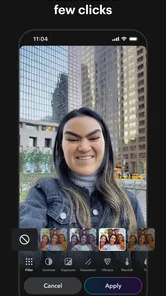
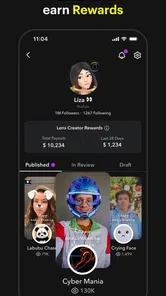
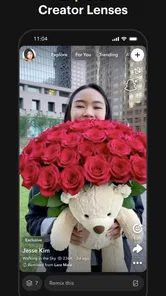
Analysis by Reviewed
I tried Easy Lens as a focused way to explore and reuse Snapchat Lenses, and its main appeal became clear quickly: it puts the creative side of Lenses at the center instead of treating them as a small camera extra. The app is aimed at people who want to discover visual effects, remix ideas, and share the results without needing to build an effect from scratch. That makes it more interesting than a simple collection of camera filters, although it also means the experience depends heavily on how much you enjoy experimenting.
Easy Lens is a free Art & Design app from Snap Inc, rated for Everyone. It has reached over one hundred thousand installs and holds a 3.5 average from more than seven hundred ratings, so I would describe it as a developing creative tool rather than an essential app that everyone already uses. The current release is version 1.13.2, and it runs on Android 7.0 or later. There are also in-app purchases priced at $8.99 per item, which is worth remembering if you are trying to keep your creative tools completely free.
Why the Lens-creation idea matters
The most important capability here is the ability to join the Lens creator side of Snapchat’s visual ecosystem. In practical terms, Easy Lens is not only about opening a camera and choosing an effect. It encourages me to look at a Lens as a starting point: something I can discover, adapt, and then use in a moment that fits my own photo or video.
That distinction changes the way I approach the app. With an ordinary filter app, I usually scroll until I find an effect that looks acceptable, apply it, and move on. Easy Lens is more useful when I want to ask a different question: “What can I do with this idea?” A playful face effect might become part of a short greeting, while a more artistic Lens could give a plain image a stronger visual identity. The value is not just the effect itself, but the invitation to make a choice and turn it into something personal.
The strongest part of Easy Lens is the creative loop: discover an idea, remix it for the moment, then share the result. That loop gives the app a clearer purpose than a general-purpose photo editor. It is built around immediate visual experimentation, not detailed retouching, layers, cropping, or long editing sessions.
I found that focus helpful because it keeps the experience approachable. You do not need to begin with a blank canvas or understand advanced design software. The Lens supplies the visual direction, and you decide how to present it. For someone who normally avoids design apps because they feel too technical, this can be a comfortable entry point into playful digital creation.
How discovery and remixing feel in everyday use
The discovery side is where I would spend most of my time. Instead of thinking of Lenses as a fixed menu, I treat each one as a prompt. I look for an effect that matches the mood of what I want to share, then consider whether changing the setting, expression, framing, or subject makes it feel less predictable. Even without turning the process into serious design work, that small pause produces better results than applying the first filter I see.
More From Our News Desk

Weather by Xiaomi Review: Clear at a Glance, Less Clear Up Close

X Under Pressure: Can It Recover When Posting Goes Wrong?

Clash of Clans Is Won Between the Battles

Android Auto Makes the Case for Quieter Car Software

MobiOffice: Transforming Mobile Productivity with Seamless Integration

EA SPORTS FC™ Mobile Soccer: Redefining Mobile Sports Gaming
Remixing is especially useful when the original Lens is close to what I want but not quite right. A Lens may work well for a quick selfie but feel awkward in a group image. Another may look amusing indoors yet lose its impact in a bright outdoor scene. The practical lesson is to test the effect against the actual moment rather than judging it only from its preview. I would also take a few seconds to check the edges of the frame, because visual effects can compete with faces, signs, or other important details.
Easy Lens makes more sense when I use it as part of a small workflow rather than opening it without a plan. I first decide whether I want a funny result, a stylized portrait, or something that helps a message stand out. Then I explore Lenses with that purpose in mind. This reduces the endless scrolling that can make creative apps feel tiring, and it makes the final share feel more intentional.
A useful habit is to separate discovery from capture. I can browse for an effect before I am ready to publish anything, save a mental note of the style I like, and return to it when the right situation appears. That is more efficient than trying to invent an idea while friends are waiting or while an event is moving quickly. It also helps me notice which Lenses are flexible and which only work for one very specific joke.
Another practical point is that remixing does not automatically make every result original. If the effect is visually loud, the Lens may still dominate the image even after I change the context. I get better results when I use the Lens as one part of the composition rather than allowing it to become the entire message. A clean background, a clear subject, and a short caption can make a familiar effect feel more considered.
A realistic scenario: making a quick group message
Imagine I am meeting friends after work and want to send a lighthearted update to someone who could not join us. A normal photo might communicate where we are, but it may look like every other casual snapshot. With Easy Lens, I can browse for a playful effect, test it on the group, and choose one that adds personality without hiding everyone’s faces. I can then share the result as a quick visual greeting instead of spending several minutes editing the image in a separate application.
The important trade-off in that situation is speed versus control. Easy Lens can help me reach a distinctive result quickly, but I am not approaching the image like a professional editor. I am choosing from a creative system and adapting it to the moment. If the group wants a spontaneous joke, that is a good exchange. If I need a polished invitation with exact typography, careful spacing, and brand colors, I would use a different tool.
For a small creator, the same workflow can be useful in another way. I could use a Lens to give a recurring social post a recognizable visual style, then vary the subject or setting so the content does not look copied and pasted. The benefit is consistency without having to design every image from the beginning. The weakness is that a Lens-based identity may be less distinctive if many other people are using the same visual idea.
Where it fits beside ordinary alternatives
Easy Lens occupies a space between a social camera and a lightweight creative app. Compared with a standard filter gallery, it offers a more participatory mindset because discovery and remixing are central to the experience. Compared with a full photo editor, it is much faster to start but far less suitable for precise corrections or carefully constructed layouts.
I would choose a traditional photo editor when the image already exists and needs practical work: removing distractions, balancing color, correcting exposure, or preparing a specific crop. I would choose a design application when I need text, multiple elements, templates, or a controlled visual system. Easy Lens is the better choice when the effect itself is the creative engine and I want a result that feels immediate, expressive, and easy to share.
It also differs from simply using a normal social-media camera. The usual camera experience encourages me to capture first and decide later. Easy Lens encourages browsing and playful testing before I settle on the final look. That can lead to more imaginative posts, but it can also make the process feel less direct when I only want a clean, natural photo.
For families and younger users, the Everyone rating makes the app broadly approachable, but that should not be confused with every Lens being suitable for every setting. Visual humor can be misunderstood, and a playful effect may not be appropriate for school, work, or a serious conversation. I would still preview the result before sharing, particularly when other people appear in the frame.
The trade-offs I noticed while using it
The biggest limitation is that creative freedom is still shaped by the available Lens ideas. If the selection matches my mood, the app feels lively. If I am looking for a very specific artistic direction, I may spend time browsing without finding something that fits. This is not a replacement for having complete control over the image; it is a way to get inspiration and a finished visual treatment quickly.
There is also a learning curve, although it is not the technical kind. The challenge is learning how to recognize which effects are adaptable. Some Lenses are strongest when used exactly as intended, while others become more interesting when I change the subject or place them in an unexpected context. The app rewards curiosity, but a user who wants predictable results may find that experimentation takes too much time.
Sharing can create another moment of hesitation. A Lens may look funny on my own screen but feel excessive when sent to a group chat or posted publicly. I recommend making a private test first, especially if the effect changes facial appearance or adds a strong visual joke. That small step helps avoid the common problem of discovering only after sharing that the effect obscured the person or message I wanted people to notice.
The free entry point is welcome, but the presence of $8.99 in-app purchases means I would pay attention before confirming any optional item. For casual use, I would begin with the free experience and only consider spending money if a paid addition clearly improves the way I create or share. The purchase price is not a reason to reject the app outright, but it does make Easy Lens less straightforward for someone who expects every creative option to be included at no cost.
Version 1.13.2 gives the app a current, defined release to work with, and support for Android 7.0 or later makes it available on a wide range of devices. Even so, the quality of a Lens can depend on the phone, the camera environment, and the complexity of the visual effect. I would not judge the whole app from one awkward result in poor lighting. At the same time, users with older hardware should keep expectations realistic when trying effects that place heavier demands on the camera experience.
Who gets the most from Easy Lens
I think Easy Lens is best for people who enjoy visual communication but do not want to learn a full design suite. It suits casual creators, social users, and anyone who likes turning an ordinary moment into something more expressive. It can also help a person who feels stuck creatively: browsing Lenses provides prompts, and remixing gives those prompts a practical direction.
It is a particularly good fit for quick personal content. A birthday greeting, a reaction to a friend, a playful update from a day out, or a short visual joke can benefit from the app’s fast creative approach. The app also makes sense for someone who wants to explore the Lens creator world before committing to more demanding creative software.
I would skip it if my priority is natural photography, detailed image correction, or professional design control. It is also not the right choice if I dislike browsing, experimenting, or effects that may change the character of a photo. A conventional camera app is better for clean documentation, and a dedicated editor is better when accuracy matters more than spontaneity.
My advice is to approach Easy Lens with a small creative objective rather than expecting it to replace every other visual tool. Decide what you want the image to communicate, find a Lens that supports that idea, and test the effect with the real subject before sharing. That method makes the app feel less like a random filter carousel and more like a practical source of visual ideas.
Overall, Easy Lens is a focused Art & Design app with a clear strength: it makes Lens discovery and remixing feel like a form of quick, accessible creation. I like it most when I want a spontaneous result with personality, and I appreciate that it lowers the barrier to experimenting with visual effects. Its limits are just as clear: it cannot offer the precision of a full editor, and optional purchases may matter to users who want a completely free toolkit.
With a 3.5 average from hundreds of ratings and more than one hundred thousand installs, it seems to appeal to a real but still selective audience. I would recommend it to a friend who enjoys playful camera work and wants ideas that can be adapted in seconds. I would not recommend it as the only creative app on a phone. Used for the right moments, though, it turns a simple Lens into a starting point for something that feels more personal.
Easy Lens by Snap Inc. Frequently Asked Questions
What is Easy Lens by Snap Inc.?
Easy Lens is a camera-focused experience from Snap Inc. designed to make discovering and using visual effects more accessible. It may help users apply lenses or augmented-reality-style enhancements without navigating through complicated menus. The exact features and availability can depend on the device, operating-system version, region, and Snap’s current product support, so users should check the official store listing before downloading.
What can I do with Easy Lens?
Easy Lens is aimed at people who want to explore creative camera effects and try lenses for different occasions. Its central appeal is discovering, remixing, and sharing lenses made for a variety of moments, so it may suit casual experimentation as well as creating visuals to share. The experience is focused on lenses rather than serving as a general photo-editing suite.
Is Easy Lens free to download and use?
Easy Lens is free to download, though it offers in-app purchases priced at $8.99 per item. That means the basic download does not cost anything, but some content or options may involve an additional purchase. Check the purchase prompt carefully before confirming anything, particularly if children use the device, and review your store settings to manage or restrict in-app spending.
Does Easy Lens require a Snapchat account?
Whether a Snapchat account is required can depend on how Easy Lens is distributed and which functions are included in the current version. Basic camera or lens features may work independently, while saving, sharing, personalization, or access to Snap-connected content could require signing in. Review the permissions and account prompts during setup, and avoid entering credentials unless the request appears inside the official Snap application or store download.
What permissions does Easy Lens request?
Because Easy Lens is intended for camera and visual features, it may request access to the camera and possibly photos or videos stored on the device. Depending on its functionality, it could also need microphone, notifications, or network access. You can deny optional permissions through Android or iOS settings, although some features may stop working. Always inspect the permission screen and privacy information before granting access.
Pros
- Quickly scans QR codes
- text
- and objects from the camera
- Simple interface makes core tools easy to access
- Useful for identifying products and visual information
- Works conveniently with content already shown on screen
- Backed by Snap’s image-recognition technology
Cons
- Some features may require an internet connection
- Recognition results can vary with poor lighting or blurry images
- May collect camera and usage data depending on permissions
- Limited usefulness if you only need a basic QR scanner
- Results may include links or suggestions that feel promotional












