Snapchat
- 1.78M
- 4.2
- Installs
- 1.00B
- Price
- Free

Screenshots
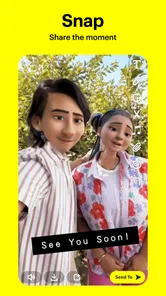
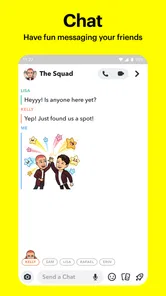
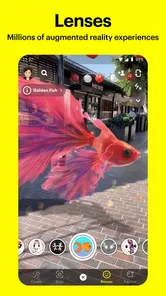
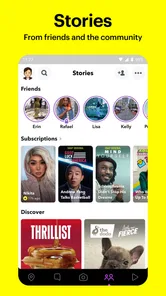



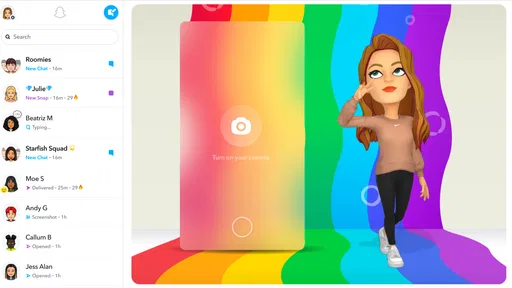
Analysis by Reviewed
I see Snapchat as a messaging app built around quick, visual exchanges rather than long conversations or a carefully curated profile. That choice gives it a distinctive, playful feel, but it also means the app works best when your friends are already there and happy to communicate in pictures and short videos. I’d recommend it to people who want sharing to feel spontaneous; I wouldn’t make it my first pick for organizing important conversations or keeping a permanent record.
When a quick visual message beats a polished post
The camera-first style is especially useful when a photo can explain something faster than a paragraph. I might show a friend which entrance I’m waiting beside, send a quick look at a dish before ordering, or capture a small detail that would be awkward to describe. The point isn’t to produce a perfect image; it’s to give someone a glimpse of what is happening now.
That immediacy is also a trade-off. If I’m in a noisy place, at work, or simply not in the mood to be on camera, a conventional text message is easier and less demanding. Snapchat makes visual sharing feel natural, but it shouldn’t make anyone feel obliged to send a face, a photo, or a reply just to prove they are present.
The Latest on Snapchat
What the camera-first approach does well
The main appeal is how quickly I can turn an ordinary moment into something worth sending. Opening straight into a camera-led experience makes taking a Snap feel more immediate than composing a post for a feed. Lenses can be a fun creative prompt, too: instead of wondering what to say, I can send a silly face effect or a quick reaction that makes sense to a close friend. That low-pressure exchange is where Snapchat feels most at home.
There’s a useful distinction between sending something to a person and sharing it more broadly. I’d think about the audience before posting: a private Snap suits a quick personal exchange, while a public-facing area is better for content meant to be browsed. This small pause helps avoid the common mistake of treating every camera share as if it had the same audience or visibility.
Everyday use, without the pressure to perform
For example, imagine I’m meeting a friend after work and spot a tiny dog wearing a raincoat on the walk over. A quick Snap gives them the joke in the moment, without turning it into a polished post or starting a long chat. If they reply with their own photo, the conversation becomes a little back-and-forth that feels more personal than a reaction in a busy group thread.
That style can suit close-knit groups, teens, and anyone who enjoys visual humor. It can also help friends who live far apart share small daily details without needing a major update. The trade-off is that a streak can make casual contact feel like an obligation: if sending something starts to feel like maintaining a counter rather than talking to someone, I’d let the streak go. The relationship matters more than the badge.
More From Our News Desk

Clash of Clans Is Won Between the Battles

Android Auto Makes the Case for Quieter Car Software

MobiOffice: Transforming Mobile Productivity with Seamless Integration

EA SPORTS FC™ Mobile Soccer: Redefining Mobile Sports Gaming

How Microsoft OneDrive Became a Mobile Productivity Giant

How Google Translate Breaks Language Barriers Effortlessly
Where it differs from familiar messaging apps
Compared with conventional messaging apps, Snapchat puts the camera, effects, and temporary sharing closer to the center of the experience. A standard messenger is usually the easier choice for practical details, searchable conversation history, and messages you need to find later. A broad social network may suit people who want a persistent profile and a public feed. Snapchat is strongest in the space between those options: informal visual contact with people you know.
That focus is also a limitation. If your friends don’t use it, the playful tools won’t make it a useful replacement for the group chat everyone already checks. I’d keep a more conventional messaging option for addresses, plans, and details that should stay easy to retrieve. Snapchat can complement that routine, but it doesn’t need to replace it.
Snapping into the Basics
Let’s dive into the basics first. Snapchat is not your average social media app. Imagine sending a picture or video to your friends, but here’s the catch — it disappears after being viewed! This ephemeral nature is what makes Snapchat unique and wildly popular among the younger crowd. It’s like sending a postcard that self-destructs!
Setting up an account is a breeze. You download the app, enter your details, and voilà, you’re ready to snap away. The interface might seem a bit overwhelming initially, especially if you're transitioning from more conventional platforms. But hang in there, because once you get the hang of it, it’s all smooth sailing.
Features That Keep You Hooked
Now, let’s talk about the features. Ever heard of Snapchat Streaks? It’s a fun way to keep in touch with friends by sending Snaps back and forth daily. The longer you keep the streak going, the better! It’s like a little competition that keeps you engaged.
And oh, the filters! From the iconic dog ears to the hilarious face swaps, Snapchat’s augmented reality filters are a hit. They’re constantly updated, ensuring that there’s always something new to try out. It’s a feature that not only keeps the app feeling fresh but also encourages creativity.
Don’t even get me started on the Discover feature. It’s like a mini entertainment hub within the app. From news snippets to celebrity gossip, and even cooking tips, there’s a little something for everyone. It’s a quick and easy way to stay updated while on the go.
Making the camera and chat work for you
A helpful habit is to decide what a Snap is meant to do before opening the camera: share a quick reaction, show a place, or start a conversation. That keeps the app’s visual tools from turning every exchange into a performance. I find a simple, unedited image can be more useful than searching through effects when the point is just to let a friend see what I’m seeing.
For small groups, it’s worth choosing the right format for the moment. A private exchange is a natural fit for a joke meant for one person, while a broader post makes more sense when I want several people to browse it. If I’m sharing plans, though, I’d put the key details in a regular message too. A photo can communicate the mood, but it is a poor substitute for an address or a time someone may need to find again.
One practical way to keep the experience manageable is to treat the app as a companion to, not a replacement for, the tools your friends already use. I might send a visual update in Snapchat, then move the final details of a meetup into the group chat everyone checks. That division makes the most of its spontaneity without asking it to be an archive.
Privacy and Security: A Double-Edged Sword
While the disappearing Snaps are Snapchat’s claim to fame, they also raise some eyebrows when it comes to privacy. It’s crucial to remember that despite the disappearing act, anything shared online can potentially be saved by the recipient. Whether it’s through screenshots or third-party apps, your Snaps might not be as fleeting as you think.
However, Snapchat has made strides in improving security. With features like two-factor authentication and the ability to control who can view your Snaps, you have more control over your privacy than ever before. So, while it’s essential to be cautious, Snapchat’s safety features do offer a comforting layer of security.
Who should install it—and who can skip it
Snapchat is a communication app from Snap Inc, and its audience is clearly substantial: it has a 4.2 average from around 39 million ratings and more than a billion installs. It is free to install, rated Teen, and the current version is 13.95.0.44; optional in-app purchases range from $0.49 to $399.99 per item. I’d treat the free experience as the starting point rather than assuming every extra is necessary.
If you’re new, use the app first with a small circle of people you already know. Set aside a few minutes to learn where chats, camera tools, and content feeds are before sharing widely; the layout can feel less obvious than a traditional inbox. Checking audience controls before posting is a practical habit, especially if you’re still learning which parts of the app are meant for friends and which are more public.
Parents and younger users should make privacy and contact choices part of the setup, not an afterthought. The Teen rating is a useful signal about the intended age context, but it doesn’t mean every interaction will suit every family. I’d also avoid sending anything sensitive on the assumption that it will vanish: a recipient can preserve what they see. For work messages, account recovery details, or plans you may need to search later, a conventional messenger is the safer fit.
Who gets the most from it
I’d suggest it to someone whose friends already use it and who enjoys sharing moments without building a polished public identity. It can be especially comfortable for people who communicate through facial expressions, quick visual jokes, and small glimpses of everyday life. You don’t need a dramatic event to have something to send; the format works precisely because an ordinary detail can be enough.
It is a weaker fit for anyone who wants one dependable inbox for everything. If your priority is searchable records, clear threads for logistics, or a calm interface with little entertainment content, a standard messaging app is likely more practical. Likewise, if you prefer to share photos only after editing them carefully, the camera-first pace may feel like pressure rather than freedom. I’d install it for a social circle and a style of communication, not because it is supposed to replace every other app.
A little friction is part of the deal
The app’s many surfaces can pull attention in different directions. A person who only wants a quiet one-to-one chat may find the lenses and entertainment content distracting, while someone who dislikes frequent visual sharing may feel there’s no reason to open it. I’d be selective about notifications and keep the app’s role clear: quick exchanges with friends, not an obligation to respond to every prompt or maintain every streak.
It also helps to remember that “disappearing” describes the usual viewing experience, not a guarantee of secrecy. I treat a Snap like something that could be kept, shown to someone else, or remembered. That doesn’t spoil the fun; it simply makes the app easier to use sensibly. The best rule is straightforward: share the joke, not anything you would regret losing control of.
Settling into a useful routine
My preferred approach is to keep the social side intentional. I’d start with a few friends, learn the difference between sending directly and posting for a wider audience, then decide which notifications actually deserve my attention. That way, the camera remains a convenient way to share rather than a reason to check the phone whenever a streak or feed might have changed.
For a typical day, I can picture sending a short visual update on the way to meet friends, trading a few replies, and then switching to a more searchable chat once the group needs to coordinate. That is not a flaw in either tool; it is simply a sensible division of labor. Snapchat is at its best when the point is the moment itself, while another messenger is better when the information needs to stick around.
A recommendation with a clear boundary
For someone deciding whether to try it, I’d ask one simple question: are the people you want to talk with active there? If yes, the camera and quick replies can make ordinary contact feel more lively, and there’s little reason to wait for a special occasion to use them. If your friends are elsewhere, adopting another inbox may add effort without creating a real social benefit.
I’d also keep the two kinds of sharing distinct in my mind. A direct Snap is for a particular person or conversation; something placed in a broader area should be treated as content that more people may encounter. Taking a moment to check the intended audience before sending is a small habit with outsized value, especially while getting used to the app’s layout.
In conclusion, Snapchat is like that quirky friend who’s always full of surprises. It’s fun, engaging, and keeps you coming back for more. Whether you’re snapping your latest adventure, experimenting with wacky filters, or just keeping up with friends through Streaks, Snapchat offers a unique way to connect in this digital age. So go ahead, give it a try — you might just find yourself hooked! Snapchat is worth trying if your friends are there and you want a playful, visual way to stay in touch; if reliable records and practical planning matter more, keep your usual messenger close.
Snapchat Frequently Asked Questions
Is Snapchat available for Android and iPhone?
Yes. Snapchat is available on Android and iOS, so you can download it from the relevant app store for your device. On Android, your phone must run Android 6.0 or later. Before installing, check that your operating system is compatible and that you have enough storage available. Snapchat is a communication app from Snap Inc, designed for sharing and staying in touch.
Who makes Snapchat, and what is the app for?
Snapchat is a communication app developed by Snap Inc. Its store summary, “Share the moment!”, reflects its focus on sending and sharing content with other people. The app is free to download and has a Teen content rating. If you are considering it for yourself or a family member, think about whether its social and sharing-oriented approach fits your communication needs.
Can I browse Snapchat before creating an account?
Snapchat is built around personal communication and sharing, so an account is needed to use its social features. If you are deciding whether to download it, consider who you hope to connect with and what kinds of content you want to share. You can review privacy choices during setup, then adjust them later as you become familiar with the app.
Does Snapchat require an account, and what should I consider before signing up?
Snapchat is a communication app built around sharing and interacting, so you will need an account to use its social features. Before signing up, think about which people you want to connect with and what personal details you are comfortable sharing. Take time to review the privacy controls during setup and later in the app, especially before posting content or sharing your location.
Can I control who sees my Snaps and Stories?
Snapchat provides privacy settings that let you control who can view your content, which is useful if you want to share selectively rather than with a broad audience. Check the audience choices before posting a Snap or Story, and revisit your settings as your contacts change. Remember that people who can see a post may still save or capture what appears on their screen.
Pros
- Fun and engaging AR filters.
- Quick and easy photo sharing.
- Strong privacy features.
- Unique content discovery options.
- Creative Bitmoji integration.
Cons
- Battery consumption can be high.
- Limited video editing tools.
- Can be addictive for teens.
- Privacy settings can be confusing.
- Frequent app updates needed.












