Driver Pulse by Tenstreet
- 3.34K
- 4.0
- Installs
- 1.00M
- Price
- Free

Screenshots
Analysis by Reviewed
When I’m looking for work in trucking, I want a clear way to keep track of applications without turning the search into another full-time job. Driver Pulse by Tenstreet is a business app aimed at that specific need: it connects drivers with the status of their IntelliApp. I see its value less as an all-purpose job board and more as a place to follow an application process that already runs through Tenstreet.
Start by checking whether it fits your application
Before downloading, I’d ask one practical question: am I using an IntelliApp that I want to keep an eye on? If yes, Driver Pulse has a clear purpose. If I’m only browsing jobs or handling an application through another route, the app may not add much to my day. That simple check helps set realistic expectations and prevents treating a specialized companion as a universal trucking-career tool.
For someone with an active application, it can be useful to separate two tasks that often get blurred together: monitoring progress and deciding what to do next. A status check can tell you whether there is something new to review, but it cannot make an offer suitable or answer a question about pay, routes, or working conditions. I’d use the app for the first task and keep the second for direct conversations and careful comparison.
Where the App Fits in a Driver’s Job Search
The distinction matters. If you already have an IntelliApp in progress, having its status available on your phone can make it easier to check where things stand between trips or during a break. It gives the app a practical role in an otherwise scattered process, rather than asking it to replace every conversation, document, or decision involved in changing jobs.
Free Access and the Value Question
The app is free to download, so trying it does not require an upfront purchase. That makes the decision fairly simple for a driver who wants to follow an IntelliApp: install it and see whether that information is useful in your routine. Free access is not the same as a guarantee that every part of a job search happens in the app, though. I would treat it as a convenient companion to the application process, not as a promise of a job or a substitute for evaluating an employer.
Tenstreet develops Driver Pulse, and the app sits in the business category. It has an average rating of 4.1 from around 9,300 ratings, with about 3,200 written reviews and over a million installs. Those figures suggest that plenty of people have tried it, but they can’t tell me whether the app will help with a particular employer’s process. Its content rating is Everyone, and the current version is 7.44.0.
A Useful Check-In, Not a Complete Hiring Solution
The most useful scenario is straightforward: you submit an IntelliApp, then want to check its status without relying on memory or repeatedly contacting someone just to ask whether anything has changed. A phone-based status check can help you keep that application in view while you handle the rest of your day. I’d still keep a simple personal note of where I applied and when I last followed up, especially if I’m pursuing opportunities through more than one route. The app’s role is narrower than a full job-search tracker, and that boundary is worth understanding before you rely on it as your only system.
More From Our News Desk

Weather by Xiaomi Review: Clear at a Glance, Less Clear Up Close

X Under Pressure: Can It Recover When Posting Goes Wrong?

Clash of Clans Is Won Between the Battles

Android Auto Makes the Case for Quieter Car Software

MobiOffice: Transforming Mobile Productivity with Seamless Integration

EA SPORTS FC™ Mobile Soccer: Redefining Mobile Sports Gaming
Compared with keeping application details in email, text messages, or a handwritten list, a dedicated place to check an IntelliApp’s status is more focused. Compared with general job-search services, its appeal is also more specific: it is useful when your application is part of the Tenstreet process, but it is not automatically a replacement for browsing openings elsewhere or speaking directly with a recruiter. If you don’t have an IntelliApp to follow, the central reason to use it may not apply to you.
Who Is Likely to Get the Most from It?
I’d consider it most relevant for drivers who are actively completing or waiting on an IntelliApp and prefer checking progress on a phone. It may also suit someone who wants a low-effort way to stay connected to that part of a job search while on the move. By contrast, a driver who is not applying through this process, or who prefers to manage every detail through direct calls and their own records, may find little reason to add another app. The useful question is not whether every driver needs it, but whether your current application is tied to the service it supports.
A practical habit is to check for a status change when you have a natural pause, rather than repeatedly opening the app throughout the day. If you see no change, keep using whatever contact route the employer has already given you when a direct answer is important. That approach makes the app a useful reference point without treating a status screen as a conversation or assuming that a lack of visible movement means a decision has been made.
Making a status check part of a routine
Imagine you have sent an application before starting a stretch of driving and want to avoid interrupting your day with unnecessary follow-ups. I’d make one check during a safe, ordinary break, then note the date and any next step elsewhere if I’m tracking several opportunities. That small routine gives the app a defined job: it helps you look for movement, while your own notes preserve the broader timeline. It also discourages constant refreshing, which can create anxiety without making an employer respond any sooner.
If a change appears, I’d read it carefully and decide whether it calls for action rather than assuming every update means a decision. For anything unclear or time-sensitive, I’d use the employer’s direct contact method. This is a useful distinction for anyone wondering whether the app can replace recruiter communication: it can help organize checking, but a status display is not a two-way conversation by itself.
Getting Started and Setting Expectations
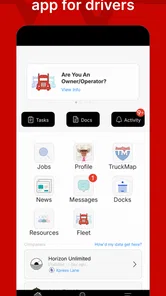
Downloading the app is a breeze and available on both Android and iOS. Once you’ve got it installed, you’ll be greeted with a clean, intuitive interface. The app guides you through setting up your profile, which is crucial since your profile is what potential employers will see. I found the setup process straightforward, and the prompts were helpful in ensuring I didn’t miss any critical information.
Driver Pulse was released on August 13, 2015, and its current version is 7.44.0. It requires Android 9 or later. Before installing, I’d check that your device meets that requirement; otherwise, the app may not be a practical option on that phone. The free price makes a trial less of a financial decision, but the app is only worthwhile if it fits the way your application is being handled.
What to keep outside the app
Even when a dedicated application tool is convenient, I wouldn’t put the whole job search in one basket. Keep a separate record of employers, dates, questions, and any commitments you need to revisit. That matters most if you are considering more than one position: an application status alone is not a comparison of the work, and it may not capture the details you need to weigh one opportunity against another.
I’d also prepare for a conversation before contacting a recruiter. A short note with the application you mean, the date you submitted it, and the exact question can make a follow-up clearer and save time on both sides. This is not extra work for its own sake; it is a way to make the app’s narrow tracking role fit neatly into a wider process that still depends on your own judgment.
Features That Stand Out
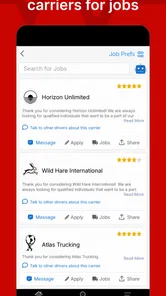
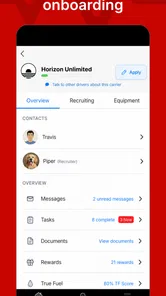
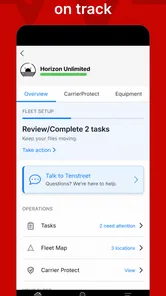
Driver Pulse offers a suite of features designed to make the job application process as smooth as possible. One of the most impressive is the ability to apply to multiple jobs with a single click. Gone are the days of filling out repetitive applications! The app also offers real-time updates on your application status, which is a game-changer. You’ll know exactly where you stand without having to chase down recruiters.
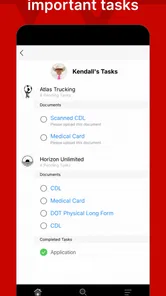
Another nifty feature is the document storage. You can upload your credentials, licenses, and other important documents directly into the app. This means no more scrambling to find paperwork when a potential employer requests it. The app also allows you to endorse skills and receive endorsements, adding an extra layer of credibility to your profile.
How to avoid preventable application friction
For an application that involves documents, I’d prepare the files before I start rather than searching for them in the middle of a form. A quick check that each document is the right one and readable can prevent avoidable delays. If an upload does not work as expected, I’d keep the original file handy and try again when I have a stable moment, instead of assuming the application has received it just because I selected it.
The same care applies to a profile that may be seen by potential employers. I’d review contact details and work information before relying on them, particularly after making changes elsewhere. A convenient profile is only helpful when it reflects what you want an employer to see; the app cannot take the place of checking your own information for accuracy.
The Community Aspect
One thing I didn’t expect was the community element within the app. You can connect with other drivers, share experiences, and even get tips on various companies. It’s a great resource for both new and seasoned drivers looking to make informed decisions about their career paths.
I’d use peer discussion as one input, not the final word on a company. A driver’s experience can depend on the route, role, and circumstances involved, so it’s sensible to look for recurring themes and then confirm important details directly. That keeps the community useful for generating questions and perspectives without mistaking informal advice for a complete picture.
When another approach is a better fit
If you mainly need to discover openings, compare employers, or keep a record of applications that do not use IntelliApp, a general job-search service or your own spreadsheet may be more useful as the main tool. Those approaches can cover a broader search in one place. Driver Pulse makes more sense as a focused companion when the application itself is tied to the process it supports, rather than as a replacement for every channel a driver might use.
Likewise, if you prefer to manage the process through calls and messages and already have a reliable system for remembering follow-ups, there may be little benefit in adding another place to check. The trade-off is convenience against duplication: a dedicated status view can reduce the need to hunt through scattered messages, but maintaining parallel records still takes a little discipline.
My Personal Experience
Using Driver Pulse for a few weeks, I’ve found that the app does indeed make the job search process less stressful. The convenience of having everything in one place cannot be overstated. Plus, the real-time updates saved me countless hours of follow-up calls and emails. However, like any app, it’s not without its hiccups. Occasionally, I experienced minor glitches, especially when uploading documents, but these were few and far between and didn’t detract significantly from the overall experience.
That kind of friction matters most when you are trying to submit something promptly. I’d avoid leaving an important document task until the last minute, and keep the original file accessible so you can try again if an upload does not go smoothly. Even when the app works well, it is sensible to verify that the information you submit is current and legible; a convenient upload flow does not remove the driver’s responsibility to check the material.
For anyone wondering whether it replaces contacting a recruiter, I wouldn’t use it that way. A status update can reduce unnecessary chasing, but a personal question or time-sensitive concern may still call for direct contact. Likewise, I would not choose it as my only tool for comparing employers: the status of an application and the quality of a job offer are different questions, and the latter still needs careful consideration outside the app.
Deciding whether to keep it
After trying it, I’d judge the app by whether it saves me effort in the particular application I’m following, not by how many tools I expect a job-search app to contain. If it gives me a convenient way to check an IntelliApp and I use that process regularly, keeping it installed is an easy choice. If I have no active application connected to it, I would not keep opening it in the hope that it will become a general job board.
Its free access makes that trial low-commitment, but time and attention still count. A driver should feel free to remove it from the routine if it duplicates a system that already works or does not match the way an employer handles applications. That is a more useful test than installing it simply because it is available.
In the end, if you’re a driver looking to simplify your job search and keep everything organized, Driver Pulse by Tenstreet is worth checking out. It brings a level of efficiency and convenience that traditional methods just can’t match. So, go ahead and give it a whirl—your next job could be just a click away!
Driver Pulse by Tenstreet Frequently Asked Questions
Who is Driver Pulse intended for, and when might it be useful?
Driver Pulse is a business app from Tenstreet aimed at truck drivers managing job applications. It may be useful if you want to keep your application activity on your phone and check the status of an IntelliApp. The app’s store summary focuses on giving drivers instant access to that status, so it is most relevant to people already using the IntelliApp application process.
What is Driver Pulse by Tenstreet and what does it offer?
Driver Pulse by Tenstreet is a comprehensive mobile application designed to streamline the job application process for truck drivers. It offers a platform where drivers can easily apply for jobs, track their applications, and communicate directly with potential employers. The app also provides access to driver profiles, allowing users to update their information and connect with a network of trucking companies.
Is Driver Pulse by Tenstreet free to use?
Yes, Driver Pulse by Tenstreet is free to download and use. The app does not charge drivers any fees for creating profiles, applying for jobs, or communicating with employers. However, users should ensure they have an active internet connection to utilize all features effectively without incurring additional data charges from their service provider.
How secure is my personal information on Driver Pulse?
Driver Pulse by Tenstreet prioritizes the security and privacy of its users' information. The app employs advanced security measures to protect personal data and ensure that only authorized parties have access. Users can trust that their sensitive information, such as contact details and employment history, is securely handled when using the app.
Can I track my job applications through Driver Pulse?
Absolutely! One of the key features of Driver Pulse by Tenstreet is the ability to track your job applications. The app provides real-time updates on the status of your applications, allowing you to know when your application has been viewed, if there are any messages from employers, and the overall progress of your job search.
Pros
- User-friendly interface for easy navigation.
- Offers real-time job application updates.
- Secure document storage for drivers.
- Connects drivers with potential employers.
- Provides a comprehensive job search tool.
Cons
- Limited to trucking industry jobs.
- Occasional app crashes reported.
- Requires constant internet connection.
- Some features need premium subscription.
- Limited customer support availability.












