TruckMap - Truck GPS Routes
- 3.59K
- 4.2
- Installs
- 500.00K
- Price
- Free

Screenshots
Analysis by Reviewed
I treat a truck route as a chain of decisions, not just a line between two addresses: the approach to a site, restrictions along the way, a place to stop, and a safe way to recover if traffic changes the plan. That is the practical problem TruckMap aims to help with. It is a free Maps & Navigation app from Tenstreet, and its truck-focused approach makes it more relevant to professional drivers than a standard car navigation app.
Start with the vehicle and the destination
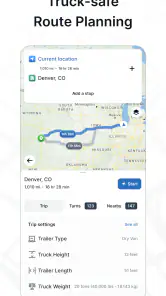
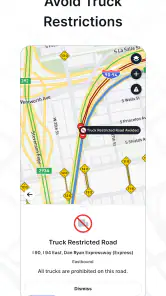
For a driver who regularly moves a commercial vehicle through unfamiliar areas, the key question is whether a route considers truck constraints rather than simply finding the shortest drive. TruckMap is built around truck navigation, so its route planning is intended to account for concerns such as weight limits, low bridges, and truck-restricted roads. That focus is useful, but I would still treat the route as a planning aid, not permission to ignore posted signs or the requirements for a particular load and vehicle.
A sensible workflow is to enter the destination before setting off, review the proposed route, and think about where a break or fuel stop might fit. That small pause matters: a route that looks fine on a phone can still need a driver’s judgement around a delivery entrance, a local restriction, or a last-minute change from dispatch. I would avoid making complex adjustments while moving; pulling over to check the map is safer and less stressful.
Features That Stand Out
First off, the TruckMap app is designed specifically for truck drivers. It’s not just a regular GPS with a truck skin slapped on top. The app provides truck-specific navigation, which means it takes into account the nuances of truck driving such as weight limits, low bridges, and truck-restricted routes. You can say goodbye to those moments of sheer panic when you realize your truck won’t fit under a bridge!
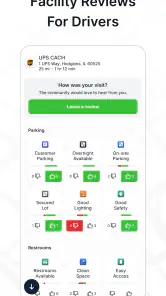
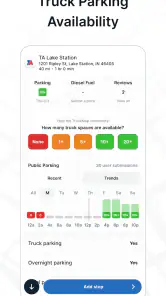
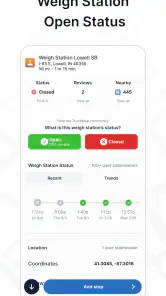
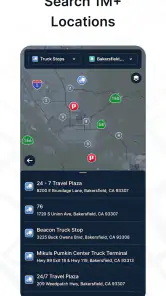
Another awesome feature is the app’s ability to locate truck stops, weigh stations, and rest areas. Let’s face it, after a long haul, knowing where you can park and grab a coffee is crucial. The app even lets you know which stops have amenities like showers and Wi-Fi. It’s like having a truck stop concierge in your pocket.
Make stops part of the plan
On a real shift, I’d use those stop locations as decision points rather than wait until I’m nearly out of fuel or exhausted. For example, if a delivery is running late and traffic has disrupted the original schedule, checking possible rest areas or truck stops can help me rethink where to pause without starting route planning from scratch. I would still check that a stop suits the vehicle and the timing; a map marker alone can’t guarantee a space or confirm that a facility is right for every driver.
This is where a truck-specific app differs from the usual car navigation option. A familiar general-purpose map can be convenient for finding an address or checking traffic, but its priorities are not necessarily a commercial vehicle’s restrictions and stop needs. TruckMap is more naturally suited to that planning context. For broad local discovery or a second opinion on an unusual access road, I’d keep a general map available as a reference rather than assume one app has every answer.
More From Our News Desk

Clash of Clans Is Won Between the Battles

Android Auto Makes the Case for Quieter Car Software

MobiOffice: Transforming Mobile Productivity with Seamless Integration

EA SPORTS FC™ Mobile Soccer: Redefining Mobile Sports Gaming

How Microsoft OneDrive Became a Mobile Productivity Giant

How Google Translate Breaks Language Barriers Effortlessly
User-Friendly Interface
When it comes to usability, TruckMap doesn’t disappoint. The interface is straightforward and easy to navigate, even for those of us who aren’t exactly tech-savvy. Setting your route is as simple as entering your destination and letting the app do the rest. The real-time traffic updates are a game changer, allowing you to reroute on the fly and avoid those dreaded traffic jams.
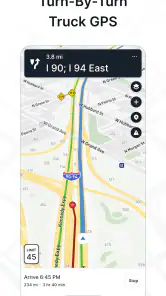
One feature I particularly love is the voice navigation. It’s clear and precise, so you’re not left squinting at your phone while trying to keep your eyes on the road. Plus, the app’s integration with weather forecasts means you can plan your journey with the weather in mind, avoiding nasty surprises.
Handoffs and practical checks
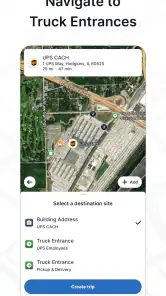
TruckMap can support the handoff between route planning and the decisions a driver makes on the road, but it should not replace communication with dispatch or a site contact. If a reroute changes the expected arrival or a delivery entrance is confusing, I’d confirm the plan through the usual work channel and verify the final approach with the people who know the site. That’s especially worthwhile when a destination lies in an industrial area where the customer entrance and truck entrance may not be the same.
Before relying on voice guidance for a long run, I’d check the destination and route while parked, set the phone where it is easy to hear without blocking the view, and make sure the device has enough battery for the trip. Traffic and weather information can help shape a decision, but conditions change; I’d use them as prompts to reassess rather than as guarantees. These simple checks make the app more useful without asking it to do a driver’s job.
A delivery-day workflow
Imagine I have a morning delivery at a warehouse I’ve never visited. Before leaving, I would enter the destination, inspect the truck-oriented route, and note the final area where an incorrect turn could put me on a narrow or restricted road. I’d also look for a suitable stop along the journey, not because I expect the plan to go wrong, but because having an alternative in mind makes a delayed departure or traffic disruption easier to handle.
Once underway, voice guidance can reduce the need to look down at the screen, while traffic information can prompt me to reconsider timing or a route change. If the arrival estimate shifts, that is the point to tell dispatch rather than quietly assume the change is acceptable. Near the warehouse, I would follow the site’s truck entrance instructions over a convenient-looking map pin. The app can help me arrive in the right area; a person at the site may still be the best source for the last turn or gate.
This workflow also answers a practical question: is TruckMap useful for occasional trips, or only for drivers who live on the road? I think it can help either, as long as truck restrictions and unfamiliar destinations matter to the trip. A driver who makes only an occasional delivery may benefit from planning the route and stops in advance, while a regular long-haul driver is more likely to value having truck-focused navigation as part of a repeatable routine.
Small habits that make it more useful
One useful habit is to separate route review from active driving. I’d check the destination spelling, route, and likely stopping options while parked, then use voice directions once moving. This avoids treating a sudden prompt or an unexpected road choice as something to solve while the vehicle is in motion. If dispatch changes the destination, I’d pull over before replacing the route and make sure the new address refers to the correct entrance or facility.
I’d also treat stop listings as a shortlist rather than a reservation. A marker can help me identify possible places for a break and compare the options with my timing, but it cannot make a parking space available or establish that a particular location will suit my rig at that moment. Checking the stop before committing is a sensible extra step, especially when the trip is already behind schedule.
Another trade-off is how much to rely on any single navigation source. TruckMap’s focus gives it a better starting point for commercial-vehicle concerns than a car-first map, but I would not use its route as a substitute for signs, local instructions, or professional judgement. If a route seems inconsistent with a posted restriction or a site’s directions, stop and verify it. A second map can help with general street context, while dispatch or the destination can clarify access rules.
Where it fits among navigation options
For a driver choosing between TruckMap and a standard phone map, the decision is less about which app is universally better and more about what the trip demands. A general map is often convenient for everyday addresses and broad local searches. TruckMap is the more relevant choice when the route needs to be considered from a truck driver’s perspective and when truck stops, weigh stations, or rest areas are part of the plan.
I would not expect it to replace a company’s dispatch tools, compliance process, or a dedicated scheduling system. Those tools handle work coordination that navigation alone cannot. Nor would I recommend relying on a truck-focused route without checking the specific vehicle and load requirements. The strongest setup is often a division of responsibility: use TruckMap to support the road plan, use work channels for changes and delivery coordination, and use signs and site guidance for the final authority on access.
Who will get the most from it
I’d recommend trying it if truck-specific routing and finding truck stops, weigh stations, or rest areas are regular parts of your working day. It is less compelling for someone who mainly drives a car, rarely travels unfamiliar routes, or needs a dedicated tool for dispatch, compliance, or delivery scheduling. The app’s focus is navigation, so drivers with those broader needs should keep the relevant work systems in their routine.
TruckMap has an average rating of 4.2 from around 7,600 ratings, with about 3,600 written reviews, and it has been installed over 500,000 times. It is rated for Everyone, runs on Android 9 or later, and its current version is 4.81.10. Those details make it accessible to many Android users, though I’d still check that the phone in the cab meets the system requirement before planning to depend on it.
Where the flow can break
The main risk is assuming that a truck-oriented route removes the need for a driver to assess the road. Restrictions can be specific to a vehicle, load, or local situation, and an app route should never overrule posted signs or instructions. A destination pin can also bring you close without settling which entrance a truck should use. I would build in time to review the approach and ask the site when the final access point is unclear.
There is also a practical difference between having information and being able to act on it. Traffic updates may suggest a change, but a driver still has to decide whether that detour is appropriate for the vehicle and communicate any meaningful schedule impact. Similarly, finding a rest area does not resolve whether it is the right place to stop at that time. TruckMap can make choices easier to consider; it cannot make every decision on the driver’s behalf.
Phone readiness is another ordinary but important point. A navigation app is only helpful if the device is usable when needed, so I’d start a long trip with the phone charged and positioned safely. I would not fiddle with route settings while moving, and I’d avoid letting a voice prompt distract me from changing road conditions. These are not reasons to avoid the app; they are part of using any phone-based navigation responsibly in a working cab.
Final Thoughts
In conclusion, if you’re a truck driver looking for a GPS app that caters specifically to your needs, TruckMap is worth considering. Its truck-focused routing, stop locations, traffic information, voice guidance, and weather context can make planning a run more grounded in the realities of driving a commercial vehicle. I like it best as a practical navigation companion, not as an authority that replaces signs, dispatch, or a driver’s own judgement.
So next time you’re hitting the road, make sure TruckMap is along for the ride. It’s like having a co-pilot without the need for small talk, provided you still do the checks that a real trip requires. If your day involves unfamiliar truck routes and planned stops, it could earn a place in your routine; if you mainly need car navigation or broader work-management tools, another option will fit better. Safe travels!
TruckMap - Truck GPS Routes Frequently Asked Questions
Is TruckMap suitable for someone who has never used a truck-specific navigation app?
TruckMap is a Maps & Navigation app built around truck-focused routing and trip information, so its features are relevant to drivers who need more than ordinary car directions. New users can explore its route guidance, truck-related locations, and planning tools as they get familiar with the app. It is free to download, and the content rating is Everyone.
What features does TruckMap offer for truck drivers?
TruckMap is designed specifically for truck drivers, offering tailored GPS routes that consider the size and weight of your vehicle. It includes features such as real-time traffic updates, low bridge alerts, rest area locations, and truck-friendly parking spots. Additionally, it provides information on weigh stations and fuel prices to help plan your trip efficiently.
Is TruckMap available for both Android and iOS devices?
Yes, TruckMap is available for download on both Android and iOS platforms. Users can easily find the app on the Google Play Store for Android devices and the Apple App Store for iOS devices. It is designed to provide a seamless navigation experience across different platforms, ensuring all truck drivers can benefit from its features regardless of their device.
Does TruckMap require an internet connection to function properly?
While TruckMap does offer offline maps for users who may not have consistent internet access, certain features like real-time traffic updates and fuel price information require an active internet connection. This ensures that truck drivers have the most current and accurate data while on the road, enhancing their navigation and planning capabilities.
Can TruckMap help with route planning and optimization for trucks?
Yes, TruckMap is specifically designed to assist with route planning and optimization for trucks. It takes into account vehicle dimensions, weight, and road restrictions to provide safe and legal routes. The app also helps in optimizing fuel consumption and time by suggesting the most efficient paths, making it a valuable tool for truck drivers looking to improve their operational efficiency.
Pros
- Provides truck-friendly routes
- Includes truck stop locations
- Offers weigh station alerts
- Real-time traffic updates
- Fuel price comparisons
Cons
- Limited offline functionality
- Occasional routing errors
- Consumes battery quickly
- Requires internet connection
- Ads in free version

- Category
- Maps & Navigation
- Version
- 4.81.10