Driver Power App
- 10.00
- 2.9
- Installs
- 10.00K
- Price
- Free

Screenshots
Analysis by Reviewed
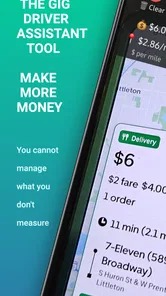
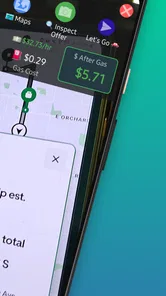
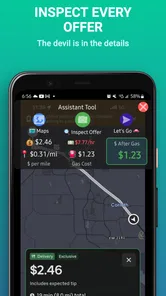
I tried Driver Power App as a practical business tool for people who earn money on the road, and my first impression was clear: it is designed around a question drivers ask constantly—“Is this trip actually worth taking?” Rather than treating a rideshare or delivery offer as simple revenue, the app aims to help you look at the numbers before committing your time, fuel, and vehicle wear. That makes it more interesting than a basic income tracker, even though its modest public reception suggests it will not suit everyone.
Developed by Byteblocks, LLC, Driver Power App is free to download and is listed for everyone. It belongs in the business category, but its usefulness is very specific: it is aimed at rideshare and delivery drivers who need quick calculations while working. The app has passed the early-release stage and is currently at version 2.2.0, with support for devices running Android 8.0 or later. I would describe it as a focused calculator rather than a complete driver-management platform.
How Driver Power App fits into a real driving day
The most useful way to think about this app is as a decision checkpoint. A driver receives an offer, looks at the payout and distance, and needs to decide quickly whether accepting it makes sense. The visible fare alone can be misleading. A short trip that ends in a busy area may be attractive, while a longer trip that leaves you far from future work can be poor value even when the displayed payment looks higher.
Driver Power App is built for that moment of hesitation. I found its concept more valuable when I treated each calculation as a small business decision instead of merely asking for an hourly estimate. The result can help you compare offers using the information you already have, such as payment, distance, and time. That approach is especially helpful for someone who is still learning how to separate gross earnings from the money that actually remains after operating costs.
A realistic example would be a weekday evening delivery shift. You are near home, an order appears with a tempting payout, but the route includes a long drive to the restaurant and a drop-off into a quiet area. A quick calculation can make the trade-off easier to see. The app cannot predict whether another order will appear afterward, but it can stop you from accepting an offer simply because its headline amount looks good.
That distinction is important. This is not a replacement for the driver platforms themselves, and I would not use it as a navigation tool, tax package, or complete earnings dashboard. Its role is narrower and, in my view, more practical: help you pause before accepting work and make your own judgment with clearer arithmetic.
What the current version does well
The current release gives the app a more established feel than a brand-new experiment. Version 2.2.0 indicates that Byteblocks, LLC has continued developing the product since its release on January 27, 2025. I see that as a positive sign for anyone considering a specialized tool, because driver workflows often expose small usability problems that only become obvious after repeated use.
More From Our News Desk

Weather by Xiaomi Review: Clear at a Glance, Less Clear Up Close

X Under Pressure: Can It Recover When Posting Goes Wrong?

Clash of Clans Is Won Between the Battles

Android Auto Makes the Case for Quieter Car Software

MobiOffice: Transforming Mobile Productivity with Seamless Integration

EA SPORTS FC™ Mobile Soccer: Redefining Mobile Sports Gaming
At the same time, I would not read the version number as proof that the app is complete. A later version can still feel limited if it does not cover the exact costs or working habits that matter to you. My experience with tools in this category is that the difference between “useful” and “not worth opening” often comes down to speed, clarity, and whether the calculations match the way a particular driver works.
The app’s public average is 2.9 from 27 ratings, with 10 written reviews. That is a mixed signal rather than a reason to dismiss it immediately. A relatively small review pool can reflect different expectations: one driver may want a fast offer calculator, while another may expect detailed records, tax support, or automatic data collection. I would install it with realistic expectations and test it during a low-pressure shift before relying on it for every decision.
How I would use it before accepting an offer
My preferred workflow is to keep the app beside the driver platform rather than trying to make it the center of the entire shift. First, I would note the offered payment and the distance shown by the work app. Then I would account for the time needed to reach the pickup or restaurant, complete the trip, and return toward an area where I actually want to work. Finally, I would compare the result with my own minimum target.
The non-obvious advantage of this method is that it forces consistency. Many drivers judge one offer emotionally and the next one mathematically. Using the same basic check for both makes it easier to notice patterns in your own work. You may discover that certain short deliveries waste more time than expected, or that a slightly lower-paying ride is better because it keeps you near your preferred working area.
I also recommend using a conservative estimate when the route is uncertain. If traffic, parking, apartment access, or restaurant delays are common in your area, do not calculate only the ideal travel time. The app can help organize the arithmetic, but your local knowledge still matters more than a neat result on the screen. That is one of the trade-offs: Driver Power App can improve the decision process, but it cannot know every real-world delay affecting a particular order.
Another useful habit is to separate fuel from broader vehicle costs. A calculation based only on gasoline may make a trip appear profitable while ignoring maintenance, tires, depreciation, insurance, or financing. I would use the app as a framework and keep a personal operating-cost estimate nearby. If your own cost per mile is higher than the number you instinctively assume, the app becomes more valuable because it exposes how quickly a seemingly good offer can shrink.
Where it differs from ordinary alternatives
The usual alternative is mental math, a calculator app, or a spreadsheet. Mental math is fast but inconsistent, especially after several hours of driving. A general calculator is flexible but makes you rebuild the same formula every time. A spreadsheet can be much more detailed, yet it is awkward when you are parked briefly between offers. Driver Power App occupies the middle ground: more focused than a blank calculator, but less comprehensive than a full financial record system.
That middle position will appeal to drivers who want a quick answer without setting up a complicated workflow. It is also the reason I would not recommend it to someone who already has a carefully designed spreadsheet, automated mileage records, and a separate tax process. In that situation, adding another calculator may create duplicate work rather than better decisions.
It is also different from relying on the rideshare or delivery platform’s own earnings screen. Those platforms show the offer and often provide trip details, but their primary job is to dispatch work, not to help you independently evaluate profitability. A separate calculator creates a little distance between the platform’s presentation and your own business judgment. That separation is useful when the displayed payout is designed to encourage a quick acceptance.
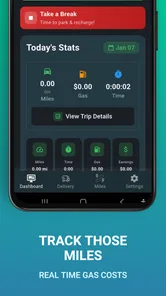
However, the app should not be confused with an automatic mileage tracker or an accounting service. If your priority is end-of-year reporting, categorized expenses, receipts, or a historical income record, a dedicated finance tool will probably serve you better. Driver Power App makes more sense as a front-line decision aid than as a back-office system.
Practical strengths for different kinds of drivers
New drivers are likely to get the most immediate benefit. When you first start, it is easy to focus on gross pay and underestimate unpaid travel, waiting, and the cost of using your car. A calculator built around rideshare and delivery work can encourage better questions from the beginning. It may help you build a personal acceptance rule instead of copying another driver’s strategy.
Part-time drivers can also find it useful because their available hours are limited. If you only have a couple of hours after work, accepting a poor offer can consume a large part of your shift. The app gives you a way to compare opportunities quickly and protect the time you deliberately set aside for earning.
Experienced drivers may benefit in a different way. You probably already know your preferred zones and rough costs, so the app is less about teaching basic profitability and more about checking unusual offers. Long-distance rides, deliveries with uncertain pickup times, and trips that end outside your normal area are the situations where a second opinion can be worthwhile.
For fleet managers or people coordinating several drivers, I would be more cautious. Nothing about the app’s positioning suggests that it is a multi-user operations system, and a simple individual calculator is not automatically suitable for dispatch, payroll, or fleet reporting. Those users should look for software built around shared records and administrative controls instead of stretching this app beyond its likely purpose.
Friction, costs, and reasons to think twice
The free price makes testing easy, but the app includes in-app purchases ranging from five cents to $47.99 per item. That does not automatically make it expensive, yet I would pay attention to what is available without paying and whether any advanced capability is essential to your routine. A free installation is most valuable when the basic workflow already solves your problem; it is less attractive if you must purchase key functionality before you can judge the app properly.
I would also be careful about using any calculator while moving. The right workflow is to check an offer when safely parked or before starting a trip, not while driving. Speed is useful only when it does not create a safety problem. This sounds obvious, but a tool designed for fast decisions can tempt people to interact with it at exactly the wrong moment.
The rating of 2.9 is another reason to test rather than commit emotionally. It is not a strong endorsement, and the small number of ratings means the average may not explain every user’s experience. I would look at whether the app fits your phone, your preferred driving platform, and your own cost method. If the input process feels slow during a real shift, the theoretical usefulness will not matter.
There is also a mental limitation that no interface can remove: calculations can create false confidence. A result may look precise even when the underlying inputs are guesses. Estimated time, uncertain tips, return mileage, and future demand all affect the real outcome. I would treat the number as a boundary for decision-making, not as a promise of profit.
What existing users should notice after updating
If you already installed an earlier release, the move to version 2.2.0 is best viewed as part of an ongoing product evolution rather than a reason to change your entire driving system overnight. I would first check whether the current workflow remains familiar, then run the same type of calculation on several offers and compare how easily you can reach a decision. Consistency matters more than a new version label.
Existing users should also revisit their personal assumptions. A calculator can be used badly even when it works correctly. If you previously entered only the visible trip distance, try including the route to pickup and the likely drive after drop-off. If you used an optimistic hourly target, compare it with a more realistic figure that includes waiting. These changes may improve your decisions more than any interface adjustment.
I would keep a short note of the situations where the app helps and where it slows you down. For example, it may be excellent for comparing two longer offers but unnecessary for a familiar short trip in a busy zone. That kind of selective use prevents the calculator from becoming another chore and lets it support your existing experience instead of replacing it.
What I would like to see watched over time
The most important thing to watch is whether the app continues to make real decisions faster and clearer. A business tool for drivers should earn its place during a busy shift, not merely look useful in a feature list. I would judge future updates by practical improvements such as smoother input, clearer results, and better support for the different cost assumptions drivers actually use.
I would also watch how the purchase model develops. Since the app is free but offers paid items, transparency will matter. Drivers should be able to understand which parts of the workflow are available at no cost and which optional tools require payment before they build their routine around them. For someone with irregular earnings, predictable value is more important than a long list of extras.
Finally, I would watch whether the product stays focused. There is a temptation for specialized apps to expand into mileage logs, tax records, earnings history, and route planning. Those additions could be helpful, but they might also make a quick calculator slower to use. In my opinion, Driver Power App’s strongest identity is its narrow focus on evaluating rideshare and delivery work. Any expansion should preserve that speed.
My recommendation for potential users
I would recommend trying Driver Power App if you drive for rideshare or delivery services and often accept offers based on instinct alone. It is particularly worth testing if you are new to the work, have limited driving hours, or want a repeatable way to account for more than the headline payout. The free entry point lowers the risk, and the app’s business focus makes it more relevant than a generic calculator.
I would skip it if you want automatic records, detailed tax preparation, fleet management, or a complete financial picture in one place. A spreadsheet or dedicated driver-finance app may be better for those needs. I would also skip it if entering an offer manually feels slower than doing the arithmetic yourself, because the best tool is the one you will actually use consistently.
Overall, I see Driver Power App as a focused companion rather than an all-in-one solution. Its value comes from encouraging a better question before accepting work: not “How much does this pay?” but “What will this opportunity really cost me in time and vehicle use?” The mixed public rating means I would test it carefully, but for the right driver, that simple change in thinking can make the app genuinely useful.
Driver Power App Frequently Asked Questions
Can I use Driver Power App on my phone?
Driver Power App is available for Android devices running version 8.0 or later. Before downloading, check your phone’s operating-system version and make sure you have enough space for the installation. The app is a business tool with an Everyone age rating, so its listed age classification is suitable for a general audience.
What is Driver Power App and what is it used for?
Driver Power App is designed to support drivers with practical tools and information while they are on the road. Depending on the version and region, it may help users monitor driving-related details, organize vehicle information, access useful services, or manage driver-focused tasks from one place. Before downloading, check the official listing to confirm the exact features available in your country and whether the app is intended for private drivers, professional drivers, or both.
Is Driver Power App free to download and use?
The application is free to download, but some functions can require in-app purchases. After installing it, review the pricing section carefully before activating paid tools or entering payment information; individual purchases range from five cents to just under forty-eight dollars. It is also worth checking whether certain features depend on your vehicle, location, account type, or a separate hardware device connected to the app.
What permissions does Driver Power App request?
A driver-focused application may request access to location services, Bluetooth, notifications, storage, mobile data, or other phone functions. These permissions can be necessary for navigation, trip recording, device pairing, alerts, or background operation. Driver Power App should only be granted permissions that match the features you plan to use. Review the privacy policy and your phone’s permission settings, especially if you do not want continuous location tracking.
Does Driver Power App work with every vehicle and smartphone?
Compatibility can vary considerably. Some features may work on most recent Android and iOS phones, while advanced functions could require a supported vehicle model, a compatible connected device, a particular operating-system version, or an active account. Before downloading, compare your phone’s software version and vehicle details with the requirements shown on the official store page. Compatibility may also differ by country or service provider.
Pros
- Quick access to vehicle performance and driving data.
- Helpful tools for monitoring fuel use and driving efficiency.
- Clean interface makes key information easy to find.
- Can support better driving habits through performance feedback.
- Useful for drivers who want more insight into daily trips.
Cons
- Some features may require compatible vehicle hardware or services.
- Accuracy can vary depending on sensor and vehicle compatibility.
- Continuous tracking may consume additional battery power.
- Advanced tools may be limited behind paid features.
- Background data collection may raise privacy concerns for some users.












