DIY Emoji: Funny Emoji Maker
- 85.00
- 4.0
- Installs
- 1.00M
- Price
- Free
Screenshots
Analysis by Reviewed
My first impression of DIY Emoji: Funny Emoji Maker is that it is built for quick, playful experiments rather than serious graphic design. I can see the appeal within minutes: instead of settling for the familiar faces on a phone keyboard, I can make something that feels more like an inside joke or a personal reaction. That novelty is real, though the bigger question is whether I would still reach for it once the first burst of creativity wears off.
A lively first week, especially for personal jokes
In the first few sessions, the fun comes from trying combinations and seeing how a small change in expression or accessories shifts the whole mood. I would use it for a friend group’s running joke, a playful reaction to a family chat, or a silly image of a pet. It suits people who enjoy making things more than people who only want a ready-made pack to send immediately.
A useful way to avoid getting stuck in endless tinkering is to start with a purpose: make one emoji for a particular person or recurring situation, then stop when it communicates the joke. That keeps the app feeling like a creative tool rather than a long menu of choices. If you simply want polished, universally recognized symbols, your phone’s built-in keyboard is quicker and more dependable.
How it fits into everyday messaging
Here is the sort of ordinary moment where I can imagine opening it: a friend sends a photo of a chaotic dinner, and I make a custom reaction that captures the group’s shared amusement instead of replying with the same laughing face everyone has seen before. The personal reference is the point. For a one-off joke, that extra effort can make a message feel warmer; for routine chats, it may be more work than the moment deserves.
The app is a free personalization app from MegaMod Studio. Its audience is reflected in a Teen content rating, while its 4.0 average from around five thousand ratings and more than a million installs suggest that it has found a sizeable group of curious users. It was released in May 2024, and version 1.3.0 requires Android 6.0 or later. Those details make it approachable for many Android users, but they do not tell me whether the creative process will match everyone’s taste.
What keeps it useful after the novelty?
Making creations worth keeping
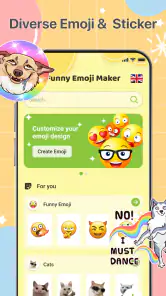
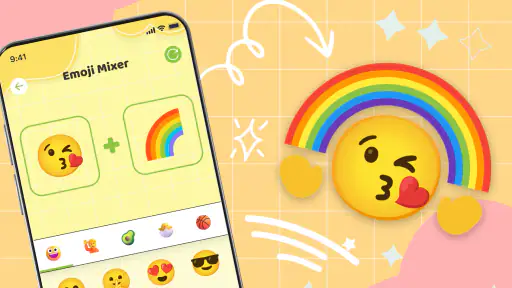
Let me tell you, diving into DIY Emoji: Funny Emoji Maker is like stepping into a world of endless creativity. The app's interface is super intuitive, making it easy for even the least tech-savvy among us to navigate. You start by choosing a base for your emoji – think of it as your blank canvas. From there, the possibilities are endless. Whether you want a quirky face, an adorable animal, or a funky object, this app has got you covered.
Customization Galore
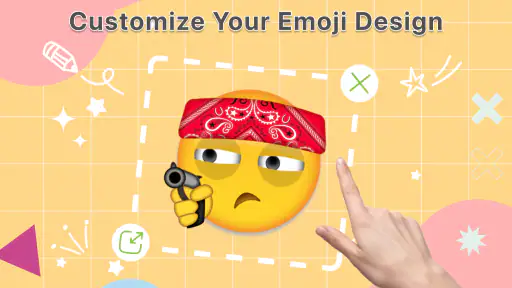
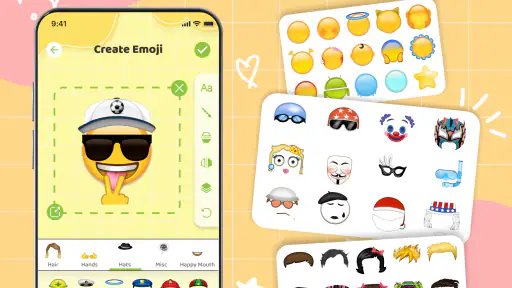
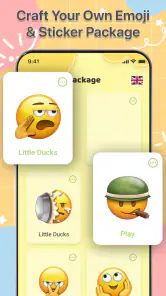
What I love most about this app is the level of customization it offers. You can tweak everything from facial expressions to accessories, ensuring your emoji is as unique as you are. I spent hours mixing and matching different eyes, mouths, and hats, and let me tell you, the results were hilarious. Plus, the app lets you save your creations, so you can build your own custom emoji library.
More From Our News Desk

Clash of Clans Is Won Between the Battles

Android Auto Makes the Case for Quieter Car Software

MobiOffice: Transforming Mobile Productivity with Seamless Integration

EA SPORTS FC™ Mobile Soccer: Redefining Mobile Sports Gaming

How Microsoft OneDrive Became a Mobile Productivity Giant

How Google Translate Breaks Language Barriers Effortlessly
For longer-term use, I would treat that saved collection as a small set of reusable reactions rather than trying to create a new image for every message. A few expressive designs can cover recurring moods—celebration, disbelief, or a familiar group-chat joke—without turning the app into another chore. The trade-off is that a saved emoji only earns its place if it is easy to find and useful again; if I rarely reuse my creations, the collection becomes clutter rather than a reason to return.
A practical workflow is to give each design one clear job before choosing details. I might make a reaction for “that went better than expected” or a face for a particular friend’s predictable punchline, then test whether the expression still reads without its backstory. That small constraint helps me avoid making several versions that differ only in a tiny accessory. If the joke depends on a visual detail, I would make that detail the focal point and simplify the rest.
Another cool feature is the ability to use your own photos to create emojis. Want to turn your pet into an emoji? Go for it! The app's photo-to-emoji feature is surprisingly accurate and adds a personal touch to your emoji collection.
When personalization has limits
Photo-based creations are most appealing when the subject is recognizable at a glance, so I would choose a clear, well-lit image with one obvious focus rather than a busy group photo. That is a practical creative choice, not a guarantee of a particular result: the final image still needs to read at emoji size. I would also think twice before using a private or sensitive photo in any app, and keep the finished image to a comfortable audience.
There is a useful distinction between making an emoji that looks amusing in the editor and making one that works as a message reaction. Tiny facial changes can disappear when an image is viewed small, while a bold silhouette or unmistakable expression is easier to understand quickly. I would zoom out or preview the saved result at the size I expect to send before spending time polishing small details. That check can save a lot of reworking.
Compared with standard emoji keyboards, this app favors personal expression over speed and familiarity. Compared with a general image editor, it offers a more focused route to playful emoji-making, but it is not the choice I would make for detailed illustration or precise design work. If my goal were a consistent set of professional-looking graphics, I would use a fuller art tool; if I only needed a quick reaction, the keyboard would win.
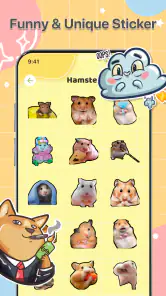
It also occupies a different niche from browsing sticker packs. A pack is convenient when I want a finished visual with no setup, and its style is usually consistent across a collection. Making my own takes longer, but the result can carry a reference that a generic pack cannot. I would choose this app when the idea is personal and specific, not simply because I need another way to send a smile or laugh.
Sharing without overcomplicating it
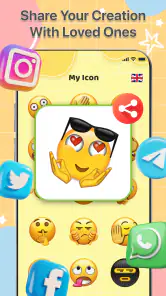
Once you've created your masterpiece, sharing it with friends and family is a breeze. The app integrates seamlessly with your favorite messaging apps, so you can send your custom emojis with just a few taps. Imagine the look on your friend's face when they receive an emoji version of your latest crazy hairdo!
In practice, I would make one design, save it, and test how it looks in the chat where I plan to use it. That quick check matters because a funny detail on a larger screen can become hard to read when sent small. Sharing is most rewarding when the image lands clearly and the recipient understands the joke; if it needs a long explanation, a simpler design may work better.
One everyday use that feels more durable than a one-off gag is making a small set for a recurring group conversation: a celebratory face for good news, a mock-shocked reaction for familiar mishaps, and a pet image that everyone in the chat recognizes. I would create them when the conversation naturally suggests an idea, rather than sitting down to fill a collection. That keeps each design connected to a real moment and makes it more likely that I will actually send it later.
If I am deciding whether to keep using it, I would ask two simple questions after a few weeks: have I sent any of the saved designs more than once, and did making them feel enjoyable rather than like preparation? A “yes” to either is a good sign that it has a place in my messaging routine. If I have saved several images but keep reaching for the standard keyboard, the app may be better as an occasional creative diversion than a regular tool.
Keeping the fun from turning into a task
And let's not forget about the laugh factor. This app had me giggling like a kid again. Making emojis with exaggerated features or silly combinations is just downright fun. It's a great way to pass the time and unleash your inner comedian.
The friction is that novelty can fade: once I have a handful of reactions I like, the urge to build more may drop. I would skip it if I rarely send images, dislike customizing things, or need a dependable communication tool rather than a creative diversion. For someone who enjoys personal jokes and will reuse a few designs, though, a short session now and then can be enough; it does not need to become a daily habit to be worthwhile.
Another possible source of fatigue is the gap between having many ways to customize a design and having a clear reason to make one. If I open the app without an idea, I can end up browsing options simply because they are there. Setting a limit—one concept, one saved result, then back to the conversation—makes the creative part feel intentional. It is a small habit, but it helps preserve the fun instead of turning every chat into an invitation to produce content.
I would also keep expectations modest about how other people will use what I send. A custom image can make a close friend laugh because they understand the reference, but a new contact may not know what it means. For conversations where clarity matters, ordinary emoji or plain text is kinder and faster. The app works best as a supplement to familiar communication, not a replacement for it.
Who is likely to get lasting value?
I think it is best suited to someone who enjoys visual play and has a few people who will recognize the jokes behind their creations. It may also suit a parent or pet owner who wants to make a lighthearted image for a family chat, provided the photo is suitable to share. The appeal is less convincing for anyone who wants instant, standardized symbols, needs careful graphic design controls, or rarely sends images in messages.
For someone wondering whether the app is approachable, its focus on choosing a base and adjusting features makes the idea easy to understand, even if the creative choices still take a little experimenting. It is free, so trying it does not require a purchase, but time is still a cost: I would start with one simple design rather than expecting a complete set of reactions in a single sitting. The app is for Android devices running version 6.0 or later, and the Teen rating is worth considering when deciding whether it is appropriate for a younger user.
My longer-term take
In conclusion, DIY Emoji: Funny Emoji Maker is a must-have app for anyone who loves emojis and wants to add a personal touch to their messages. It's user-friendly, packed with features, and an absolute blast to use. Whether you're looking to create the next viral emoji or just want to have a good laugh, this app has got you covered. So go ahead and give it a try – your emoji game will never be the same!
My more measured recommendation is to try it if the appeal is making a few personal, reusable reactions—not because you expect a permanent stream of new ideas. I would keep it around if creating a pet emoji or a group-chat callback genuinely makes messaging more fun; I would move on if I found myself opening it only to browse without making anything I wanted to send. Its strongest lasting value is the personal connection behind a design, not endless novelty.
That is why I see its recurring value as dependent on the people and conversations around it. If a small circle shares a sense of humor, one well-chosen custom reaction can keep paying off long after the first session. If you mostly communicate with people who prefer plain text, or you rarely revisit saved images, the standard keyboard is likely to remain the more practical choice. I would treat this as a lightweight creative extra: worth keeping when it earns a genuine laugh, easy to leave aside when it does not.
DIY Emoji: Funny Emoji Maker Frequently Asked Questions
Is DIY Emoji: Funny Emoji Maker suitable for younger users?
The app has a Teen content rating, so it is intended for a teen audience rather than very young children. Its focus is making and sharing playful, personalized emojis, which may appeal to users who enjoy creative customization. Parents and guardians can consider that age guidance when deciding whether it is appropriate for their family.
What is DIY Emoji: Funny Emoji Maker?
DIY Emoji: Funny Emoji Maker is an innovative app that allows users to create their own custom emojis. With a wide array of customization tools, you can design emojis that match your personal style, mood, or creative vision. The app is user-friendly, making it easy for anyone to craft unique emojis to share with friends and family on various messaging platforms.
How do I create an emoji using DIY Emoji: Funny Emoji Maker?
Creating an emoji in DIY Emoji: Funny Emoji Maker is simple and fun. Start by choosing a base emoji shape, then customize it with different facial features, accessories, and colors. The intuitive interface allows you to drag and drop elements, resize them, and adjust colors to perfect your design. Once you're satisfied, you can save your creation and use it across multiple apps.
Is DIY Emoji: Funny Emoji Maker free to use?
DIY Emoji: Funny Emoji Maker is free to download. The app’s main appeal is giving users a way to make personalized emojis, so you can explore its creative purpose without paying to get started. If you are comparing apps before installing, its free price makes it an easy option to try for casual emoji-making and customization.
Can I share my created emojis on social media and messaging apps?
Yes, DIY Emoji: Funny Emoji Maker is designed to seamlessly integrate with social media platforms and messaging apps. Once you create an emoji, you can easily share it directly from the app to platforms like WhatsApp, Facebook, Instagram, and more. This makes it convenient to express yourself in a personalized way across various digital communication channels.
Pros
- Highly customizable emoji options
- User-friendly interface
- Wide range of design elements
- Regular updates with new features
- Lightweight and quick to install
Cons
- Limited free features
- In-app purchases can be pricey
- Ads can be intrusive
- No offline mode
- Limited sharing options
- Category
- Personalization
- Version
- 1.3.0












