

Tattoo Maker: Design & Art
- 12.00
- 3.5
- Installs
- 500.00K
- Price
- Free
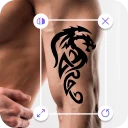
Screenshots
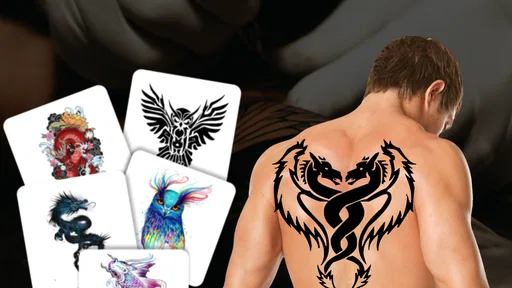
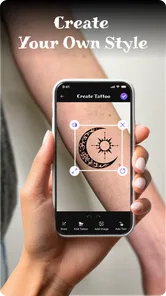
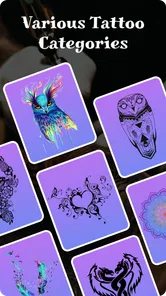
Analysis by Reviewed
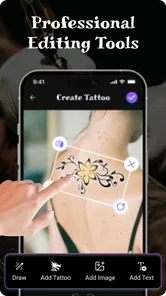
When I’m considering a tattoo, the hardest part is often not finding an idea but working out whether I want to see it on my body every day. A design that looks great in a gallery can feel very different once I picture its size and placement. Tattoo Design & Tattoo Maker gives me a low-commitment way to explore that question: I can experiment with tattoo concepts and see a visual preview before deciding what to do next.
What this kind of preview can—and cannot—tell me
I think of the app as an early-stage decision aid, not a substitute for an artist or a promise of how a tattoo will look in real life. A screen preview can help me compare ideas, but it cannot settle questions about how a design will fit my body or translate into ink. That distinction matters most when I’m moving from casual curiosity toward an actual appointment: the app can help me explain what I like, while a tattoo professional can help shape the final design.
That boundary also makes the app easier to judge fairly. I don’t expect a phone tool to provide a complete consultation; I want it to help me think more clearly before one. If I’m only browsing, a rough visual is enough to decide whether an idea is worth keeping. If I’m close to booking, I’d use the result as a conversation starter rather than treating it as a finished stencil or a guarantee.
Explore designs, but keep your expectations grounded
One of the first things I noticed about Tattoo Design & Tattoo Maker is its extensive library of tattoo designs. We’re talking thousands of options, from minimalist designs to intricate, full-body art. Whether you’re into tribal patterns, Japanese motifs, or something a bit more modern and abstract, this app has got you covered. I found myself lost in the endless possibilities, scrolling through the vast collection like a kid in a candy store.
A quick visual sandbox, not a tattoo consultation
Now, let’s talk about the user interface. The app is super intuitive and easy to navigate. No need for a tutorial here; everything is laid out in a way that just makes sense. You start by selecting a body part, and boom, you’re ready to start designing. The drag-and-drop functionality is smooth, making it a breeze to test different designs and placements. It’s like having a tattoo artist right in your pocket!
That kind of ease is most useful when I have a rough idea but cannot decide on placement. I can compare a small design on the forearm with a larger one elsewhere, then save the options instead of relying on memory. For a more useful comparison, I’d keep the same design and change only its size or position; changing everything at once makes it harder to tell what actually suits me. The mock-up can help me prepare for a conversation with an artist, but it is not a substitute for an artist checking how a design fits the body’s shape or explaining how it will translate to skin.
Personalizing a draft without mistaking it for finished artwork
What really sets this app apart is the level of customization it offers. You can tweak the designs to your heart’s content—change the color, size, and even combine different elements to create something truly unique. I spent hours crafting a design that felt just right, and the best part? You can save your creations to revisit or tweak later. This feature is a game-changer for anyone who wants a tattoo that’s genuinely personal.
More From Our News Desk

 Instagram
Instagram’s Power Comes From Its Place in Your Phone
A close look at how Instagram turns Meta’s reach, recommendation systems and everyday camera habits into durable platform power—and what that costs users.

 Gmail
GmailGmail in a Busy Inbox: Who Benefits Most?
From first account to crowded workday, Gmail earns its place through dependable search and flexible sorting—but its best fit depends on how much inbox maintenance you can tolerate.

 Prime Video
Switching to Prime Video: What Changes in Your Viewing Routine
Prime Video can make a compelling second home for streaming, but switching means learning a different catalog, rental layer, and route from browsing to playback.

 Universal TV Remote Control
Universal TV Remote Control Works Best as a Reliable Backup
A phone remote earns its place through quick setup and reliable habits. Here is how to get more from Universal TV Remote Control—and where its limits show.

 Weather - By Xiaomi
Weather by Xiaomi Review: Clear at a Glance, Less Clear Up Close
Xiaomi’s weather app makes everyday forecasts quick to scan, but its calm surface can leave useful details and recovery paths harder to find than they should be.

 X
XX Under Pressure: Can It Recover When Posting Goes Wrong?
A resilience-focused review of X, examining setup, mistaken posts, interruptions, weak connections, and the gaps that matter when recovery needs to be dependable.
Latest News



A practical workflow is to save a few distinct drafts rather than endlessly polishing one version. I’d make one restrained option, one bolder option, and perhaps a version with a different placement, then look at them again after a day or two. That pause is useful because a design that feels exciting in the moment may not feel right later. Combining elements is also a trade-off: it gives me room to experiment, but a crowded composition can lose clarity, so I would use the app to explore and bring the strongest draft to a professional for refinement.
Previewing a design involves a personal choice
Another cool feature is the augmented reality function. Yes, you heard me right! You can use your phone’s camera to see what your chosen design would look like on your skin. It’s pretty surreal to see a virtual tattoo on your arm, and it definitely helps in visualizing the final look. This way, you’re not just imagining it; you’re seeing it, which makes the decision-making process so much easier.
A camera-based preview is a more personal moment than browsing designs, so I’d decide whether I’m comfortable using that view before starting. I would also treat it as a rough visual aid, not a guarantee of how ink will look: lighting, angle, and body movement can change what appears on screen. For a realistic everyday test, I might preview a small symbol on my wrist in ordinary room light, then check the saved draft later rather than making a decision from one flattering camera angle. That gives me a better sense of whether the placement feels natural in day-to-day life.
Ideas from other people, with a clear boundary
What’s a creative process without a little inspiration from others? The app includes a community feature where you can share your designs and see what others are creating. It’s a vibrant space filled with creativity and encouragement. I’ve picked up so many ideas just from browsing other users’ creations, and it’s a fantastic way to get feedback on your own designs.
Sharing is optional in the sense that I can simply use the app to explore my own ideas; I don’t need to post a draft to get value from designing. If I do share, I’d avoid including a personal photo or details that identify me unless I’m comfortable making that choice. Community feedback can reveal whether a design reads clearly to someone else, but it is not the same as professional advice about placement, tattooing, or aftercare. For anyone who prefers private planning, the saved drafts and visual experimentation are the more relevant parts of the experience.
From a passing idea to a useful artist conversation
There’s a simple way to get more value from the app than just trying designs for a few minutes: use it to make your preferences specific. I’d note which draft feels closest, what I changed between versions, and which placement I keep returning to. That gives me concrete points to discuss with an artist instead of saying only that I want “something like this.” A saved mock-up may not be technically ready to tattoo, but it can still communicate scale, mood, and the parts of the concept I want to keep.
This is especially useful when I’m choosing between a small, discreet tattoo and a more noticeable one. I can compare the two in the same session, then revisit the options later with a clearer head. The trade-off is that a polished-looking mock-up can make an idea feel more final than it is. I’d leave room for an artist to simplify or redraw it, particularly if combining several elements makes the image busy at the size I’m considering.
Who will get the most from it
I see this as a good fit for someone curious about tattoos, someone comparing placements before booking, or a tattoo enthusiast who enjoys playing with visual ideas. It is less suitable if I need a professional-grade drawing tool, a reliable consultation, or a precise preview of the final tattoo. Compared with browsing images in a general photo app, the body-placement workflow makes experimentation more direct; compared with working with a tattoo artist, it lacks the individual guidance needed to turn a rough concept into a tattoo-ready design. I’d use it for early exploration, then take a clear saved draft to an artist rather than treating the app as the final step.
It may also suit someone who is still learning what styles they like. Browsing a range of designs can help me notice patterns in my own taste: perhaps I keep choosing clean outlines, or repeatedly save compact designs rather than large compositions. That observation is more useful than simply collecting images, because it can narrow down what I want to ask an artist about. On the other hand, if I already have a precise custom concept and need detailed drawing controls, I’d be better served by a dedicated art tool or direct collaboration with an artist.
Trust, access, and choosing how far to go
The app is a free beauty app from MegaMod Studio, with an Everyone age rating. It was released on June 6, 2024, and version 1.0.7 is the current version. It has more than 100,000 installs, with an average rating of 3.3 from around 377 ratings and 7 written reviews. Those figures suggest a mixed reception rather than a universal favorite, so I’d approach it as a handy experiment and judge whether its particular workflow suits me. It supports Android 7.0 and later.
When trying it, I’d pay attention to the permission prompts and make choices deliberately, especially before using the camera or sharing a creation. I wouldn’t assume that a feature’s presence tells me how images are handled; I’d review the app’s visible privacy choices and device prompts for myself. If the controls do not feel clear enough for the photos I want to use, I can stick to browsing and designing without adding a personal image. That cautious approach preserves the app’s main benefit—trying ideas—without feeling obliged to use every option.
A practical way to decide whether it fits
For me, the best test is to begin with an idea that is easy to compare rather than trying to design a complete sleeve or a complex custom piece straight away. I’d choose one motif, preview it at a couple of sizes, and see whether the placement still feels appealing when I return to it later. If the app helps me clarify what I like, it has done a useful job even if I ultimately ask an artist to redraw everything.
If my main concern is privacy, I’d keep the first session simple: browse and make a draft without using a personal photo or sharing anything. If I later want a camera preview or community feedback, I can make that choice after considering the prompts and controls I see. The important point is that I don’t have to use every feature to benefit from the app. That flexibility makes it more approachable for cautious users, though anyone who expects a complete explanation of image handling should make their own careful assessment before adding personal material.
For people comparing it with other ways to plan a tattoo, each option answers a different question. A general image search is quick for collecting inspiration but does not place a design on a body; a drawing app offers more control over original artwork but may take more skill; an artist can give personal guidance but is not merely a browsing tool. This app sits between those choices, helping me move from “I like this idea” to “I can picture this placement.” I’d choose it for that exploratory step, not as a replacement for either specialist drawing software or a professional consultation.
To wrap it up, this app isn’t just an app; it’s a gateway to exploring the art of tattoos without the commitment. Whether you’re a tattoo veteran or a complete newbie, this app offers something for everyone. It’s fun, easy to use, and incredibly versatile. So, if you’ve ever thought about getting inked, or just love the idea of playing around with designs, give this app a shot. You might just find your next tattoo masterpiece!
Tattoo Maker: Design & Art Frequently Asked Questions
Is Tattoo Design & Tattoo Maker free to download, and what should I expect to pay?
Tattoo Design & Tattoo Maker is free to download and is listed as a Beauty app by MegaMod Studio. It is rated for Everyone, so its audience is not limited to adults. Before installing, check the app’s current store page for any in-app purchase details that matter to you. The download itself is free; that does not necessarily mean every feature or item inside an app is free.
What is Tattoo Design & Tattoo Maker?
Tattoo Design & Tattoo Maker is a versatile app that allows users to explore and create unique tattoo designs. Whether you're a tattoo enthusiast or a professional artist, this app provides a wide array of design tools and a vast library of templates to inspire creativity. With its user-friendly interface, it's perfect for crafting personalized tattoos or simply browsing for ideas. Its main appeal is the chance to design a tattoo and preview it on an image of your body, helping you consider how an idea might look before taking it further.
Is Tattoo Design & Tattoo Maker free to use?
Tattoo Design & Tattoo Maker offers a free version with basic features, which includes access to a limited number of templates and design tools. However, for a more comprehensive experience with advanced tools, an extensive library of designs, and ad-free usage, users can opt for a premium subscription, which may require a fee. Since the app is free to download, review any purchase prompts in the app before deciding whether to spend money.
Can I save and share my tattoo designs?
Yes, the app allows users to easily save their tattoo designs directly to their device. Additionally, users can share their creations via social media platforms or email, making it convenient to showcase your designs with friends or even consult with professional tattoo artists for feedback. This can be useful when comparing ideas or asking someone else for an opinion before settling on a design.
Does the app provide professional tattoo design tools?
Tattoo Design & Tattoo Maker is equipped with professional-grade design tools suitable for both beginners and experienced tattoo artists. These include customizable brushes, layering options, and a wide range of colors and fonts, allowing users to create intricate and detailed tattoo designs with ease. It can help with visual experimentation, although a finished app design should be treated as a concept to discuss with a tattoo professional, rather than a substitute for their work.
Pros
- User-friendly interface for easy navigation.
- Wide variety of tattoo designs available.
- Customizable options for personalization.
- High-quality graphics for realistic previews.
- Regular updates with new design trends.
Cons
- Occasional crashes reported by users.
- Limited free designs
- most require purchase.
- Ads can be intrusive during use.
- No offline mode available.
- Customer support response can be slow.












