

Disneyland®
- 23.93K
- 4.5
- Installs
- 5.00M
- Price
- Free

Screenshots

Analysis by Reviewed
My main advice for using the Disneyland® app is to think of it as a companion to your day, not a replacement for a plan. It can help you make decisions while you are in the park, but those decisions depend on being able to get online and quickly find the screen you need. If you are heading out with a group, agree on a simple meeting point as well as using the map; it is much easier to regroup when everyone knows where to go than to coordinate every move by phone.
When a connection changes the day
Wait times, maps, reservations and mobile ordering are most useful when you can check them at the moment you need them. That makes connectivity part of the experience rather than a background detail. I would check important plans before leaving your hotel or home, then use the app in the park for choices that can change, such as whether to head toward an attraction or pause for food. A useful distinction is that an itinerary can guide your day, while live information helps you adjust it.
There is a trade-off: checking the screen too often can pull attention away from the park itself. I find it more practical to look at wait times when deciding what to do next, then put the phone away while walking or enjoying an attraction. For families, one person can handle the next decision and share it aloud instead of having everyone repeatedly open the app.
Practical habits for busy park days
For a realistic afternoon, imagine your group has finished an attraction and is deciding between lunch and another ride. You can consult wait times, check the map, and place a mobile food order if that suits your plans. Before you split up, agree on where to meet and when; the map can help with navigation, but it cannot replace clear coordination between people.
I would also keep a short mental or written list of the few things your group most wants to do. That gives you a fallback if a screen takes time to load or you change your mind, and it prevents the app from turning every moment into a new planning session. If a feature is not responding, try moving to a place where you can reconnect and reopen the relevant screen. For time-sensitive choices, avoid assuming that information you saw earlier is still current.
Who benefits most, and what to expect
This is most worthwhile for visitors who expect to use several park services in one day, especially people balancing attractions, food and navigation. Casual visitors who only want a general map may prefer a simpler map app, while frequent visitors may still appreciate having park-specific tools together. Unlike a general travel app, Disneyland’s version is focused on decisions inside the resort; it is less useful for planning the rest of a broader California trip.
Disney is the developer, and the app is free, with an Everyone age rating. It has a 4.5 average from around 89,000 ratings, and more than 5 million installs. The current version is 8.16, and it has been available since August 4, 2015. Those details make it a widely used option, but popularity does not remove the practical need for a working connection when you are checking changing information. I would install it before the visit, explore the main screens at home, and make sure your group knows who will use it for orders or itinerary decisions.
More From Our News Desk

 Weather - By Xiaomi
Weather by Xiaomi Review: Clear at a Glance, Less Clear Up Close
Xiaomi’s weather app makes everyday forecasts quick to scan, but its calm surface can leave useful details and recovery paths harder to find than they should be.

 X
X Under Pressure: Can It Recover When Posting Goes Wrong?
A resilience-focused review of X, examining setup, mistaken posts, interruptions, weak connections, and the gaps that matter when recovery needs to be dependable.

 Clash of Clans
 Is Won Between the Battles
Its raids are quick; its community is a long-term project of coordination, teaching, rivalry, and shared responsibility—with all the friction that entails.

 Android Auto
 Makes the Case for Quieter Car Software
The car interface is no longer judged by how much it can do, but by how quietly it helps. Android Auto shows what drivers now expect—and what still gets in the way.

 MobiOffice: Word, Sheets, PDF
MobiOffice: Transforming Mobile Productivity with Seamless Integration
MobiOffice: Word, Sheets, PDF is redefining mobile productivity with a surprising blend of functionality and innovation.

 EA SPORTS FC Soccer Mobile 26
EA SPORTS FC™ Mobile Soccer: Redefining Mobile Sports Gaming
Dive into EA SPORTS FC™ Mobile Soccer, where immersive gameplay and strategic depth transform mobile sports gaming.
Latest News



Navigating the Magic
First off, the navigation of the Disneyland® app is super intuitive. It's like the app developers took a sprinkle of pixie dust and sprinkled it all over the interface. Everything is laid out in a way that even if you're not tech-savvy, you'll find your way around with ease. I mean, who wants to spend their time fiddling with their phone when there's a whole park to explore, right?
Real-Time Updates and Wait Times
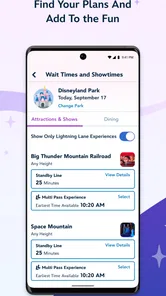
One of the coolest features of the app is the real-time updates on ride wait times. No more wandering around aimlessly trying to figure out which attraction has the shortest line. Just check the app, and boom, you're on your way to your next adventure. It's like having a magical map that keeps you one step ahead. And trust me, when you're trying to squeeze in as much fun as possible, this feature is a lifesaver.
Dining Reservations and Mobile Ordering
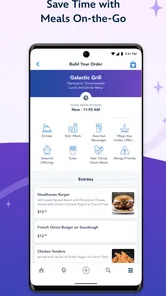
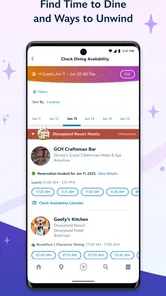
Food is a big part of the Disneyland experience, and the app makes it super easy to manage dining reservations. You can book your favorite restaurant right from your phone, which means more time for rides and less time waiting for a table. Plus, the mobile ordering feature allows you to skip the food lines altogether. Just order, pay, and pick up your food. It's as easy as saying "Bibbidi-Bobbidi-Boo!"
A small habit makes these tools more useful: decide who is responsible for the group’s orders and reservations before the day gets busy. That avoids duplicate decisions and makes it easier to keep everyone on the same page. I would also treat the map and wait-time screen as aids, not guarantees; plans can change, so leave room to choose a nearby alternative rather than crossing the park for one hoped-for short line.
Interactive Park Maps
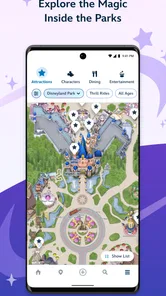
Getting lost in Disneyland is a rite of passage, but with the interactive park maps, you're less likely to lose your way. These maps are detailed and easy to follow, and the GPS functionality means you can always find your way back to Main Street, U.S.A. It's like having your own enchanted compass guiding you through the park.
That location help is especially handy when you are moving between areas with children, carrying food, or trying to meet someone after separating briefly. I would still use visible landmarks for meetups: a screen can show your position, but a familiar landmark is easier for a whole group to describe and recognize. If you are visiting with someone who prefers not to use a smartphone, make the plan understandable without requiring them to follow the app themselves.
In a nutshell, the Disneyland® app is a game-changer for anyone visiting the park. It's packed with features that make your trip smoother and more enjoyable. From keeping track of your itinerary to finding the best churro stand, this app does it all. So, if you're heading to Disneyland, do yourself a favor and download the app. You'll thank me later when you're breezing through the park like a pro!
My connectivity verdict
For a visit centered on Disneyland, I would choose this over relying only on a general map or notes because the park-focused tools bring navigation, changing wait information and food planning into one place. It is not the right choice as your only source of travel guidance for a wider trip, and it is less convenient if you plan to avoid checking your phone altogether. Set up the basics beforehand, use it selectively on site, and keep a simple backup plan for meeting your group or choosing what to do next. That balance lets the app help without letting the screen run the day.
Before you leave for the park
My first practical step would be to open the app at home and get comfortable moving between the map, wait information and food options. That is less about building a rigid schedule than removing small points of friction when you are already managing tickets, bags and company. If someone else in your party is likely to place orders, let that person explore the relevant screens too; relying on one person to learn everything on the fly can become awkward when the group is hungry or separated.
It is also worth deciding what “a good day” means for your group before you start chasing changing wait times. A family with young children may value short walks and breaks, while a couple with a few must-do attractions may be comfortable changing areas more often. The app can help you see choices, but it cannot decide which trade-off matters most to you. A short priority list makes its information easier to use, because you can compare options against your own plans rather than treating the lowest displayed wait as an automatic winner.
Using the map without overplanning
Park maps are most useful when they answer a specific question: where is the next place we need to reach, what is nearby, or where should we meet? I would avoid constantly tracing every step in advance. A route that looks neat on a screen may feel less sensible once the group is tired, stopping for food, or moving at different speeds. Check the map at decision points and use the surroundings to orient yourself in between; that keeps navigation helpful without turning a visit into a phone-led march.
For a group that splits briefly, agree on a landmark and a rough return point before anyone walks away. Then the map can help each person get back without making live messaging the only plan. This is a useful distinction for visitors with children or anyone whose phone may be in a bag: location tools can reduce uncertainty, but a spoken plan is more resilient if a device is inconvenient to check.
Food planning and changing circumstances
Mobile ordering is most valuable when it fits the rhythm of your day, not simply because it is available. I would look at food choices before everyone is already hungry, then decide whether ordering ahead suits the group and its timing. If plans shift, a nearby alternative may make more sense than sticking to an order or reservation merely because it was arranged earlier. Keep the person handling food decisions in the loop, especially if the group is moving between areas.
Reservations and mobile orders also solve different problems. A reservation helps organize a sit-down meal, while ordering from a phone can make a quicker food stop easier to coordinate. Neither removes the need to allow time for the group to arrive, decide what they want and collect food. I would treat these tools as ways to reduce uncertainty, not promises that the rest of the day will run on a fixed timetable.
When the screen is slow or the signal is poor
A network-dependent feature is only helpful when it loads at the moment you need it, so I would avoid making the app the sole keeper of an important plan. If wait information does not appear promptly, use the priorities you already agreed on and choose a sensible nearby option rather than repeatedly refreshing while the group waits. For a map issue, look for a recognizable landmark and try again when you can reconnect. The app is useful, but the most dependable recovery move is often to simplify the decision.
That approach matters most when several people are relying on one phone. If the device is running low or its connection is unreliable, one person can check the next useful detail and then put it away, rather than keeping multiple screens open across the group. I would also avoid making a tight plan that depends on every live update being available; leave room for a change of direction, a pause or a meal that takes longer than expected.
How it compares with other travel tools
A general maps app is a sensible choice for getting around a city, finding places beyond the resort or keeping navigation simple. It is not a like-for-like substitute for a park-focused companion that brings wait information, park maps and food planning into the same visit. Conversely, if you only need basic directions and do not expect to use the park services, opening a dedicated app may feel like extra work. I see the strongest case for this one when the day involves several decisions inside Disneyland, rather than as an all-purpose travel planner.
Paper notes and a shared verbal plan have an advantage too: they do not require anyone to keep checking a screen. They cannot show changing wait information or help coordinate mobile ordering in the same way, though. I would combine the approaches instead of choosing one blindly: use the app for details that can change, and keep a few priorities and meeting instructions simple enough to remember or write down.
Who may want a different approach
This app is a good fit for first-time visitors who would rather have park-specific information close at hand, and for returning guests who want to make food and attraction decisions as the day unfolds. It can also help a group with different priorities compare what to do next without walking somewhere first just to find out. On the other hand, visitors who want to spend the whole day away from their phones, or who only need a broad city map, may get more value from a simpler approach and a clear plan made in advance.
For visitors who are not comfortable using a smartphone, the app should not become a requirement for participating in the day. One person can handle checks and share the useful information aloud, while the group agrees on meeting points and priorities together. That keeps the practical benefits available without asking every member of the party to manage an account of screens and updates.
Overall, I would install it before a Disneyland visit and use it deliberately: check the details that can change, let the map support rather than dictate your route, and make food choices before hunger turns them urgent. Its value comes from bringing park-specific decisions within reach, but a working connection and a little restraint still matter. If you pair it with a simple plan and clear group communication, it can make a busy day easier to navigate without becoming the focus of the visit.
Disneyland® Frequently Asked Questions
Is the Disneyland® app only useful when I am visiting the parks?
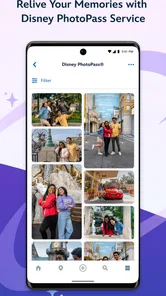
It is designed to help with both trip planning and an on-site visit. The app brings together tickets, hotel information, maps, wait times, mobile ordering, and Disney PhotoPass, so you can use it to organize parts of a trip as well as look up useful park information while you are there. Its value depends on which of these services you want in one place.
Who publishes the Disneyland® app, and what is it for?
Disney develops the Disneyland® app, which is a travel and local app focused on Disneyland Resort visits. Its tools bring together practical trip and park features, including tickets, hotel information, maps, wait times, mobile ordering, and Disney PhotoPass. If you are looking for a general travel guide unrelated to Disneyland Resort, this app is more specifically aimed at planning and supporting a visit there.
What should I know about the Disneyland® app before downloading it?
Disneyland® is a free Travel & Local app from Disney for planning and navigating a Disneyland Resort visit. Its tools include tickets, hotel information, wait times, maps, mobile ordering, and Disney PhotoPass. The app is rated for Everyone and is available on devices running Android 10 or later. It is most useful when you want park information and visit-related services gathered in one place.
Can the Disneyland® app help me plan a hotel stay as well as a park visit?
Yes. The app includes hotel information alongside park-focused tools, so it can be useful while organizing a Disneyland Resort trip and while you are there. You can also check maps and wait times, and use mobile ordering and Disney PhotoPass features. Having these options together makes the app a practical place to start when planning the main parts of a visit.
What can I do with the Disneyland® app?
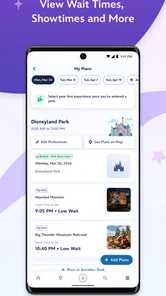
The Disneyland® app is your ultimate companion for navigating the Disneyland Resort. It allows you to view park maps, check wait times, and make dining reservations. You can also purchase tickets and access them directly from your phone. Additionally, the app provides showtimes for parades and fireworks, and it even offers mobile food ordering. It's an essential tool for maximizing your visit.
Pros
- Immersive park maps available.
- Real-time wait times for attractions.
- Easily manage dining reservations.
- Access to special event info.
- Personalized itinerary planning.
Cons
- Requires constant internet connection.
- Can drain battery quickly.
- Occasional app crashes reported.
- Limited functionality without account.
- May lag during peak hours.













