Disney Cruise Line Navigator
- 6.45K
- 4.3
- Installs
- 1.00M
- Price
- Free

Screenshots
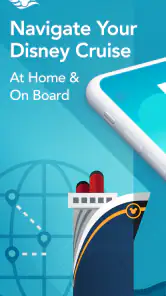
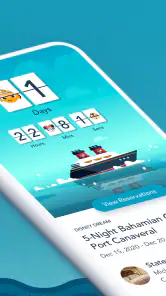
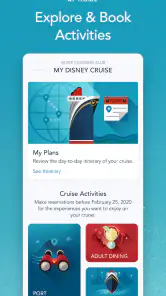
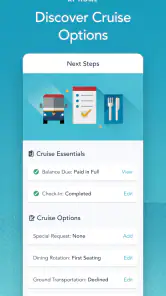
Analysis by Reviewed
I wouldn’t judge Disney Cruise Line Navigator by how much it can do on land; its real value is having cruise information and planning tools together when you’re aboard. The app is free, made by Disney, and sits in the Travel & Local category. I see it as a trip companion rather than a general travel planner: it makes the most sense for people sailing with Disney, not for someone comparing hotels, flights, or cruises across different companies.
What to expect from its speed
For a trip app, the useful question is less whether every screen feels instant and more whether you can find the next detail without turning a simple decision into a project. Navigator brings practical cruise tasks into one place, which can save time when you’re checking plans between activities. I’d still approach it as a companion to your own itinerary, not as a reason to leave all your planning until the last minute.
Before sailing, I’d use a quiet moment to look through the parts that matter to my group and get familiar with where they sit in the app. That small bit of preparation can make it easier to check a schedule when you’re already moving around the ship. The app has a 4.3 average from around 17,000 ratings, but my advice is to judge it by how well its cruise-specific tools fit your own trip rather than treating a rating as a promise of a flawless experience.
When the ship gets busy
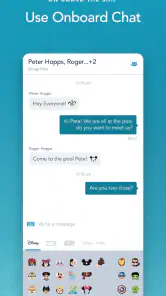
A busy cruise day is where a focused tool can be more useful than switching between general-purpose apps. If your group is splitting up, onboard chat gives you a way to coordinate without relying on an internet connection. I’d agree on a simple habit—such as checking messages before heading to the next activity—so nobody assumes a chat alert will replace a clear meeting plan.
For a family, the practical payoff is less about having more information and more about reducing small coordination problems: checking what’s coming up, settling on a plan, and regrouping after different activities. If your group prefers to stay together and already uses another reliable way to communicate, chat may matter less. The strongest use case is a party that needs to make plans while people are exploring different parts of the vessel.
Reliability and sensible backups
I’d keep the app in the role of a convenient guide, not the only place I remember an important plan. Before a show or excursion, it’s sensible to check the details in the app and make sure everyone in your group knows the meeting point. If a screen takes longer than expected at a busy moment, having agreed on the basics beforehand keeps that pause from becoming a bigger problem.
Navigator has grown into an established cruise companion: it was released in 2013, has over a million installs, and its current version is 5.41.0. Those figures give a sense of its history and reach, but they don’t tell me how it will behave on every device or during every sailing. I’d install it before traveling, open it once, and make sure I know how to reach the sections I expect to use.
More From Our News Desk

Clash of Clans Is Won Between the Battles

Android Auto Makes the Case for Quieter Car Software

MobiOffice: Transforming Mobile Productivity with Seamless Integration

EA SPORTS FC™ Mobile Soccer: Redefining Mobile Sports Gaming

How Microsoft OneDrive Became a Mobile Productivity Giant

How Google Translate Breaks Language Barriers Effortlessly
Device fit and who should skip it
The app requires iOS 11 or later, so I’d check that before relying on it for a trip. It’s rated for Everyone, but that doesn’t mean every feature will matter to every traveler. If you aren’t taking a Disney cruise, or you mainly want a broad travel organizer for reservations across several providers, a general travel app is a better fit. Navigator is free, which makes trying it ahead of time a low-commitment way to see whether its cruise tools suit you.
So, I finally got around to checking out the Disney Cruise Line Navigator app, and let me tell you, it’s a game-changer for anyone planning to embark on a Disney cruise adventure. This app is like having a personal assistant in the palm of your hand, making your cruise experience as seamless and magical as possible.
Your Cruise Companion
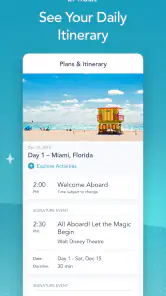
First off, let’s talk about how this app serves as your ultimate cruise companion. From checking in to exploring the ship, the Disney Cruise Line Navigator app covers all the bases. You can easily access your cruise itinerary, view deck plans, and even see what’s happening around the ship each day. It’s like having a pocket-sized guidebook that updates in real-time.
Stay Connected Onboard
One of my favorite features is the onboard chat. You know how you’re always trying to find friends or family on the ship? Well, this app lets you chat with them without needing an internet connection. It’s super handy for organizing meet-ups or just keeping in touch while you’re off exploring different parts of the vessel.
Dining and Entertainment Made Easy
Now, let’s talk about food and fun—two of the most important aspects of any cruise! The app lets you browse dining menus, make reservations, and even order room service without leaving your deck chair. Plus, keeping track of all the entertainment options is a breeze. Whether it’s a Broadway-style show, a movie screening, or a character meet-and-greet, the app makes sure you won’t miss out on any of the action.
Plan Your Adventures
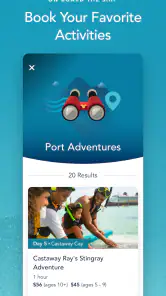
Another cool feature is the ability to book shore excursions directly through the app. You can read descriptions, check availability, and reserve your spot all in one place. This makes planning your off-ship adventures super convenient, and it’s great to have everything sorted out before you even step foot on land.
A practical routine for a sailing day
Here’s how I’d put the tools to work without constantly staring at a phone: check the day’s activities over breakfast, pick one or two priorities, then use the schedule as a reference rather than rebuilding the plan every hour. If a family member wants a different activity, onboard chat can help settle where and when to meet again. That routine makes the app most useful as a shared point of reference, while leaving room for the spontaneous moments that are part of a cruise.
For a first-time cruiser, the combination of itinerary, ship information, and daily events can help answer the practical question, “What should we do next?” A returning guest may care more about checking specific entertainment or dining options. Either way, I’d review plans with the group before everyone disperses; a phone is convenient, but agreeing on a fallback meeting place is still a smart move if someone misses a message or doesn’t check the screen.
Choosing it over general travel tools
Compared with the usual travel apps, Navigator is deliberately narrow. A general organizer is better for collecting bookings from different airlines, hotels, and tour operators; this app is more relevant once your plans center on a Disney sailing and shipboard activities. I wouldn’t expect it to replace a broader trip-planning setup. Instead, I’d use each for its strength: a general tool for the journey to the port and Navigator for the cruise itself.
That focus is also a trade-off. If you want one app to manage every part of a holiday, a cruise-specific companion may feel limited. But if your main questions concern what’s happening aboard, where to go, or how to coordinate with your party, keeping those details together can be more useful than forcing them into a generic itinerary. The app is best judged by that focused job, not by the number of unrelated travel tasks it handles.
Small preparation, fewer surprises
I’d install it before departure, check that it opens on the device I plan to bring, and make sure the people I’ll coordinate with know how they intend to use onboard chat. It’s also worth checking plans together rather than assuming everyone has seen the same update. These are modest steps, but they reduce the chance of a last-minute scramble when a group is trying to choose between activities or find one another.
For everyday use, I’d keep expectations practical: a mobile app is convenient for looking up cruise plans, but it’s still wise to remember important times and meeting arrangements. If your phone is older, short on space, or running an operating system below the stated minimum, resolve that before travel rather than discovering a compatibility issue when you need the app. The app is for Everyone, though its usefulness depends much more on whether you’re sailing with Disney than on age.
Making group plans work smoothly
One small but useful approach is to decide in advance which decisions belong in the app and which are better settled face to face. I’d use the schedule to compare options, then agree on a specific meeting point and time before splitting up. That avoids turning chat into a running stream of “Where are you now?” messages, and it helps children or less phone-focused members of a party follow a simple plan.
For a group with different interests, the app can also make compromise easier: each person can identify an activity they care about, while the day’s schedule helps everyone see where there is room to meet again. I wouldn’t try to fill every open moment, though. A cruise day can change as the group’s energy shifts, so it’s more useful to keep a few priorities visible than to treat the itinerary as a rigid timetable.
What to do if the app is slow or unavailable
I can’t promise identical performance on every phone or in every onboard situation, so I’d avoid making a time-sensitive plan depend on opening one screen at the last possible minute. If a page is slow to appear, a remembered time and meeting place give you a simple fallback while you try again. Before leaving your room, I’d also check anything important that the group needs to know, rather than waiting until everyone is already moving in different directions.
This is less about expecting trouble than about using a phone sensibly in a busy setting. Keep the device charged enough for the day, avoid unnecessary last-minute app setup, and make sure the people you’re traveling with know the basic plan. The app can reduce friction, but it can’t replace a clear agreement between people or make everyone check a screen at the same moment.
Who gets the most from it
I’d recommend Navigator most readily to families and friends who expect to use several shipboard tools and may split up during the day. It is also a sensible fit for a first Disney cruise, when having ship information and activities gathered in one place can make the environment feel easier to navigate. A traveler who likes to plan loosely can still use it as a reference without needing to turn every decision into a scheduled commitment.
On the other hand, a passenger who prefers paper notes, rarely checks a phone, or expects a single app to handle flights, hotels, and every other part of a holiday may get less value from it. In that case, I’d keep a broader travel organizer for the land portion and use Navigator only for the specific cruise tasks that matter. Its narrow focus is a strength when it matches the trip, not a reason to install it for every vacation.
Where it earns its place
The overall experience is strongest when several cruise tasks come up in the same day: checking an activity, coordinating a meetup, and deciding what to do next. The app’s focused design can reduce the mental load of keeping those plans straight, especially for families or friends who don’t want to rely on one person remembering everything. I wouldn’t call it essential for every traveler, but I would consider it a sensible companion for anyone who expects to use its onboard planning and communication tools.
In conclusion, the Disney Cruise Line Navigator app is a must-have for anyone setting sail with Disney. It’s user-friendly, packed with features, and truly enhances the cruise experience. Whether you're a first-time cruiser or a seasoned sailor, this app will make your trip more enjoyable and stress-free. So go ahead, download it before your next cruise—it’s like having a little bit of Disney magic right in your pocket!
Disney Cruise Line Navigator Frequently Asked Questions
Is Disney Cruise Line Navigator available in multiple languages?
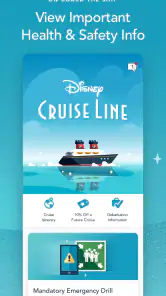
The app is Disney Cruise Line’s travel companion, with tools such as onboard chat, payments, and options to view and book activities and entertainment. If you plan to use it while traveling, it is worth checking the language and accessibility settings on your device and exploring the app before your cruise. That gives you time to become comfortable with its menus and find the features you expect to use.
Can I install Disney Cruise Line Navigator before my cruise?
Yes, you can download the app before your trip and get familiar with its layout in advance. It brings together cruise-related tools, including onboard chat, payments, and ways to view and book activities and entertainment. Installing it ahead of time can make it easier to find your way around when you are preparing for the cruise, and you can keep it ready on your phone or tablet for onboard use.
Is Disney Cruise Line Navigator free to download?
Yes, Disney Cruise Line Navigator is free to download. It is a travel app from Disney for guests who want cruise-related tools on their mobile device, including onboard chat, payments, and ways to view and book activities and entertainment. You can install it before your trip to become familiar with its layout, then use it as a handy companion while planning and during your cruise.
Which devices can install Disney Cruise Line Navigator?
The app is available for Android and iOS devices, so you can use a compatible phone or tablet to access its cruise tools. It requires Android 11 or later, and its age rating is Everyone. Checking that your device meets the operating-system requirement before downloading can help you avoid installation problems and make it easier to prepare the app ahead of your sailing.
What is the Disney Cruise Line Navigator app used for?
The Disney Cruise Line Navigator app is designed to enhance your cruise experience by providing a wealth of information and convenience. Users can access daily itineraries, view dining menus, explore ship maps, and even communicate with family and friends onboard through a chat feature. It also supports payments and lets guests view and book activities and entertainment, helping keep useful cruise details together in one place.
Pros
- Intuitive user interface for easy navigation.
- Provides real-time updates on ship activities.
- Comprehensive dining and entertainment options.
- Personalized itineraries and reminders.
- Access to free onboard Wi-Fi for app use.
Cons
- Limited functionality without Wi-Fi connection.
- App can be slow during peak times.
- Occasional glitches in reservation system.
- Limited customization options for alerts.
- Requires frequent updates for new features.

- Category
- Travel & Local
- Version
- 5.41.0