

Design Sessions
- 28.00
- 4.9
- Installs
- 10.00K
- Price
- Free

Screenshots


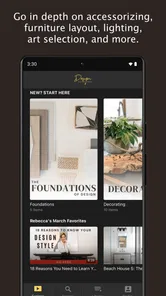


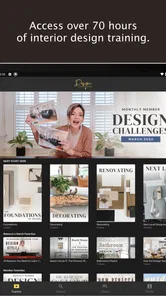
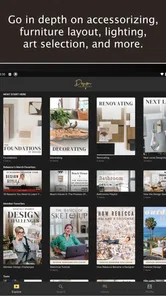

Analysis by Reviewed
I opened Design Sessions expecting a straightforward home-decoration app, but its appeal became clearer when I treated it as a planning companion rather than a complete interior-design replacement. Developed by Kinwoven, this free Art & Design app is aimed at people who want to make their home feel more considered without beginning with professional software, a blank sketchbook, or a long list of design rules. Its simple promise is useful: start with the room you have, think through the choices, and move toward a more beautiful result.
My experience is best summed up this way: the app works well when I already have a real room, a specific problem, and the patience to make decisions in stages. It is less convincing if I want a fully measured floor plan, exact product sourcing, or a technically precise rendering. That distinction matters because many home-design tools try to do everything at once. Design Sessions feels more approachable when the goal is to clarify taste and direction before spending money.
From an Unclear Room to a More Confident Design Direction
I found that the most useful first step is to name what feels unresolved before changing anything: a room can seem awkward because of its layout, its mood, or the way it supports daily routines. Starting with that distinction gives the design process a practical anchor, so I can judge ideas by whether they address the real problem rather than simply looking appealing.
Starting with the room as it really is
The most useful way to begin is not by imagining a perfect home. I started with the kind of situation most people actually face: a room that was functional but visually unsettled. The furniture worked, yet the arrangement lacked intention, and I was unsure whether the problem was color, clutter, scale, or simply too many unrelated choices. That starting condition is where the app makes the most sense.
Rather than asking me to become an interior designer immediately, the experience encouraged a slower look at the space. I could think about what I wanted the room to do, how it should feel, and which existing pieces deserved to stay. That change in mindset is more important than it sounds. A decorating app can tempt people into collecting attractive ideas without solving the original problem. Here, the value comes from connecting inspiration to a particular home.
I would recommend using it with one room in mind. A living room, bedroom, entryway, or work corner gives the process a boundary. If I tried to redesign the whole home mentally, every preference competed with every other preference. Focusing on one space made it easier to notice the practical questions: where people walk, what needs to be stored, which surface receives the most use, and what currently makes the room feel unfinished.
This is also where I found one of the app’s less obvious strengths. It is not only for people who already know their style. It can help someone who keeps saving different looks but cannot explain why they work together. By comparing feelings and priorities across a single room, I could move from vague language such as “cozy” or “clean” toward decisions about atmosphere and visual balance.
More From Our News Desk

 Gmail
GmailGmail in a Busy Inbox: Who Benefits Most?
From first account to crowded workday, Gmail earns its place through dependable search and flexible sorting—but its best fit depends on how much inbox maintenance you can tolerate.

 Prime Video
Switching to Prime Video: What Changes in Your Viewing Routine
Prime Video can make a compelling second home for streaming, but switching means learning a different catalog, rental layer, and route from browsing to playback.

 Universal TV Remote Control
Universal TV Remote Control Works Best as a Reliable Backup
A phone remote earns its place through quick setup and reliable habits. Here is how to get more from Universal TV Remote Control—and where its limits show.

 Weather - By Xiaomi
Weather by Xiaomi Review: Clear at a Glance, Less Clear Up Close
Xiaomi’s weather app makes everyday forecasts quick to scan, but its calm surface can leave useful details and recovery paths harder to find than they should be.

 X
XX Under Pressure: Can It Recover When Posting Goes Wrong?
A resilience-focused review of X, examining setup, mistaken posts, interruptions, weak connections, and the gaps that matter when recovery needs to be dependable.

 Clash of Clans
Clash of Clans Is Won Between the Battles
Its raids are quick; its community is a long-term project of coordination, teaching, rivalry, and shared responsibility—with all the friction that entails.
Latest News



Turning inspiration into decisions
The next step is separating inspiration from instruction. I treated attractive ideas as prompts rather than orders. A room can look wonderful in a session and still be unsuitable for a small apartment, a busy family, a rental, or a home with limited storage. The app is most helpful when I ask, “What principle can I borrow here?” instead of, “How do I copy this exactly?”
That approach produced more practical choices. I could identify whether I was responding to warm colors, layered textures, open space, traditional details, or a calmer arrangement. Then I could test those ideas against the furniture and finishes I already owned. This saved me from the common mistake of replacing everything simply because a new style looked appealing.
A useful personal workflow is to keep three groups in mind: pieces that must remain, pieces that might move, and pieces that are candidates for replacement. I found that this made the app’s guidance easier to apply. The first group protects the budget and the character of the room. The second creates quick progress through rearrangement. The third prevents impulse purchases because I can identify what truly fails instead of shopping generally.
The key trade-off is inspiration versus precision. Design Sessions can help me decide what direction feels right, but I still need to verify dimensions, construction, compatibility, and cost elsewhere before committing. That is not a flaw for a design-focused app, although it does mean the app should sit early in the process rather than at the final purchasing stage.
Working through the design flow step by step
In practice, I moved through the experience by making one decision at a time. First came the room’s purpose. Then came the mood I wanted, followed by the elements that could create it. Finally, I considered how those choices would fit the room I actually use. This order prevented decorative details from taking over before the functional foundation was clear.
For an everyday example, imagine a bedroom that feels crowded and restless. I would begin by identifying whether the issue is poor circulation, insufficient storage, harsh lighting, or mismatched visual weight. If the bed dominates one side and smaller items are scattered around it, the answer may not be a new color scheme. It may be editing, repositioning, or creating a clearer focal point. The app becomes useful here because it encourages a design conversation instead of reducing the problem to a shopping list.
For a home office, the same process changes slightly. The room has to support concentration, equipment, and comfort, so an attractive arrangement that causes glare or blocks movement is not a success. I would use the app to establish the desired feeling and visual structure, then check the practical details in the room itself. This handoff between design thinking and physical testing is essential.
I also learned not to make every decision in one sitting. A short pause between choosing a direction and changing the room helps reveal whether the idea still feels appropriate. When I returned with fresh eyes, some choices felt more convincing while others seemed like temporary excitement. That makes Design Sessions better suited to thoughtful iteration than to rapid, one-tap makeovers.
The handoff from app guidance to the physical room
The most important handoff happens when the screen stops being the main workspace. I had to carry the design direction into the room, where walls, outlets, door swings, daylight, existing furniture, and everyday habits become impossible to ignore. This is where a user should take notes and make simple checks before ordering anything.
I found it useful to record the decisions in plain language: keep the room warm rather than stark, reduce visual clutter near the entrance, give the main seating a clearer relationship, or create a calmer surface beside the bed. These statements are more useful than a vague collection of saved images because they guide later choices. If a proposed item does not support the statement, it may not belong in the room.
Another practical handoff is between the person designing and anyone else who shares the space. A partner, roommate, or family member may care less about the look and more about storage, cleaning, comfort, or access. I would show them the direction and ask for objections before making expensive changes. The app can help start that discussion, but it cannot replace negotiation inside the home.
This matters especially when the design involves removing familiar furniture or changing a well-used area. A visually cleaner room may be frustrating if it eliminates the place where someone drops keys, charges devices, or keeps daily essentials. I treated those habits as requirements, not clutter to be ignored. That made the final result feel more sustainable.
What the finished result can realistically be
The result I got was not a construction document or a perfect digital replica of the room. It was more valuable in a different way: I had a clearer design direction, fewer competing ideas, and a better sense of which changes should happen first. That clarity can prevent wasted purchases and make small improvements feel connected.
For a modest refresh, the outcome might be a better furniture arrangement, a more coherent palette, or a decision to edit rather than add. For a larger project, the app can serve as an early briefing tool before speaking with a decorator, contractor, or retailer. I could explain the desired atmosphere and priorities more confidently because I had already thought them through.
There is also a psychological benefit. When a room feels wrong, it is easy to assume the entire space needs a dramatic overhaul. A structured design session can reveal that the real issue is limited to one visual conflict or one missing function. In my case, that made the project feel manageable. I was no longer trying to create a magazine image; I was trying to make daily life in the room work better.
That said, the final result depends heavily on the user’s follow-through. The app cannot rearrange furniture, measure a wall, compare materials, or decide whether a purchase fits a budget. Someone who wants an automatic before-and-after transformation may find the process too hands-on. Someone who enjoys making informed choices will likely appreciate the breathing room.
Where the workflow breaks down
The first point of friction is precision. If I need exact dimensions, a detailed floor plan, realistic placement of my own furniture, or technical renovation planning, I would choose a dedicated room-planning tool or professional software instead. Design Sessions is better at shaping a point of view than documenting every physical constraint.
The second limitation is that inspiration can still outrun reality. A refined design direction may involve materials, proportions, or maintenance demands that are difficult in a busy household. I had to keep asking whether the idea would survive pets, children, frequent guests, limited time, and ordinary wear. The app can support the conversation, but the user must supply that real-life filter.
There is also a financial boundary to keep in mind. The app itself is free, while optional in-app purchases range from about fifteen dollars to nearly one hundred fifty dollars per item. That makes it important to understand what level of guidance I actually need before paying for anything. If I only want occasional inspiration, the free experience may be enough. If I am looking for deeper direction, I should consider the value of that help against alternatives such as a consultation, a book, or a specialized planning app.
Another possible break occurs for users who prefer a large catalog of products and instant shopping links. Design Sessions is not the first choice for someone whose main goal is to compare sofas, calculate delivery costs, or assemble a complete cart. Retailer tools are often more convenient for that narrow job, although they may encourage choices based on available inventory rather than the needs of the room.
I would also skip it if my project is primarily structural. Moving plumbing, changing electrical work, selecting building materials, or preparing contractor-ready plans requires a different level of technical information. The app can help clarify the look and feeling I want, but it should not be treated as a substitute for professional advice where safety or construction is involved.
Who will get the most from it
I think Design Sessions is a strong fit for renters, first-time decorators, and homeowners who feel stuck between too many ideas. It is especially useful when the room needs a coherent direction but the user is not ready to hire a designer or learn complex software. The approachable format lowers the barrier to starting.
It also suits people who want to improve an existing room rather than erase it. If I already own meaningful furniture, inherited pieces, or items that work well functionally, the app encourages a more selective process. That can lead to a better result than following a trend from scratch.
Users who enjoy reflection will probably find the experience more rewarding than users seeking automation. I had to make judgments, compare priorities, and test ideas against the physical room. That involvement is part of the benefit, but it is also the reason the app will not satisfy everyone.
The age rating is Everyone, which fits the accessible subject matter, and the app runs on Android devices using at least version 8.0. It has reached over ten thousand installs and holds a 4.9 average from more than a hundred ratings, with a few dozen written reviews. Those figures suggest a small but notably positive audience, though I would still judge it by whether its guided design approach matches my needs rather than by the rating alone.
My recommendation after using the complete workflow
Design Sessions works best as the thoughtful middle stage between “I dislike this room” and “I know exactly what to change.” I would open it before shopping, before repainting, and before asking someone else to help. The strongest workflow is to define the room’s real problem, use the app to clarify the desired direction, test that direction against daily habits, and only then move to measurements, products, or professional services.
Kinwoven has made an app that feels more useful when I resist rushing through it. Its current version is 10.200.1, and the free entry point makes it easy to explore without treating the first idea as a commitment. The optional purchases mean I would pay attention to what additional guidance provides, but the central value remains the ability to think more clearly about a home.
I would recommend it to a friend who has a room full of decent pieces but no clear plan, or to someone who keeps collecting inspiration without turning it into action. I would not recommend relying on it alone for technical layouts, exact purchasing, or construction decisions. Used for what it does best, it turns decorating from an impulsive search for attractive objects into a more deliberate sequence of choices.
My final verdict: Design Sessions is a worthwhile free Art & Design app for finding direction, especially when the starting condition is uncertainty rather than an empty room. It will not finish the project for me, and that is precisely why I found it useful. It gives the early design process enough structure to produce a realistic outcome, while leaving the final handoffs—measurements, budgets, household agreement, and implementation—in my hands.
Design Sessions Frequently Asked Questions
What should I know about Design Sessions before downloading it?
Design Sessions is an Art & Design app from Kinwoven, with the store summary “Make your home beautiful.” It is free to download and is rated for Everyone. The app has 10K+ installs, giving prospective users a sense of its reach. If you are looking for an app connected with home design, its stated focus makes it worth exploring.
What is Design Sessions, and who is it intended for?
Design Sessions is an app focused on helping users organize, plan, and participate in creative design activities or learning sessions. It may be useful for students, beginners, professionals, and anyone interested in improving their design workflow. Before downloading, users should check the current app description because available tools and session topics can vary between Android and iOS versions.
What features can I expect from Design Sessions?
The app generally provides a structured environment for exploring design subjects, following guided sessions, and keeping creative work organized. Depending on the version available on your device, it may include session schedules, educational content, project references, progress tracking, or community-related features. Some functions could require an account, an internet connection, or access to paid content, so reviewing the store listing is recommended.
Is Design Sessions free to download and use?
Design Sessions is free to download, but that does not mean every feature is free. Some lessons, resources, advanced tools, or subscription-based content may be restricted behind in-app purchases, with purchases listed from $14.99 to $147.99 per item. I recommend checking the pricing section in the Google Play Store or Apple App Store before installing, especially if the app is intended for regular study or professional use.
Does Design Sessions require an internet connection?
An internet connection may be necessary for downloading sessions, synchronizing progress, accessing updated content, or participating in any online community features. Certain materials might remain available offline after they have been loaded, but offline functionality can differ depending on the platform and app version. Users with limited data should open the app over Wi-Fi first and review its permissions.
Pros
- Clear session-based workflow keeps design tasks focused and organized.
- Useful for planning
- reviewing
- and documenting creative work in one place.
- Simple interface helps users start sessions without a steep learning curve.
- Session records can make progress easier to track over time.
- Suitable for solo designers and small creative teams.
Cons
- May feel too limited for users needing advanced design collaboration tools.
- Some features may require an account or additional setup to access.
- The session-focused approach may not suit unstructured creative work.
- Limited integrations could make it harder to connect existing design tools.
- New users may need time to understand the best way to organize sessions.











