

Design Home - AI Home Makeover
- 0.00
- 0.0
- Installs
- 10.00K
- Price
- Free

Screenshots

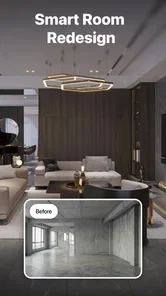
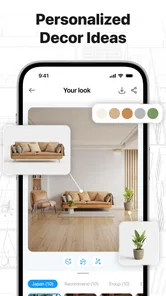
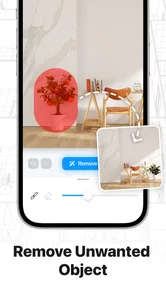
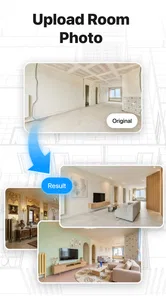

Analysis by Reviewed
I would treat Design Home - AI Home Makeover as a quick visual-thinking companion, not as a replacement for a professional interior designer or a full room-planning suite. Its appeal is the chance to explore makeover ideas with AI, which can help when a space feels tired but you cannot yet picture what might work. I found the most useful way to approach an app like this is to bring it a clear design question: what mood should this room have, or how might a different style change its feel? That keeps the results useful rather than turning the process into aimless browsing.
Quick ideas, not a measured design plan
The app is in the art and design category, and its focus is home makeovers and decor inspiration. That makes it a natural fit for the early, exploratory stage of decorating: collecting a direction before shopping, painting, or moving furniture. If you have a room that feels bland, a visual concept can make it easier to explain what you like—and just as importantly, what you do not.
I would start with one room and one goal at a time. For example, if a living room feels crowded, look for a calmer visual direction before asking whether every item needs replacing. If you are refreshing a bedroom, decide whether you want it to feel brighter, warmer, or more restful. A focused prompt or brief tends to give you something easier to judge than a request that mixes several rooms, styles, and practical problems together.
That distinction matters because an AI makeover is best treated as inspiration, not a construction drawing. A concept may help you compare moods, but it should not be taken as proof that furniture will fit, that a color will look identical in your lighting, or that a proposed change is practical. I would use the visuals to make a shortlist of ideas, then check dimensions, materials, and costs separately before committing.
How I would use it when a room needs a reset
Picture a familiar weekend problem: you want to update a spare room, but it has gradually become a place for work, storage, and occasional guests. Instead of trying to solve everything at once, use the app to explore a single intended use—say, a calmer guest room—and note which parts of the resulting look feel achievable. Then make a small real-world list: keep, move, replace, and investigate. This turns visual browsing into a decision process rather than a collection of attractive images.
A less obvious benefit of that approach is that the app can help you identify preferences before you spend money. You may discover that you like the feeling of a lighter room but not the specific furniture shown, or that a dramatic palette looks appealing on screen yet would be too much for a room you use every day. Treating each result as a conversation starter helps prevent a polished image from dictating an impractical purchase.
It is also worth comparing ideas against the room’s fixed details. Floor color, window placement, ceiling height, and the direction of natural light can all change how a design feels in person. I would save or note the elements that seem transferable—such as a general color relationship or a preference for less visual clutter—rather than assuming the whole concept can be copied exactly.
More From Our News Desk

 Gmail
GmailGmail in a Busy Inbox: Who Benefits Most?
From first account to crowded workday, Gmail earns its place through dependable search and flexible sorting—but its best fit depends on how much inbox maintenance you can tolerate.

 Prime Video
Switching to Prime Video: What Changes in Your Viewing Routine
Prime Video can make a compelling second home for streaming, but switching means learning a different catalog, rental layer, and route from browsing to playback.

 Universal TV Remote Control
Universal TV Remote Control Works Best as a Reliable Backup
A phone remote earns its place through quick setup and reliable habits. Here is how to get more from Universal TV Remote Control—and where its limits show.

 Weather - By Xiaomi
Weather by Xiaomi Review: Clear at a Glance, Less Clear Up Close
Xiaomi’s weather app makes everyday forecasts quick to scan, but its calm surface can leave useful details and recovery paths harder to find than they should be.

 X
XX Under Pressure: Can It Recover When Posting Goes Wrong?
A resilience-focused review of X, examining setup, mistaken posts, interruptions, weak connections, and the gaps that matter when recovery needs to be dependable.

 Clash of Clans
Clash of Clans Is Won Between the Battles
Its raids are quick; its community is a long-term project of coordination, teaching, rivalry, and shared responsibility—with all the friction that entails.
Latest News



Speed expectations and moments that take more patience
AI design tools are most satisfying when they return ideas quickly enough to keep a decision moving, but the experience can depend on the task and the device. I would not judge the app by a single result or expect every exploration to be instant. A visual-generation process can involve waiting, and repeated changes may make a session feel slower than simply browsing a fixed gallery. The sensible expectation is that it helps you explore possibilities, not that it behaves like a lightweight photo viewer at every moment.
Heavy use is likely to mean trying several variations in one sitting, especially when you are narrowing down a style. That can be useful, but it is also where the process can become noisy: after many loosely defined attempts, it gets harder to remember what changed and why one result appealed. My practical tip is to make each attempt answer one question. Compare a warmer direction with a cooler one, for instance, rather than changing the room’s mood, furniture character, and color palette all at once.
When an output is not quite right, I would refine the idea instead of immediately starting over with a completely different brief. Keep the parts you liked and change one element in your next exploration. This creates a more meaningful comparison and can reduce wasted time. It is a useful workflow for anyone who is using AI visuals to make a real decision, rather than just browsing for entertainment.
Reliability, expectations, and keeping useful ideas
For a design app, reliability is not only about opening successfully; it is also about whether the session helps you make progress. I would keep a simple record of promising concepts outside the app, such as a short note describing the palette or the room features you want to revisit. That way, a useful idea does not depend on remembering exactly how you arrived at it later. It also makes it easier to compare an AI suggestion with advice from a decorator, a store visit, or your own measurements.
I would be cautious about treating an attractive result as a final specification. AI-generated room concepts can be persuasive precisely because they present a complete-looking scene, while the difficult questions—clearance, storage, durability, and installation—still need human checking. If you are making a major renovation decision, use the app to articulate a direction and then turn to a measured plan or a qualified professional for the details.
For casual exploration, that limitation is manageable. For a renter who cannot change fixtures, or for someone working with a strict budget and a room with unusual dimensions, the most helpful output may be a small idea rather than a comprehensive makeover. The app is more valuable when you already know what constraints matter and can filter its inspiration accordingly.
Device fit and the cost of exploring more
Design Home - AI Home Makeover is free to install, and its minimum operating-system requirement is Android 7.0. The developer is INFINITE HILLS PRODUCTIONS INC. The app is rated Everyone, so its stated audience is broad, although the practical value will naturally be greatest for people interested in rooms, decoration, and visual experimentation.
The current version is 1.0.1, and the app has over ten thousand installs. Those details place it as a relatively focused option to try, rather than a long-established design suite with a broad professional workflow. I would approach it with realistic expectations: it is a place to test visual directions, not a guarantee of precise architectural or shopping guidance.
There are in-app purchases priced at $9.99 per item. Since trying an AI design app can invite repeated experimentation, I would decide what you want to learn before making any purchase. A good test is whether the free experience already gives you a useful direction for a specific room. If you are only curious, there is little reason to spend before you know that the app’s style of output suits your taste and your project.
As with any image-heavy or AI-oriented tool, older or more modest devices may feel less comfortable during extended sessions than newer hardware. I would keep other demanding tasks closed if the app feels sluggish, avoid running a long series of experiments when the device is already warm, and give it a fresh start if it stops responding. Those are sensible general precautions rather than a claim that this app has a particular battery or memory problem.
Where it sits beside familiar design alternatives
Compared with searching image boards or decor websites, an AI makeover app is potentially more personal: the point is to explore a direction around your own home rather than only browse finished rooms. In return, it may be less dependable for exact product sourcing and practical details. A conventional room planner is usually the better choice when measurements, clearances, and furniture placement are the main concern. A photo collection is better when you want reliable examples of real materials and finished spaces. This app makes the most sense between those stages, when you need to get unstuck and see a possible mood.
That middle-ground role is also why I would not recommend it to everyone. If you already have a detailed plan and need precise dimensions, use a planning tool built for that job. If you want verified product options that match a specific budget, browse retailers or consult a designer. If you enjoy exploring visual concepts but are willing to check every practical detail separately, the app has a clearer purpose.
Making a useful session fit into an ordinary day
A practical way to use the app is to make a short, focused session part of a real decorating task rather than treating it as a source of endless inspiration. Imagine noticing on a weekday evening that the entry area feels dark and cluttered. Before opening the app, jot down what cannot change—perhaps the flooring or the available wall space—and what you would like to improve. Then explore a single visual direction and write down one or two ideas that could be tested cheaply, such as reducing competing colors or changing how storage is presented.
This approach also helps answer a common question: does an AI makeover tell me exactly what to buy? I would not use it that way. Its value is in clarifying the look you want, while product choice still calls for checking dimensions, material, availability, and budget elsewhere. If a concept suggests a large piece of furniture, treat that as a cue to measure the walkway and room before shopping, not as evidence that the item will fit.
For renters, the same restraint makes the tool more useful. Focus on reversible choices—textiles, movable lighting, small accessories, or furniture arrangement—rather than assuming a polished image can be recreated through permanent changes. If the concept relies on alterations you are not allowed to make, keep the color or atmosphere as inspiration and discard the impractical parts.
Who will get the most from this kind of tool
I can see the app suiting someone who has a room they want to refresh but has not settled on a style, especially if visual examples help them make decisions. It can also be useful for a household conversation: instead of saying only that a room feels wrong, you can discuss whether the goal is softer, brighter, or less busy. That gives different tastes something concrete to react to, even when nobody intends to copy the generated scene exactly.
On the other hand, I would skip it if your priority is a precise floor plan, a dependable bill of materials, or professional renovation instructions. It is also a poor fit if you already know your exact look and simply need to source a particular chair or paint color. In those cases, a room-planning tool, retailer catalog, or human designer is more direct. The useful distinction is whether you need help imagining a direction or help executing a settled one.
It is worth asking whether a result can be recovered or compared later. I would not make an important project depend on being able to return to a particular generated image or recreate it from memory. Keep a separate note or screenshot when you find an idea worth discussing, and label it with the room and the question it answered. That simple habit makes the app easier to use alongside measurements, saved product options, and input from other people.
My performance verdict for everyday use
My overall view is that Design Home - AI Home Makeover is worth considering as a low-pressure way to start a home refresh. Its strongest use is helping you name a style preference, compare a few possibilities, and turn vague dissatisfaction with a room into a more specific plan. The key trade-off is that visual inspiration can look more decisive than it really is; measurements, materials, and real-world constraints remain your responsibility.
I would recommend trying it when you have a particular room in mind and a clear question to explore. Keep sessions focused, preserve the ideas that matter, and compare concepts against the room you actually live in. If you want exact layouts or dependable renovation guidance, choose a more technical alternative. But if your main obstacle is imagining how a room could feel different, this app offers a practical starting point—provided you treat its output as a prompt for your own judgment, not the final answer.
Design Home - AI Home Makeover Frequently Asked Questions
What is Design Home – AI Home Makeover?
Design Home – AI Home Makeover is a home-design game where you decorate virtual rooms with furniture and décor, then see how your choices come together in a finished space. It is aimed at players who enjoy interior design, styling challenges, and browsing different looks. The exact features and title may vary by platform or version, so check the store listing to confirm what is available on your device.
Is Design Home – AI Home Makeover free to download and play?
The app may be free to download, but that does not necessarily mean every item or feature is free. Home-design games commonly offer optional in-app purchases, such as virtual currency or access to additional décor, and some content may have limits or waiting periods. Review the app-store listing for current pricing and in-app purchase details, and use purchase restrictions if children share your device.
How does the AI home makeover feature work?
The AI makeover feature is intended to help transform or visualize room-design ideas, but its exact tools can depend on the app version and the options presented in your region. Before uploading a photo or entering a prompt, check the feature’s instructions and permissions. Results from AI tools are suggestions rather than guaranteed professional plans, and generated designs may not accurately reflect real-world measurements, materials, or availability.
Does Design Home – AI Home Makeover work offline?
Some basic menus or previously loaded content may remain accessible temporarily, but design games often need an internet connection to load rooms, download furniture, submit challenges, or synchronize progress. Do not assume that all features work offline. If you plan to play while traveling, open the app beforehand and check which screens remain available without a connection; availability can also vary with the device and app version.
What permissions or privacy considerations should I check before downloading?
Check the app-store privacy information and the permissions requested during setup, particularly if you intend to use photo-based makeover tools. An app may need access to selected images or other device features for specific functions, but you can review or change permissions in your phone’s settings. Avoid sharing photos containing personal information, and consult the developer’s privacy policy for details about data collection, use, and retention.
Pros
- Easy-to-use controls make room decorating accessible to newcomers.
- Daily challenges offer fresh design goals to work toward.
- A broad catalog of furniture and décor supports varied styles.
- Finished rooms can be saved and shared for inspiration.
- A relaxing pace lets you experiment without time pressure.
Cons
- Many furniture choices require in-game currency or real-money purchases.
- Some challenges restrict which items you can use.
- Waiting for rewards or currency can slow down progress.
- Furniture placement options may feel limited compared with full design tools.
- An internet connection is needed for many features and challenges.











