DeepSeek - AI Assistant
- 7.10K
- 3.8
- Installs
- 50.00M
- Price
- Free

Screenshots
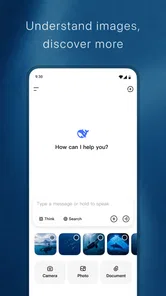
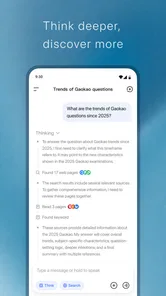
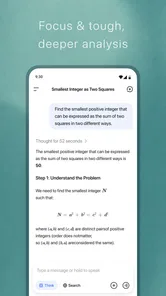
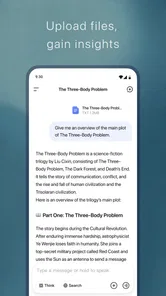
Analysis by Reviewed
When I’m stuck between a blank page and a task I don’t know how to break down, an AI assistant can be useful—but only if I give it a clear job. DeepSeek - AI Assistant works best for me as a thinking partner: I use it to explore a question, shape rough notes, or get a first draft moving, then check the result and keep important information in the tools where I normally store it. That makes it a more practical part of a productivity routine than a place to hand over every responsibility.
Start with a workflow, not another app
I get the most from an AI assistant when I treat it as a place to think through a task, not as a replacement for every tool I already use. Before opening DeepSeek, I try to name the actual job: clarify an idea, compare options, or turn a rough note into a useful first draft. That small pause makes the conversation more focused and gives me something concrete to check afterward.
A realistic example is planning a busy weekday. I might ask for a simple sequence for errands and desk work, then adjust it around the commitments I already know about. I would still put appointments in my calendar and keep deadlines in a dependable task manager; the assistant is most useful for working out the plan, not serving as the only record of it.
Getting to Know DeepSeek
So, what exactly is DeepSeek - AI Assistant? Well, imagine having an AI-powered buddy that's always got your back. Whether you're looking for answers to complex questions or need help managing daily tasks, DeepSeek has got you covered. It's designed to be intuitive, making it easy even for non-techies to get the hang of.
Turn a conversation into something usable
One practical habit is to give the assistant the context that changes the answer: who the message is for, what tone you want, and what must remain unchanged. For a work email, I can ask for a concise draft that keeps a particular deadline clear, then review the wording before sending. This is more effective than asking for a vague “better version,” and it keeps me responsible for the final decision.
For longer tasks, I find it helpful to ask for a short outline first, correct any assumptions, and only then request a fuller response. That staged approach makes mistakes easier to spot than accepting a polished answer all at once. I also copy any genuinely important result into the document or planning tool where I expect to find it later; a chat is a poor substitute for a durable filing system.
Capture ideas without creating a second inbox
A useful way to keep the exchange manageable is to arrive with a small amount of prepared context rather than typing every thought as it occurs. I might collect a few points in my notes app, remove names or details that are not needed, and then ask DeepSeek to group the points into themes. I can turn the result into a draft or checklist, but I keep the source notes until I have checked that the important points survived the rewrite.
More From Our News Desk

Weather by Xiaomi Review: Clear at a Glance, Less Clear Up Close

X Under Pressure: Can It Recover When Posting Goes Wrong?

Clash of Clans Is Won Between the Battles

Android Auto Makes the Case for Quieter Car Software

MobiOffice: Transforming Mobile Productivity with Seamless Integration

EA SPORTS FC™ Mobile Soccer: Redefining Mobile Sports Gaming
This is especially handy when the material is untidy rather than difficult: scattered observations after a call, a list of errands mixed with reminders, or several competing ideas for a presentation. The assistant can help me see a structure to work from. It does not decide which item matters most to my team or household, so I still make that judgment before treating the organized version as a plan.
Features That Stand Out
One of the standout features of DeepSeek is its ability to understand natural language. You don't have to speak in code or use specific commands. Just talk to it like you would with a friend, and it gets you. Natural language processing is a game-changer here, making interactions smooth and effortless.
Another cool feature is its task management capabilities. From setting reminders to scheduling meetings, DeepSeek integrates seamlessly with your calendar and keeps you organized. It's like having a personal assistant who never sleeps.
A repeatable routine that stays under your control
I would build it into a routine with a clear beginning and end: bring one question, ask for a useful output, check it, and move the result into the right place. For example, before a meeting, I could use a prompt to organize my own notes into questions and decisions to raise. Afterward, I would keep the final decisions in the team’s normal notes rather than relying on a conversational answer as the official record.
This distinction matters if you're choosing between an AI assistant and a conventional productivity app. A calendar or task list is better for fixed dates, recurring reminders, and seeing obligations at a glance. DeepSeek is better suited to language-heavy work: exploring an unfamiliar topic, restructuring a draft, or considering alternatives. I see them as complementary tools, not direct replacements.
For a repeatable weekly review, I would use it to help sort a written list into “needs a decision,” “needs a next step,” and “just an idea,” then transfer only the actionable items to my normal task list. That extra transfer step may sound less seamless than keeping everything in one place, but it prevents a chat from becoming a pile of obligations I cannot scan quickly. It also gives me a useful checkpoint: if the proposed next step is too vague to schedule, I can ask for a smaller action before I commit to it.
How It Stacks Up
I've tried a few AI assistants before, and I have to say, DeepSeek is right up there with the best. The developers have really put a lot of thought into making it user-friendly. It’s not just about answering questions; it’s about providing a comprehensive experience. The interface is clean, and responses are quick and accurate. Whether you're using it for personal curiosity or professional needs, it adapts beautifully.
One thing I particularly appreciate is the customizability. You can tweak the settings to suit your preferences, making it a personalized tool rather than a one-size-fits-all solution. Plus, the app continuously learns from interactions, which means it gets better over time. Smart, right?
Choosing between an assistant and familiar productivity tools
Compared with a search engine, a conversational assistant is more useful when I already know the shape of the help I want: a plain-language explanation, a comparison arranged around my priorities, or a draft I can edit. Search remains the better starting point when I need to locate an original source, verify a current detail, or see several independent viewpoints. I treat an AI response as a starting interpretation, not a citation.
Compared with a notes app, DeepSeek can help reshape information rather than simply hold it. That is a real advantage when I have rough material and need a clearer structure, but it is not a reason to move my archive into a conversation. Notes are easier to browse and maintain as a personal reference library. A task manager is still preferable when I need a dependable view of dates, priorities, and unfinished work. The choice depends on whether the bottleneck is thinking through the work or tracking it after the decision is made.
Where I draw the line
I don’t treat a confident-sounding reply as proof, especially for health, legal, financial, or other consequential choices. I check important claims against trustworthy sources, and I avoid sharing sensitive personal or workplace details when a general description will do. The same caution applies to drafts: an assistant can help me get started, but it can miss context, tone, or a detail that matters to the recipient.
There is also a practical limit to using one conversation for everything. Mixing unrelated plans and questions can make it harder to find the useful result later, so I keep each request focused and save outcomes that I’ll need again elsewhere. If you need offline access, strict control over records, or guaranteed scheduling, a dedicated tool designed around that need is the safer choice.
Small checks that make the workflow more reliable
When I ask for a plan, I find it worth stating the constraints that are easy to overlook: what is fixed, what can move, and what a successful result should look like. For a day with errands, for instance, I would distinguish appointments from flexible tasks instead of asking for a generic “productive schedule.” I then check that the suggested order fits real travel time and energy, rather than assuming a neatly written plan is automatically workable.
For writing, I use a similar check: keep the facts that must remain exact, ask for a specific audience and tone, and review every claim before sending or publishing. If an answer contains a detail I did not provide and cannot verify, I remove it rather than letting fluent wording make it seem settled. That small editing habit matters more than trying to write an elaborate prompt every time.
Who will get the most from it
DeepSeek is a free productivity app from DeepSeek, rated Teen, and it runs on Android 5.0 or later. It was released on January 8, 2025, and version 1.5.5 has an average rating of 4.1 from around 227,000 ratings, with more than 50 million installs. Those figures suggest a broad audience, but the right fit still depends on how you work: I’d recommend trying it if you regularly need help shaping ideas or getting unstuck, while someone who only wants reliable alarms and lists may be better served by a conventional organizer.
I can see it being especially useful for students who want to test their understanding by asking for a concept to be explained in simpler language, or for freelancers who need to turn a rough brief into questions before starting a draft. In both cases, the person using it still needs to judge whether the explanation or wording is sound. It is less suitable for anyone who wants an automated source of truth, a private filing cabinet, or a guaranteed substitute for professional advice.
One question worth considering before relying on it is where the finished work will live. If the answer is a shared document, calendar, or project board, decide that first and use the assistant only for the step that benefits from conversation. Another is whether you can check the result: for low-stakes brainstorming, a quick personal review may be enough; for consequential decisions, independent verification is essential. Those habits make the app easier to use without confusing convenience with certainty.
For a new user, the best first test is a low-stakes task you already understand, such as turning a messy set of notes into a clear checklist. Compare the result with your own judgment, revise the prompt if it misses the point, and see whether the exchange actually saves effort. That gives you a realistic sense of its value without handing over an important decision.
Final Thoughts
In a world where time is of the essence, having an assistant like DeepSeek is invaluable. It’s not just an app; it’s like having an extra pair of hands to help you navigate through the chaos of everyday life. If you're someone who values efficiency and loves tech, giving DeepSeek a try might just be the smartest move you make today.
My recommendation is more measured: give it a place in your routine when the work involves words, questions, or turning uncertainty into a first workable draft. Keep your calendar, task list, and trusted references as the dependable home for commitments and facts. If that division suits the way you work, DeepSeek can reduce the friction of getting started; if you mainly need precise reminders or an organized archive, another kind of productivity app will serve you better.
DeepSeek - AI Assistant Frequently Asked Questions
Is DeepSeek - AI Assistant free to download?
DeepSeek - AI Assistant is a productivity app from DeepSeek, and it is free to download. Before installing, check that you are choosing the official app and that your device meets its requirements. The free download lets you try the app, while any optional paid features should be reviewed in the app or store before you decide to use them.
What devices and operating systems can run DeepSeek - AI Assistant?
DeepSeek - AI Assistant is compatible with Android devices running version 5.0 or later. Before downloading, check your device’s operating system and available storage, and make sure you are installing the current version offered for your device. A compatible operating system is a useful first check, though the experience may differ depending on the device.
Can I use DeepSeek - AI Assistant without creating an account?
Whether you need an account can affect how quickly you can get started and which features are available. Check the sign-in options shown when you open the app and review any prompts before entering personal details. If you prefer not to register, see whether the app offers a way to try its assistant first without signing in.
What is DeepSeek - AI Assistant, and what does it do?
DeepSeek - AI Assistant is a cutting-edge application designed to enhance productivity and streamline various tasks using artificial intelligence. It offers features like voice recognition, task automation, scheduling, and personalized recommendations, making it ideal for both personal and professional use. Users can enjoy seamless interaction and efficient task management, boosting their daily productivity.
Is DeepSeek - AI Assistant compatible with all devices?
DeepSeek - AI Assistant is compatible with most modern Android and iOS devices. On Android, it requires version 5.0 or later, so users should check their device's software before downloading. Compatibility can vary across devices, and keeping the operating system up to date can help provide a smoother experience with the app.
Pros
- Intuitive and easy-to-use interface.
- Highly accurate AI-driven responses.
- Supports multiple languages.
- Quick integration with existing systems.
- Regular updates with new features.
Cons
- Requires internet connection to function.
- Limited free version capabilities.
- May have occasional response delays.
- Not all features available offline.
- Subscription required for premium features.











