Deep Clean Elite
- 882.00
- 4.1
- Installs
- 1.00M
- Price
- Free

Screenshots
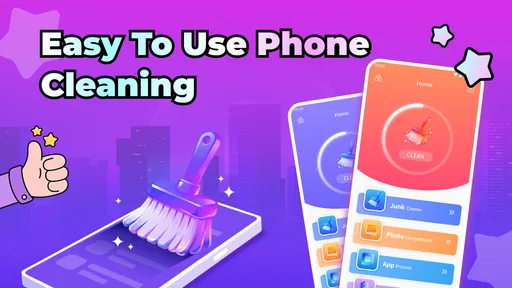
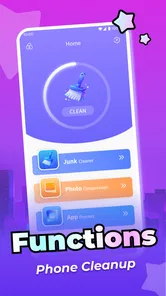
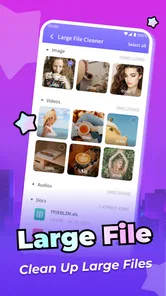

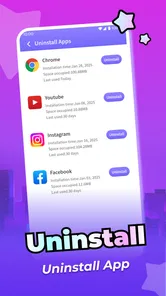
Analysis by Reviewed
I judge a phone-cleaning app less by how forcefully it promises a tidy device and more by whether it helps me make careful, repeatable decisions. Deep Clean Elite is a free productivity app from PDI Turbo, built around the practical idea of cleaning up an Android phone. Its pitch is appealing if storage clutter has become a recurring nuisance, but a cleaner is only useful when its suggestions are easy to understand and safe to act on. I’d approach it as a hands-on helper, not as a substitute for knowing what I’m deleting.
A useful way to set expectations
Before installing any cleaning tool, I ask what job I actually want it to do. If I’m trying to identify clutter I have let accumulate, a dedicated app can provide a convenient place to start. If I already know that one folder or app is responsible, going straight to that source may be quicker and more precise. That distinction helps keep a cleanup session focused instead of turning it into a search for a one-tap fix.
I would also judge the app by whether its approach fits my comfort level. Someone who likes to inspect choices can benefit from a guided starting point; someone who wants every file handled automatically may find that the necessary caution feels like extra work. A cleaner should make good decisions easier, not persuade me to stop making them.
A careful routine beats a rushed clean
I’d begin this section by treating a cleanup as a small decision-making task, not a race to clear every suggestion. A quick look at what has accumulated can help me separate obvious clutter from files I may still need, especially when I’m preparing for something like a trip or a large download. Keeping that first pass modest also makes it easier to notice which parts of my routine deserve attention next.
Start with a baseline, not a big sweep
My preferred first session with a cleaner is deliberately small. I would open the app when I have a few minutes, look over what it presents, and deal only with items I can confidently identify. That first pass gives me a sense of how Deep Clean Elite fits my phone’s habits without turning an ordinary storage problem into a risky mass deletion.
This matters because “junk” is not always obvious. A file can be old and still useful; a download may be a document I need later, and a cached item may be something an app will simply create again. The sensible test is not whether a cleaner can offer to remove something, but whether I understand what that action will affect. Review first, remove second is the habit I’d bring to this app.
For a realistic example, imagine I’m preparing for a trip and discover that my phone is short on room for new photos. I’d use a cleaning session as a prompt to inspect likely clutter, then make deliberate choices about what can go. I would not tap through every suggestion just to finish quickly. If I needed space urgently, I’d also check my own downloads and media, where I can recognize personal files more reliably than any broad cleanup label.
More From Our News Desk

Weather by Xiaomi Review: Clear at a Glance, Less Clear Up Close

X Under Pressure: Can It Recover When Posting Goes Wrong?

Clash of Clans Is Won Between the Battles

Android Auto Makes the Case for Quieter Car Software

MobiOffice: Transforming Mobile Productivity with Seamless Integration

EA SPORTS FC™ Mobile Soccer: Redefining Mobile Sports Gaming
That distinction is useful for anyone who has accumulated screenshots, saved files, or app residue over time. A cleaner can make the task feel more manageable, but it cannot decide whether a particular item matters to me. I’d treat Deep Clean Elite as a way to focus attention, with the final call staying in my hands.
Use the first clean to learn your own pattern
Rather than judging the app by one dramatic before-and-after moment, I’d pay attention to what repeatedly appears during ordinary use. If the same kind of clutter returns, that points to a habit worth changing: perhaps I keep saving files I never revisit, or I leave old downloads untouched. A cleaner is more valuable when it helps reveal that pattern than when it simply encourages repeated sweeping.
I’d also avoid cleaning on autopilot. A quick review after a busy week is different from a deep inspection before freeing space for something important. Keeping those tasks separate makes it easier to be cautious: routine maintenance can stay light, while a storage crunch deserves a slower look at files and app behavior.
Check the choices before making cleanup routine
Before making Deep Clean Elite part of a regular schedule, I’d spend time understanding the options it actually presents on my device. The useful question is what each action targets and whether I can review the affected items before removal. If a screen is clear, a routine becomes easier to trust; if a label feels broad or ambiguous, I’d pause rather than assume it is harmless.
This is also where I’d be attentive to the app’s settings and any prompts it shows. I wouldn’t assume that a cleaner needs to run constantly, or that every suggested change is appropriate for my phone. For many people, opening a cleaning tool only when there is a reason is a better balance than treating it as something to run reflexively.
On Android, settings and available controls can vary by device and system version. I would therefore make decisions based on what Deep Clean Elite displays on my own phone, not on a promise that every handset behaves identically. If I’m unsure what an action means, the safest workflow is to leave it untouched and use Android’s built-in storage view or the relevant app’s own controls to investigate further.
Small shortcuts that make repeat use safer
The best shortcut here is a habit, not a hidden trick: clean when there is a clear reason, and keep the task narrow. If I’m trying to make room for a particular download, I can focus on reviewing likely disposable items instead of turning the session into a general purge. That reduces the temptation to remove unfamiliar files just because they are visible.
I’d also choose a predictable moment for maintenance, such as after I’ve finished a project or sorted a batch of downloads. That timing gives me a better chance of recognizing what is no longer needed. Cleaning immediately after saving lots of new material is less ideal because I may not yet remember which files are important.
Another useful practice is to separate identifying clutter from deleting it. I can first inspect a category or list, then return to the items I’m certain about. Even if the app makes cleanup feel quick, I would not confuse speed with accuracy. The few extra seconds spent checking a file are worthwhile when the alternative is losing something I meant to keep.
For recurring mess, I’d pair the cleaner with a simple personal rule: review downloads before they pile up, and avoid using a cleanup button as a replacement for organizing files. Deep Clean Elite can support that routine, but it cannot make choices about what I value or remember. That is an important limit, not a flaw unique to this app.
Settings are a checkpoint, not a promise of automation
I’d treat any settings screen as a place to understand how I’m expected to use the app, rather than assuming it contains a shortcut to safer cleanup. Before changing an option, I’d read its wording and consider whether it changes what gets surfaced or how I review it. If I cannot tell what a setting will do, leaving it as it is is a sensible choice; there is no benefit in adjusting controls just to make the app feel more advanced.
This is a useful distinction for experienced users too. A repeatable routine does not require aggressive automation. I would rather spend a moment opening the app when a real need comes up than rely on an assumed schedule or behavior that I have not checked. The app’s own prompts and controls should guide what I do, while my judgment sets the boundaries.
Where a dedicated cleaner fits among alternatives
Android already gives users ways to inspect storage, while individual apps often provide their own controls for clearing temporary data or managing saved files. Those built-in options can be a better choice when I know exactly which app is taking up room or want direct control over one type of content. A dedicated cleaner is more appealing when I want a single place to begin reviewing a messy phone.
That convenience comes with a trade-off. A broad cleanup tool can make the task feel simpler, but the phone owner still has to interpret what is safe to remove. If I only need to delete a few known files, opening the file manager may be more direct. If I want a guided starting point for a general tidy-up, Deep Clean Elite may be more comfortable than hunting through several menus.
I would not expect a cleaner to solve every cause of low storage. Large personal videos, offline media, and files I intentionally keep may be the real reason a device is full. In that situation, deleting or moving those items myself is more effective than repeatedly running a general cleanup. The app is best treated as one tool in a storage routine, not as a guarantee that space will always be available.
Good fit for deliberate users; less so for hands-off cleaning
I can see Deep Clean Elite suiting someone who wants a simple place to begin a cleanup and is comfortable reviewing suggestions before acting. It is especially relevant if clutter builds gradually and a small, repeatable check feels easier than sorting through the phone only when storage becomes urgent. The app is marked for Everyone, and its free price makes it easy to consider without paying to try a different approach.
I’d be more cautious about recommending it to someone who expects a cleaner to make every decision automatically. If you rarely check what you are deleting, even an easy interface can encourage a careless tap. Users who prefer exact control over every file may be happier sticking to Android’s storage tools and the file manager they already know.
People with a specific storage problem should also start at its source. If one app contains a large offline library, its own management screen may give clearer choices. If personal media is the issue, reviewing those files directly is usually more informative. Deep Clean Elite makes more sense as a general starting point than as a specialized answer to every storage complaint.
What the app’s scale says—and what it doesn’t
Deep Clean Elite has reached over a million installs, with an average rating of 4.1 from around ten thousand ratings and 882 written reviews. Those figures suggest it has attracted a sizeable audience, but they cannot tell me whether its cleanup suggestions suit my particular phone or habits. I’d use the app’s behavior on my own device as the real test.
The current release is version 1.2.1, and the app requires Android 7.0 or later. Since phones differ in their storage patterns and available system controls, I’d still take a measured approach on a compatible device. Compatibility means I can install it; it does not mean I should accept every cleanup suggestion without checking.
My verdict: useful when the user stays in charge
After weighing its role, I see Deep Clean Elite as a practical cleaning companion for people who want a more focused way to review phone clutter. Its strongest potential is not magic, but structure: it can give a cleanup session a clear starting point and help turn an occasional scramble into a calmer routine. That works best when I inspect what is being targeted and keep my own priorities in view.
The trade-off is straightforward. A dedicated cleaner may feel more convenient than searching through separate system menus, but convenience should never replace judgment. I would skip broad or unclear actions, use built-in Android tools when I need more precise control, and reserve the app for deliberate maintenance rather than constant background attention.
For an everyday user who wants a free, approachable place to begin tidying an Android phone, Deep Clean Elite is worth considering. I’d recommend it most to someone willing to review before removing and least to someone expecting hands-off cleanup. Used thoughtfully, it can support a sensible storage habit; used carelessly, it can make the wrong action feel deceptively easy.
Deep Clean Elite Frequently Asked Questions
What is Deep Clean Elite, and what does it do?
Deep Clean Elite is presented as a cleaning utility intended to help users manage storage and keep a device running smoothly. Its exact tools can vary by version and platform, so review the app’s current store listing before installing. Check whether it offers features such as junk-file cleanup, storage analysis, or app management, and remember that no cleaner can reliably improve every device’s speed.
Is Deep Clean Elite safe to use on my phone?
Safety depends on the app’s permissions, developer, and the version available through your app store. Before using Deep Clean Elite, check its privacy information and requested access, and install it from an official store or another trusted source. Be cautious if it asks for permissions that do not seem necessary, and review any files it proposes to remove before confirming a cleanup.
Is Deep Clean Elite free, or does it require a subscription?
Pricing and available features may differ by platform, region, and version. Check the store listing and the app’s in-app purchase details to see whether Deep Clean Elite is free to download, includes advertising, or offers paid features or a recurring subscription. Read the payment terms carefully before starting a trial, since trials may renew automatically unless canceled according to the store’s instructions.
Will Deep Clean Elite delete important files or personal data?
A cleaning app may identify temporary files or other items it considers unnecessary, but automated recommendations are not always correct. With Deep Clean Elite, inspect the cleanup list and avoid removing photos, downloads, documents, or app data unless you are sure you no longer need them. Back up important information first, and do not assume that deleted files can always be recovered.
What devices and operating systems support Deep Clean Elite?
Compatibility can change as the developer releases updates, and an app available for one platform may not be offered for another. Before downloading Deep Clean Elite, confirm that its current store page lists your device and operating-system version as supported. Also check the required storage space and recent user feedback; these details can help you judge whether the app is likely to work on your particular phone or tablet.
Pros
- Can help free up storage by identifying unnecessary files.
- A focused cleaning tool can be easier to use than a full utility suite.
- May make it simpler to review files before deciding what to remove.
- Useful for users who want a dedicated phone-cleanup app.
- Cleaning options can help keep clutter from building up over time.
Cons
- Cleaning apps may request broad access to personal files or device data.
- Some suggested files may be useful
- so review them before deletion.
- Results can vary depending on your device and Android version.
- Background scans may use battery or system resources.
- Check for ads
- subscriptions
- and in-app purchases before installing.











