Dallas Cowboys
- 5.11K
- 4.2
- Installs
- 1.00M
- Price
- Free

Screenshots
Analysis by Reviewed
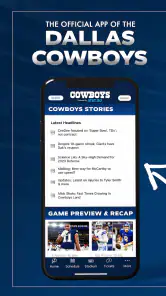
I installed Dallas Cowboys expecting a straightforward team companion, and that is exactly where it makes the most sense: as a focused way to keep the official Dallas Cowboys experience close at hand. It is a free sports app from Dallas Cowboys, rated for Everyone, and its strongest appeal is not trying to replace every sports service on your phone. Instead, its value comes from putting the team itself at the center of the experience.
That distinction matters. A general sports app is usually built around many leagues, scores, headlines, and notifications. This one is for the person who opens their phone because they want the Cowboys first. I found that narrower purpose useful when I wanted team-specific information without searching through unrelated clubs or sports. It feels more like a dedicated doorway into the organization than a broad scoreboard.
Why the official team focus matters
The app’s defining capability is its official Dallas Cowboys focus. That sounds simple, but it changes how I use it. Rather than treating the team as one item in a long list, the app gives the Cowboys a permanent home on my phone. For a supporter, that reduces the small amount of effort involved in finding the right team page, filtering a league, or separating Cowboys coverage from everything else.
I would not describe that focus as a replacement for every sports tool. If I want to compare several teams, follow multiple competitions, or manage a wide collection of scores, a larger sports platform may be more convenient. The dedicated approach works best when loyalty is the main reason I am opening the app. It keeps the experience pointed at one club instead of asking me to build that focus myself.
The developer is Dallas Cowboys, which also gives the app a clear identity. I appreciate that because it removes some uncertainty about whether I am using a third-party fan utility or an official team product. The app has been available since August 4, 2012, and its current version is 4.0.3. That long presence suggests a product intended to remain part of the team’s digital relationship with supporters rather than a temporary promotional download.
Its audience is already visible in the adoption figures: it has passed one million installs, with an average rating of 4.2 from roughly twenty-four thousand ratings and about five thousand one hundred written reviews. I do not treat those numbers as proof that every fan will love it, but they do indicate that the app has reached a substantial audience. More importantly, the rating feels consistent with my impression: useful and relevant for its purpose, though not necessarily the only sports app someone needs.
A better fit than a general sports feed in one important situation
Imagine a Sunday when I am following the Cowboys while also checking messages, preparing food, and moving between rooms. With a general sports application, I may need to search for the team, dismiss unrelated alerts, or switch from a league overview to a specific club page. A dedicated app gives me a more direct starting point. I open it with one question in mind: what is happening around Dallas?
More From Our News Desk

Clash of Clans Is Won Between the Battles

Android Auto Makes the Case for Quieter Car Software

MobiOffice: Transforming Mobile Productivity with Seamless Integration

EA SPORTS FC™ Mobile Soccer: Redefining Mobile Sports Gaming

How Microsoft OneDrive Became a Mobile Productivity Giant

How Google Translate Breaks Language Barriers Effortlessly
That is the app’s practical advantage. It is not necessarily about offering more information than every competitor. It is about reducing the distance between the fan and the chosen team. For occasional supporters, that difference may be minor. For someone who checks Cowboys information repeatedly, removing those extra steps can make the app feel much more natural.
I also see value in using it before and after a game rather than only during live action. Beforehand, it can serve as the place I check for the team’s current context. Afterwards, it becomes a team-specific destination instead of a noisy stream of league-wide reaction. I prefer that concentrated rhythm to opening a broad sports feed and having to reconstruct the Cowboys story from mixed coverage.
How the focused experience works in everyday use
The first thing I noticed is that the app’s usefulness depends on my intention. When I open it knowing I want Dallas Cowboys information, the narrow scope feels efficient. When I open it without a clear purpose and expect a complete sports portal, the experience feels less expansive. That is not a flaw by itself; it is the central trade-off built into an official team app.
I found it helpful to think of the app as a home base. I would use a broad service for cross-team comparisons, then return here when I wanted to stay with Dallas. That division of labor prevents disappointment. The Cowboys app does not need to win every category if it handles the team-specific visit more cleanly than a general alternative.
One practical tip is to decide what role you want it to play before installing it. If you want a single place devoted to the team, it is easy to justify. If you mainly need a universal scoreboard, the extra dedicated app may feel unnecessary. This simple decision saves storage, attention, and notification clutter, especially for people who already have several sports tools installed.
Another useful habit is to treat the app as a filter for attention. Sports coverage can become overwhelming when every headline, result, and discussion competes for space. A team-specific product naturally narrows that stream. For me, that is valuable on busy days when I want to stay connected without turning sports browsing into a long session.
The app is also approachable for family use because its content rating is Everyone. That does not mean every person will want the same level of team coverage, but it does make the product feel suitable for a broad household audience. A younger fan can use it as a simple team destination, while an adult supporter can make it part of a more structured game-day routine.
The strongest scenario: a Cowboys-centered game-day routine
The best scenario is a supporter who wants one dependable place for the Dallas Cowboys before, during, and after a game. I would open it earlier in the day to reconnect with the team, check it again when the game becomes the main event, and return later when I want to stay with Cowboys-related information rather than move immediately to wider sports coverage.
That routine is especially useful when I am watching with other people. Instead of passing around a phone loaded with unrelated sports, I can keep the conversation centered on the team. The app becomes a shared reference point: not necessarily the only source of information, but the most relevant one for that particular gathering.
There is also a quieter use case. Suppose I have ten minutes during a commute or lunch break and want a quick Cowboys check-in. A general sports app may be faster if it is already configured exactly how I like it, but a dedicated app can feel more intentional. I am not wandering through a sports database; I am visiting the team I follow.
For fans who live away from Dallas, that emotional focus may matter even more. A team app cannot recreate being at the stadium, but it can provide a small, repeatable connection to the club. I would recommend it to someone who wants the Cowboys to have their own place on the phone rather than appearing only as one saved favorite among many.
Where the trade-offs become noticeable
The same specialization that makes the app appealing can limit it. I would not install it as my only sports application if I regularly follow several teams or need a broad view of scores across different sports. A general sports service is usually better for comparison, discovery, and quick movement between competitions. This app makes a deliberate choice to keep the Cowboys at the center.
There is also a potential duplication issue. Many fans already use a league app, a news reader, a live-score tool, or a television service. Adding an official team app can create overlapping destinations. Before downloading, I would ask whether I want official team-centered access badly enough to maintain another app. If the answer is no, the broader service already on the phone may be sufficient.
I also think expectations should be realistic. The store summary presents it as the official app of the Dallas Cowboys, not as a complete replacement for every game-watching or sports-news product. I would not judge it harshly because it does not behave like a universal platform. Its job is narrower, and the right question is whether that narrow job is useful to me.
Another trade-off is attention. A dedicated team app can make it easier to check the Cowboys, but that convenience can also encourage more frequent checking. I prefer to use it with a purpose, such as a pre-game visit or a short post-game review, rather than allowing every sports moment to interrupt the day. The best experience comes from controlling the app’s role instead of letting it control my routine.
Device compatibility is worth checking before installation. The listed minimum operating-system requirement is version 10, so I would confirm that my phone or tablet meets it. That is a small step, but it avoids downloading an app only to discover that an older device cannot run the current experience properly.
Who will gain the most from installing it
The clearest audience is the committed Cowboys supporter who wants a dedicated team destination. If Dallas is the team I check first, this app gives that habit a natural home. I can see the appeal for fans who want to reduce searching, avoid unrelated sports coverage, and keep their attention on one organization.
It is also a sensible choice for newer fans who do not yet have a complicated sports setup. Instead of learning a large multi-sport application with many menus and filters, they can start with a product built around the team they care about. That focused beginning may feel less intimidating and more personal.
Families and casual viewers can benefit too, particularly when the app is used as part of a game-day ritual. The Everyone rating makes it broadly approachable, while the official identity gives it a clear connection to the team. I would still explain to a casual user that this is a Cowboys app, not a general sports guide, so the narrower scope is understood from the start.
The people I would steer toward another option are heavy multi-team followers, fantasy-focused users, and anyone who mainly wants the fastest possible overview of sports everywhere. Their needs are broader than this app’s central purpose. A general sports platform may offer a more efficient all-in-one workflow, especially if opening a second team-specific app feels like unnecessary repetition.
My practical verdict after using the team as the filter
I like Dallas Cowboys most when I stop expecting it to be a universal sports toolbox. Its real strength is the way it keeps one team in focus. That makes it useful for quick check-ins, game-day routines, and fans who want a direct relationship with the official club rather than a crowded feed built around the entire sports world.
The free price removes the biggest barrier to trying it, and the broad age rating makes it easy to recommend across a household. The established release history, current version 4.0.3, and sizeable audience also make it feel like a serious long-term team app rather than a disposable download. Still, I would keep a broader sports service nearby if I needed league-wide coverage or frequent comparisons.
My recommendation is therefore specific: install it if the Dallas Cowboys are the reason you open a sports app. Use it as your team home base, especially around games, and let another service handle the wider sports picture when necessary. The key benefit is focused access, not endless breadth. For the right fan, that focus is exactly what makes Dallas Cowboys worth keeping on the phone.
Dallas Cowboys Frequently Asked Questions
Who publishes the Dallas Cowboys app, and is it the official team app?
The app is published by Dallas Cowboys and is described as the official app of the Dallas Cowboys. That makes it a team-focused option for fans looking to follow the organization through a mobile app. When installing, check that the publisher shown in your app store is Dallas Cowboys so you select the official release rather than an unrelated Cowboys-themed app.
What kind of content can I expect from the Dallas Cowboys app during the offseason?
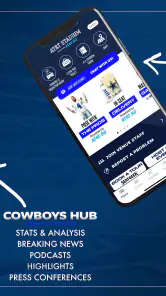
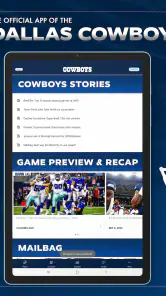
The app is designed to serve fans beyond game day, with team news, player information, videos, photos, and official announcements as well as schedules and scores. Its role as a central hub can be useful throughout the year, including the offseason, when news and team updates are more relevant than live game coverage. The content available may vary with the season and your location.
Is the Dallas Cowboys app free to download, and what should I know about its audience rating?
The Dallas Cowboys app is free to download, so fans can install it without paying an upfront app charge. It is categorized for Everyone, making it suitable for a broad audience. Some activities reached through the app, such as buying tickets or merchandise or using an outside streaming service, may still involve separate costs. Check the terms of any purchase before confirming it.
Will the Dallas Cowboys app work on my phone, and how can I install the official version?
The current version is 4.0.3 and requires Android 10 or later. The official Dallas Cowboys app is generally available through major mobile app stores for supported Android and iOS devices, though compatibility can vary by phone, operating system, and location. For the safest installation, use Google Play or Apple’s App Store, verify that the publisher is Dallas Cowboys, and keep your device software updated.
What is the Dallas Cowboys app used for?
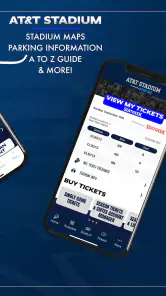
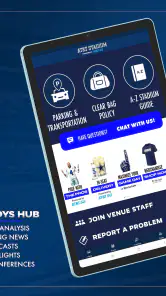
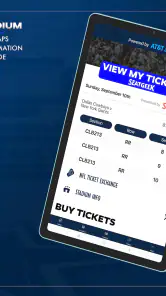
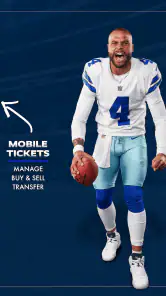
The Dallas Cowboys app is designed for fans who want quick access to team news, game schedules, scores, player information, videos, photos, and official announcements. Depending on the season and your location, it may also provide live game updates, ticket information, stadium details, team merchandise links, and other features connected with the Cowboys organization. It works best as a central hub for following the team throughout the year.
Pros
- Official team news
- scores
- and updates in one place.
- Useful for following schedules
- rosters
- and game-day information.
- Includes Cowboys-focused content for dedicated supporters.
- Helps fans stay connected while traveling or away from home.
- Simple way to keep up with the team throughout the season.
Cons
- Some content may require a subscription or paid access.
- Notifications can become frequent during games and breaking news.
- Features may focus heavily on Cowboys fans rather than casual users.
- Video and live content can consume significant mobile data.
- Performance may depend on your internet connection and device.

- Category
- Sports
- Version
- 4.0.3