DairyBar
- 99.00
- 4.3
- Installs
- 10.00K
- Price
- $3.99

Screenshots
Analysis by Reviewed
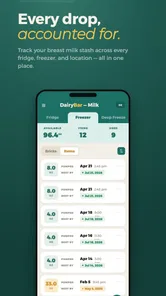
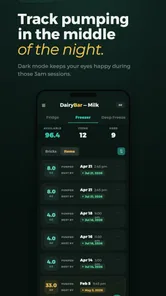
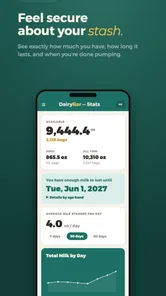
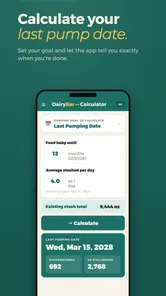
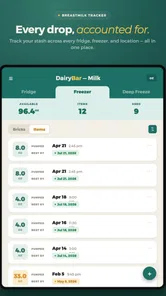
When you’re keeping expressed milk for later feeds, the hard part is often remembering what is where and when you stored it. I’d look at DairyBar as a focused helper for that small but demanding routine, not as a general parenting guide or a replacement for clinical advice. Its purpose is to help you keep track of stored breastmilk, which makes it most relevant when pumping and storage have become part of everyday life.
A focused tool for a tiring routine
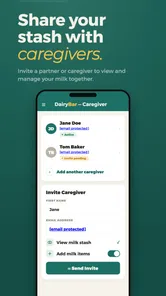
I can see this being useful for a parent returning to work, building a freezer supply, or sharing feeding duties with another caregiver. Rather than relying on memory or scattered notes, the value is having a dedicated place to keep storage details together. That can make handoffs less muddled: the person preparing a bottle can check your records instead of asking you to recall which container should be used first.
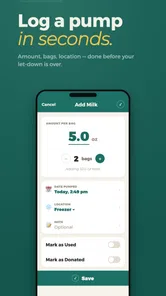
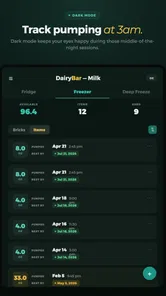
A realistic example is a busy evening after pumping: you label and put away a container, then record it before moving on to the next task. Later, when someone else is preparing a feed, the record can help them choose an appropriate stored portion. The benefit depends on making the entry part of the routine; if you postpone logging several sessions, a tracker cannot reliably reconstruct details you no longer remember.
For a household with changing schedules, that handoff can matter more than building a large archive. A caregiver starting an early feed may need a clear record while you are asleep or away, rather than a long explanation sent at the last minute. I would agree on one simple sequence—label the container, enter its details, then put it away—and ask everyone who handles feeds to follow it. That small agreement reduces the chance that a useful record and the container itself drift apart.
Why a dedicated tracker may beat notes
Compared with a paper list, a phone-based tracker is easier to keep close during a hectic day and less likely to be separated from the rest of your routine. A general notes app can also work, especially if you want complete control over a simple format, but it asks you to design and maintain that system yourself. A dedicated breastmilk tracker is the more natural choice if you want the recordkeeping to stay centered on stored milk rather than getting buried among shopping lists and reminders.
There is a trade-off: a specialized app only helps if its way of recording information suits your habits. Before depending on it, I’d try a small number of entries and check that the details I personally need are easy to record and retrieve. If you mainly store a few containers and already have a dependable labeling system, a notebook or note on your phone may be enough. If your supply changes often or another caregiver regularly handles feeds, a dedicated record is easier to justify.
One useful test is to imagine the most rushed moment in your week, not the calm moment when you first set up an app. Can you make a record without interrupting the rest of the pumping routine, and can another adult understand it without asking you to translate your shorthand? If either answer is no, simplifying your shared labels may solve more than switching to a tracker. The point is not to log every possible detail; it is to preserve the information that helps your household identify and manage stored portions consistently.
More From Our News Desk

 Gmail
Gmail in a Busy Inbox: Who Benefits Most?
From first account to crowded workday, Gmail earns its place through dependable search and flexible sorting—but its best fit depends on how much inbox maintenance you can tolerate.

 Prime Video
Switching to Prime Video: What Changes in Your Viewing Routine
Prime Video can make a compelling second home for streaming, but switching means learning a different catalog, rental layer, and route from browsing to playback.

 Universal TV Remote Control
 Works Best as a Reliable Backup
A phone remote earns its place through quick setup and reliable habits. Here is how to get more from Universal TV Remote Control—and where its limits show.

 Weather - By Xiaomi
Weather by Xiaomi Review: Clear at a Glance, Less Clear Up Close
Xiaomi’s weather app makes everyday forecasts quick to scan, but its calm surface can leave useful details and recovery paths harder to find than they should be.

 X
X Under Pressure: Can It Recover When Posting Goes Wrong?
A resilience-focused review of X, examining setup, mistaken posts, interruptions, weak connections, and the gaps that matter when recovery needs to be dependable.

 Clash of Clans
 Is Won Between the Battles
Its raids are quick; its community is a long-term project of coordination, teaching, rivalry, and shared responsibility—with all the friction that entails.
Latest News



What I would check before relying on it
Breastmilk records can feel personal, so I would inspect the app’s visible privacy information and the choices it presents before entering anything sensitive. I would also look through the available controls and confirm that the current version behaves as expected on my device. I can’t treat the subject matter alone as proof of how information is stored or shared; the sensible approach is to review the app’s own disclosures and use only the details needed for the task.
That same cautious approach applies to practical decisions. A tracker can organize your own notes, but I would not use an entry as a substitute for guidance from a healthcare professional about storage or feeding. Keep physical labels clear too, especially when another person may prepare a bottle. The app is most helpful as a second layer of organization, not the only safeguard against mixing up containers.
Before adding entries, I’d take a minute to notice what the app asks for and whether each field is necessary for my own routine. If it requests information I do not need to track, I would leave it out where that is possible rather than treating more detail as automatically better. I’d also consider who can pick up my phone during a normal day and whether I am comfortable with the information being visible there. Those are practical privacy choices, not a judgment about the app’s unseen data practices.
Have you ever wished for an app that could help track your daily food intake while also keeping your health goals on track? Well, let me introduce you to DairyBar – the app that promises to do just that and more. As someone who's always juggling between work and personal commitments, I found this app to be a breath of fresh air. Let me take you through my experience and why I think DairyBar deserves a spot on your phone.
Getting Started with DairyBar
The installation process is a breeze, and before you know it, you're ready to start logging your meals. The interface is user-friendly with a clean layout that doesn’t overwhelm you with too many options. Setting it up felt like a walk in the park. You start by entering some basic details about yourself, like age, weight, and health goals. Once that’s done, you’re ready to dive in!
Features That Stand Out
One of the first things I loved about DairyBar is its extensive food database. Whether you're at home cooking or dining out, the app seems to have it all covered. Logging meals is simple. You can search for foods, add them manually, or even scan barcodes for quick entry. The app calculates the nutritional breakdown instantly, helping you make informed decisions about your diet.
Another feature that caught my attention was the personalized meal suggestions. Based on your dietary preferences and goals, DairyBar offers meal ideas that keep things fresh and interesting. No more repetitive, boring meals!
The Community Element
What truly sets DairyBar apart for me is the community aspect. The app has a vibrant community of users who share tips, recipes, and motivational stories. It’s like having a support group at your fingertips. You can join challenges, track your progress, and even encourage other users. It makes the whole tracking process feel a lot less solitary and much more engaging.
Is It Worth It?
In a world filled with countless diet tracking apps, finding one that sticks can be challenging. But I genuinely believe DairyBar has something unique to offer. It’s not just about counting calories; it’s about fostering a healthier lifestyle, one meal at a time. The app is free to download, with optional premium features for those who want to go the extra mile.
So, if you're looking to make some positive changes in your eating habits, DairyBar might just be the app you’ve been looking for. It’s practical, easy to use, and most importantly, it motivates you to stay on track with your health goals. Give it a whirl and see how it fits into your daily routine!
Who should give it a try
Jennifer Brandes’s parenting app is aimed at a much narrower job than the food and diet tracker described in the published section below: organizing stored breastmilk. The app has a 4.4 average from 242 ratings, and more than 10,000 installs, which suggests that other families have found the idea useful, but those figures do not tell me whether its recording flow will match your household. I’d consider it if you pump regularly, keep several portions in storage, or need a consistent handoff between caregivers.
It is less compelling if you rarely store milk, already maintain a clear system everyone follows, or are looking for feeding schedules, medical recommendations, or broader parenting tools. DairyBar costs $3.99, so I’d weigh that against how often you expect to use a dedicated tracker. Its Everyone content rating describes its audience classification; it is not a substitute for checking whether the app’s actual features fit your needs.
The strongest case is a household where stored milk moves between several people and the person who pumped is not always the person preparing the next feed. In that situation, a consistent record can reduce repeated questions and make the routine easier to hand over. By contrast, if you are the only person handling a small number of containers, a clearly marked container and a short note may already provide all the reassurance you need. I would not pay simply because tracking sounds responsible; I would pay only if the recordkeeping problem is real and recurring.
Small habits that make a tracker useful
The most practical way to avoid confusing records is to enter details as close as possible to the moment you store a portion, then use the same naming and labeling habits every time. I would keep the physical container label aligned with whatever I record in the app, rather than expecting a phone entry alone to identify a container in a crowded fridge or freezer. If more than one caregiver uses the system, agree on a simple routine first: who logs a new portion, and who checks the record before preparing it.
I’d also test the workflow with one or two entries before making the app the household’s main reference. That gives you a chance to see whether it is quick enough during a pump-and-put-away routine and whether the information you need is easy to find later. If logging feels like an extra chore, a simpler shared note or a consistent paper log may be more sustainable. The best system is the one every caregiver actually follows.
A second practical check is how the record fits alongside your existing labeling method. If you already use a reliable convention, keep it stable rather than inventing a different naming scheme just to make the app feel more complete. A mismatch—one description on the container and another in the phone—can create more uncertainty than either system would on its own. I’d also make a plan for interruptions: if you cannot log immediately, set the container aside in a clearly identifiable way and complete the entry as soon as you can, rather than relying on memory at the end of a long day.
Cost, version, and a measured decision
The app was released on November 19, 2018, and its current version is 4.4.26; it requires Android 7.0 or later. Those details may help you judge whether your device can run it, but they do not by themselves establish how well the app fits your workflow. I would install it only after considering the price and reviewing the choices and privacy information shown in the app, particularly before adding details I would rather not keep in a phone-based record.
My cautious recommendation is to treat DairyBar as a possible organizational aid, not a necessary purchase for every breastfeeding family. If keeping track of stored milk is already a recurring source of confusion, paying for a dedicated tool may feel worthwhile. If your supply is small and your current labels or notes are dependable, you may not gain enough to justify changing systems. Either way, keep clear container labels and follow appropriate professional guidance for storage and feeding; a tracker can support that routine, but it cannot make those decisions for you.
In the end, I would judge it by a short, ordinary trial rather than by the promise of a tidy record. Does the entry routine fit a real pumping session? Can the other caregiver locate the information they need without relying on your memory? Are the visible privacy choices comfortable for you? Those answers matter more than a polished setup screen. If the app makes a recurring handoff calmer without adding another task you resent, it has a useful role; if it does not, returning to a simple shared method is a sensible choice.
DairyBar Frequently Asked Questions
What should parents know about DairyBar before downloading it?
DairyBar is a parenting app focused on keeping track of stored breastmilk. Its straightforward purpose may make it useful for parents who want a dedicated place to monitor their milk storage. The app is developed by Jennifer Brandes, has an Everyone content rating, and costs $3.99. Its current version is 4.4.26, and it requires Android 7.0 or later.
What is DairyBar and what does it offer?
DairyBar is a comprehensive application designed for dairy enthusiasts and professionals alike. It offers features such as milk production tracking, herd management, and nutritional analysis tools. This app aims to streamline dairy operations by providing insights into herd health, productivity, and profitability, making it an essential tool for modern dairy farming.
Is DairyBar suitable for both small and large-scale dairy operations?
Yes, DairyBar is designed to cater to both small and large-scale dairy operations. Its scalable features allow farmers to manage everything from a single herd to large-scale dairy operations with multiple herds. Users can customize the app according to their specific needs, making it highly adaptable and efficient for any size of operation.
Can I access DairyBar offline, or does it require an internet connection?
DairyBar can be accessed offline for most of its features, which is particularly beneficial for farmers working in areas with limited connectivity. However, certain features, such as data syncing and backup, may require an internet connection. This ensures that users can work efficiently without being hindered by connectivity issues.
How does DairyBar help in improving dairy farm productivity?
DairyBar enhances productivity by providing detailed analytics and reports on milk production, herd health, and feed efficiency. By analyzing this data, farmers can make informed decisions to optimize feeding schedules, improve herd health, and increase milk yield. The app’s user-friendly interface makes it easy to track and manage various aspects of dairy farming effectively.
Pros
- User-friendly interface for easy navigation.
- Offers a wide variety of dairy recipes.
- Includes nutritional information for each recipe.
- Allows customization of recipe ingredients.
- Offline access to saved recipes.
Cons
- Limited non-dairy options available.
- Requires account creation for full features.
- Ads may interrupt user experience.
- Lacks video tutorials for recipes.
- Occasional crashes reported by users.