Daily Planner, To Do List
- 1.80K
- 4.6
- Installs
- 1.00M
- Price
- Free
Screenshots
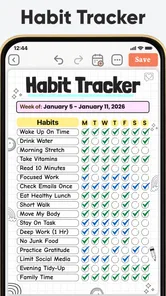
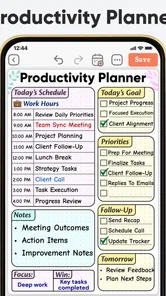
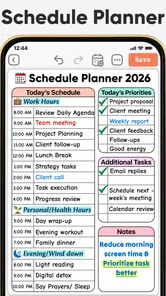
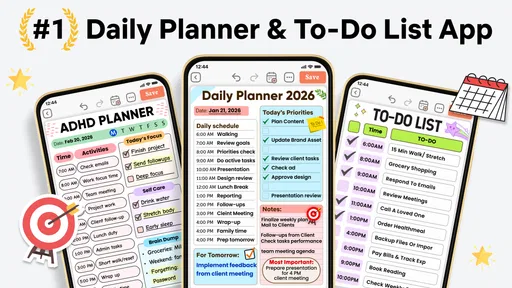
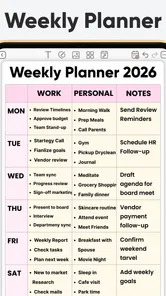
Analysis by Reviewed
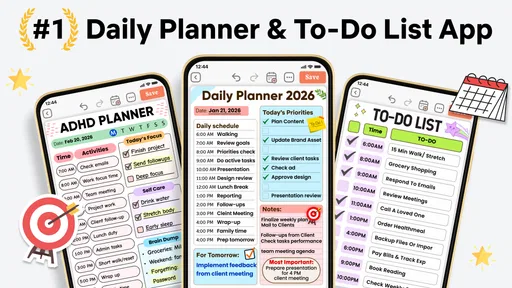
I usually approach planner apps with one question: will this actually help me decide what to do next, or will it become another place where I collect unfinished intentions? Daily Planner, To Do List is aimed at the first problem. It combines daily planning, tasks, journaling, diary-style reflection, schedule planning, and templates in one productivity app from Simple Productivity Apps. After spending time with it, I see the appeal: it is less about building a complicated project-management system and more about giving each day a clear shape.
The app is free to start, suitable for Everyone, and currently sits at version 98.0. Its Android requirement is modest, beginning with Android 8.0, so it is accessible on many older phones as well as newer devices. The app has reached over a million installs and holds a 4.6 average from around 148 thousand ratings, which suggests that its straightforward daily-planning approach has found a substantial audience.
How Daily Planner, To Do List feels in everyday use
The most useful way to think about this app is as a personal daily control panel. Instead of opening a separate task manager, journal, habit notebook, and schedule template, I can use one place to outline the day and then add a little context around it. That combination matters because a task rarely exists in isolation. “Finish report,” for example, may need a time block, a note about the next step, and a quick reflection later when the workday is over.
I found the daily-planner focus more approachable than systems built around projects, labels, filters, and nested lists. The app encourages me to begin with the day in front of me rather than redesign my entire life. That makes it especially useful when I am overwhelmed and need to reduce a long mental list to a few visible actions.
The journal and diary side also changes how I use the task list. A conventional to-do app tends to ask whether something is complete. This one gives me room to consider how the day went, what interrupted it, and what should move forward. The strongest idea here is the connection between planning and reflection: unfinished tasks become information instead of simply looking like personal failure.
That does not mean the app will suit everyone. If you need a shared workspace for a team, detailed dependencies, advanced project reporting, or a full calendar replacement, I would look elsewhere. This is primarily a personal productivity tool. Its value comes from keeping daily decisions visible and manageable, not from coordinating a large operation.
A practical morning routine
My preferred workflow starts with a short planning session rather than filling the day with every possible task. I would first write down the fixed commitments, then choose the few actions that would make the day feel successful. After that, I would add smaller tasks that can fit around those priorities. The journal area is useful for recording why a task matters or what “done” actually means, which prevents vague entries from sitting on the list indefinitely.
More From Our News Desk

Weather by Xiaomi Review: Clear at a Glance, Less Clear Up Close

X Under Pressure: Can It Recover When Posting Goes Wrong?

Clash of Clans Is Won Between the Battles

Android Auto Makes the Case for Quieter Car Software

MobiOffice: Transforming Mobile Productivity with Seamless Integration

EA SPORTS FC™ Mobile Soccer: Redefining Mobile Sports Gaming
For instance, imagine a weekday with a morning appointment, a work deadline, grocery shopping, and a desire to exercise. In a basic task app, these may appear as four equal lines. In this planner, I can treat the appointment as a fixed point, place the deadline as the main work priority, and use the journal space to note a realistic fallback for exercise. If the day becomes crowded, I can see what deserves protection and what can move without losing the whole plan.
That is a small but important distinction. Many planners encourage ambitious schedules because an empty page makes it tempting to add more. A daily view can be more honest: there is only so much attention available today. I recommend leaving visible space between tasks instead of scheduling every minute. The app works better as a decision aid than as a promise that the day will unfold perfectly.
Why the templates can be more useful than a blank page
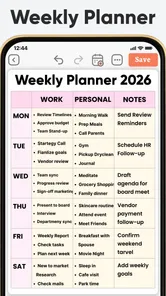
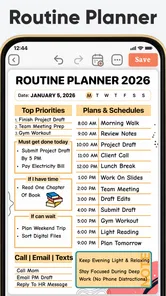
Blank journals are flexible, but they also create friction. When I am tired or distracted, deciding what to write can be harder than writing itself. The schedule-planning templates help by offering a starting structure. I can use one when I need a repeatable routine, then adjust it rather than beginning from nothing each time.
A useful approach is to keep separate planning patterns for different kinds of days. A workday may need priority tasks and time boundaries, while a weekend may benefit from errands, personal projects, and a short reflection. Templates are most effective when they reduce setup without forcing every day into the same shape.
There is also a trade-off. A template can quietly become a standard I feel obligated to complete. If I copy a highly detailed schedule and then miss several entries, the structure may create pressure instead of clarity. I would treat templates as prompts, not rules. Keep the parts that consistently help and remove anything that turns planning into administration.
A focused option for people who struggle with attention
The app’s positioning around ADHD and schedule planning makes sense because a daily view can lower the number of decisions required at once. I do not see it as a substitute for professional support, and no planner can solve attention difficulties by itself. Still, a visible sequence of small actions can be easier to approach than a large undifferentiated backlog.
My advice would be to write tasks in physical, observable language. “Work on finances” is difficult to start. “Open the bank statement and mark recurring charges” gives me a first movement. The journal can hold the reason for the task, while the to-do area holds the next action. That separation is valuable: motivation and execution do not have to compete in the same sentence.
Another helpful tactic is to plan a recovery path. If I lose the morning, I would not rewrite the entire day as a failure. I would choose one essential task, one quick win, and one activity that helps me reset. A planner becomes more sustainable when it supports imperfect days rather than only ideal ones.
What the current version means for new and existing users
Version 98.0 shows that this is a mature, actively presented product rather than a tiny experimental notebook. The app was released on June 5, 2024, and its current positioning brings several familiar personal-productivity needs together: daily tasks, planning, journaling, diary entries, and reusable schedules. I would not interpret the version number alone as proof of a particular feature history, but it does make the current build the one to evaluate rather than relying on impressions from an earlier release.
For a new user, that current state is convenient because the app can be approached in layers. Start with the daily task view, then add templates once the basic routine feels natural. Only after that would I bring journaling into the process. Trying to configure every part on the first day risks turning a simple planner into a project of its own.
Existing users should notice the broader role the app is trying to play. It is not merely a checklist anymore in the way I would use it. The combination of scheduling and reflection encourages a loop: plan the day, act on the next step, review what happened, and adjust tomorrow. That loop is more valuable than any individual page because it helps reveal recurring problems, such as consistently underestimating errands or placing demanding work too late in the day.
The free entry point is important here. I can test whether the daily workflow fits my habits before deciding whether the additional paid options are worthwhile. In-app purchases range from $3.99 to $47.99 per item, so I would pay attention to which parts of the experience I actually use before spending anything. The right question is not whether every extra is attractive, but whether it removes a real obstacle in my routine.
I also appreciate that the age rating is Everyone. That makes the app broadly approachable for personal planning, family routines, study organization, or simple household coordination. However, an Everyone rating should not be confused with a guarantee that it is ideal for children, shared family use, or sensitive diary material. I would still decide carefully who can access a device containing personal notes.
Where it compares well with ordinary alternatives
Compared with a basic notes app, this planner gives daily organization a clearer home. Notes are excellent for collecting information, but they often mix shopping lists, ideas, appointments, and reflections into one stream. A dedicated daily structure makes it easier for me to distinguish something I need to do from something I merely want to remember.
Compared with a standard to-do list, the journal and diary elements add context. A checklist can tell me that I postponed a task, but a short note may reveal that the task was too broad, badly timed, or dependent on something else. That makes the app more useful for improving my planning habits rather than simply recording completion.
Compared with a full calendar, it feels more personal and flexible for small daily decisions. Calendars are better for appointments and commitments that must happen at a particular time. This app is better for deciding how I want to approach the spaces between those commitments. I would use both if my schedule is busy: the calendar for immovable events, and this planner for priorities, preparation, and review.
Compared with advanced task managers, the advantage is lower complexity. I do not need to maintain a hierarchy of projects just to remember what matters today. The disadvantage is that users who enjoy detailed metadata, automation, collaboration, or extensive reporting may find the experience too limited or too manual. Choosing this app means accepting that simplicity is part of the design, not an accidental lack of depth.
Small workflows that make a noticeable difference
One workflow I recommend is the “next physical action” rule. Whenever a task remains unfinished for more than a day, I would rewrite it as something I can begin immediately. Instead of carrying “organize bedroom,” I might write “clear the chair for five minutes.” The daily planner then becomes a place for movement, not a museum of vague goals.
A second workflow is to use the diary as a short evening audit rather than a long personal essay. I would answer three practical prompts in my own words: what moved forward, what caused friction, and what should change tomorrow. This takes less effort than formal journaling while still turning repeated patterns into useful evidence.
A third is to create a “minimum day” template. It should contain only the essential obligation, one maintenance task, and one restorative activity. On difficult days, this gives me a realistic fallback instead of forcing me to abandon the entire plan. On normal days, it also acts as a reminder that productivity should not require filling every available hour.
A fourth is to separate planning time from doing time. I would avoid constantly editing the day while trying to complete a task. Make a short plan, begin the next action, and only revise when new information genuinely changes the situation. Otherwise, the flexibility of a planner can become a form of procrastination.
The friction points I would consider before committing
The app’s broad scope can be both its strength and its weakness. Having tasks, schedules, templates, and diary-style writing together is convenient, but it also means I need to decide how much of the system I want to maintain. Someone looking for a nearly automatic reminder tool may prefer a simpler task list. Someone who wants a rich writing environment may prefer a dedicated journal.
There is also a risk of overplanning. The more attractive the template and daily structure become, the easier it is to spend time arranging the day instead of living it. I would keep the number of priorities deliberately small and resist copying every possible routine into the planner. The app can support focus, but it cannot choose priorities for me.
Privacy is another practical consideration for any diary-capable app. I would be careful about writing highly sensitive information unless I am comfortable with the device and app environment I am using. Even when an app is convenient, a diary should not automatically become a storage place for passwords, financial credentials, or information that would cause serious harm if exposed.
The purchase range also deserves a measured approach. The free version is enough to judge whether the central workflow suits me, while the paid items may appeal to users who want more of the app’s planning experience. I would not buy simply because I like the idea of becoming more organized. I would first use the free experience consistently and identify the exact limitation I am trying to solve.
Who should use it, and who should skip it
I would recommend Daily Planner, To Do List to someone who wants a personal daily routine with more emotional and practical context than a bare checklist provides. It is a particularly good fit for people who like writing short reflections, need help breaking down an overloaded day, or want templates that make planning easier to repeat. Students, solo workers, busy household managers, and people experimenting with gentler ADHD-friendly routines may all find a useful starting point here.
I would be more cautious if your main requirement is team collaboration, deep project management, strict calendar scheduling, or sophisticated automation. In those cases, a dedicated calendar, shared task platform, or advanced project tool will probably be the better primary system. You could still use this app for personal planning, but it should not be expected to replace every specialized tool.
The same applies if you dislike daily reviews or journaling. The app can still function as a planner, but part of its distinctive value comes from connecting today’s tasks with a short record of how the day went. If that reflection feels like unnecessary work, a simpler to-do app may be more efficient for you.
What I would watch as the app continues to evolve
Because the current version is 98.0, I would watch how future updates balance the app’s wide range of uses with its approachable daily focus. The most important test is whether new additions make planning faster or merely add more places to configure. For me, the best evolution would preserve the calm, personal workflow while making it easier to move from intention to the next concrete action.
I would also pay attention to how well the app serves both quick planners and people who enjoy detailed templates. Those groups need different levels of structure. Too little guidance leaves beginners staring at a blank day; too much structure can overwhelm users who only want a short list. The product will remain strongest if it lets me start simply and expand only when a real need appears.
Finally, I would judge future changes by their effect on consistency. A planner is successful when I return to it without resentment. Features that support realistic rescheduling, clear priorities, and useful reflection would matter more to me than decorative additions. The best improvement is the one that helps me plan tomorrow after today did not go exactly right.
My overall impression is positive, with a clear boundary around what this app is meant to do. It is a thoughtful personal organizer that brings daily tasks, schedules, templates, and reflection into one routine. Use it as a lightweight daily system, not as a complete replacement for every productivity tool, and its design makes much more sense.
With a free starting point, broad device compatibility, and a 4.6 average from around 148 thousand ratings, it is easy to try without making a large commitment at the beginning. I would begin with one simple daily list, add a short evening review, and ignore the temptation to build an elaborate system immediately. If that small routine helps me make better decisions about my time, the app has earned a permanent place on my phone. If I need collaboration, advanced automation, or a strict calendar-first workflow, I would choose a specialized alternative instead.
Daily Planner, To Do List Frequently Asked Questions
Does Daily Planner, To Do List include templates for different planning styles?
The app’s store summary includes planner templates, as well as journal and diary features, alongside its daily planner and to-do list. That makes it worth considering if you prefer starting with a structure rather than building every part of your routine from scratch. Its summary also mentions ADHD and schedule planner templates, which may appeal to people looking for different ways to organize their day.
Can Daily Planner, To Do List help me manage ADHD-related planning?
The app’s store summary specifically mentions ADHD planner templates, so users who find structured prompts helpful may want to explore what it offers. It can serve as an organizational aid for arranging tasks and daily plans, but it should not be treated as medical care or a replacement for professional guidance. Consider whether the planner’s approach suits your personal routine before relying on it for important responsibilities.
Is Daily Planner, To Do List available for my device?
Daily Planner, To Do List is a mobile productivity app for Android and iOS, so check the relevant app store to see whether it is compatible with your device. On Android, it requires version 8.0 or later. The app is rated for Everyone, making it suitable for a broad audience, though you should still review the store page on your device for the current compatibility details.
Who develops Daily Planner, To Do List, and what can I expect from the app?
Daily Planner, To Do List is developed by Simple Productivity Apps. Its store summary describes a combination of a daily planner, to-do list, journal, diary, and planner templates, including options for ADHD and scheduling. That range suggests it is intended for people who want to bring several everyday organization habits together, rather than use a task checklist alone. The store short description is simply “Daily Planner.”
What is Daily Planner, To Do List used for?
Daily Planner, To Do List is designed to help you organize everyday responsibilities, appointments, personal goals, and recurring tasks in one place. After reviewing its planning workflow, the app feels most useful for users who want a clearer overview of their day without relying on scattered notes. You can create tasks, arrange priorities, check completed items, and keep track of upcoming activities more systematically.
Pros
- Simple layout makes daily planning quick and easy.
- Recurring tasks help automate regular routines.
- Priority settings keep important activities visible.
- Useful reminders reduce the chance of missing deadlines.
- Works well for organizing personal and work-related tasks.
Cons
- Some advanced planning tools may require a paid upgrade.
- Limited collaboration features for shared task management.
- Too many reminders can become distracting during busy days.
- Customization options may feel basic for experienced planners.
- Tasks can take time to organize if your list is very detailed.











