

CYBEX
- 26.00
- 3.6
- Installs
- 50.00K
- Price
- Free

Screenshots



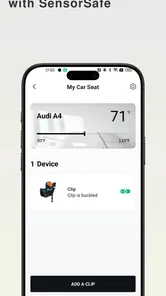
Analysis by Reviewed
I approached CYBEX as a practical companion for parents who already use CYBEX products and want one place to manage their relationship with the brand. It is a free parenting app from CYBEX GmbH, released in April 2024, with an Everyone age rating and support for Android 8.0 or later. My first impression is that it makes the most sense as a brand-specific tool rather than a complete parenting organizer.
That distinction matters. If you are comparing it with a general baby tracker, a shopping app, a digital manual library, or a broad family-planning tool, you are not choosing between identical products. You are deciding whether a dedicated CYBEX experience is more useful to you than keeping everything spread across ordinary apps, email, browser bookmarks, and paper documents.
What I would check before installing it
My first decision criterion would be whether CYBEX equipment is already part of your daily routine. The application is described as being for all CYBEX consumers, so its value is naturally strongest for someone who owns, is considering, or regularly manages CYBEX products. If your household has no connection to the brand, there is little reason to make this your main parenting app.
The second question is what kind of convenience you actually need. Parents often say they want “one app,” but that can mean several different things: finding product information quickly, keeping track of purchases, understanding equipment, receiving brand-related support, or organizing a child’s sleep and feeding. A brand app may be useful for the first group of tasks without replacing a dedicated tracker for the last group.
I would also consider how often you expect to use it. A product companion can be valuable even when it is not opened every day. For example, a parent may use it when preparing a stroller for travel, checking information about a car seat, or revisiting details after a purchase. That is a different pattern from an app designed for constant logging.
The current version is 3.0.3, and the version label also includes a build identifier. I would keep the app updated, especially if I depend on it when away from home. Still, I would not treat an update number as proof that every workflow will feel polished on every device. The practical test is simple: install it before an urgent trip or appointment, sign in if necessary, and explore the product area while you have time.
How I would test it during the first session
I would begin by checking whether the app recognizes the products I actually use. Then I would look for the information I am most likely to need in a hurry, rather than browsing every screen. Can I reach the relevant product area without repeatedly searching? Is the wording clear enough for a tired parent? Does the app help me move from a product name to useful guidance?
More From Our News Desk

 Gmail
GmailGmail in a Busy Inbox: Who Benefits Most?
From first account to crowded workday, Gmail earns its place through dependable search and flexible sorting—but its best fit depends on how much inbox maintenance you can tolerate.

 Prime Video
Switching to Prime Video: What Changes in Your Viewing Routine
Prime Video can make a compelling second home for streaming, but switching means learning a different catalog, rental layer, and route from browsing to playback.

 Universal TV Remote Control
Universal TV Remote Control Works Best as a Reliable Backup
A phone remote earns its place through quick setup and reliable habits. Here is how to get more from Universal TV Remote Control—and where its limits show.

 Weather - By Xiaomi
Weather by Xiaomi Review: Clear at a Glance, Less Clear Up Close
Xiaomi’s weather app makes everyday forecasts quick to scan, but its calm surface can leave useful details and recovery paths harder to find than they should be.

 X
XX Under Pressure: Can It Recover When Posting Goes Wrong?
A resilience-focused review of X, examining setup, mistaken posts, interruptions, weak connections, and the gaps that matter when recovery needs to be dependable.

 Clash of Clans
Clash of Clans Is Won Between the Battles
Its raids are quick; its community is a long-term project of coordination, teaching, rivalry, and shared responsibility—with all the friction that entails.
Latest News



This is a better test than judging the application only by its appearance. A clean interface is pleasant, but a parenting companion earns its place when it reduces small moments of uncertainty. If I have a CYBEX stroller in the hallway and need to understand a setting before leaving, the important question is how quickly the app gets me from opening screen to an answer.
I would also test it with the phone held in one hand. Parents frequently use apps while carrying a child, standing beside a car, or packing a bag. Small navigation decisions become more important in those situations. If the app requires too much typing or makes me repeatedly return to a home screen, that friction can outweigh its brand-specific convenience.
Where the dedicated approach helps
The strongest reason to choose this app is concentration. Instead of searching the web for CYBEX-related information and sorting through general results, I can start from an environment built around the company’s products. That focus can be reassuring when I want to stay within one manufacturer’s ecosystem.
It is also useful during handovers. Imagine one parent normally handles the stroller while the other handles the car. When responsibilities change, the app can serve as a shared reference point for the CYBEX items in the household. I would still explain important safety procedures directly and read official instructions carefully, but having product-related information associated with the same brand may make those conversations easier.
A realistic everyday scenario would be preparing for a weekend visit with a baby. I might check the relevant CYBEX product information before loading the car, confirm that I am looking at the correct item, and use the app as a quick reference instead of relying on memory. The benefit is not dramatic automation; it is reducing the number of places I need to search when time is short.
Another non-obvious advantage is continuity after purchase. The shopping decision is only the beginning of using baby equipment. Parents may need to revisit details months later, especially when a child grows or when equipment moves between caregivers. A dedicated app has a better chance of keeping that product relationship visible than a receipt buried in an email account.
I also see value for people who prefer a manufacturer’s own context over scattered advice. Parenting forums can be helpful, but they mix personal experience, old information, and recommendations for different products. When I need information tied specifically to CYBEX equipment, a brand-centered starting point is more sensible than treating every search result as equally relevant.
The app’s free price removes an easy barrier to testing it. I can install it without committing money, explore whether it fits my routine, and remove it if it does not. That makes the decision less about financial risk and more about whether the convenience justifies another app on the phone.
Useful habits that make the app more worthwhile
My first tip is to set it up before the stressful moment arrives. Do not wait until you are beside the car, at an airport, or trying to answer another caregiver’s question. Open it at home, identify the parts that relate to your products, and learn the route to them. This turns the app from something you hope will help into a tool you have already tested.
My second tip is to use precise product names when organizing your own notes around the app. CYBEX has a broad product range, and vague labels such as “the baby seat” can create confusion in a busy household. Even if the application makes product discovery easy, I would keep my own descriptions specific so another caregiver knows exactly which item I mean.
My third tip is to treat the app as a reference companion, not as a substitute for careful safety checks. A digital screen can help me locate information, but it cannot replace reading instructions attentively, checking the physical condition of equipment, or following professional guidance where appropriate. This is especially important when a child’s safety depends on correct installation or adjustment.
A fourth useful habit is to check it after a major change in routine. Moving from one car to another, lending equipment to a relative, traveling, or preparing for a new stage of use can expose information gaps. I would use those moments to revisit the relevant product section instead of assuming that what worked last month is automatically the best approach now.
These habits reveal the app’s real strength: it can reduce searching and improve access to brand-specific information. They also reveal its boundary. It does not become a full family operating system simply because it sits on the same phone as other parenting tools.
Where ordinary alternatives may fit better
If your main goal is logging feeds, naps, diapers, medication, or growth, I would look first at a dedicated baby-tracking application. Those tools are designed around repeated entries and timelines. A CYBEX-focused companion is a better match for product-related tasks than for recording every part of a child’s day.
If you own products from several manufacturers, a general household organizer may be more convenient. One neutral app can keep appointments, shopping lists, documents, and reminders together without asking you to switch between brand ecosystems. The trade-off is that it may not provide the same focused context for CYBEX equipment.
For shopping, a retailer’s app or a broad marketplace may offer a wider comparison experience. That can be preferable when I am still deciding between brands, looking for accessories across manufacturers, or comparing availability. The CYBEX app is more naturally suited to someone who wants a relationship with CYBEX products rather than a neutral catalog of everything.
For technical questions, a browser search can sometimes be faster when I already know the exact phrase I need. Search is also more flexible when the answer involves a mixed setup with products from different companies. The advantage of the dedicated app is focus; the advantage of search is breadth. I would use each according to the question instead of forcing one tool to handle both.
There is also a social alternative: asking another parent who owns the same equipment. Personal advice can be practical, especially for daily routines, but it should not be treated as a replacement for manufacturer information. A friend can explain what worked in their home; the app can help me stay oriented around CYBEX products. Those roles are complementary, not interchangeable.
The friction of adding another parenting app
The cost of switching is not only the price of an application. It is also the time spent installing it, learning its layout, maintaining another account or product record, and remembering which app contains which information. Because this one is free, the financial cost is low, but the attention cost still exists.
I would avoid installing it merely because I own one CYBEX item and never need product information. In that case, a saved manual, a browser bookmark, or a general household system may be enough. The app becomes easier to justify when I expect repeated interaction with CYBEX products or want a central place for that brand relationship.
Storage and notifications are other practical considerations. I would review notification choices during setup and keep only the alerts that genuinely help me. Parenting phones are already crowded with reminders, messages, health information, and shopping prompts. An app that adds noise will feel less useful even if its core content is relevant.
Privacy is worth considering in a sensible, practical way. I would avoid entering more personal family information than the app requires for the task I want to complete. I would also make sure every caregiver understands which account or device is being used. Good digital housekeeping matters more than installing every available parenting service.
The app has a 3.6 average from around 690 ratings, with 26 written reviews. I read that as a sign to keep expectations realistic: there is enough public feedback to show that experiences vary, but not enough to assume that every household will use it in the same way. I would judge it by my own product needs and device experience rather than by the score alone.
Its reach is still modest compared with the largest general-purpose parenting services, with over 50 thousand installs. That does not make it a poor choice. It simply reinforces the idea that this is a more specialized companion, aimed at people with a reason to be inside the CYBEX ecosystem.
Who should use it, and who should skip it
I would recommend trying it if you own several CYBEX products, share those products with other caregivers, or regularly need manufacturer-specific information. It is also a reasonable choice if you prefer a brand’s own app over collecting product details from unrelated websites and messages.
I would be more cautious if you are looking for a complete parenting dashboard. Someone who wants one place for sleep logs, feeding records, medical reminders, shopping, and appointments may become frustrated if the app’s focus remains tied to CYBEX. In that situation, a general family organizer or baby tracker should be the primary tool, with this app used only when product information is needed.
I would also skip it if your household uses many competing brands and you strongly prefer neutral tools. The more mixed your equipment collection becomes, the less convenient a single-brand app may feel as a daily hub. Its specialization is its advantage for CYBEX consumers and its limitation for everyone else.
For a new parent, I would not make installation a priority before basic safety preparation. Learn the equipment, read the relevant instructions, and establish a reliable routine first. Then add the app if it helps you keep product information accessible. That order prevents the technology from becoming a distraction from the physical tasks that matter most.
My recommendation after weighing the trade-offs
My recommendation is conditional but positive: CYBEX is worth trying for CYBEX consumers who want a dedicated digital companion, especially when product information, shared ownership, and easier reference are more important than daily child logging. The free price makes a trial straightforward, and the Everyone rating makes it broadly suitable as a family-oriented app.
I would not describe it as a universal replacement for every parenting application. Its best role is narrower and more useful: keeping the CYBEX side of family life easier to access. Pair it with a general organizer if you need household planning, or with a baby tracker if you need detailed routines and records.
After installing it, spend a few quiet minutes testing the exact workflow you care about. If it helps you reach the right CYBEX information faster than your current method, keep it. If it merely duplicates a bookmark or adds another place to look, uninstalling it is a sensible decision. The right reason to keep this app is reduced friction around CYBEX products, not the promise of managing all of parenting from one screen.
That is where I land: a focused, free parenting companion from CYBEX GmbH with a clear audience. It will be most valuable when the brand is already part of your household and least valuable when you want a neutral, all-purpose family planner. Used within that boundary, it can earn a practical place on a parent’s phone without pretending to solve problems it was not designed to handle.
CYBEX Frequently Asked Questions
What devices can run the CYBEX app?
The CYBEX app is available for mobile devices, and its minimum operating-system requirement is version 8.0. Before downloading, check that your device meets this requirement and has enough available storage for the installation. Keeping your operating system and app current can also help with compatibility. The app is listed for both Android and iOS users.
Who develops the CYBEX app, and what is it intended to cover?
CYBEX GmbH develops the app for people who use CYBEX products. It is a parenting app intended to bring product-related information and services together for CYBEX consumers. The exact experience can depend on the product you own, your location, and the features available in your version of the app, so it is worth checking product support before relying on a particular function.
What is the CYBEX app used for?
The CYBEX app is designed to support parents and caregivers who use CYBEX products, such as strollers, car seats, and baby carriers. Depending on the product and region, it may provide product information, setup guidance, manuals, safety recommendations, warranty or registration options, and access to customer support. Its usefulness can vary depending on the specific CYBEX model you own.
Is the CYBEX app compatible with every CYBEX product?
Not necessarily. CYBEX offers a broad range of products, and app features may differ according to the model, country, and product generation. Some items may only be supported for registration or documentation, while connected products may offer additional functions. Before downloading, check the app listing and CYBEX website to confirm that your stroller, car seat, or other product is supported.
Does CYBEX provide installation and safety instructions through the app?
The app may provide access to manuals, instructional content, product information, and guidance for using certain CYBEX products. However, digital instructions should not replace careful reading of the official manual supplied with your product or professional installation advice where appropriate. Car seats must always be installed exactly as instructed, and users should verify local regulations and safety requirements.
Pros
- Real-time tracking helps parents monitor a child’s location and safety.
- Supports multiple CYBEX devices and family profiles in one account.
- Safety alerts can provide reassurance during everyday travel.
- Clean interface makes essential information easy to find.
- Useful companion for compatible CYBEX smart products and services.
Cons
- Most features require a compatible CYBEX device to work properly.
- Location tracking may reduce battery life on connected devices.
- Requires account creation and sharing personal information.
- Some functions may depend on mobile data or a stable internet connection.
- Availability of features can vary by region and supported product.











