Currency converter offline
- 909.00
- 4.8
- Installs
- 10.00M
- Price
- Free

Screenshots
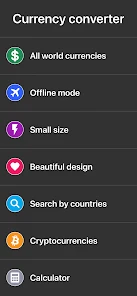
Analysis by Reviewed
When I’m traveling, I don’t want a weak connection to turn a simple price check into a guessing game. That practical problem is the main reason I’d keep Currency Converter Offline on my phone: it can convert currencies without an internet connection, making it useful when I’m moving between airports, transit, and places where getting online is inconvenient.
Offline conversion is the useful distinction
The offline capability is most valuable when I prepare before a trip. I can refresh exchange rates while I have internet access, then use those saved rates to estimate costs later. That changes the app from something I have to open only when connected into a quick reference I can consult while out and about. The important detail is that an offline result relies on rates saved earlier, so I treat it as a practical estimate rather than a promise of the exact amount a card provider or exchange counter will use.
That distinction also helps set expectations: offline access solves the connection problem, not every question about the final charge. If I need a current rate, I refresh when I’m online. If I just want to compare a menu price with what I usually spend at home, a saved rate is often enough.
A Lifesaver on the Go
I can't emphasize enough how convenient it is to have a currency converter that works offline. Whether you're on a plane, in a remote area with no internet access, or simply trying to save on data usage, the Currency Converter Offline app has got you covered. Once you download the latest exchange rates before going offline, you're all set. It’s like having a pocket-sized financial assistant.
Simple and Intuitive Design
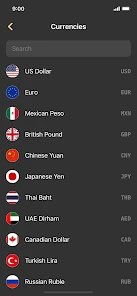
The first thing I noticed was how user-friendly the interface is. The app has a clean design that's easy to navigate. You don’t need to be a tech whiz to figure it out. Just choose your currencies, input the amount, and voila! You get an instant conversion. Plus, the app supports a wide range of currencies, so no matter where you are in the world, it's got your back.
In everyday use, I find it helps to check the amount I actually expect to pay, rather than converting a round figure and trying to do the rest in my head. At a café, for instance, I can enter the bill total and get a quick home-currency estimate before deciding whether to add a snack or another drink. For a larger purchase, I’d still check the live rate when I’m back online and compare it with the payment terms, since the converted figure is a guide rather than a guaranteed transaction total.
Features That Stand Out
One feature that I particularly love is the ability to favorite certain currencies. If you're like me and frequently deal with the same currencies, this feature is a real time-saver. You can simply tap and hold on a currency, and it gets added to your favorites list. Another cool feature is the historical exchange rate charts. It’s a great way to see trends over time, which can be super handy for business travelers or anyone dealing in forex.
More From Our News Desk

Weather by Xiaomi Review: Clear at a Glance, Less Clear Up Close

X Under Pressure: Can It Recover When Posting Goes Wrong?

Clash of Clans Is Won Between the Battles

Android Auto Makes the Case for Quieter Car Software

MobiOffice: Transforming Mobile Productivity with Seamless Integration

EA SPORTS FC™ Mobile Soccer: Redefining Mobile Sports Gaming
Favorites are especially useful if a trip involves more than one stop: keeping the currencies I’m comparing close at hand saves me from repeatedly searching through a long list. I’d set them up before leaving, alongside the currencies I use at home, so the app is ready for quick checks rather than requiring setup in a queue. The charts serve a different purpose. I’d use them to understand how a rate has moved over time, not to predict what it will do next or to decide on a financial trade by themselves.
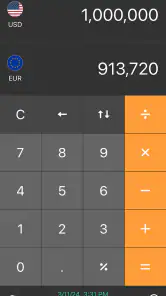
Another thing I found quite handy was the calculator tool built right into the app. You can perform basic arithmetic operations within the app, which is perfect when you’re trying to get a quick total conversion of multiple items.
That built-in calculator makes a small but useful difference when prices come in pieces. I can add a few items in the local currency first and convert the combined amount, which is less error-prone than converting each price separately and adding rounded estimates. It’s also a handy way to compare two options with different listed prices. For budgeting, I’d use the result as a quick check and leave some room for fees or rate differences at the point of payment.
Planning before the connection disappears
I’d treat the first online session before a trip as a small setup routine, not something to leave until I’m standing at a counter. I would select the currencies I expect to use, refresh rates, and enter a familiar amount to make sure I understand the direction of the conversion. This last check matters because travelers often switch between asking “what is this in my home currency?” and “how much local cash will this amount buy?” A quick test while connected helps avoid a needless mental reversal later.
For a trip with several stops, I’d also keep a short note of the rates’ freshness in mind. The app makes the conversion available offline, but the saved figure cannot respond to market movement while the phone is disconnected. If I have been offline for a while, I can still use it to compare relative prices or stay within a rough daily budget; I would not use it as the deciding number for a large exchange. That is a useful distinction between having an answer immediately and having a current answer.
A realistic day of use
Imagine arriving in a new city after a long flight, with airport Wi-Fi unavailable and no wish to buy anything just to get online. I can check a transit fare against my budget using the last saved rate, then use the same reference at a grocery shop to compare a few essentials. Later, at dinner, I can add the meal and a drink with the calculator before converting the total. None of those checks needs to be exact to the cent to be useful: they help me make ordinary choices without repeatedly guessing at unfamiliar prices.
The workflow changes when the decision becomes consequential. If I’m paying for a hotel or a costly purchase, I’d use the app to understand the scale of the price, then review the payment screen or my bank’s conversion details before accepting. A convenient estimate can help me spot an obviously expensive option, but the provider’s rate and any applicable charges determine what leaves my account. I find that division of labor more sensible than expecting one converter to answer both questions.
Where it fits—and where it doesn’t
For a traveler who wants quick estimates without relying on mobile data, this is a sensible alternative to searching the web each time. A browser lookup can be a better choice when I need a fresh rate and have a connection; a bank or card provider is the better reference for the amount that will actually be charged. The app’s strength is convenience between those moments, not replacing either source.
Compared with doing conversions in my head, it reduces the chance that I’ll lose track of a decimal or misjudge a price after a long day. Compared with a general-purpose calculator, it saves the step of looking up and applying the exchange rate separately. A web search can be faster for a one-off conversion when I’m already online, while this app makes more sense when I expect repeated checks or want a reference in a dead zone. I would not call it a substitute for a bank app, because those tools are closer to the actual payment and settlement process.
It also suits people who regularly compare a small set of currencies, including anyone planning a trip or checking overseas prices. It is less compelling if I rarely need conversions, always have reliable internet, or need accounting-grade records and exact settlement amounts. In those situations, a live financial service or the payment provider’s own conversion details may be more useful than a pocket converter.
Small habits that make the estimates more useful
One practical habit is to compare like with like. If I’m weighing two meals, I enter each full listed price rather than converting only the headline price and mentally adding extras afterward. If I’m setting a spending limit, I convert a slightly larger round amount than I expect to spend, so I have a buffer for small purchases and rate variation. The app does not make that judgment for me, but its quick entry makes it easier to apply consistently.
I’d also avoid treating a historical chart as a forecast. A past movement can give context if I’m deciding when to exchange a substantial amount, but it cannot tell me where the rate will go next. For routine travel decisions, the chart is best understood as background; for a transaction, I would prioritize the live terms offered by the service handling it. That keeps a useful visual reference from becoming false confidence.
Another sensible question is whether the app remains useful if I forget to refresh. It can still serve as a rough mental yardstick if a saved rate is available, but the longer I go without an online update, the more cautiously I’d interpret it. If the rate is central to a purchase decision, I’d wait until I can check a current source. If I’m simply deciding whether a snack seems inexpensive or whether a taxi quote is far outside my budget, an older estimate may still provide a helpful scale.
Who will get the most from it
Currency Converter Offline is a free Travel & Local app from Mezhevikin Aleksei, with optional in-app purchases listed at $4.99 per item. It is rated for Everyone, runs on Android 7.0 and later, and its current version is 3.1.22. Its 4.8 average from around 364,000 ratings and over 10 million installs suggest it has found a broad audience, though popularity matters less than whether offline estimates fit your routine.
I’d recommend it most to travelers who want to check everyday spending without constantly opening a browser or using data. It has also been available since January 18, 2020, and has around 909 written reviews, but the practical test is simple: refresh rates before leaving, choose the currencies you’ll need, and try a sample conversion while still connected. That way, you know what to expect before relying on it during a connection gap.
It is particularly appealing if your travel style involves public transport, casual meals, markets, or comparing prices as you go, where a fast approximation is more useful than a formal record. It can also help someone shopping across currencies online, provided they use a current rate while connected and confirm the final checkout total separately. On the other hand, someone who exchanges money professionally, keeps detailed expense accounts, or needs guaranteed settlement figures should choose a service built around those needs rather than leaning on an offline estimate.
For a first-time user, the key question is not whether every conversion will match a card statement exactly; it is whether a quick reference will reduce uncertainty in the moments that matter. I’d install it if I expect to make several comparisons during a trip, and I’d skip it if my needs are only an occasional search that a browser can handle. The free starting point makes it easy to try the basic routine, while the listed optional purchases mean the app may offer paid extras; I would decide about those only after seeing whether the core converter fits my habits.
Final Thoughts
All in all, the Currency Converter Offline app is a must-have for anyone traveling or dealing with multiple currencies regularly. Its offline capability, combined with an easy-to-use interface and a suite of useful features, makes it a standout choice. The ability to access accurate currency conversions without the need for constant internet connectivity is a game-changer. So, next time you're planning a trip or need to convert currencies on the spot, give this app a try. You won't regret it!
I’d make one adjustment to that recommendation: think of it as a dependable planning aid, not a guarantee of the final exchange amount. With that in mind, I’d gladly keep it ready for a trip where I expect to compare prices, add up small purchases, or travel through patchy coverage. If those are the moments you want help with, it earns its place on my phone; if you need live settlement figures every time, I’d use the provider handling the payment instead.
Currency converter offline Frequently Asked Questions
Can I use Currency Converter Offline without an internet connection while traveling?
Yes. Offline conversion is central to the app’s purpose, making it useful when you are traveling without reliable mobile data or Wi-Fi. The app can use the most recently downloaded exchange rates while offline, so it is sensible to connect before a trip to refresh them. Rates can change, and offline results may not reflect the latest market movement.
Does Currency Converter Offline include a calculator for working out totals?
The app’s store summary describes it as a currency converter with online exchange rates and a calculator. That combination can be handy when you want to work through an amount rather than simply check a quick conversion, such as estimating the cost of a purchase abroad. Exchange-rate results still depend on how recently the rates were updated when you are offline.
Is Currency Converter Offline suitable for children and general audiences?
Currency Converter Offline has an Everyone content rating, so it is presented as suitable for a general audience. Its purpose is practical currency conversion, which may be useful for adults planning travel or checking prices, as well as for families discussing costs in another currency. As with any app, parents can decide whether its functions are appropriate for a particular child.
Who develops Currency Converter Offline, and what kind of app is it?
Currency Converter Offline is a Travel & Local app developed by Mezhevikin Aleksei. Its focus is straightforward: helping users convert currencies, including when they are away from an internet connection. That can make it useful to consider for trips or other situations where checking an exchange rate quickly is more convenient than searching online.
What does the app cost, and are there in-app purchases?
Currency Converter Offline is free to download, with in-app purchases listed at $4.99 per item. The free download lets you try the app, while any purchase is optional. Before buying anything, check the purchase details shown in the app so you can decide whether a particular paid option is useful for the way you plan to convert currencies.
Pros
- Works without internet connection
- Supports multiple currencies
- User-friendly interface
- Quick conversion times
- Regular updates
Cons
- Limited currency database
- No historical data access
- Ads in free version
- Lacks advanced features
- No customization options
- Category
- Travel & Local
- Version
- 3.1.22