

CurbSmart Parent
- 20.00
- 3.1
- Installs
- 10.00K
- Price
- Free

Screenshots


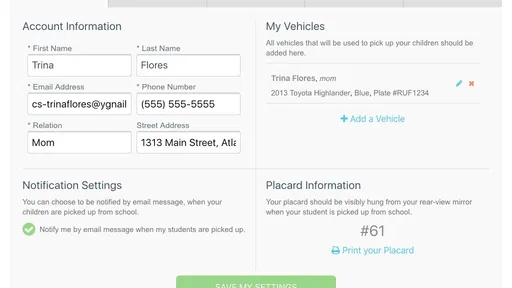
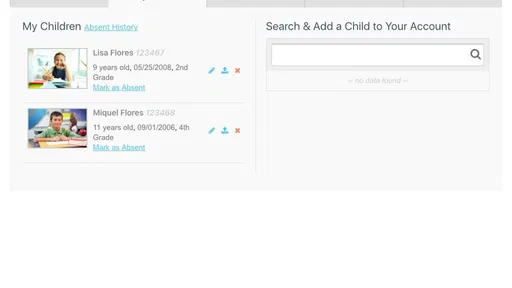
Analysis by Reviewed
Picking up a child after school sounds simple until several cars arrive at once, children leave through different doors, and a parent is trying to watch the clock while driving. CurbSmart Parent is built for that narrow but important parenting problem: coordinating an after-school car pickup rather than managing a whole family calendar. I found it most useful when the school’s pickup routine is already organized and the main challenge is making the handoff calmer and more predictable.
This is a free parenting app from NutriLink Technologies. It is rated for Everyone, works on Android devices running version 5.1 or later, and its current version is 4.2.1635. Those details make it approachable for families using older phones, although the actual value depends less on the phone and more on whether the child’s school or pickup group is prepared to use the same system.
A practical decision guide for school pickup
I’d use this section to help you decide whether a dedicated pickup routine solves a real problem in your family, rather than adding another task to the day. The key is to look at how your school and caregivers already coordinate, then weigh that against the consistency a shared process requires.
Start with the real problem you need to solve
Before installing it, I would ask one question: is your difficulty the pickup itself, or is it the wider family schedule? CurbSmart Parent is aimed at the first problem. It is not the kind of app I would choose as a general-purpose calendar, homework tracker, family messenger, or school communication hub. Its appeal comes from concentrating on the short period between a parent arriving and a child getting safely into the car.
That focus can be a strength. A broad family organizer often makes parents search through events, messages, recurring activities, and contact lists just to find today’s pickup detail. A dedicated pickup tool can reduce that mental load because the task is more specific. In my view, the right decision criteria are simple: whether your school supports the workflow, whether the other adults involved will use it consistently, and whether you need structured pickup coordination rather than ordinary messaging.
The app has a modest footprint in the parenting space, with over ten thousand installs and an average rating of 3.1 from around fifty ratings. I would not treat that rating as a final verdict, but I would treat it as a reason to test the app with your actual school routine before depending on it for every afternoon. A pickup system only works well when the people on both sides of the handoff follow the same process.
How I would test it before relying on it
I would begin on a normal school day, not on the busiest afternoon of the week. I would install the app, check that the phone meets the Android requirement, and make sure I could identify the relevant pickup arrangement without rushing. Then I would ask another authorized adult to follow the same process. This small trial reveals more than reading a feature list because it shows whether the app fits the school’s actual habits.
More From Our News Desk

 Gmail
GmailGmail in a Busy Inbox: Who Benefits Most?
From first account to crowded workday, Gmail earns its place through dependable search and flexible sorting—but its best fit depends on how much inbox maintenance you can tolerate.

 Prime Video
Switching to Prime Video: What Changes in Your Viewing Routine
Prime Video can make a compelling second home for streaming, but switching means learning a different catalog, rental layer, and route from browsing to playback.

 Universal TV Remote Control
Universal TV Remote Control Works Best as a Reliable Backup
A phone remote earns its place through quick setup and reliable habits. Here is how to get more from Universal TV Remote Control—and where its limits show.

 Weather - By Xiaomi
Weather by Xiaomi Review: Clear at a Glance, Less Clear Up Close
Xiaomi’s weather app makes everyday forecasts quick to scan, but its calm surface can leave useful details and recovery paths harder to find than they should be.

 X
XX Under Pressure: Can It Recover When Posting Goes Wrong?
A resilience-focused review of X, examining setup, mistaken posts, interruptions, weak connections, and the gaps that matter when recovery needs to be dependable.

 Clash of Clans
Clash of Clans Is Won Between the Battles
Its raids are quick; its community is a long-term project of coordination, teaching, rivalry, and shared responsibility—with all the friction that entails.
Latest News



For families with more than one child, I would also test a day when the children leave together and a day when their schedules differ. Those situations expose an important trade-off: a tool that feels wonderfully simple for one pickup may become less obvious when several children, adults, or changes are involved. I would make the test part of a backup plan rather than replacing the existing arrangement immediately.
My strongest practical tip is to agree on a fallback before the first serious use. Keep the school’s normal contact method available, and make sure another caregiver knows what to do if a phone battery is low, a child is absent, or the pickup plan changes. Digital coordination is helpful, but it should not become the only way a parent can explain an unexpected change.
Where the focused design makes a difference
The clearest advantage is concentration. A parent arriving at a crowded curb does not necessarily need another place to store every family detail. They need the pickup information to be easy to reach at the moment it matters. CurbSmart Parent makes sense when the school has a defined car-line process and parents want a purpose-built way to participate in it.
Imagine a realistic afternoon: I finish work, pull toward the school, and several families are arriving at roughly the same time. Instead of relying entirely on a text sent earlier in the day, I can use the pickup workflow that the school expects parents to follow. If my child is ready and the adults coordinating the line are using the same arrangement, the handoff can feel less improvised. The benefit is not flashy; it is the reduction of small misunderstandings when everyone is trying to move through the same space.
That makes the app especially suitable for parents who regularly collect children by car and find ordinary group chats too loose. A message thread can contain yesterday’s instructions, unrelated conversations, and several different interpretations of who is collecting whom. A dedicated pickup context may be easier to understand because the task is separated from general family chatter.
It can also help when pickup responsibility changes between people. One afternoon it may be a parent, another day a grandparent or another approved caregiver. The useful insight here is that the app should be treated as a shared routine, not as a private note-taking tool. Its value increases when the adults involved understand the same steps and use them at the same time.
Small workflow choices that matter in daily use
I would use the app before leaving home, while parked safely, rather than trying to learn its process in the moving car line. That sounds obvious, but pickup tools are most valuable when they remove decisions from the curb. Set up the day’s arrangement early, confirm who is responsible, and keep the phone accessible without handling it while driving.
A second useful habit is separating planned changes from emergencies. If another adult is collecting the child, update the arrangement before the normal pickup window whenever possible. If the change happens at the last minute, use the school’s established backup communication method as well. This avoids a common failure in coordination apps: one person assumes the digital update was seen while another person is still following the old plan.
I would also avoid treating a successful first day as proof that the system is foolproof. Try it during rain, a delayed departure, a sibling’s different dismissal time, or a day when a caregiver is unfamiliar with the school entrance. Those are the moments when clarity matters most. A parent choosing this app should judge it by how well it handles the family’s awkward days, not only its smooth ones.
Where ordinary alternatives may fit better
For a single household with a simple routine, a shared calendar or a family messaging app may be enough. If one parent always picks up from the same location and there are few changes, adding a dedicated tool may feel like extra work. In that situation, CurbSmart Parent is not automatically a better answer just because it is specialized.
Messaging remains useful when the arrangement changes constantly or when a child’s school communicates through a broader platform. A text can explain unusual circumstances in natural language, while a focused pickup workflow may be better at keeping routine information organized. I would use messaging for exceptions and the pickup app for the agreed process, provided the school’s community actually recognizes that process.
A general family organizer may also be the better choice for parents who need one place for appointments, activities, medication reminders, shopping, and school events. CurbSmart Parent should not be judged unfairly for not replacing those tools; its narrow purpose is precisely why it may feel cleaner for pickup. But that narrowness also means it is a poor fit if your main goal is managing the entire household.
There is another important exception: families who do not drive to school may gain little from it. Walking groups, public transport, school buses, and after-school clubs create different coordination needs. The app’s car-pickup focus is an advantage only when the family’s routine matches it. I would skip it if your child usually leaves school through a non-car arrangement and you are looking for a broader safety or scheduling app.
What the rating and adoption suggest for a new user
The app has received around twenty written reviews and carries a 3.1 average. I read that as a mixed signal rather than a reason to dismiss it. A specialized tool can be genuinely helpful to one school community and awkward for another because the surrounding process matters so much. A rating in this range tells me to pay attention to setup friction, communication habits, and whether the school has clearly explained how parents should use it.
Its free price removes the financial risk of trying it, which is valuable for a family deciding between a dedicated pickup tool and an existing free messaging routine. The real cost is time and coordination. If every caregiver must learn a new process but the school still sends last-minute instructions through another channel, the family may end up maintaining two systems. That duplication can cancel out the convenience.
My recommendation is to ask the school or pickup coordinator three practical questions before making it part of your routine: Is this the expected parent-facing app, which caregivers should use it, and what is the backup when the plan changes? These questions are more important than the app’s install count because they determine whether your child’s handoff will be understood by the people managing it.
The cost of switching from texts and paper routines
Moving from a familiar text thread to CurbSmart Parent has a small but real learning cost. Every adult collecting the child needs to know where the relevant information appears and when it should be updated. Grandparents or occasional caregivers may need a quick demonstration. If they only pick up once in a while, a simple written instruction may still be necessary.
The transition is easiest when the family does not attempt to change everything at once. Keep the old contact route available for a short trial period, use the app for ordinary pickups, and compare the two workflows after several days. Look for fewer clarification messages, fewer repeated details, and less uncertainty at the curb. If those improvements do not appear, the dedicated system may not be earning its place.
There is also a privacy and attention consideration in any child-pickup app. I would share access only with adults who genuinely need it, avoid handling the phone while moving, and keep sensitive family conversation out of the pickup workflow unless the app specifically requires it. The safest routine is the one that gives the school enough clarity without turning every detail of family life into a notification.
For a parent switching from a paper sign-in or verbal arrangement, the benefit may be greater because a digital process can make the plan easier to repeat. Still, the school’s staff and other families must recognize the arrangement. A private system that no one else checks cannot reliably improve a shared pickup line.
Who should choose it, and who should pass
I would recommend trying it if you routinely drive to after-school pickup, your school or group uses a compatible process, and you want something more focused than a general family calendar. It is also worth considering if several trusted adults share pickup duties and the current arrangement depends on scattered messages.
I would be more cautious if your school has not mentioned it, if your pickup changes several times each afternoon, or if caregivers are unlikely to install and check another app. I would also pass if you want a complete parenting platform. The category label may place it among parenting apps, but its practical job is much narrower than the category itself.
For iPhone families, I would first confirm that the version available for their device supports the same school workflow before planning a mixed-device household around it. For Android users on older hardware, the stated minimum of version 5.1 or later is reassuring, but compatibility alone does not guarantee that the experience will suit a particular school’s process.
My recommendation after weighing the trade-offs
CurbSmart Parent is a focused solution rather than a universal parenting companion. I like the idea of giving school pickup its own clear workflow, especially when the alternative is a noisy group chat and repeated explanations. The free price makes a trial sensible, and the Everyone age rating keeps it approachable for ordinary family use.
My final advice is to treat it as a coordination layer, not as a replacement for judgment or direct communication. Test it with one normal pickup, include every regular caregiver, and keep a backup for unexpected changes. If it reduces confusion at your school, it can earn a useful place in the afternoon routine. If your family needs broad scheduling, rich conversation, or a process that works without school-wide participation, a general family organizer or familiar messaging method may be the better choice.
In short, the right reason to install CurbSmart Parent is not that every parent needs another app. It is that your car pickup has enough moving parts to deserve a dedicated routine. When that condition is true, this Parenting app from NutriLink Technologies is worth a careful trial. When it is not, keeping the simpler system you already understand may be the more reliable decision.
CurbSmart Parent Frequently Asked Questions
What devices and operating systems can run CurbSmart Parent?
CurbSmart Parent is an app for families using a school’s CurbSmart transportation service. On Android, it requires version 5.1 or later, so check your device’s operating system before downloading. Keeping the phone’s software and the app current can also help with everyday use, especially when you rely on transportation updates during busy school pickup times.
Who develops CurbSmart Parent, and is it intended for children to use?
CurbSmart Parent is developed by NutriLink Technologies and is a parenting app focused on school transportation and pickup coordination. It is primarily useful to parents or guardians who need to connect with a participating school’s service, rather than as a general-purpose app for children. Its content rating is Everyone, but families should still follow the school’s guidance about who should manage student accounts and transportation details.
What is CurbSmart Parent, and what is it used for?
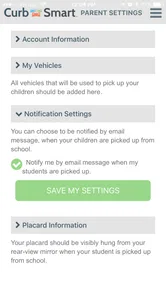
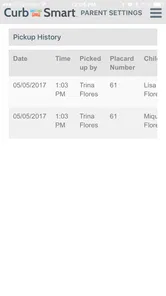
CurbSmart Parent is a school transportation companion app designed to help families manage student pickups and drop-offs. After connecting with a participating school or transportation provider, parents can typically view assigned transportation details, receive notifications, and follow updates related to a child’s route or pickup status. The exact tools available may vary depending on how the school has configured the service.
How do I sign in and connect my child to CurbSmart Parent?
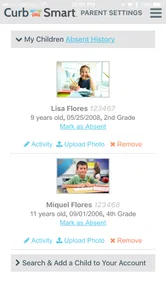
Access usually depends on an invitation, account details, or enrollment information provided by your child’s school or transportation department. After installing the app, use the credentials or registration instructions supplied by the school and verify that the correct student is linked to your account. If your child does not appear, or your information is rejected, contact the school rather than creating multiple accounts.
Can I track my child’s school bus or receive pickup notifications?
CurbSmart Parent may provide route progress, pickup or drop-off updates, and alerts when a student’s transportation status changes, but these features depend on the participating school and its equipment. Location information may not always be continuous or perfectly accurate because it can be affected by GPS coverage, traffic, driver check-ins, and network connectivity. Treat notifications as helpful updates, not a replacement for school instructions.
Pros
- Simple interface makes daily pickup details easy to check.
- Real-time updates can reduce uncertainty during school transportation.
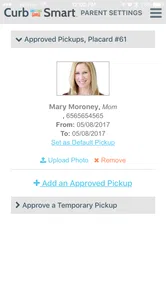
- Useful for coordinating authorized pickup arrangements with schools.
- Notifications help parents stay informed about schedule changes.
- Supports safer dismissal by organizing student pickup information.
Cons
- Availability depends on the school or district using CurbSmart.
- Some features may require location services and notification access.
- Pickup updates can be delayed if staff or drivers do not refresh data.
- Parents may need to learn the school’s specific workflow first.
- App usefulness is limited outside participating transportation programs.











